dsh-plugin
DayuanJiang/next-ai-draw-iodsh 的 draw.io 绘图插件:通过 next-ai-drawio MCP 服务器作图,点回复里的链接在右侧栏打开实时预览,可以手动修改图,AI 的每次修改都是可以恢复的版本。需 Node.js 18+,首次使用由 npx 下载 MCP 服务器。
Community web add-ons for DeepSeek Harness.
This package provides a small, out-of-tree DSH plugin with both Host and Web client halves. It does not modify DSH core files.
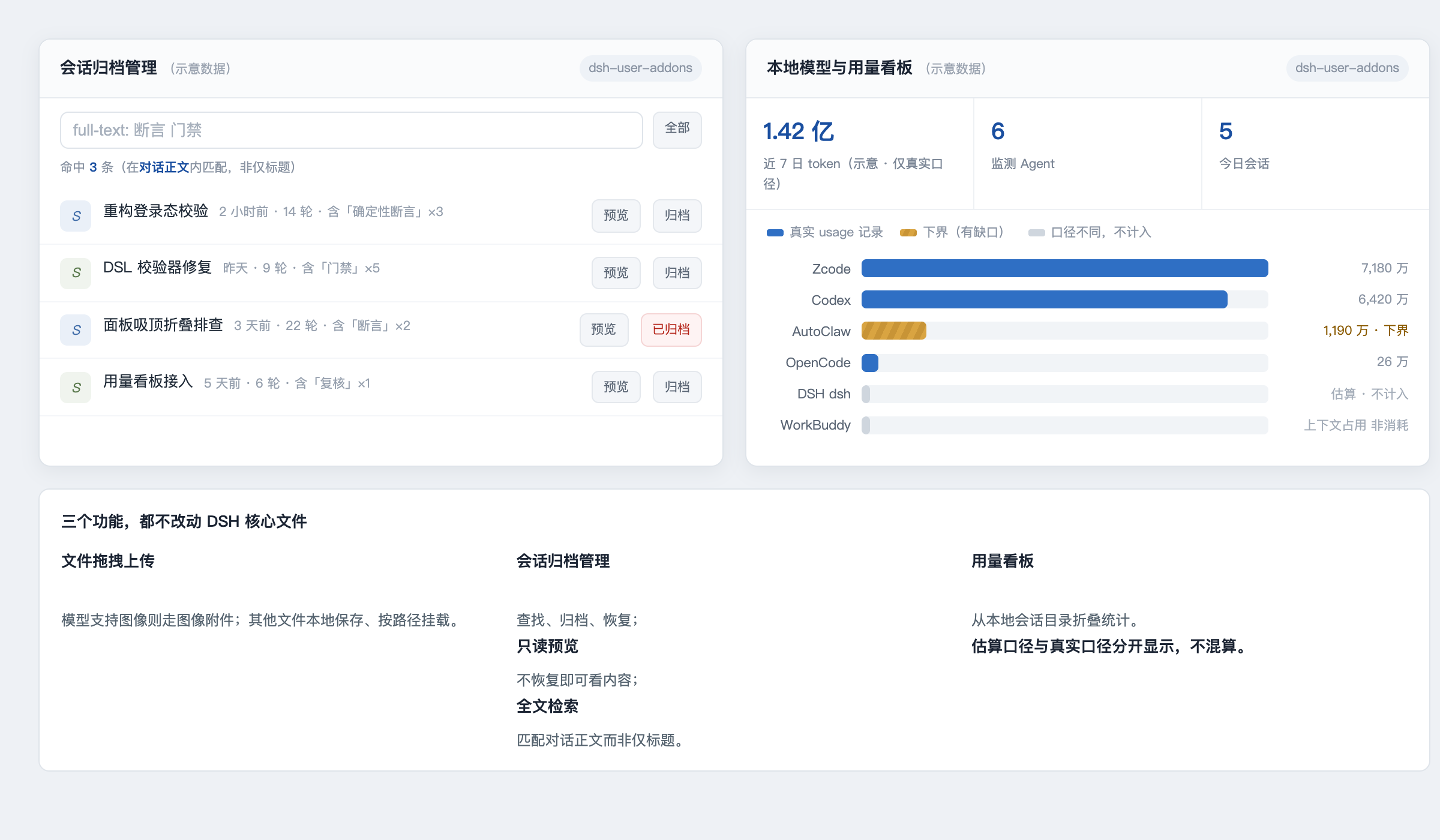
(Interface sketch — layout and colour semantics only; all figures shown are illustrative placeholders, not real measurements.)
~/.dsh/sessions.This package is not published to npm. There is no @yur0918/dsh-user-addons
on the registry — installing by package name will fail with a 404. It is a
local profile plugin, loaded by symlinking the source directory into the
profile's node_modules and inserting one row into the profile patch layer.
From a clone of this repository:
# 1. symlink the package into the profile's node_modules
ln -s "$PWD" ~/.dsh/profiles/node_modules/dsh-user-addons

# 2. add the loader row to the web profile patch layer
#    (append to ~/.dsh/profiles/web/cordis.patch.yml)
cat >> ~/.dsh/profiles/web/cordis.patch.yml <<'YAML'

- insert:
    - id: user-addons
      name: 'dsh-user-addons'
YAML

# 3. restart the Web profile so it picks up package metadata + lib/client.js
launchctl kickstart -k gui/$(id -u)/com.deepseek.dsh

# 4. verify
curl http://127.0.0.1:3080/addons/health
# → {"ok":true,"addon":"dsh-user-addons","version":"1.3.0"}
Steps 1 and 2 are idempotent: re-running them just recreates the symlink and
appends a duplicate row, so check before re-adding. To uninstall, remove the
symlink and the - id: user-addons row, then restart the profile.
If you use a non-default DSH_HOME, point both paths at that home instead of
~/.dsh.
The package declares its client entry point as:
{
  "dsh": {
    "client": {
      "platform": "web",
      "inject": [
        "@deepseek-ai/dsh-client-locale"
      ]
    }
  }
}
Run the package check with:
npm run check
The Host half registers same-origin /addons/* routes:
GET /addons/healthGET /addons/archive/listGET /addons/archive/previewPOST /addons/archive/archivePOST /addons/archive/restoreGET /addons/image-capabilityPOST /addons/uploadGET /addons/usage/summaryUploads are limited to 100 MiB (UPLOAD_LIMIT_BYTES in lib/index.js) and
filenames are sanitized before being written below the DSH home. Usage data is
read locally from DSH session logs; this plugin does not make network requests.
The browser bundle in lib/client.js is intentionally committed because DSH's Web host serves built client bundles. Keep the Host and Client halves compatible with the DSH version you are using, and run npm run check before publishing.
Please do not commit session logs, uploaded files, credentials, generated task state, or backup files.
MIT
dsh 的 draw.io 绘图插件:通过 next-ai-drawio MCP 服务器作图,点回复里的链接在右侧栏打开实时预览,可以手动修改图,AI 的每次修改都是可以恢复的版本。需 Node.js 18+,首次使用由 npx 下载 MCP 服务器。
把 WeKnora 知识库接入 dsh 的四个只读工具:列出知识库、混合检索原文片段、按顺序还原单篇文档,以及直接取用 WeKnora 自己带引用的 RAG 或 ReAct agent 回答(含可续聊的 session id)。
把腾讯云 CloudBase 后端接入 DeepSeek Harness——在对话里搭好并部署全栈应用,查询结果渲染为表格卡片(分页、排序、导出 CSV),部署后可预览真实域名,并提供 CloudBase MCP 工具集(`mcp__cloudbase__*`),登录走 device-code 流程。