
dsh-web
zhu1090093659/dsh-webDeepSeek Harness(DSH)Web 插件聚合生态包 · 一切皆插件,创意工坊分发(dsh-market.com)

顶替 DSH Web 编辑器模型座位的模型选择器:检索优先的弹层,左栏是供应商索引、点击滚动右侧分组列表,收藏组固定在首位,用图片图标区分原生与桥接的视觉输入,点触发器右区单独打开推理档位面板。
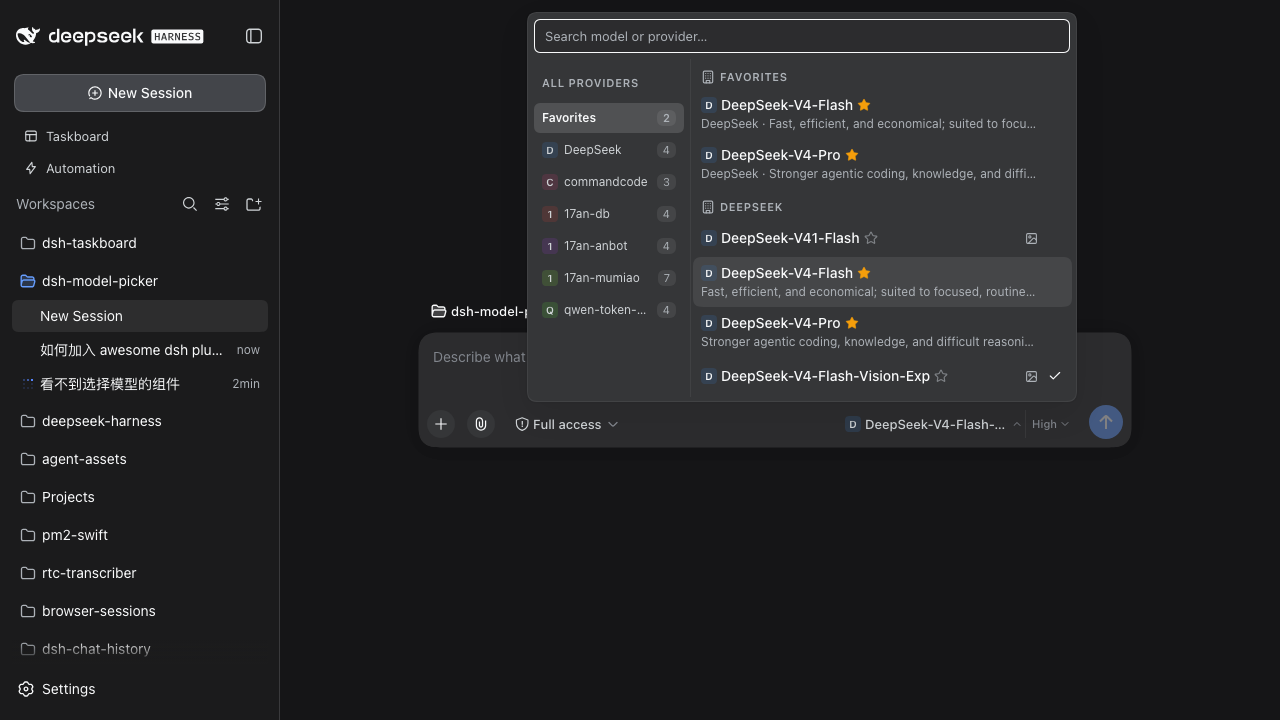
Enhanced model picker for the dsh web GUI — replaces the composer's model seat
(conversation.input.model).
A two-zone trigger button splits model selection and reasoning-effort selection into separate popups:
| Zone | Click | Popup content |
|---|---|---|
| Left (model name) | Opens the model picker | Search box at top (auto-focused), provider column on the left, model list on the right |
| Right (effort) | Opens the effort picker | List of available reasoning-effort levels |
Hovering a zone names what it will act on. The model zone reads
provider · model: one model id is routinely served by several providers, so
the name alone does not say where the model runs. The supplier named is the
display one, so a selection on a folded (modlens vision) route still reads
as its base provider — the same name the user clicked in the column.
The panel is 540px wide and up to 500px tall, and both give way under pressure
rather than overflowing. Its height is clamped against the measured space above
the trigger (which is 50vh + 61px in the hero layout, checked at six window
heights), minus the panel's own chrome: at a 900px-tall window the panel measures
exactly 500px and keeps an 11px margin from the top edge. When the provider
column folds, the panel gives up that column's width instead of stretching the
model list (see Configure official models).
A model row leads with the mark of whoever made the model — DeepSeek's whale,
Zhipu's mark, Qwen's — on the closed trigger as well as on every row in the
list, so which model is in use, and whose it is, reads before the picker is ever
opened. Marks are the published mono cuts from
@lobehub/icons-static-svg (MIT),
inlined as paths on their own 24×24 grid and filled with currentColor.
17an-mumiao,
qwen-token-plan-cn and opencode-go1 all serve deepseek-v4-flash, and the
question a row answers is "what am I picking". A per-supplier mark would answer
"who resells it" and, worse, could only ever be a letter for the three 17an
floors.vendor/model, vendor:model or vendor_model segment — that is what
catches 17an-db/deepseek-v4.1-flash. Only when no lab is named does the
host in the label earn a mark, matched as a whole word, so Composer 2.5 · Cursor and Auto · Cursor wear Cursor's.grok-4.7@500k · Cursor is Grok's
model resold through Cursor, and DeepSeek-V4.1-Flash · Trae CN is
DeepSeek's through Trae. Reading the host first would relabel both with the
wrong maker — exactly the mistake a mark exists to prevent — so a host mark
only ever appears on a row whose model segment named no lab at all.Auto · routing group,
Space-Bunny, Ling 3.1 Flash Free — keeps the supplier's tinted initial
instead. The two shapes say different things at a glance: a mark is a lab, a
tinted uppercase letter is "the picker cannot name this row's maker yet". A
mislabelled logo would be worse than a letter the panel can always back up.mimo and hy3 are real families whose ids carry
no lab in them, so they are listed by name, while a rule loose enough to guess
them would also hand auto a logo it has not earned.17an-db, 17an-anbot and 17an-mumiao would otherwise
be indistinguishable. The model list beside it names labs, which have marks.color: inherit), so they are dark
on the light theme and light on the dark one (12.35:1 and 6.56:1 measured on
painted pixels). A per-hue glyph colour was tried and removed: a light tint of
the hue is legible on the dark theme and effectively invisible on the light
one, which is the theme nobody checks. Full-colour brand marks were declined
for the same reason the tint is held down: a dozen brand palettes would fight
the panel's one accent, which is the check mark on the model in use.max-width (300px) leaves room for the avatar's footprint (16px
plus its gap) on top of the name budget, so wearing it costs the model
name no characters. When the composer row runs short it is the model
NAME that truncates, never the effort zone: the effort zone reports a state in
one short word, and a clipped state word is a different string ("Hi..."), while
a name is free-form, truncates readably, and the tooltip carries it in full.A provider whose name is another provider's name plus a trailing parenthesized
capability suffix folds into that base provider's row. modlens registers vision
as its own provider route (DeepSeek (modlens vision)), which would otherwise
put a near-duplicate row per provider in the column.
The browser catalog the seat reads (ModelCatalogModel) carries only
id / name / description / reasoning — no context window and no input
modalities. Both exist on the Host's llm service, so the host half
(lib/host.js) republishes them over one loopback route:
GET /api/model-picker/models
→ { ok: true, models: [{ provider, id, contextWindow?, input? }] }
resolveModel() is the only source of context: { contextWindow };
listModels() is the cheaper source of inputModalities.1M, 384K) in the trailing strip, where the numbers line up as a
column you can compare down. Both are joined on provider/modelId.(modlens vision) suffix is what tells the two apart.The right column is always one grouped list: Recent (最近使用 in a Chinese UI — the route history, pinned at the top once it has entries), Favorites (收藏 — the starred models, another mirrored copy), then every provider's group. The left column is a table of contents to this list.
position: sticky, so the left row always matches the header you see.The panel opens on the models used lately, with the route in use at the front — so switching back to the previous model is one Enter away from opening the popup. Every history row names the provider serving it, because the group spans suppliers.
/model popup, or by a session reopening on its own model all count as "used" — the history answers "what have I been using", not "what did I click in this panel".provider/modelId), deduplicated and fixed-length (6 entries): reusing a route only moves it to the front instead of taking a second slot.localStorage under dsh.modelPicker.recent, with the same conventions as the favorites. A route that is no longer configured (provider uninstalled, model retired) stays in storage but is not rendered: the record comes back with the provider, and the list never shows a model that is not there.Every model row carries a ☆ / ★ toggle after the model name, and after the vision mark when there is one, so a row reads as a name followed by its marks: what the model accepts first, then the action you can take on it. The row is itself a <button>, so the star stops its click from reaching it — favoriting a model must never also pick it — and it handles Enter / Space on its own.
The star is revealed, not always present. Favoriting is something you do to a row, not part of what the row says, so the star stays unpainted until the row is hovered or holds keyboard focus. Its box keeps its place either way, so revealing it never shifts the row under the pointer, and only a pointer that can actually hover hides it: on a touch screen it would be permanently unreachable, so there it stays visible.
A favorited row always shows its star. That star is state rather than an invitation, and hiding it would hide the answer.
Favorited models appear twice in the list: once in their provider's group, and once in the favorites group pinned at the top of the list. A favorites row always names the provider serving it.
Favorites are keyed on the route (provider/modelId), not the bare model id: one model id is routinely served by several configured providers, and favoriting one route says nothing about the others.
They live in localStorage under dsh.modelPicker.favorites, the same place the shipped conversation plugin keeps its own view and width preferences. A storage refusal (private mode, full quota) is swallowed: the in-memory set still tracks the page.
The Host draws one line in the transcript — This turn failed — and stops there.
Switching into that conversation, the reader is looking straight at the red row
and has nothing to press: to try once more they have to type "retry" into the
composer themselves. This puts the Retry button under that row, above the
composer.
The narrowest repair there is. It does not switch the model, does not touch the fallback, and changes nothing the user chose — it re-sends the failed turn on the model already in use. Because nothing has to be configured first, it needs no setup: it is there with no fallback designated, and it is there on a conversation opened cold from history.
The cold open is the whole point. That failure is not in the session
snapshot — it is durable history, and the Host draws the red row from
turn/end's reason.error. So the panel reads the same fact: when the latest
turn/end ended with kind:'error' the retry is offered; when it ended
completed it is not, because the conversation has already moved past that
failure and re-running it would walk backwards. The tooltip carries the
provider's own words (lobsterai: no usable credential; log in first), so the
reason is legible before anything is pressed.
Three failure shapes, three submissions. Same discrimination as the failover button, different action:
| Failure | Signal | What the retry sends |
|---|---|---|
| Send — the request never left the client | promptError.op === 'send' | The original words, read back from the session log |
| The turn died on the model — the Host drew the red row | the latest turn/end's reason.error | The original words under one line saying the turn failed |
| Agent failure — no recoverable words | lastAgentError | The resumption instruction: check what completed, then carry on |
That middle line earns its place: the failing turn is still in the transcript, so the words alone would read to the model as a second, identical instruction; "this turn failed — retry once" followed by the same request is what makes it the same request tried again.
It never fights the fallback over one failure. With a fallback designated
that failure belongs to Retry with the fallback (and to the automatic
escalation), and this button does not appear — two repairs over one event is how
a turn ends up run twice, once on the old model and once on the new one. With no
fallback the reverse holds: this is the only repair offered.
The press does not flicker. Admitting a prompt is a round trip, and until it settles the failure still reads as live, which would re-arm the button the user just pressed. So the press disables it (the row stays, only the button goes inert), a second press cannot queue the same turn again, and the arm is reset once the failure really clears — the next failure is a new question.
To shoot it: node scripts/screenshot-retry.mjs (writes live-retry.png,
live-retry-disarmed.png and live-retry-with-fallback.png from the same seat
and store npm test uses, rendered in real Chromium).
The scenario: a turn dies — the route ran out of quota, got rate limited, or the Agent failed partway through — and the user has to pick a model that still works and then retype "continue". That retyping is what this removes.
The design rule is visibility. This is a rare event, so it must not touch ordinary model switching at all. Nothing is rendered on a healthy session: there is no standing toggle to arm, no per-row mark, no menu entry. Instead a small button appears beside the composer only while a failure is live, and only when a fallback model has been designated. With no fallback the switch does not exist — the same-model retry above takes that case instead.
One click does both halves. The button switches to the fallback model and then sends the repair. The switch is committed first and awaited, because sending the repair on the old model would repair in exactly the place that just failed; if the switch does not take, nothing is sent.
Two failure shapes, two different repairs. They are told apart using the session's own public snapshot, and the button labels itself accordingly:
| Failure | Signal | Repair |
|---|---|---|
| Send — the prompt never left the client | promptError.op === 'send' | the original words are replayed verbatim, read back from the session log |
| Agent — accepted, then failed or was interrupted mid-turn | lastAgentError, or a final assistant/message with interrupted === true | a resumption instruction: check what actually completed, then continue |
Collapsing these into one "continue" would be wrong in the case that matters. A send failure left nothing behind, so re-sending the same request is exactly right. An agent failure may have left tools half-run and files half-written, so re-sending the request reads as a fresh instruction and risks redoing finished work — that repair instead tells the model to inspect the current state first. A bare "continue" is deliberately never used, because it reads as new input.
Designating fallback models. The popup footer's Fallback models entry opens a manager where you can search for and add multiple models, drag them into priority order, or remove them. Failover uses the first available route in that order that differs from the model that just failed. Older single-route settings migrate automatically. The queue persists in localStorage under dsh.modelPicker.fallback.
Probing a route, and remembering when it last failed. Every row in that manager carries a Test connection button: it sends one tiny prompt through the Host's own model runtime and reports OK with the round trip. When it does not answer, it says more than Failed — the failure is split into four classes: Out of quota, Rate limited, Auth failed, and Timed out; only what stays unrecognized reads as the generic failure. That split is the point. An exhausted balance and a momentary throttle fail identically and call for opposite responses (top up versus wait), and one "Failed" collapses them into a question the reader has to open a tooltip to answer. The class comes from the harness failure code (QUOTA / ACCOUNT_QUOTA / RATE_LIMIT / AUTH), and only when no code names one does the provider's own wording get a say — tested with the Host's own quota classifier, plus Chinese phrasing, because the channels on this machine answer in Chinese. The tooltip carries the sentence and keeps the provider's words as the evidence.
A route that fails — from that probe, or from a turn that actually died on the model in use — is stamped in localStorage under dsh.modelPicker.failures, with the time it failed, what said so, and the class. Keeping the class is what lets a reopened page still say Out of quota instead of degrading to Failed. The model list then wears that time after the model's name: an alert glyph and a clock, the source and the message in the tooltip. The one moment a dead channel is worth knowing about is the moment the next model is being chosen. A probe that answers clears the stamp, and a stamp older than two weeks is dropped on read, so the mark states a recent fact instead of keeping a permanent record. Unlike the vision mark, the pin and the star, it reserves no space — an absent stamp leaves no gap.
Checking a channel, and checking a model. The footer's probe button walks the list the panel is showing, and its label says how much that is. With a query typed — or a provider facet picked inside that query — the column is one specific set of models, so every one of them is probed: Check 12 models. With no query the column is the whole catalog, which on this machine is 1080 routes across 20 providers, and walking all of them answers a question nobody asked. The failures that decide whether a model is usable are channel-level — a dead key, a spent account, an endpoint that is simply unreachable — so that is one answer per provider, not one per model. The unfiltered run therefore probes one representative per provider (Check 20 providers) and leaves the other thousand routes alone. It is the same probe either way, one route at a time, so every answer lands in the ledger and the rows grow their marks while the run is still going.
The representative is the route its reader would reach for there: one they starred, else one they used recently — so the provider you are on is judged by the model you are on — else the first model that is not a free mirror, because a free tier turning a request down says something about the free tier and not about the account being paid for.
Three routes at a time, deliberately: a wide fan-out would answer "is this route dead" by killing healthy channels with 429s of its own making, and the ledger would record the outage it caused. The button is the stop control while it runs (its label becomes 12/20, tabular so the row cannot jitter), pressing it again ends the run, and closing the panel ends it too — a batch nobody is watching has no business holding request slots. In-flight answers still count into the receipt, which then says Checked 20/20 · failed 8, or stopped …, and retires itself after a few seconds; its tooltip names what failed, in provider scope by the same name the left column uses. The marks are the record; the receipt is only a receipt.
It retires itself. The failure state is read through the Session's own
subscribe/getSnapshot pair, so the button appears the moment the Host reports
a failure and disappears the moment prompt() clears it — no polling, and no
extra bookkeeping to keep the two in step. Clicking repairs once; a rejected
submission says so and stays retryable rather than latching as done. Everything
is submitted with mode queue, so a repair never interrupts a live turn.
Retries exhausted → it escalates without being asked. The Host retries a
failed request five times on the same model and only reports
lastAgentError once that budget is spent, so a Host-raised error already means
"retrying this route is futile". At that point the panel switches to the first
designated fallback that is not the model that just failed, sends the same
repair, and says which model it moved to. Four guards keep that from being
reckless: a user pressing stop never escalates (an interrupted turn is not an
error, and re-sending it would fight the cancel); an install with no fallback
designated stays completely passive — that case belongs to the same-model retry,
which never fires by itself; a failure alr
DeepSeek Harness(DSH)Web 插件聚合生态包 · 一切皆插件,创意工坊分发(dsh-market.com)
把回答做成一页可视化 HTML:模型只写简短的 Markdown 草稿,随包附带的 `am` 命令行生成页面,支持流程图、时序图、树、时间线、ER 图、表格和提示框。
在 dsh 里装上这个插件即可,无需登录、注册或填 API Key,就能使用包括 Muse Spark 1.3、MiMo V2.6 在内的前沿模型——完全免费,不限量。 All you do is install this plugin in dsh: no login, no sign-up, no API key — the frontier models are just there, Muse Spark 1.3 and MiMo V2.6 among them. Completely free, with no usage cap.

