

dsh-web
zhu1090093659/dsh-webDeepSeek Harness(DSH)Web 插件聚合生态包 · 一切皆插件,创意工坊分发(dsh-market.com)
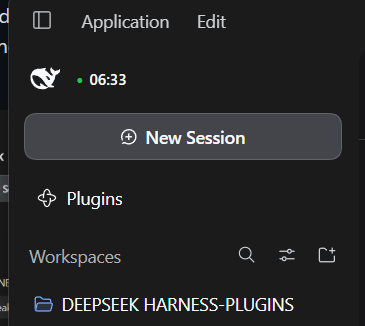
The first and smallest gadget in this repository does exactly one thing: it puts the
current time next to the dsh logo in the sidebar, coloured by the DeepSeek API price
tier that is running - green while off-peak hours are on, red during peak
hours. That is the whole feature; everything below is how it works and how to install it.
Small, opinionated add-ons for DeepSeek Harness (dsh) -
every one of them a proper dsh plugin bundle: install once, they survive restarts,
sessions and harness updates, and each can be switched off again from
Settings > Plugins.
Right now there is one gadget, and it is the one this repository was started for.
A tiny clock next to the Harness logo, in the left sidebar, that tells you which DeepSeek API price tier is running right now:
| Colour | State | What it means |
|---|---|---|
| 🟢 green | off-peak | DeepSeek charges half price |
| 🔴 red | peak | full price - and the widget says PEAK next to the time |
Hover it and it tells you when the tier flips, in UTC - the time zone the pricing rules are written in. The screenshot at the top of this page is the real widget in its green state at 06:33 UTC.
DeepSeek has changed this schedule more than once, and the current policy (checked 2026-10-02 against Models & Pricing, footnote 2) is inverted compared to the 2025-era one:
Off-peak rates are half of the peak rates. Peak hours are 01:00 - 04:00 and 06:00 - 10:00 UTC, Monday through Friday, excluding Chinese public holidays. All other hours are off-peak, including weekends and Chinese public holidays in full.
So off-peak is the default and green is the normal state; red marks the two weekday windows. The clock knows the Chinese statutory holidays, which matters more than it sounds: a holiday week is off-peak all day, and a naive weekday check would show red during exactly the busiest weeks of the year.
To move to the next year, add the new holidays to packages/suite/src/features/offpeak.ts
and packages/suite/client/offpeak.client.js (two copies - see
packages/suite/README.md for why), then rebuild.
You need DeepSeek Harness Desktop 0.2.0-rc.2 (the pinned runtime), Node.js >= 20.10 and
pnpm 9+:
git clone https://github.com/timacek/DEEPSEEK-HARNESS-PLUGINS.git
cd DEEPSEEK-HARNESS-PLUGINS
pnpm install
pnpm build
node scripts/dsh.mjs plugin --profile desktop add ./packages/suite
Or without the CLI: in the app, Settings > Plugins > Add plugin, and paste the
absolute path of the packages/suite directory. Then restart the app - a bundle is
loaded at startup - and the clock appears next to the logo while the sidebar is expanded.
Switching the dsh-offpeak row off in Settings > Plugins only stops the Host-side
configuration; the widget itself is served by the bundle's Client anchor row, so disable
that row (or remove the bundle) to take the clock away. Removing the bundle restores the
default DeepSeek Harness wordmark:
node scripts/dsh.mjs plugin --profile desktop remove dsh-plugin-suite
One honest trade-off, by design: the widget takes the seat beside the logo, so while it is active it replaces the wordmark, and clicking that row still starts a new session (it is the shell's New-session button). It also only exists while the sidebar is expanded.
The bundle also carries a hello row - a one-line tool, kept as a smoke test that a row
is active and its tool is callable. It is harmless, and a good reference for writing your
own first gadget.
Everything in this repository is one bundle (packages/suite) with one row per feature,
plus the scaffolding to add more:
| Task | Command |
|---|---|
| add a feature (row + module) | pnpm new-feature suite weather |
| add a bundle | pnpm new-bundle tools |
| build / typecheck all bundles | pnpm build / pnpm typecheck |
| check runtime pins against the installed dsh | pnpm check |
| any launcher command | node scripts/dsh.mjs <args> |
| Document | Content |
|---|---|
| docs/architecture.md | rows, bundles, layer order, module resolution, when to split |
| docs/plugin-development.md | writing a feature: tools, schemas, Config, client UI, pitfalls |
| docs/install-and-reload.md | install into a profile, reload semantics, verification, troubleshooting |
A UI gadget is a client half: hand-written plain JavaScript in client/, served through
a ./client export. It is the part with sharp edges - a bundle that ships one needs
exactly one row named after the package, and that row's module must export apply, or the
browser half is dropped from the page with no error anywhere. Both failure modes are
written down, with the diagnostic that tells them apart, in
docs/plugin-development.md section 7. Templates to start
from: templates/bundle/ and templates/client/decoration.client.js.
Pinned runtime: dsh 0.2.0-rc.2, @deepseek-ai/cordis 4.0.4,
@deepseek-ai/dsh-tools 0.2.0-rc.2. After a harness update run pnpm check: it compares
every bundle manifest with the installed runtime and prints the exact edits needed.
.
├── packages/
│   ├── suite/                      bundle dsh-plugin-suite - install this one
│   │   ├── cordis.patch.yml        one row per feature (id + module + config)
│   │   ├── src/index.ts            bundle root module - the Client anchor
│   │   ├── src/features/*.ts       one module = one row
│   │   └── client/*.client.js      hand-written browser half, served through "./client"
│   └── README.md                   how packages/ is organized
├── templates/                      scaffolds copied by the scripts (bundle, feature, client)
├── scripts/                        scaffold, launcher wrapper, runtime check
├── docs/                           architecture, authoring, install and reload
└── tsconfig.base.json
Generated lib/ directories are build output and are git-ignored - never edit them.
| Layer | What it is | Unit of |
|---|---|---|
| Row | one entry in the Cordis tree: id, name, config | activation: switch it on/off and configure it in Settings > Plugins |
| Bundle | a package whose package.json declares dsh.bundle.patch | installation, versioning, publishing |
| Feature | one row inside this repo, implemented by one module under src/features/ | so one capability changes without touching the others |
One bundle carries many feature rows. Add a second bundle only when a feature needs its own dependencies, its own release cadence, or has to be shared with someone else. Details: docs/architecture.md.
| Tool | Version | Note |
|---|---|---|
| Node.js | >= 20.10 | the tooling in this repository |
| pnpm | 9 or newer | workspace install and build |
| DeepSeek Harness | 0.2.0-rc.2 | the Desktop app; the bundle pins must match it |
| Task | Command |
|---|---|
| install into the app profile | node scripts/dsh.mjs plugin --profile desktop add ./packages/suite |
| remove from the app profile | node scripts/dsh.mjs plugin --profile desktop remove dsh-plugin-suite |
| see the composed rows | Settings > Plugins > Plugin list, or a scratch profile |
| runtime pins check | pnpm check |
scripts/dsh.mjs finds the Desktop-installed launcher (override with DSH_CLI) and turns
relative bundle paths into absolute ones, which pnpm and the GUI require.
| Thing | Convention | Example |
|---|---|---|
| Bundle directory | kebab-case | packages/suite |
| Bundle package | dsh-plugin-<bundle> | dsh-plugin-suite |
| Feature module | src/features/<feature>.ts | src/features/hello.ts |
| Row id | dsh-<feature>, unique in the profile | dsh-hello |
| Row module | <package>/features/<feature> | dsh-plugin-suite/features/hello |
| Client half | client/<feature>.client.js, plain JS, exported as ./client | client/offpeak.client.js |
| Tool name | snake_case | hello |
| Runtime pins | exact, never ^ | 0.2.0-rc.2 |
Row ids are global to a profile: the scaffold scripts refuse to create a duplicate id.
mode field that switches
capabilities - that is what rows and config are for. The one exception is the
Client anchor: a bundle that ships a browser half must have exactly one row whose
name is the bare package name, and its module must export apply. Two rows resolving
the package, or an anchor without apply, silently drop the browser half from the page.
Details and the diagnostic in docs/plugin-development.md,
section 7.Config, never into code. Users then change behaviour in
cordis.patch.yml (or Settings > Plugins) and it survives your next upgrade.%USERPROFILE%\.dsh\profiles\desktop\...).
Install, toggle and configure through Plugin Manager or dsh plugin.@deepseek-ai/* goes into peerDependencies + devDependencies, never into
dependencies. The host routes peers to the installation copy; a bundled copy would
drift from the runtime.dsh-* peer is checked against the running runtime;
a mismatch blocks activation as incompatible-version.pnpm build, then toggle the row or restart.
Replacing a bundle version always needs a restart.client/ and shipped through a
./client export. They are not covered by pnpm build, and the page re-fetches them
only on refresh. Copy templates/client/decoration.client.js to start one.MIT - see LICENSE.
DeepSeek Harness(DSH)Web 插件聚合生态包 · 一切皆插件,创意工坊分发(dsh-market.com)
把回答做成一页可视化 HTML:模型只写简短的 Markdown 草稿,随包附带的 `am` 命令行生成页面,支持流程图、时序图、树、时间线、ER 图、表格和提示框。
在 dsh 里装上这个插件即可,无需登录、注册或填 API Key,就能使用包括 Muse Spark 1.3、MiMo V2.6 在内的前沿模型——完全免费,不限量。 All you do is install this plugin in dsh: no login, no sign-up, no API key — the frontier models are just there, Muse Spark 1.3 and MiMo V2.6 among them. Completely free, with no usage cap.

