

dsh-web
zhu1090093659/dsh-webDeepSeek Harness(DSH)Web 插件聚合生态包 · 一切皆插件,创意工坊分发(dsh-market.com)
A complete web-theme plugin for the DeepSeek Harness Web GUI: three Furina / 芙宁娜
skins, a wallpaper layer you can switch on its own, translucent glass surfaces, a
芙宁娜主题 section inside DSH's own Settings dialog, a themed startup splash and
readable file cards — no rebuild, no patched markup, no !important arms race.
Repository: https://github.com/TanPass/furina-dsh-theme ·
Install: dsh plugin --profile web add github:TanPass/furina-dsh-theme ·
Issues: https://github.com/TanPass/furina-dsh-theme/issues
| Skin | Preview |
|---|---|
fontaine-nocturne 雨夜枫丹 | 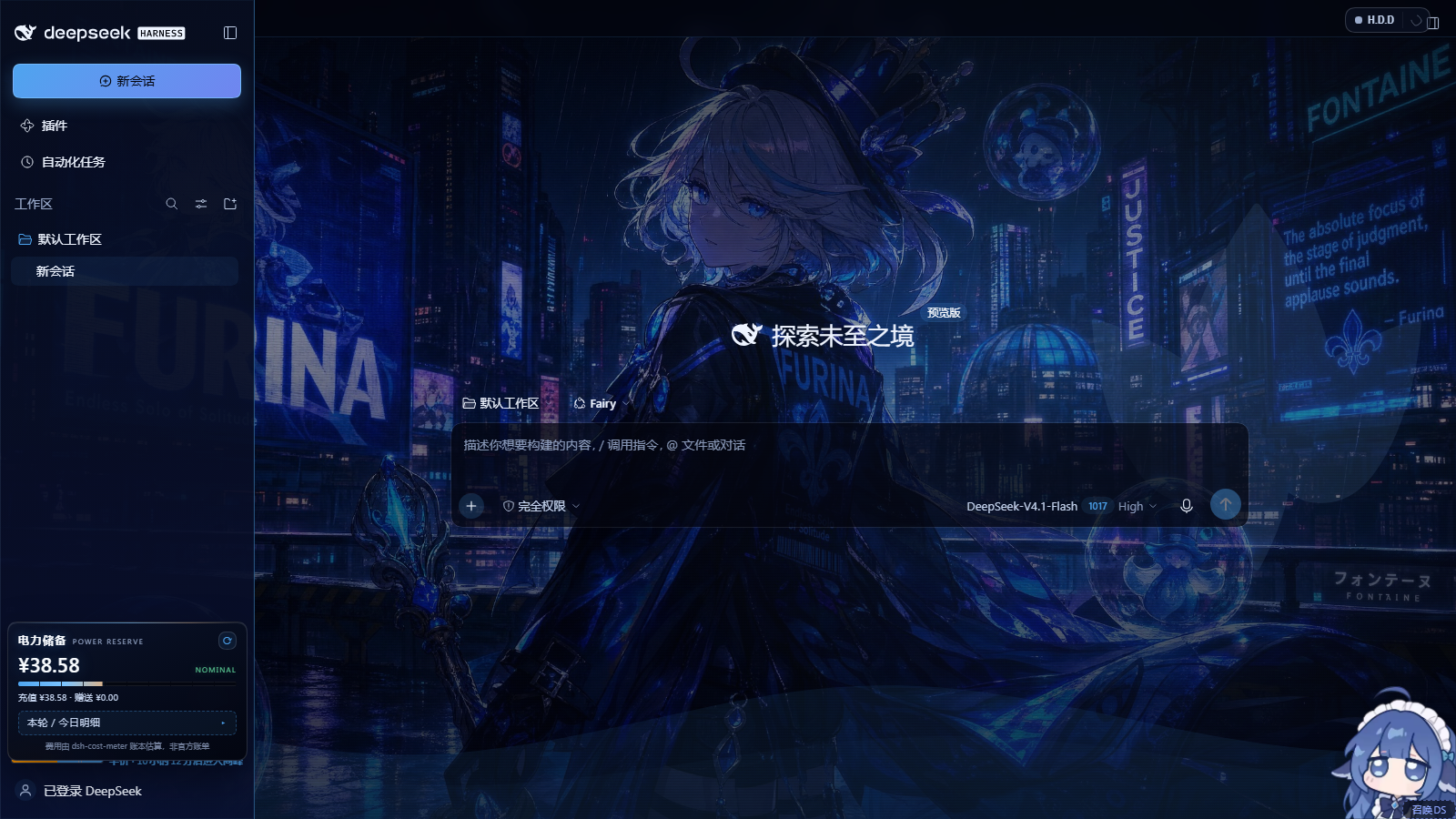 |
hydro-iris 水镜鸢尾 | 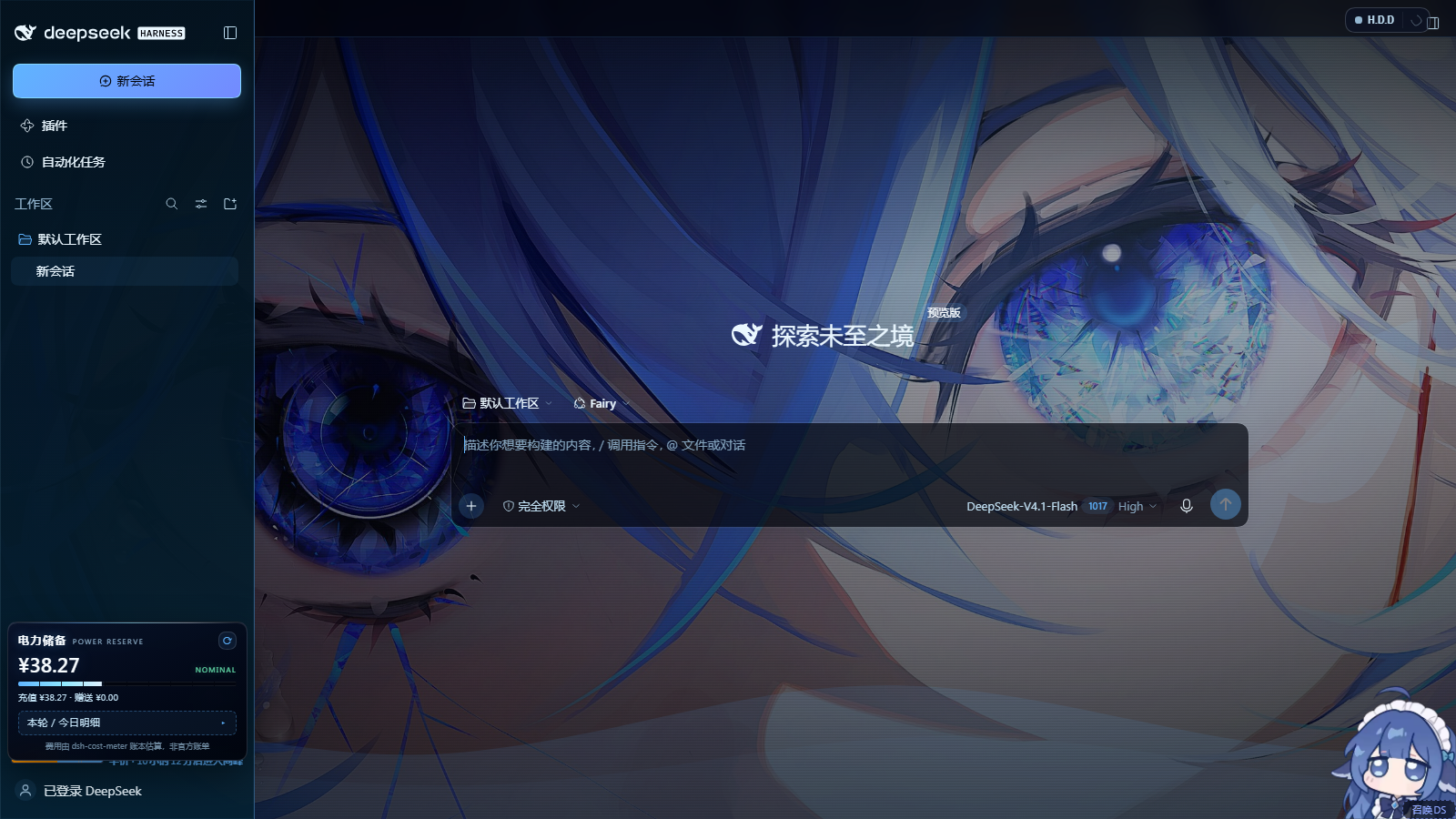 |
salon-solitude 沙龙独处 | 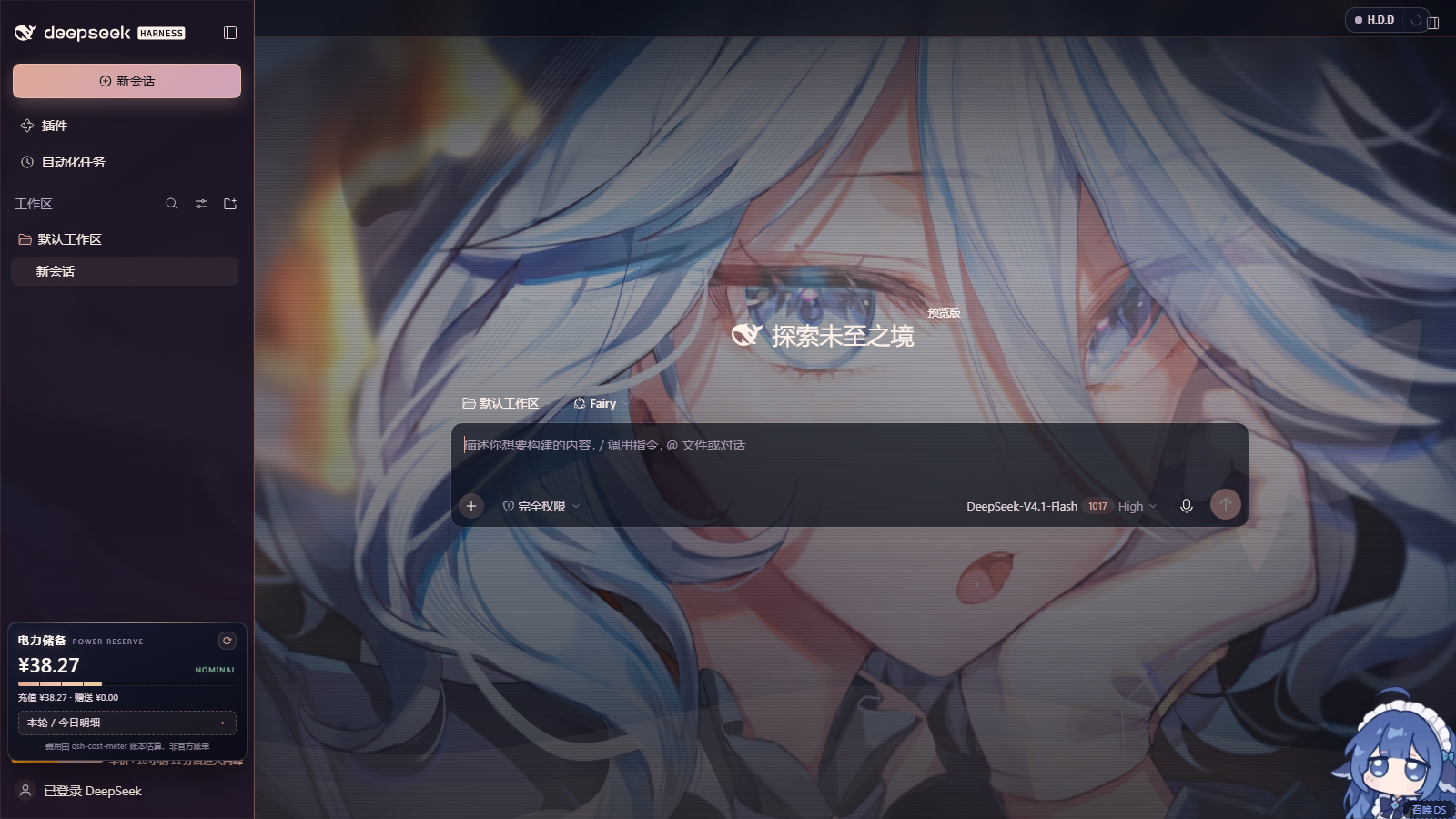 |
| Settings page | Startup splash | File & deliverable cards |
|---|---|---|
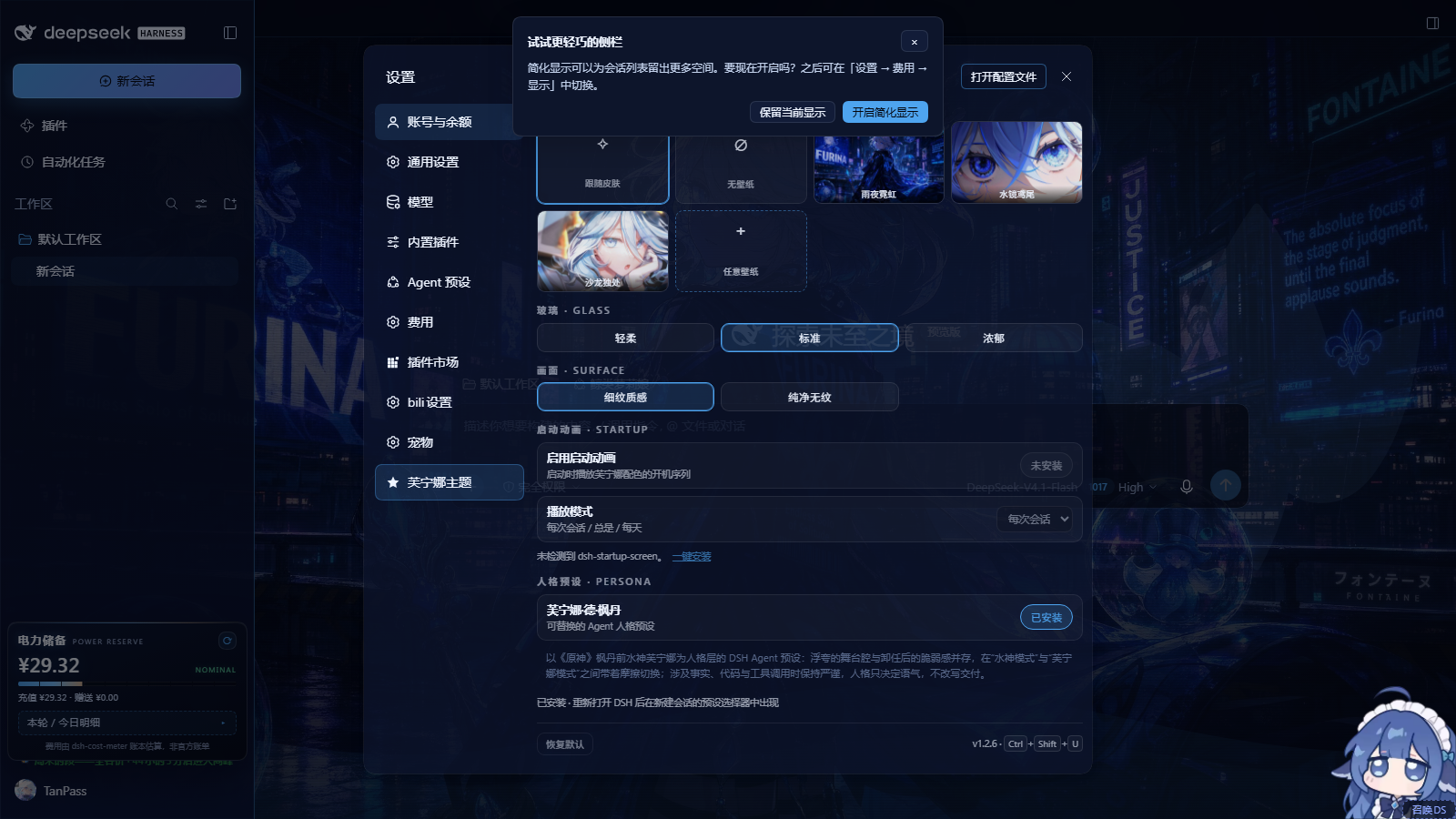 | 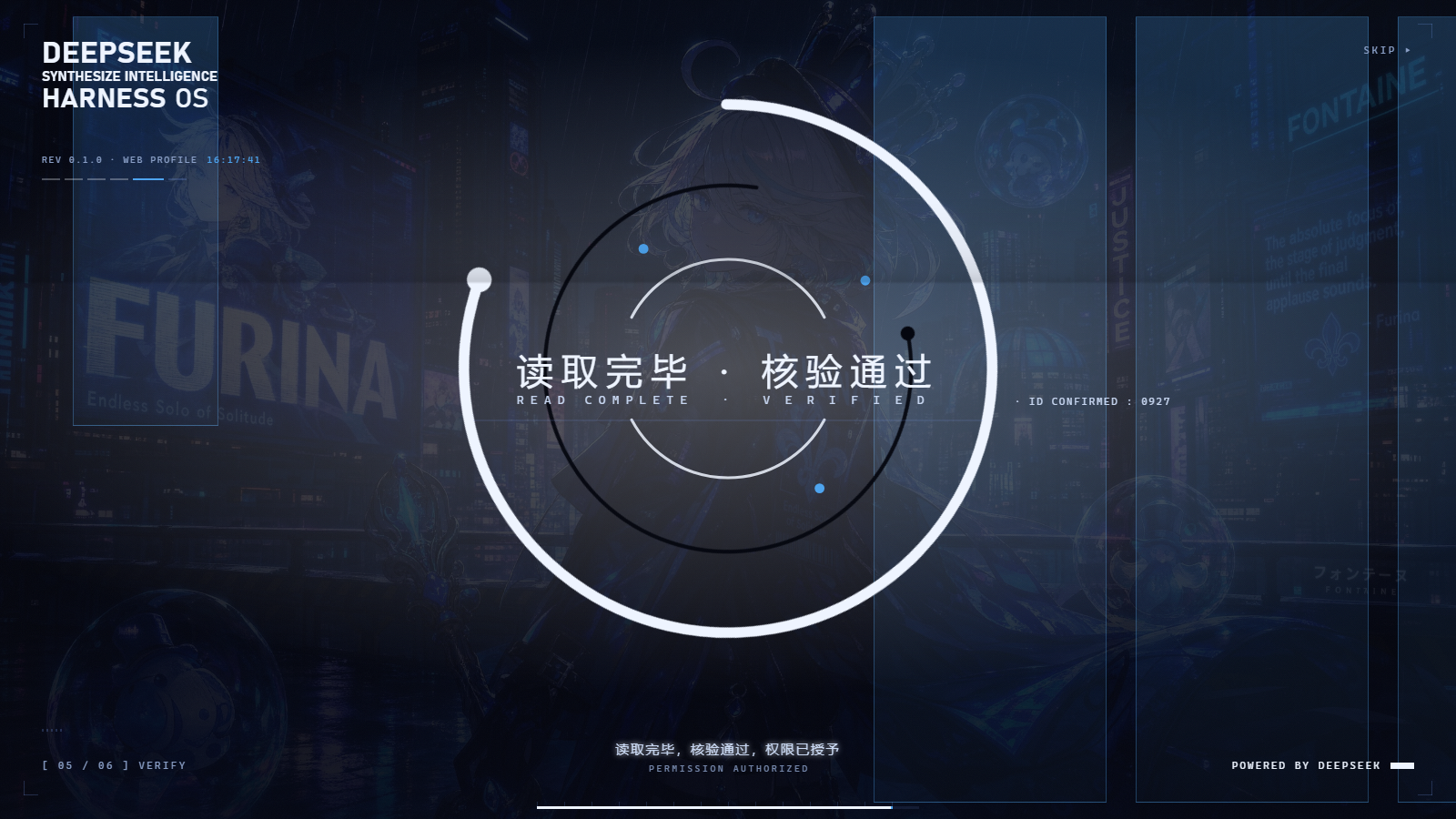 | 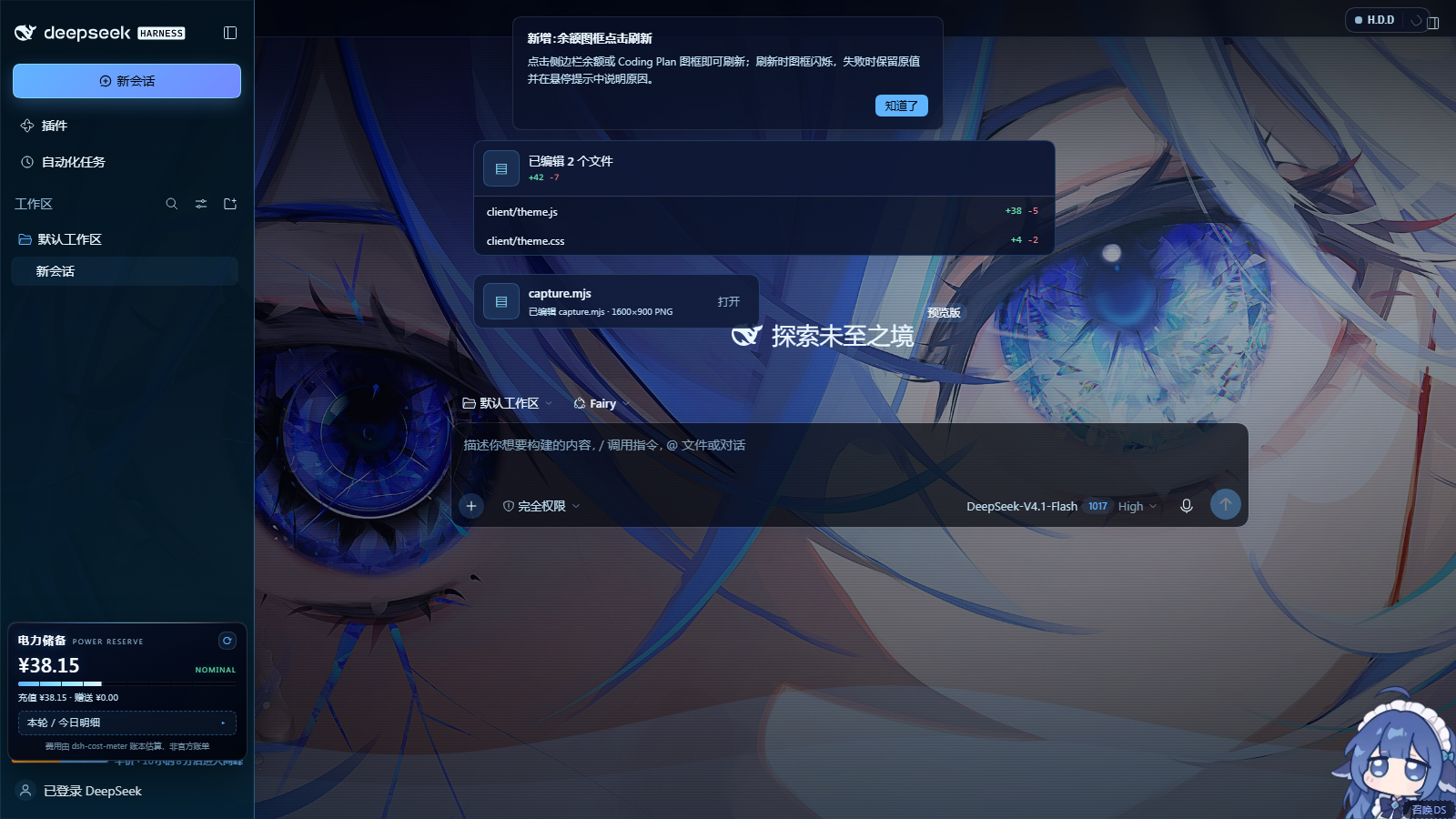 |
All six images are real 1600×900 captures of throwaway DSH instances (isolated
DSH_HOME, ports 3083/3084) — see Verification. The five round-1
captures under docs/ (screenshot-switcher-open.png etc.) are kept as history:
they show the old floating switcher that round 2 replaced.
Three skins, each a full palette (background, surfaces, text hierarchy, four
accents, semantic colours) mapped onto DSH's own --dsh-* design tokens, so every
stock component — sidebar, composer, message bubbles, code blocks, menus — re-skins
without touching application markup.
| id | 中文 | feel | accent |
|---|---|---|---|
fontaine-nocturne | 雨夜枫丹 | rain-slick neon, indigo night | #4ea4ef |
hydro-iris | 水镜鸢尾 | crystal water, near-black ice glass | #5fb4ff |
salon-solitude | 沙龙独处 | rose-gold afternoon, lavender | #dea998 |
A wallpaper layer behind the whole application. Three shipped wallpapers plus
跟随皮肤 (auto — each skin's own art) and 无壁纸 (painted ground). Wallpaper and
skin are independent: pick the night-city art with the rose-gold palette if you
want. Any image you drop into $DSH_HOME/furina-wallpapers/ shows up in the
switcher as an extra tile — free wallpaper switching is not limited to the shipped
set.
Translucent glass UI in three strengths — 轻柔 / 标准 / 浓郁 — applied to
the sidebar, composer, popovers and the settings card itself. A separate
画面 · Surface switch removes the faint scanline film for users who prefer a
perfectly clean wallpaper.
A settings page inside DSH Settings — a 芙宁娜主题 / Furina theme section in the
app's own Preferences dialog (an extra nav row rendered in a Shadow DOM pane): skin
cards with live swatches, a wallpaper tile grid — including 任意壁纸 to pick any
local image — glass modes and reset. Ctrl + Shift + U still opens the same card
from anywhere, and if the Settings dialog never appears a small emblem pill in the
bottom-right corner remains as the fallback launcher.
A themed startup splash — the installed dsh-startup-screen boot sequence is
re-coloured per skin through its own --dsu-* custom properties, with the active
wallpaper laid under the veil, so the first paint is Fontaine night instead of the
stock white plate. The startup package is not modified.
A replaceable Furina agent preset — the 人格预设 · PERSONA block in the settings
page installs a real @deepseek-ai/dsh-agent-preset declaration generated from two
plain-text sources under preset/furina-preset/ (preset.yml for metadata,
agent.cordis.yml for the persona prompt and the rest of the agent composition).
Edit those files — or point the installer at another folder — to swap the persona
without touching any code. See Persona preset.
Readable file & deliverable cards — the "已编辑 …" changed-file card and the presented-file row are repainted from the skin palette instead of the stock white surface. See File cards.
Per-skin sidebar — left rail, workspace tree, account chip and footer take their
tint from the active skin (--fr-side-* variables), with body text kept above the
4.5:1 contrast target. See Sidebar and text contrast.
Persistence in localStorage under furina-theme.settings.v1. Settings survive
reloads; deleting the key (or the plugin) returns the GUI to stock.
No residue when disabled: every rule is scoped to html[data-furina-skin…], the
backdrop, settings pane, splash style and fallback launcher are plain DOM nodes the
plugin removes on dispose, and the app never sees a monkey-patched React tree.
Round 2 moved the controls out of the floating panel and fixed the two surfaces that were still stock white: the first paint and the agent's file cards.
The app has no plugin slot for settings sections, so the theme mounts one the same way the bundled plugins do:
div[role="dialog"][data-shortcut-modal="settings"], the list is the nav's
[class*="navList"]; the row is a clone of a shipped button.VOzbGW_navCell with
data-furina-settings-nav, labelled 芙宁娜主题. Third-party plugins (HDD / Fairy,
bili, pets) add rows the same way, so the list is not React-private.#furina-settings-pane ([data-furina-settings-pane]) is absolutely
positioned over the dialog's options area; it holds a second Shadow DOM with the
shared card markup (controlsMarkup() / wireControls() are shared with the
fallback launcher, so the two can never drift apart).MutationObserver
re-mounts the nav row and pane if React re-renders the dialog, and the boot flow
keeps the old floating switcher code path dormant (#furina-switcher with
data-furina-fallback="1"); it is only revealed when [data-slot="settings.launcher"]
never appears, so the old UI remains an honest fallback rather than the primary
surface.Below 玻璃 the same pane carries the 画面 · Surface card (细纹质感 / 纯净无纹,
the latter hides the decorative scanline layer) and the 启动动画 · Startup block, so
the companion startup-animation plugin is operated from the same screen as the skin it
is coloured from: an enable switch, a 每次会话 / 总是 / 每天 play-mode select and a
打开完整设置 link that jumps to the plugin's own section for its 30+ options. The
block talks to the plugin's own JSON endpoint (GET/POST /dsh-startup/config, patch
semantics owned by that plugin). When dsh-startup-screen is not installed the block
offers 一键安装: the host copies the vendored companion into the active profile
(lib/startup-install.js) and adds the bundle entry, then asks for one DSH restart —
no network access and no command line. The theme itself never hard-depends on it.
client/theme.js appends one <style id="furina-startup-skin"> to <head>. The splash
root (#dsh-startup-root) already exists at the start of <body> by then, and the
overrides are pure custom-property declarations scoped by the active skin:
html[data-furina-skin='<skin>'] #dsh-startup-root {
  --dsu-bg / --dsu-bg-2 / --dsu-ink / --dsu-ink-soft / --dsu-muted
  --dsu-hair / --dsu-hair-soft / --dsu-box-bg / --dsu-box-ink / --dsu-sub-glow
  --dsu-accent / --dsu-glitch-a / --dsu-glitch-b   (the last four need !important
                                                    because splash.js writes them
                                                    inline on the same element)
}
plus paint-layer overrides for the hard-coded light parts of splash.css:
.dsu-plate (skin wallpaper + veil gradient), .dsu-wm (archive panels — the white
slabs), .dsu-wash, .dsu-black, .dsu-flash, .dsu-bloom. While the sequence owns
the screen (html.dsu-lock), every sibling of the splash root — app shell, composer,
transcript, toasts, footer status and the theme's own panels — is kept out of the frame.
The · ID CONFIRMED : xxxx annotation sits at left:69.666vw — inside the right
archive column, clear of the centered headline — and the mode restores itself when
splash.js releases the lock. The black opening act with the DeepSeek wordmark is
intentionally left dark; everything after it is Fontaine night. Proof is a capture of a
real boot from an isolated instance that keeps dsh-startup-screen in its bundle
list (the shared verify instance removes it because its GRANT ACCESS gate blocks
automation) — docs/screenshots/splash-boot.png.
The settings page also carries a 人格预设 · PERSONA block. It is not a JS-embedded
prompt: the package ships two plain sources and the host renders one
@deepseek-ai/dsh-agent-preset declaration from them.
| File | Role |
|---|---|
preset/furina-preset/preset.yml | display metadata: id, name, description, order |
preset/furina-preset/agent.cordis.yml | the preset's plugin list; - id: persona carries complete: true and the Furina config.prefix; the remaining rows mirror DSH's standard agent composition (tools, skills, planning, compaction, delegation) |
{action:'install'|'remove'} to
/furina-theme/api/preset; the host writes or deletes only the marker-delimited
block # [furina-dsh-theme] furina agent preset — begin … end in the active
profile's cordis.patch.yml, backing the file up first. A DSH restart is required
for the new preset to appear in the new-session preset picker.node tools/install-preset.mjs [--status|--remove] [--home <DSH_HOME>] [--preset <folder>] does the same without the GUI.preset/furina-preset/ anywhere, change id/name/
description, replace the config.prefix text, and install that folder (the CLI's
--preset or by swapping the folder inside the installed package before pressing
install). Nothing reads the legacy $DSH_HOME/.agent-presets/<id>/ directory any
more; the declaration row is the only supported form.@deepseek-ai/dsh-agent-preset in the profile the
GET reports ok:false and the block explains it instead of failing the page.The deliverables plugin only darkens its surfaces under body[data-ds-dark-theme], and
this app runs its light token branch (html[data-ds-theme-source="system",
color-scheme: light, no dark body attribute). Round 2 therefore:
theme.js: assertDarkMode() sets
html.style.colorScheme="dark", html[data-ds-theme-source="dark"] and
body[data-ds-dark-theme], and a guarded MutationObserver re-asserts them if the
app flips back;hz8-rW_*, nyYjTG_*):
[data-changed-files] (--changes-fill, --changes-hover), _header / _row /
_path / _tile / _counts, [data-changes-hover-preview] (diff hover card),
[data-presented-files-row] (--deliverable-fill, --deliverable-hover),
[data-presented-file], _fileIcon, _fileName, _description.Before: #fafafa fill with near-white text. After: --fr-surface-2 fill, --fr-text
labels, accent-tinted icon tile, accent border — see docs/screenshots/file-card.png.
The left rail used to be a fixed navy gradient. Round 2 adds per-skin rail variables in the palette blocks and paints the rail from them:
| variable | Fontaine Nocturne | Hydro Iris | Salon Solitude |
|---|---|---|---|
--fr-side-top | #070c1f | #03141f | #191122 |
--fr-side-bottom | #0b1438 | #072a3f | #291b2f |
--fr-side-line | rgba(78,164,239,.30) | rgba(143,232,255,.28) | rgba(222,169,152,.32) |
--fr-side-active | rgba(78,164,239,.22) | rgba(95,180,255,.24) | rgba(199,155,214,.24) |
html[data-furina-skin] body [data-slot='sidebar'] > div {
  background: linear-gradient(180deg, color-mix(in srgb, var(--fr-side-top) var(--fr-g-soft), transparent),
                                      color-mix(in srgb, var(--fr-side-bottom) var(--fr-g-soft), transparent)),
              linear-gradient(180deg, color-mix(in srgb, var(--fr-accent) 7%, transparent), transparent 55%);
  border-right: 1px solid var(--fr-side-line);
}
Text colours were raised per skin and measured with the WCAG contrast formula against
every opaque token ground (worst case is usually --fr-surface-2, the lightest):
| skin | --fr-text (on --fr-bg-deep → --fr-surface-2) | --fr-text-2 | --fr-text-3 | --fr-muted |
|---|---|---|---|---|
| Fontaine Nocturne | #eef4ff 18.44 → 15.06 | #c3d2ec 13.33 → 10.89 | #9aabcc 8.80 → 7.18 | #7488ae 5.70 → 4.65 |
| Hydro Iris | #eaf7ff 18.89 → 15.69 | #c0dff2 14.80 → 12.29 | #93b6d0 9.66 → 8.02 | #6f92ad 6.27 → 5.21 |
| Salon Solitude | #fff2ea 17.88 → 13.85 | #e4d3dc 13.69 → 10.60 | #b9a8c2 8.82 → 6.83 | #94879f 5.82 → 4.51 |
Every text step is above 4.5:1 in every skin and ground, including the muted/decorative step. The glass panels on the main canvas keep their own translucent layers, so the tint does not flatten them.
dsh web), profile web.dsh-theme-endfield / dsh-endfield-theme — override the same --dsh-* tokens and
paint their own opaque layer over the app. They are not broken, but they will win:
enable one theme at a time. See Coexistence.The plugin is a normal DSH cordis plugin, installed into a profile with dsh plugin:
# canonical install — straight from GitHub
dsh plugin --profile web add https://github.com/TanPass/furina-dsh-theme
# same package, short GitHub spec
dsh plugin --profile web add github:TanPass/furina-dsh-theme

# or, without `dsh` on PATH, through the DSH checkout's CLI entrypoint
node "<dsh-checkout>\lib\bin.js" plugin --profile web add https://github.com/TanPass/furina-dsh-theme
A published version can be pinned the same way, e.g.
dsh plugin --profile web add furina-dsh-theme@1.1.0.
The latest release
ships furina-dsh-pack-<version>.zip containing both plugins plus a Windows
installer, because the themed startup animation is a separate plugin
(dsh-startup-screen). To install both halves by hand instead:
dsh plugin --profile web add https://github.com/TanPass/furina-dsh-theme
dsh plugin --profile web add github:6shenhonghong9/dsh-startup-screen
The bundle's install.cmd does exactly these two commands and then tells you to
restart DSH. The startup plugin is optional — without it the theme still works and the
in-panel 启动动画 block disables itself. Its source is also vendored under
companion/dsh-startup-screen/ for reference and credit.
Local development — install the working tree as a link, so edits are live after a page refresh:
dsh plugin --profile web add file:"<path-to-this-checkout>"
The profile's package.json should then contain the artifact spec under
dependencies, with the package in dsh.profile.bundles:
{
  "dependencies": { "furina-dsh-theme": "github:TanPass/furina-dsh-theme" },
  "dsh": { "profile": { "bundles": [ /* …, */ "furina-dsh-theme" ] } }
}
Restart the DSH server once if the profile bundle list changed; after that, refresh
the page. cordis.patch.yml ships with the package and inserts its own furina-theme
plugin row; dsh --dump-config shows the resolved row (see Verification).
To uninstall: dsh plugin --profile web remove furina-dsh-theme (or remove the bundle
entry and the dependency), then restart the server. The browser half also disposes
cleanly if the plugin row is removed while a page is open.
Two full-page themes cannot both own the surface. The measured behaviour with
dsh-theme-endfield + dsh-endfield-theme also installed:
--dsh-* tokens and paint an opaque page layer, so this theme's
wallpaper and palette are mounted but invisible;So enable exactly one theme. If the Furina theme does not appear:
package.json (C:\Users\<you>\.dsh\profiles\web\package.json).dsh-theme-endfield and dsh-endfield-theme from dsh.profile.bundles.- id: theme-endfield row from cordis.patch.yml if present.(Removing other themes touches a live profile — back it up first. In the isolated instance used for verification, the same two bundles were removed and the theme painted immediately; with them present the theme mounted but stayed hidden.)
Settings page — open DSH Settings (account chip → 设置, or Ctrl + Alt + ,), then
pick 芙宁娜主题: skin cards (accent swatches + one-line description), wallpaper tiles
(跟随皮肤 / 无壁纸 / three art tiles / 任意壁纸), glass strength and reset.
Keyboard — Ctrl + Shift + U opens/closes the same card on top of the app,
Esc closes it.
Fallback launcher — if the page never renders the Settings launcher
([data-slot="settings.launcher"]), the Furina emblem pill stays in the
bottom-right corner and opens the same card as a modal.
Custom wallpapers — two ways: 任意壁纸 picks any local image (downscaled to
max 1920 px and stored as a data URL in the settings key), or drop
.jpg / .png / .webp / .avif files into
%USERPROFILE%\.dsh\furina-wallpapers\ (or $DSH_HOME/furina-wallpapers/) and
reload; the browser half asks the host for that list via
GET /furina-theme/wallpapers.
Scripting — the browser half exposes a small API for console use and tests:
window.__furinaTheme.skins        // ['fontaine-nocturne', 'hydro-iris', 'salon-solitude']
window.__furinaTheme.wallpapers   // ['city-noir', 'hydro-iris', 'salon-solitude']  (built-ins)
window.__furinaTheme.state        // { skin, wallpaper, glass }
window.__furinaTheme.mounted      // { sheet, backdrop, switcher, skin }
window.__furinaTheme.setSkin('hydro-iris')
window.__furinaTheme.setWallpaper('salon-solitude')  // 'auto' | 'none' | id | 'user:<file>'
window.__furinaTheme.setGlass('rich')                // 'soft' | 'standard' | 'rich'
window.__furinaTheme.openPanel(true)
window.__furinaTheme.reset()      // defaults: fontaine-nocturne / auto / standard
window.__furinaTheme.remount()    // re-inject after an SPA hard reset
Two halves, one package.
Host half — lib/index.js (Node, runs inside the DSH server):
/furina-theme and serves the browser half:
theme.css, theme.js, assets/emblem.svg, assets/wallpapers/*.jpg,
assets/thumbs/*.jpg;resolveRelative), requests are restricted
to same-origin via Sec-Fetch-Site / Origin, and unknown files 404 instead of
taking the route down;GET /furina-theme/wallpapers lists $DSH_HOME/furina-wallpapers (images only)
and GET /furina-theme/user-wallpaper/<name> serves them;index.html: a critical html,body{background-color:…}
style (prevents a stock-white flash before the theme CSS loads) and the theme
<script> tag; a companion row sets data-furina-boot on <html> so the first
stylesheet can fade its decoration in. theme.js clears that attribute once the
backdrop is mounted, with a 4-second timer as the fallback.Browser half — client/theme.js + client/theme.css (no framework, no build):
theme.css defines a semantic --fr-* palette per skin and maps it onto the app's
--dsh-* tokens plus targeted surface rules scoped to html[data-furina-skin…];theme.js owns the wallpapers (a fixed backdrop layer at z-index:-1 so nothing
intercepts input), the glass strength, the settings-page integration, the themed
startup splash style, the forced dark token branch, keyboard shortcuts and
localStorage persistence;MutationObserver reconciles the injected nodes if the SPA (re)renders and drops
them — backdrop, fallback launcher, settings nav row/pane — and re-asserts the dark
theme attributes;data-furina-boot is removed on first paint so a failed load
never leaves the page with a blank ground.Settings shape (versioned, tolerant of unknown values):
{ "skin": "fontaine-nocturne", "wallpaper": "auto", "glass": "standard", "customSrc": null }
customSrc is the optional data URL written by 任意壁纸 (wallpaper: "custom"); it is
only honoured when it starts with data:image/, and the key is dropped by 恢复默认.
Two layers, both runnable from the repository.
npm test
# or, if npm's PowerShell shim is blocked by execution policy on this machine:
node --test test/host.test.mjs test/client.test.mjs
node --test test/*.test.mjs (or plain node --test) runs 36 tests across
test/host.test.mjs (route resolution and traversal rejection, content types,
same-origin gate, wallpaper listing/serving, injection rows, dispose),
test/client.test.mjs (skin/wallpaper tables, settings read/write tolerance,
wallpaper resolution, markup escaping, keyboard map) and test/billing.test.mjs
(billing document: balance merge incl. granted wallets, day buckets, endpoint shape).
tools/verify.mjs boots a private Chromium (Edge) page against a running DSH web
server, drives the theme through window.__furinaTheme, asserts 14 checks and writes
the screenshots above.
The captures were taken against an isolated DSH_HOME on a spare port (the live GUI
was never touched). Reproduce them anywhere by pointing the same script at your own
instance:
$verifyHome = "<scratch-dir>\.dsh"        # throwaway home: a copy of profiles/web, with the
$env:DSH_HOME = $verifyHome               #   competitor full-page themes removed
node "<dsh-checkout>\lib\bin.js" web --port 3081 --no-open --host 127.0.0.1
#   → prints http://127.0.0.1:3081/?token=…   (single-use: every navigation spends it,
#     so a re-run needs a fresh token, i.e. a server restart)
node tools/verify.mjs --url "<printed url>" --outdir "<repo>\docs"
(tools/verify.mjs --url <url> is the only required argument; --outdir defaults to
docs/. It needs Edge or Chrome and no extra npm dependencies — it speaks CDP over
the standard WebSocket in Node 22+.)
Result — docs/verify-report.json:
PASS  browser half mounted (sheet + backdrop + switcher)
PASS  skin attribute present
PASS  theme tokens reach the app
PASS  wallpaper layer is on
PASS  backdrop sits behind the app
PASS  switcher is a shadow-root panel with every choice
PASS  body ground is transparent (wallpaper shows through)
PASS  skin fontaine-nocturne applied in place
PASS  skin hydro-iris applied in place
PASS  skin salon-solitude applied in place
PASS  switcher panel opens
PASS  wallpaper changes independently of the skin
PASS  no-wallpaper mode keeps a painted ground
PASS  no attributable page exceptions from the app
{"ok":true,"checks":14,"f
DeepSeek Harness(DSH)Web 插件聚合生态包 · 一切皆插件,创意工坊分发(dsh-market.com)
把回答做成一页可视化 HTML:模型只写简短的 Markdown 草稿,随包附带的 `am` 命令行生成页面,支持流程图、时序图、树、时间线、ER 图、表格和提示框。
在 dsh 里装上这个插件即可,无需登录、注册或填 API Key,就能使用包括 Muse Spark 1.3、MiMo V2.6 在内的前沿模型——完全免费,不限量。 All you do is install this plugin in dsh: no login, no sign-up, no API key — the frontier models are just there, Muse Spark 1.3 and MiMo V2.6 among them. Completely free, with no usage cap.

