
dsh-web
zhu1090093659/dsh-webDeepSeek Harness(DSH)Web 插件聚合生态包 · 一切皆插件,创意工坊分发(dsh-market.com)

Permanently delete archived DeepSeek Harness sessions along with their on-disk history and log directories.
Permanently delete archived DeepSeek Harness sessions and their on-disk logs.
DSH's built-in archive only hides a session from the sidebar — its history and log files stay on disk. This plugin erases an archived session together with its physical directory, while keeping restore as a way back.
English | 简体中文
Settings → Archived Sessions
Lists every archived session with its disk directory, size, archive time and workspace. Rows are selectable, with batch Restore and Delete Permanently. Sorted oldest first by default, and every destructive action asks for confirmation first.
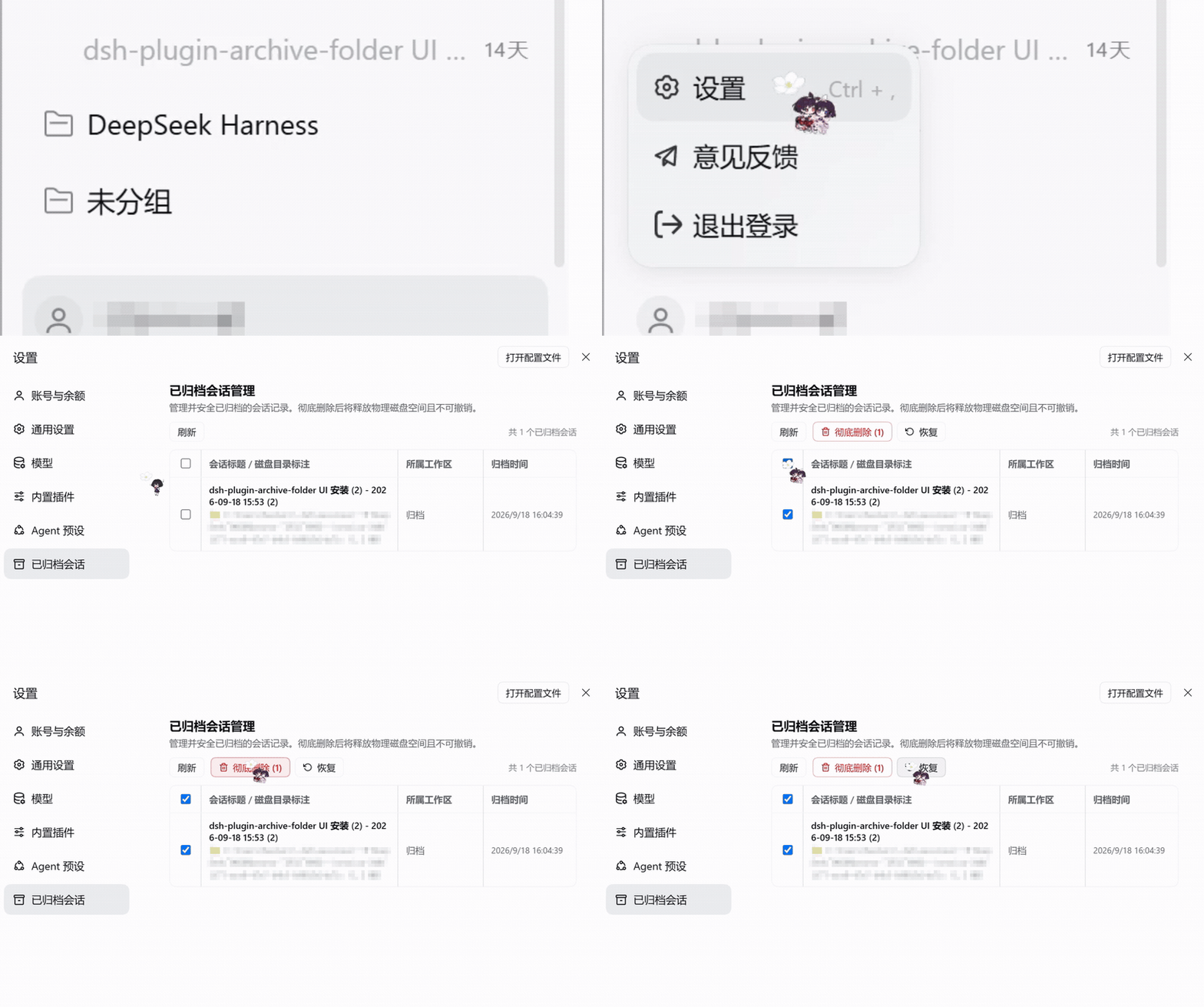
Sidebar session menu
Archived sessions gain a Delete Permanently entry in their "⋯" menu.

Agent tool
delete_archived_sessions removes one session by session_id, or every archived session when session_id is omitted. Sessions that are not archived are never touched.
Paste this into DSH's Settings → Plugins → install entry:
github:Seelerc/dsh-plugin-delete-archived
Or just ask the agent to install it — plugin_manager, action: "install_bundle", target: "github:Seelerc/dsh-plugin-delete-archived".
Prerequisites
A github: spec is resolved with pnpm and git. The desktop app injects its own bundled pnpm, but a standalone CLI profile looks for both on your PATH.
pnpm → npm i -g pnpm (or corepack enable pnpm)git → install Git, e.g. winget install Git.Git; pnpm runs git ls-remote to resolve a github: address before downloading anythingRoutes registered on DSH's web server, for scripts and integrations.
| Method | Path | Body | Response |
|---|---|---|---|
GET | /api/archived-sessions | — | { sessions: ArchivedSession[] } |
POST | /api/archived-sessions/delete | { sessionId } | single-delete result |
POST | /api/archived-sessions/delete-batch | { sessionIds? } | { total, deletedCount, errors } |
POST | /api/archived-sessions/restore | { sessionId } | { success, sessionId } |
POST | /api/archived-sessions/restore-batch | { sessionIds } | { success, restoredCount } |
POST | /api/archived-sessions/open-folder | { path } | { success } |
Omitting sessionIds on delete-batch means "delete every archived session".
interface ArchivedSession {
  id: string;
  title: string;
  cwd?: string;
  workspaceTitle: string;
  diskPath: string;         // placeholder when no standalone directory is found
  sizeBytes: number;
  sizeFormatted: string;    // e.g. "1.2 MB"
  createdAt: string | null; // ISO 8601
}
dsh-plugin-delete-archived/
├── lib/
│   ├── index.js          # backend: HTTP routes, agent tool, disk cleanup
│   └── client.js         # frontend: settings page + sidebar menu (AMD loader)
├── locale/
│   ├── zh.json           # Chinese strings
│   └── en.json           # English strings
├── cordis.patch.yml      # loader injection declaration
└── package.json          # manifest: exports / dsh.bundle / dsh.client
sessionPersistence.findLog(sessionId) first, then falls back to scanning persistence.root for a directory named after the encoded session id.window.__ModuleLoader__.load() and injects into the settings.section and sidebar.workspaces.session.menu.item slots."Delete Permanently" is irreversible — it truly erases session history and log files from disk. No recycle bin, no recovery. Every delete entry point asks for confirmation, but please double-check that you no longer need the session. If you only want it out of the sidebar, DSH's native Archive is enough.
Plain JavaScript, no build step. Edit lib/client.js and the change applies immediately while the DSH client-plugin HMR receiver is active; otherwise restart DSH.
DeepSeek Harness(DSH)Web 插件聚合生态包 · 一切皆插件,创意工坊分发(dsh-market.com)
把回答做成一页可视化 HTML:模型只写简短的 Markdown 草稿,随包附带的 `am` 命令行生成页面,支持流程图、时序图、树、时间线、ER 图、表格和提示框。
在 dsh 里装上这个插件即可,无需登录、注册或填 API Key,就能使用包括 Muse Spark 1.3、MiMo V2.6 在内的前沿模型——完全免费,不限量。 All you do is install this plugin in dsh: no login, no sign-up, no API key — the frontier models are just there, Muse Spark 1.3 and MiMo V2.6 among them. Completely free, with no usage cap.

