
packages/dsh-task-board
zhu1090093659/dsh-web侧边栏多列任务看板:卡片交给真实 DSH 智能体会话执行,支持 cron 定时(Host 侧到点执行,关浏览器也生效)。

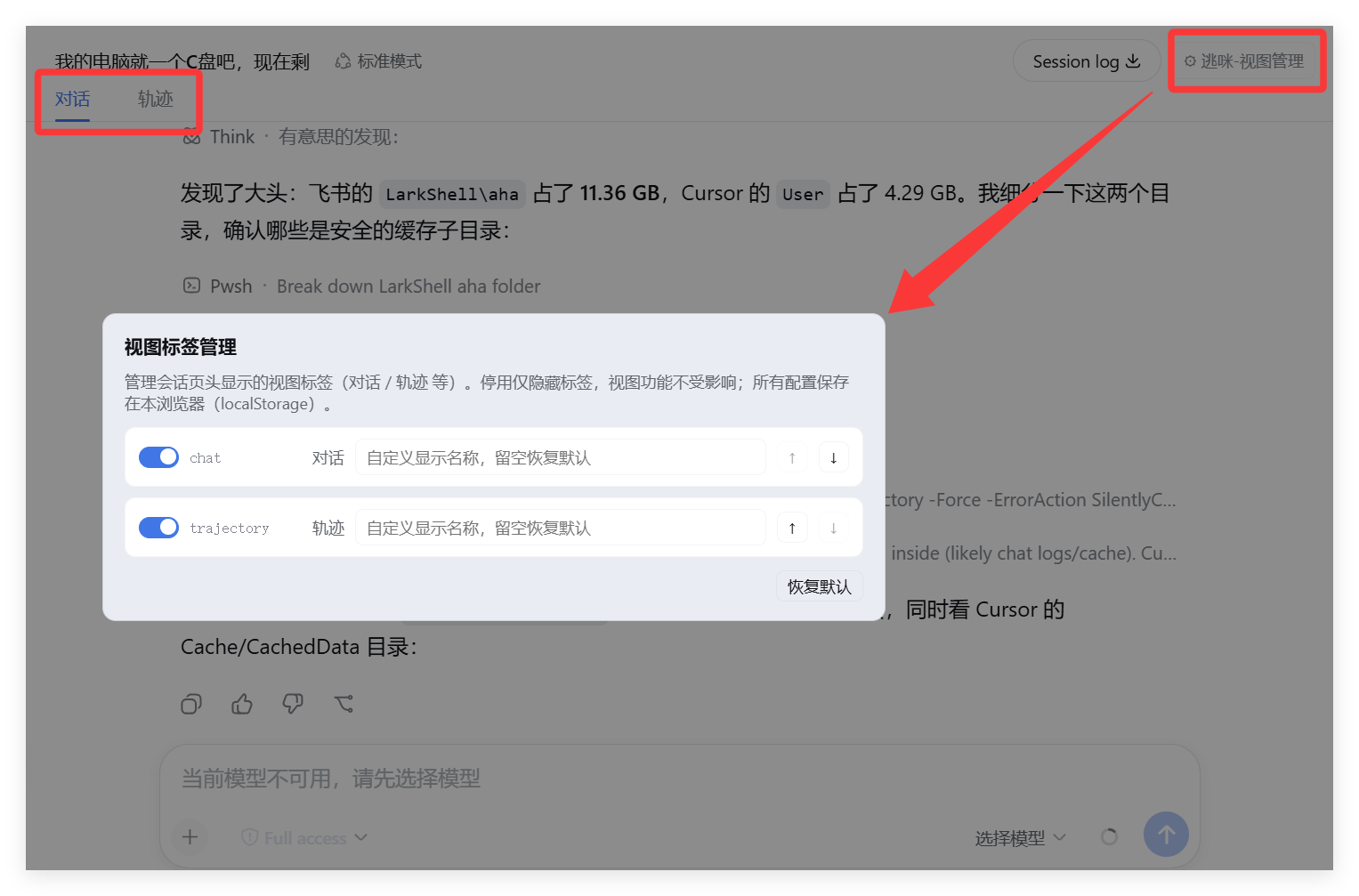
DSH 视图标签管理器(逃咪):管理会话页头视图标签(对话/轨迹)——启停、隐藏、排序与重命名,文案随界面语言中英切换,并带 npm 更新提醒。
Manage the view tabs in the DeepSeek Harness Web GUI session header — the
tabs contributed through the conversation.view slot (e.g. 对话 / Chat,
轨迹 / Trajectory, and any future view plugins).
| 简体中文 | English |
|---|
方式一:从 npm 安装(推荐):
dsh plugin --profile web add dsh-view-manager
方式二:从 GitHub 安装:
dsh plugin --profile web add github:runcat-tommy/dsh-view-manager
方式三:本地开发安装——克隆本项目后,进入项目文件夹执行:
cd dsh-view-manager
dsh plugin --profile web add .
安装后重启 Web UI,打开任意会话,在会话页头右侧会出现 ⚙ 逃咪-视图管理 按钮,点击即可打开管理面板。
原名:当前默认名称(跟随语言)slots.entries("conversation.view")
(viewTabs() 同源),所以永远能看到当前所有视图注册项[role="tablist"] 内按钮按 entries 顺序对齐,
隐藏用 display:none、排序用 flex order、重命名改 textContent,
MutationObserver 守护,React 重渲染后自动重新应用conversation.session.header.utilities(list/session)locale 服务注册(viewManager 命名空间),跟随 DSH 语言/view-manager-api/version | check-update | update
三个路由(loopback 信任检查),对比 npm registry 与本地版本;更新后
重新读取本地版本验证,不裸信退出码dsh-view-manager/
├── package.json # dsh.bundle.patch + dsh.client 声明
├── cordis.patch.yml # profile 层 bundle patch
├── lib/
│ ├── index.js # node 半端:更新检测/执行 API 路由
│ └── client.js # 浏览器端:管理面板 + DOM 应用 + 更新卡片
本地调试(热更新需要 dev:web 编译,否则改后重启 Web UI):
dsh plugin --profile web add file:./dsh-view-manager
MIT
侧边栏多列任务看板:卡片交给真实 DSH 智能体会话执行,支持 cron 定时(Host 侧到点执行,关浏览器也生效)。
DSH Web UI 插件与皮肤合集:任务看板、git 图、右侧面板、远程移动端 UI、桌宠、实时 token 统计与皮肤中心。
助手回复内渲染交互式 UI 组件:布局、图表、表单、测验、mermaid、3D 场景与回传事件循环。
