
dsh-web
zhu1090093659/dsh-webDeepSeek Harness(DSH)Web 插件聚合生态包 · 一切皆插件,创意工坊分发(dsh-market.com)

Nearly half the agent cost, with accuracy intact. Just enough tools is a DeepSeek Harness plugin that uses Jev to reveal tools and skills progressively. The main model starts with a clean planning step. Jev then selects which capabilities to add as the task unfolds.
Think first. Bring in tools and skills when they matter.
简体中文 · Install · Contributing
Our goal: nearly half the agent cost, with accuracy intact.
Just enough tools is a DeepSeek Harness plugin for progressive tool and skill selection, powered by Jev, with an optional OpenAI-compatible scorer.
Agents often receive more capabilities than a task needs:
The plugin puts tools and skills in one candidate pool and exposes only the capabilities selected for the task. Each agent has its own enabled set.
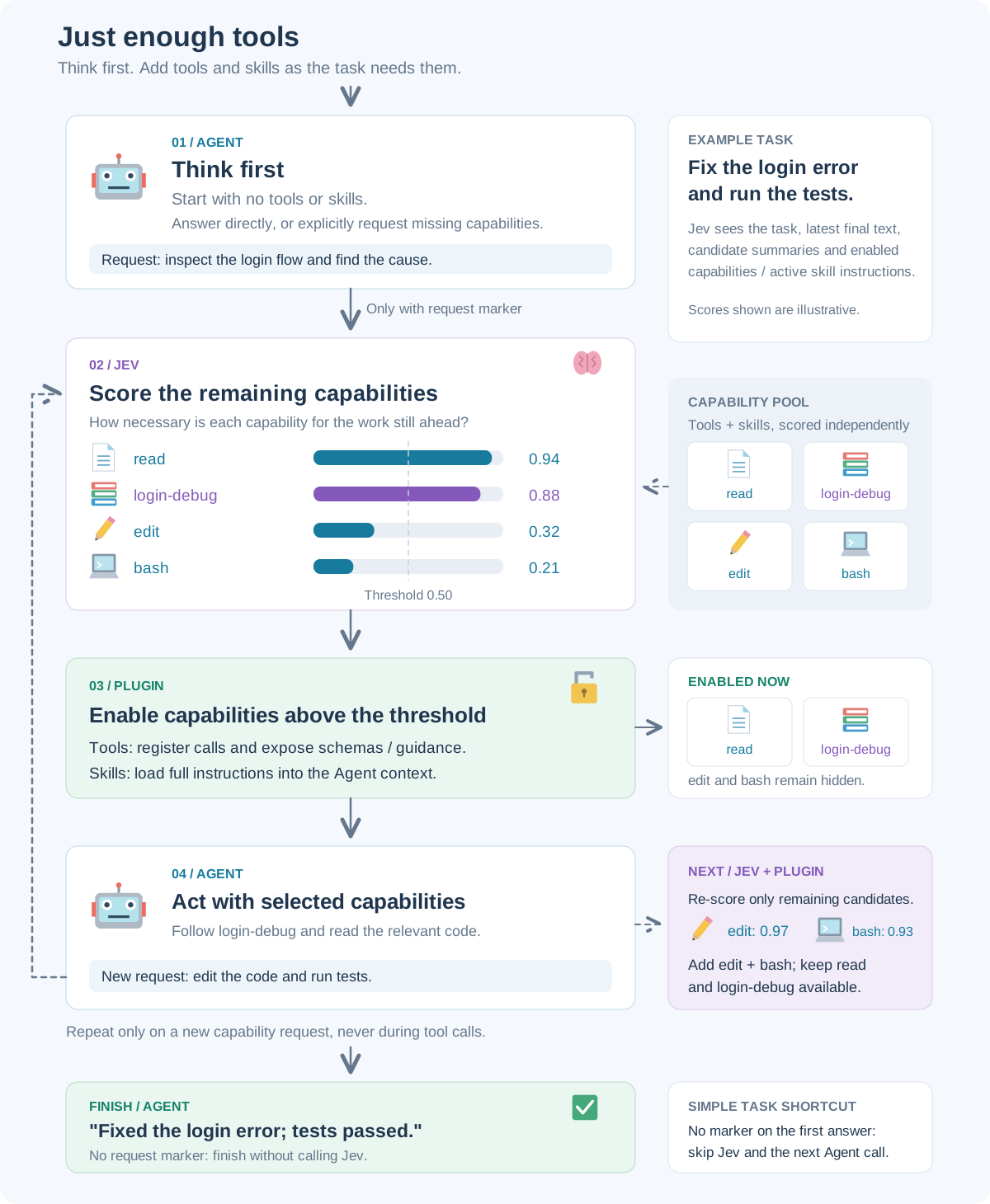
Example scores illustrate progressive selection; they are not benchmark results. Editable TikZ source.
Each Agent response can trigger these three independent actions, for native calls and complete DeepSeek DSML calls:
REQUEST_CAPABILITIES is present: ask Jev to score the remaining candidates.For “Fix the login error and run the tests,” with a threshold of 0.50:
| Stage | Agent response or action | Jev / plugin decision |
|---|---|---|
| Think | [REQUEST_CAPABILITIES] + newline + “I need to inspect the login flow.” | read 0.94 and login-debug 0.88 are enabled; edit 0.32 and bash 0.21 stay hidden. |
| Inspect | Agent reads the code using the debug workflow, then requests: [REQUEST_CAPABILITIES] + newline + “Bug found. I need to edit and run tests.” | Only remaining candidates are scored: edit 0.97 and bash 0.93 are added. Previously enabled capabilities stay available. |
| Finish | Agent edits the code, runs tests, and replies: “Fixed; tests passed.” | No marker: no Jev call; the turn ends. |
Scores and outcomes are illustrative. A writing task may need only a style skill, or no external capabilities at all.
Requires Node.js 22.19+, DeepSeek Harness 0.1.7-alpha.1, and Cordis 4.0.3.
Build from the repository:
npm ci
npm pack
Install the package and start dsh:
npx @deepseek-ai/dsh@0.1.7-alpha.1 plugin --profile web add /absolute/path/to/dsh-just-enough-tools-0.5.8.tgz
npx @deepseek-ai/dsh@0.1.7-alpha.1 web
The acting model remains the one configured in dsh. The mode includes file, search and terminal tools, and discovers model-invocable skills through dsh.
| Protocol | Default base URL | Model | Key environment variable |
|---|---|---|---|
| System One / TypeSafe | https://api.typesafe.ai/v1 | jev-latest | TYPESAFE_API_KEY |
| Vercel AI Gateway (Evaluation) | https://ai-gateway.vercel.sh/v4/ai | typesafe-ai/jev | AI_GATEWAY_API_KEY |
| OpenAI-compatible / LM Studio | http://127.0.0.1:1234/v1 | Required: provider model ID | OPENAI_API_KEY |
Custom compatible base URLs and full endpoints are supported. Credentials are resolved in this order: saved key → JEV_API_KEY → provider environment variable. Reset a saved key to use an environment variable. Unauthenticated local chat servers may leave the key blank. dsh reads .env at startup; restart it after changing that file.
System One and Vercel return native decision probabilities. OpenAI-compatible scoring requires a generative model that returns JSON scores; these are model estimates, not calibrated decision probabilities. Encoder-only models require a separate decision service. There is no automatic fallback between protocols.
| Setting | Default |
|---|---|
| Tool / skill threshold | 0.5 |
| Maximum steps per user turn | 12 |
| Routing operation timeout | 60000 ms |
| Terminal routing diagnostics | Enabled |
Provider settings and diagnostics apply immediately; start a new conversation after changing routing limits. Diagnostics show per-capability scores, threshold and admission results in the dsh terminal. Scoring or registration failures stop execution with an explicit error.
Create .dsh/skills/login-debug/SKILL.md (or use dsh's other configured skill directories):
---
name: login-debug
description: Diagnose login and session failures before changing authentication code.
---
Reproduce the failure, inspect the relevant code, make a focused fix, and run the affected tests.
The scorer initially sees the summary; the Agent receives full instructions only after selection. Capability selection controls availability and instruction injection, not filesystem permissions.
Help improve capability selection, provider support, thresholds and examples. See CONTRIBUTING.md, design, and integration details.
Independent community project · MIT license.
DeepSeek Harness(DSH)Web 插件聚合生态包 · 一切皆插件,创意工坊分发(dsh-market.com)
把回答做成一页可视化 HTML:模型只写简短的 Markdown 草稿,随包附带的 `am` 命令行生成页面,支持流程图、时序图、树、时间线、ER 图、表格和提示框。
在 dsh 里装上这个插件即可,无需登录、注册或填 API Key,就能使用包括 Muse Spark 1.3、MiMo V2.6 在内的前沿模型——完全免费,不限量。 All you do is install this plugin in dsh: no login, no sign-up, no API key — the frontier models are just there, Muse Spark 1.3 and MiMo V2.6 among them. Completely free, with no usage cap.

