
dsh-web
zhu1090093659/dsh-webDeepSeek Harness(DSH)Web 插件聚合生态包 · 一切皆插件,创意工坊分发(dsh-market.com)

通过经历增量积累记忆、修正认识、逐渐形成理解的认知系统(Accumulate memory, revise knowledge and gradually form a cognitive system of understanding through incremental experience.)

A second brain that remembers what is new.
Give it the material you choose. It organizes and archives it, extracts what adds to what you already know, and turns proposed insights into long-term memory only after you confirm them.
Quick start · Features · Evaluation · Usage · Architecture · Privacy · Development
A 2:45 walkthrough of adding material, confirming new insights, and asking a follow-up question. Chinese narration with Chinese and English subtitles · 1080p60.
https://github.com/user-attachments/assets/8f51499d-bbfb-47a2-9ab0-91193313f1f0
Download video · English subtitles (SRT) · English subtitles (VTT)
I want a second brain that can work alongside me over time.
The idea comes from everyday research. Whenever I ask AI a question or give it a task about the same project, I have to explain the background, my existing judgments, and the material I have already found all over again. Knowledge accumulates, but conversations often start from scratch.
Incremind is designed around two goals:
Saving articles and videos does not automatically make their contents useful or memorable. Incremind therefore focuses on what each new source adds:
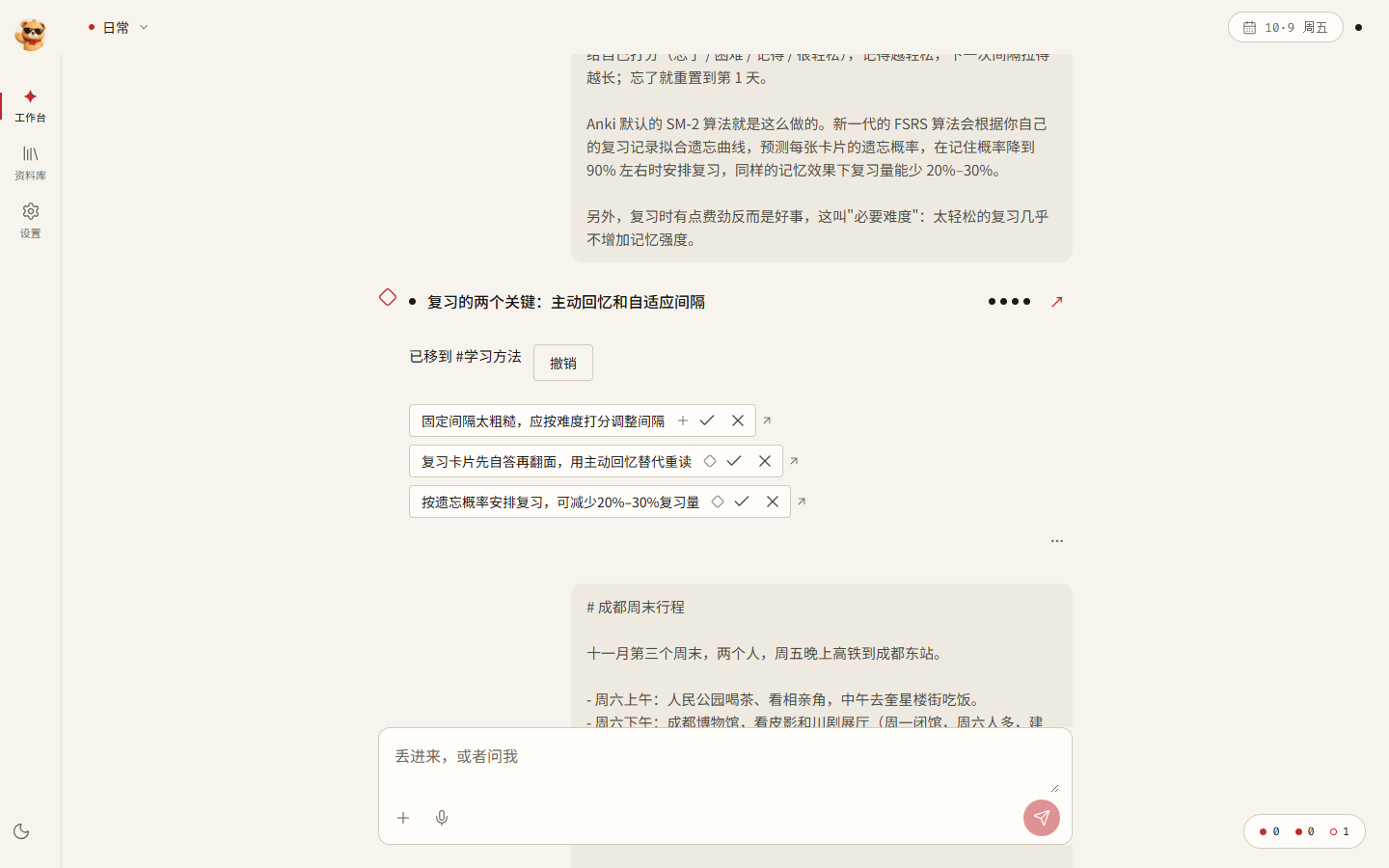
For example, an introductory article on spaced repetition might produce an insight about reviewing on days 1, 2, 4, 7, and 15. A later article on active recall and adaptive intervals should add only the relevant differences and methods: adjust intervals to difficulty, and try answering before revealing the answer.
| Status | Feature | What it does |
|---|---|---|
| ✅ | One input box | Automatically handles remembering, asking, and doing tasks. Mixed requests, such as a reminder followed by a question, are split and handled separately. |
| ✅ | Automatic organization | Builds memory in layers: original → organized note + summary → insight. Supports text, links, PDFs, and DOCX files. |
| ✅ | Automatic project assignment | Without an explicit #Project, assigns material to the most relevant existing project or creates one for a new topic. Everyday items stay in the Everyday space. Assignment can be undone with one click. |
| ✅ | Incremental insights | Compares material with existing insights and proposes additions, differences, and new methods for confirmation on the receipt. |
| ✅ | Answers with citations | Uses eligible insights, summaries, organized notes, and originals as evidence; citations open the original source. Questions in Everyday can be routed to the relevant project. |
| 🧪 | Agentic retrieval | The model decides whether to search or read again, can consult applicable skills enabled for the current project and configured web search, and asks for missing conditions before continuing in the same conversation. See Agentic RAG (Chinese) for the S1–S4 stages and validation scope. |
| ✅ | Task execution | Uses project memory, confirmed profile facts, and Library lookup to create output documents, which you can continue revising or regenerate. Real DeepSeek initial-draft and continuation runs have verified note facts, version history, and source provenance. |
| ✅ | Library | Browse insights, summaries, organized notes, and originals; confirm, edit, forget, or restore insights. Recover unsaved note edits in the same browser, with revision checks when saving. View saved revision metadata from the editor menu. |
| ✅ | Privacy controls | Keeps data on the computer or server hosting the application, excludes private projects from external model requests, and records a receipt for each external call. |
| 🧪 | More input formats | Image OCR, audio and video transcription, and Bilibili favorites import; requires the corresponding models to be configured. |
| 🧪 | Forgetting and daily organization | Adjusts recall weights by usage and a forgetting curve. Daily organization proposes patterns from recurring material for your confirmation. |
| 🧪 | Local embeddings | Install EmbeddingGemma from Settings, approximately 1.5 GB, for semantic retrieval without a network connection. |
| 🧪 | Claude Code, Codex, and DeepSeek Harness | All three clients can access memory tools through plugins. Workbench delegation saves new drafts; server-side delegation is currently limited to DeepSeek Harness. See installation requirements and validation limits in the agent guide (Chinese). |
| 🧪 | Servers and multiple users | Home or cloud server deployment, device pairing, backup, and recovery. See the server guide (Chinese). |
✅ Basic usage paths are implemented. 🧪 Optional dependencies or further real-environment validation are required. The table below states the actual validation scope; the icons do not establish coverage of every scenario.
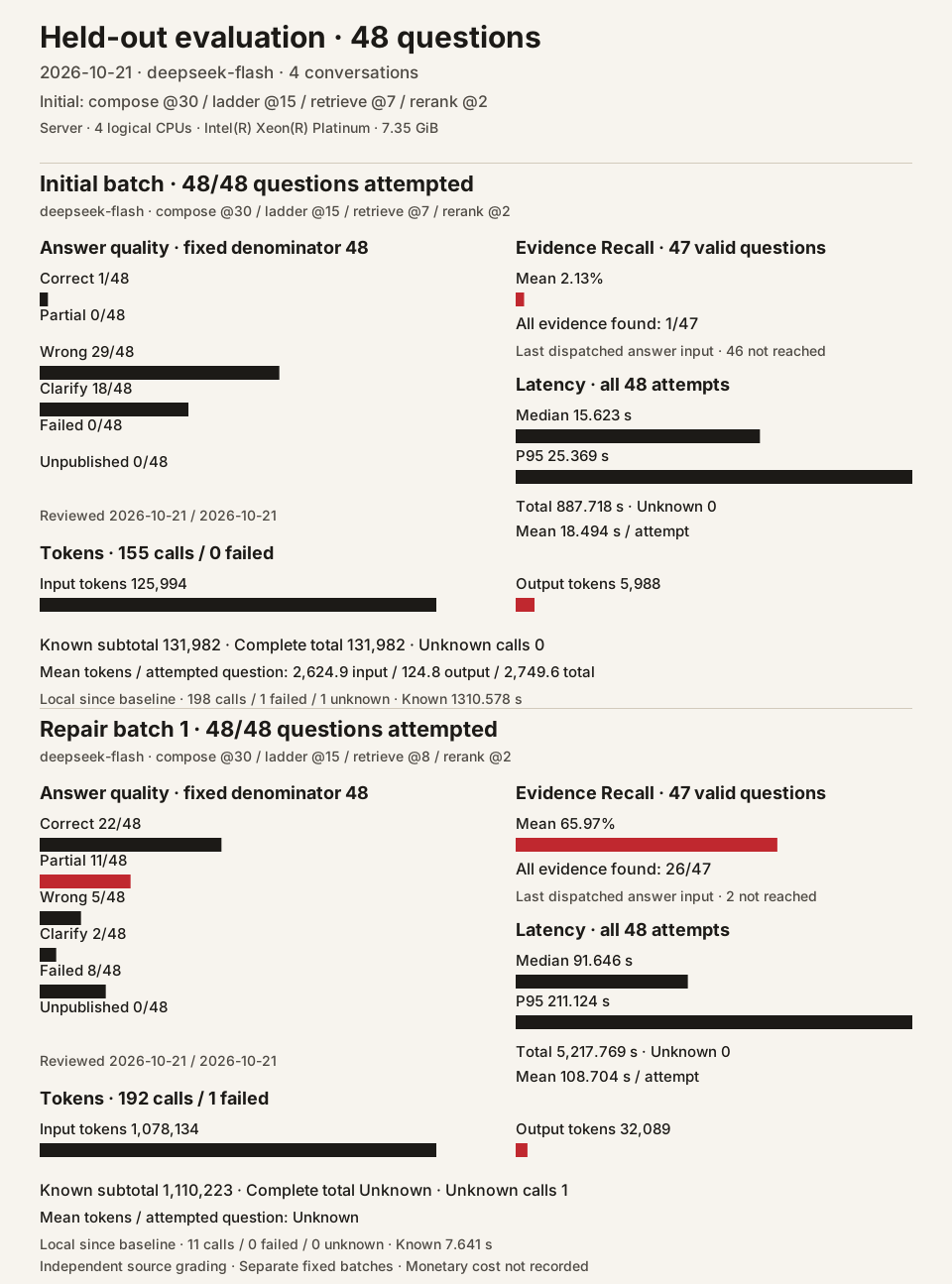
The same frozen 48 questions were run twice on a server with 4 logical CPUs and 7.35 GiB memory, using real DeepSeek Flash and CPU EmbeddingGemma 2 through the normal Workbench ask workflow. The dataset contains four conversations, 116 sessions, and 2,536 messages; it has no conversation or question-text overlap with the development set.
| Metric | Initial retrieve@7 | Repair retrieve@8 |
|---|---|---|
| Attempted questions | 48 / 48 | 48 / 48 |
| Correct / partially correct / wrong | 1 / 0 / 29 | 22 / 11 / 5 |
| Clarifications / failures / unpublished | 18 / 0 / 0 | 2 / 8 / 0 |
| Mean evidence Recall, 47 eligible questions | 2.13% | 65.97% |
| All evidence found | 1 / 47 | 26 / 47 |
| Mean / median / P95 request time, all attempts | 18.494 / 15.623 / 25.369 s | 108.704 / 91.646 / 211.124 s |
| Known input / output tokens | 125,994 / 5,988 | 1,078,134 / 32,089 |
| Unknown-usage calls | 0 | 1 |
| Physical model requests | 155 | 192 |
Both batches used compose@30 / ladder@15 / rerank@2. The repair makes original material reachable when upper memory layers are empty; retrieve@8 is now the default. Two independent agents reviewed frozen answers against the complete original conversations. Recall measures evidence in the last dispatched answer input, with one invalid source annotation retained as null and excluded from its 47-question denominator. Time covers each complete server-side Workbench request, including failures and retries. The repair token count is a known subtotal; its complete total remains null because one transport failure has unknown usage. All 347 model attempts have terminal records. The eight Workbench 502 responses and all quality failures are retained.
The evaluation guide (Chinese) records grading, source annotation issues, CPU encoding, failures, and reproduction commands. The aggregate JSON and tools/rag_report.py reproduce this chart without model calls. Presentation follows the OpenViking RAG report. Monetary cost was not recorded. tools/rag_dataset.py freezes the original inputs; tools/rag_holdout.py runs the normal application workflow on the server.
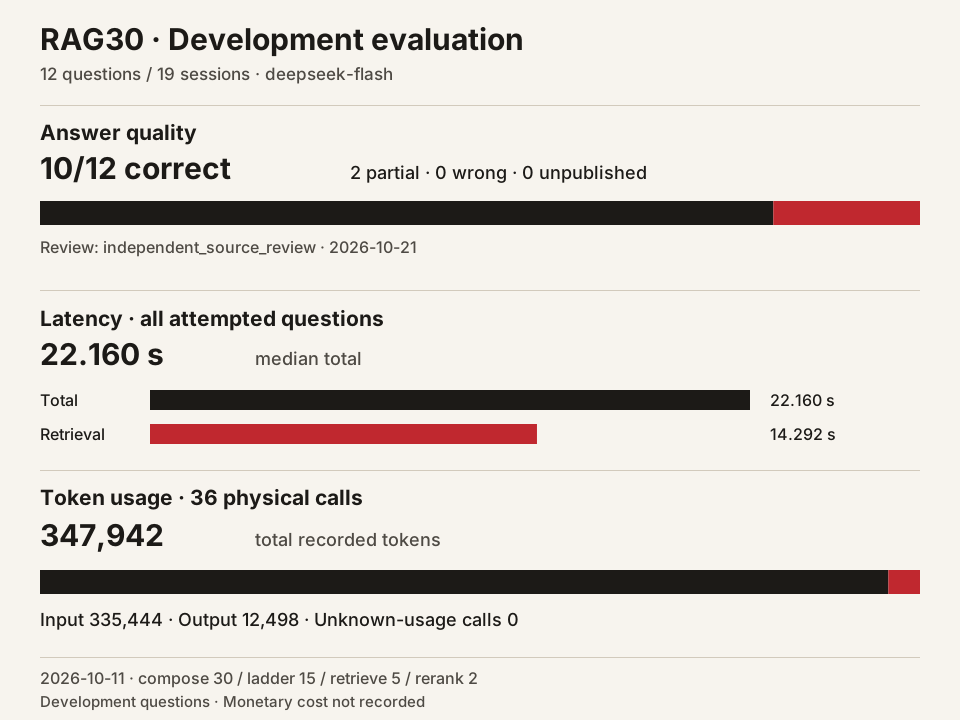
| Fixed development set | Observed result |
|---|---|
| Source review on 2026-10-21 | 10 correct · 2 partially correct · 0 wrong · 0 unpublished |
| Questions / conversation sessions | 12 / 19 |
| Median total / retrieval latency, all 12 attempts | 22.160 / 14.292 s |
| Recorded input / output tokens | 335,444 / 12,498 |
| Physical model requests | 36 |
RAG30-20261011 used DeepSeek Flash, local EmbeddingGemma 2, and compose@30 / ladder@15 / retrieve@5 / rerank@2. The review checked frozen answers against all source messages with no new answer requests. These questions were repeatedly used during development. Supported unknown answers can count as correct; partial answers omit required facts. Its original aggregate JSON remains available.
Real DeepSeek acceptance on 2026-10-15 used two synthetic scenarios with pre-indexed originals:
| Scope | Observed result |
|---|---|
Final attempt, retrieve@7 | Three Workbench inputs returned HTTP 200; 17 functional checks passed, including retrieval, reading, clarification, and continuation after a reply without a question mark. |
| All three attempts | 38 real model requests; 51,797 input / 4,877 output tokens, including the earlier @6 decision failure and @7 follow-up failure. Unknown usage: 0. Monetary cost was not calculated. |
This acceptance run covers retrieval, reading, clarification, and continuation in two synthetic scenarios. Live web search, AI organization after upload, and vector quality need separate evaluation. See the actual attempts, timings, and validation limits (Chinese).
Engineering verification below is separate from answer quality:
| Area | Environment and scope | Observed result |
|---|---|---|
Agentic RAG isolated controls (retrieve@6) | Full application factory using the then-active defaults without policy overrides; temporary SQLite and fixed local HTTP model responses | 31 assertions passed for repeated retrieval, layered reading, clarification continuity, unconfigured web search, and idempotency. These fixed-response controls do not measure live model or web-search quality. |
| Built-in task recall | Project retrieval, storage, read proofs, drafts, and receipts; synthetic model HTTP | 21 distinct controls passed, including profile and Library selection, prior-source revocation during retrieval, and a declared final draft. See scope and retained failures (Chinese). No new paid model requests. |
| DeepSeek Harness task to draft | Isolated data root on Ubuntu 22.04; real Harness and DeepSeek Flash, including authenticated MCP memory tools | After a fix, one real task passed 29 checks. Both real attempts used 4,017 input / 1,226 output tokens in total; the first MCP tool-call failure is retained. |
| Correction after Hy-ASR | Real SQLite, Turns, and confirmation; simulated ASR delivery and model transport | 30 new checks and 13 existing targeted checks passed; one pre-existing comment-fetch failure is retained. Real recognition and correction quality await evaluation. |
| Server CPU embeddings | Ubuntu 22.04 instance, real model assets, and device pairing | Loading, encoding, unloading, and reloading verified. GPU and standalone vector-service integration remain unverified. |
The material-analysis candidate has confirmed L1 notes for 7/19 sources; the next source failed quotation validation. No new 12-question answer evaluation was run. Candidates compose@31, @32 / ladder@16 produced wrong or unpublished answers in retests; the current defaults are compose@33 / ladder@15.
The RAG pilot report (Chinese) retains earlier protocols and results.
Requirements:
Three steps:
Clone the repository into a short path, such as D:\incremind. Deep directory paths can encounter the Windows 260-character path limit.
git clone https://github.com/qingmingyiyang/Incremind.git incremind
Double-click start.bat in the repository. The first run downloads and installs dependencies and takes several minutes. Later launches take about a minute. Your browser opens at http://127.0.0.1:4173. Closing the terminal window stops the application.
Open Settings → Models and enter the endpoint URL, model name, and API key. The application interface currently uses Chinese; the names in this guide are English translations of its controls.
Send the example files in samples/ to the Workbench in order to try organization, project assignment, and incremental insights. The sample material is in Chinese.
runtime/ directory by default and is excluded from Git.start.bat -DataRoot D:\IncremindData.-DataRoot reuses the running application.start.bat -NoBrowser.logs/.tools/backup.py. See the backup and recovery section of the server guide (Chinese).tools/backup.py; retain separately any authorized local files outside the data directory.Set up the dependencies from the repository root:
py -3.12 -m venv .venv
.\.venv\Scripts\python.exe -m pip install -r requirements-web.txt -r requirements-dev.txt
cd src/frontend
npm ci
cd ../..
Run each command below in a separate PowerShell terminal at the repository root:
.\run-web.ps1
The backend runs at http://127.0.0.1:8001. This script fixes the data root to runtime/.
.\run-ui.ps1
The Vite development server runs at http://127.0.0.1:4173 and proxies /api requests to port 8001.
For experiments with a temporary data directory, start the backend directly:
$env:CHRIPTMAS_APP_ROOT = "$PWD\work\try-root"
$env:PYTHONPATH = "$PWD\src"
.\.venv\Scripts\python.exe -m uvicorn backend.memory_app.app:app --host 127.0.0.1 --port 8001
One-click startup is currently available for Windows. For Linux server deployment, see the server guide (Chinese).
Recommended synchronization: use local development commits as the code source, and publish filtered code changes along the public repository's existing clean AGPL history. Update servers to a fixed release, record deployment-version.json, back up code before restarting, check health, and retain a rollback path. Do not push private development history, runtime/, credentials, model configuration, or personal material from the server. Handle data backups and migration separately.
Load or unload the vector model on your computer, or use a standalone private server for vector computation while keeping the library on your computer. The standalone vector service and full application deployment are separate options. See Private server vectors (Chinese) for configuration and Linux templates. Self-hosted mode still follows the vector egress switch and privacy rules; it fills the cache on demand during questions. Real-server integration remains unverified.
Full server deployment keeps both the application and its data on the server. Users share the server's local vector model while retaining separate libraries and caches. The model starts unloaded; an administrator controls loading and unloading. See Server deployment (Chinese) for CPU/CUDA configuration, model installation, and device pairing. Installation, device pairing, CPU vector loading, encoding, unloading, and reloading, trusted HTTPS for the public IP address, and multi-user API isolation have been verified on an Ubuntu 22.04 instance. GPU and standalone vector-service integration remain unverified.
The Workbench provides a single input box.
| Input | Result |
|---|---|
| Paste text or a link, or drop a file | Remember: create an organized note and summary, assign a project, and propose insights for confirmation. |
| Ask a question | Ask: answer using your memory, with citations. |
| Request a document or another piece of work | Do: create an output document using relevant memory. |
| Combine several requests | Split them into parts and handle each separately. |
Begin with #ProjectName or #ProjectName/Scene | Specify the assignment or retrieval scope. Otherwise, the system infers it. |
While Ask or built-in Do is running, use the square Stop button on its receipt. Once it shows Stopped, Continue resumes the same task and keeps completed work. Model costs already incurred remain recorded.
After a note used in a clarification is edited or forgotten, new input uses the current materials. The original clarification and receipt remain available in the conversation.
Scene entry points and cross-project question suggestions preserve saved project and scene names containing spaces, slashes, or #.
If a file was accepted before a connection loss, resend the attachment still shown on the page to recover its original receipt. Once accepted, selecting the file again starts a new submission.
File uploads support UTF-8 TXT, Markdown (.md), and CSV, with or without a BOM. CSV keeps its original quotes, commas, and line breaks. PDF and DOCX files are also supported. DOCX extraction follows the order of paragraphs and tables, including nested tables. After a file is accepted, the receipt's More menu opens its full original text and download while organization is unfinished. Image groups list every original for download. Upload errors identify password-protected, text-free, or damaged documents and retain the text and attachment so you can replace the file and retry.
Unsaved Workbench note edits recover in the same browser after opening another original, navigating to the Library, refreshing, or reopening the browser. Saving checks the original revision; conflicts let you choose the content before saving again. Background task updates keep the selected source quotation highlighted.
Use the editor's download button to export a saved note or output as Markdown, HTML, DOCX, or PPTX. Save edits and resolve conflicts first; each file uses the exact saved revision.
Forgotten organized notes remain readable. Restore a note to edit or move it; its existing local draft is available again after restoration.
On a receipt, use ✓ to confirm an insight or ✕ to dismiss it. The project assignment receipt also offers an undo action.
Splitting or merging handwritten insights from the same scene keeps their scene for browsing and questions.
The Library groups insights, summaries, organized notes, and originals by project. Follow each layer down to its source evidence, or confirm, edit, forget, and restore insights here. Keyboard focus stays in the detail panel as you move between layers; Escape closes it and returns to the original list entry. Nested panels close one level at a time. If another client changes an insight during a split or merge, reload its current revision while keeping your text and selections, then submit explicitly.
Opening an insight's versions returns focus to its menu button. Tab enters the history, and Escape closes the detail panel.
Moving an organized note preserves its original source. If insight extraction fails, use Retry beside its assignment. After restoring the model configuration, it extracts insights from the same material and updates the original conversation and task list. Undo restores the previous project assignment.
Library and memo dates use your browser's local time zone. Date-only facts retain their recorded calendar date.
Administrators can edit a user's quota while disabling or restoring that account; unsaved quota fields remain available until explicitly saved or the account form is closed.
Sharing a result from a multipart turn includes that part's original question, answer, and selected citations.
When a method's sources change, you can refresh them, check the handwritten content, and save a new version without a model call. Review that version explicitly before exporting its ZIP. Refreshing restores focus to its button when focus has been lost, while preserving any control you selected during the request.
Inbox project suggestions file the complete suggested group, including members hidden by search. Retry in the same panel continues the accepted batch after a lost response.
Insight actions in multipart turns use the part's project. Confirming or discarding an insight immediately updates that part's receipt.
Opening an output's version list keeps keyboard focus in its panel. Escape closes the output and returns to its entry point.
Switching an editor between Markdown source and the organized view returns focus to its editor menu. Tab and Escape continue within the current panel.
Originals accepted through an external agent appear in the Library's Originals layer. You can open th
DeepSeek Harness(DSH)Web 插件聚合生态包 · 一切皆插件,创意工坊分发(dsh-market.com)
把回答做成一页可视化 HTML:模型只写简短的 Markdown 草稿,随包附带的 `am` 命令行生成页面,支持流程图、时序图、树、时间线、ER 图、表格和提示框。
在 dsh 里装上这个插件即可,无需登录、注册或填 API Key,就能使用包括 Muse Spark 1.3、MiMo V2.6 在内的前沿模型——完全免费,不限量。 All you do is install this plugin in dsh: no login, no sign-up, no API key — the frontier models are just there, Muse Spark 1.3 and MiMo V2.6 among them. Completely free, with no usage cap.

