

dsh-web
zhu1090093659/dsh-webDeepSeek Harness(DSH)Web 插件聚合生态包 · 一切皆插件,创意工坊分发(dsh-market.com)

Autonomous AI Coding Workspace for Desktop, Web, VS Code, and Mobile.
Created, programmed, and maintained by Ahmed (GEMTM).
OpencodeSilver is an advanced autonomous AI coding workspace and intelligence platform architected and developed by Ahmed (GEMTM). Powered by the proprietary Silver Intelligence Engine (@opencodesilver/core), OpencodeSilver provides software engineers and development teams with full visibility, multi-model consensus, automated AST security inspections, and complete governance over autonomous coding agents.
@opencodesilver/core)At the heart of OpencodeSilver lies the Silver Intelligence Engine, a proprietary suite of autonomous systems designed by Ahmed (GEMTM) to bring enterprise-grade reasoning, multi-model consensus, and security to modern AI-driven software development:
OPENCODESILVER_DATA_DIR.total_cost_usd) and session resumption.
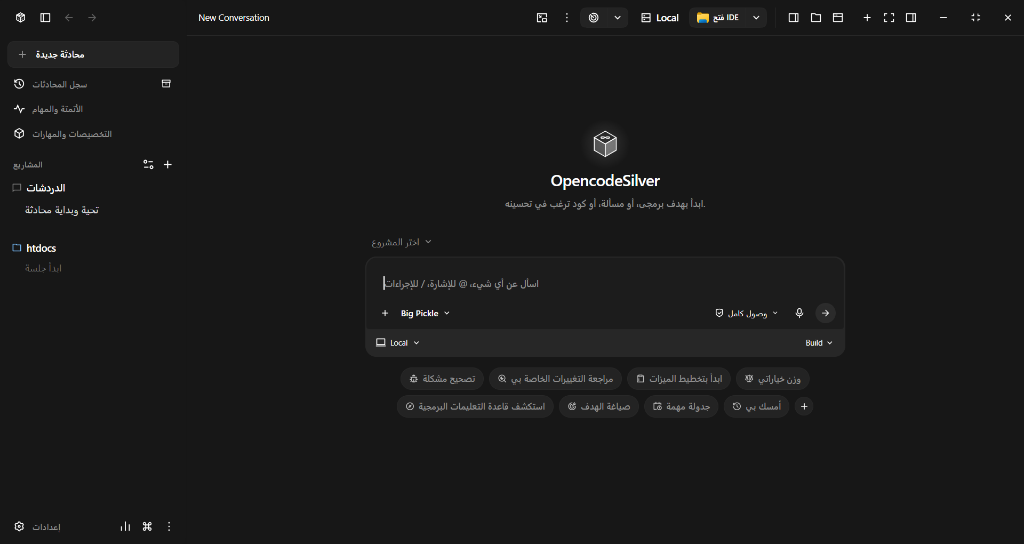
OpencodeSilver Desktop — Full-featured workspace with prompt composer, model selector, RTL localization, and context controls.
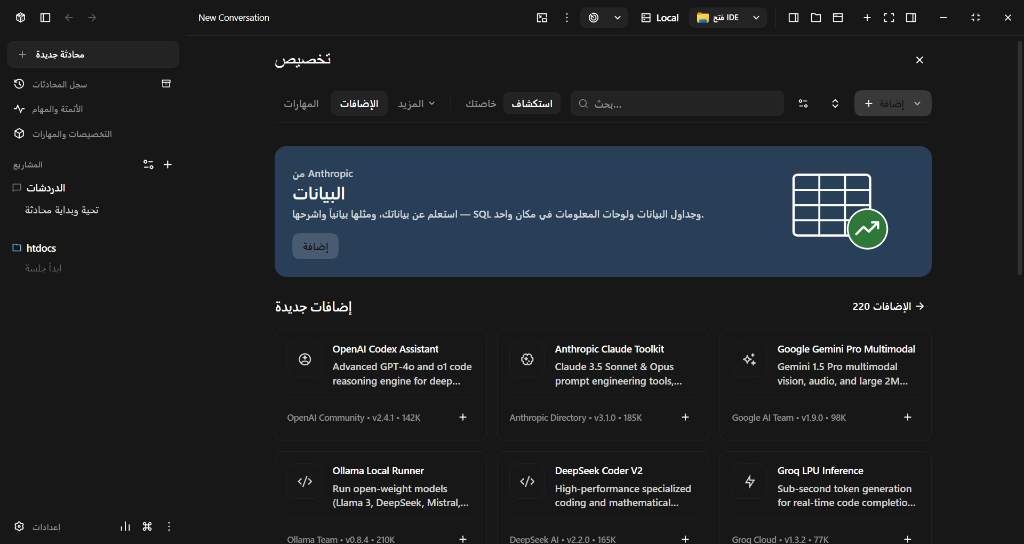
Skills & Extensions Marketplace — Integrated hub for discovering and installing AI agent toolkits, providers, and community extensions.
Dispatch the same prompt or coding task across up to five different models simultaneously using isolated Git worktrees. Compare implementation approaches side by side, benchmark accuracy, and synthesize the best parts into a single solution.
Transforms large code diffs into structured, step-by-step walkthroughs. Related changes are grouped logically with architecture explanations and impact analysis before any changes are written to disk.
Define mission goals for any session. OpencodeSilver evaluates progress after each step and keeps guiding the agent until completion. Background agents continue running even when the application window is closed.
Work seamlessly across multiple environments with real-time state synchronization:
Connect remote workstations and mobile devices using end-to-end encrypted private relays with one-click QR code pairing. No public ports or complex firewall configurations required.
Built from the ground up with native right-to-left (RTL) and left-to-right (LTR) bidirectional layout support, complete Arabic translation across all settings and dialogues, and smart prompt handling.
The workspace is organized as a unified Bun monorepo:
OpencodeSilver/
├── packages/
│   ├── core/        # Silver Intelligence Engine: Mission Orchestrator, Consensus Matrix, Inspector & Claude Bridge
│   ├── electron/    # Desktop application shell and native OS integrations
│   ├── web/         # Web server, REST API, WebSocket transport, and CLI entrypoint
│   ├── ui/          # Shared React/Tailwind user interface and design system
│   ├── vscode/      # Visual Studio Code extension
│   ├── mobile/      # iOS and Android Capacitor wrapper
│   ├── sdk/         # Extensions contract, manifest parser, and iframe host bridge
│   ├── extensions/  # Built-in extensions and tools registry
│   └── docs/        # Documentation source
└── scripts/         # Development, test, and release automation scripts
git clone https://github.com/OpencodeSilver/OpencodeSilver.git
cd OpencodeSilver
bun install
bun run dev
This boots both the backend API server and the front-end interface with Hot Module Replacement (HMR).
bun run build:web
bun run build:ui
bun run electron:build
.vsix)bun run --cwd packages/vscode package
# Type check across all packages
bun run type-check

# Run unit tests
bun run test

# Code linting
bun run lint
OpencodeSilver supports configuration through environment variables or local files:
| Variable | Default | Purpose |
|---|---|---|
OPENCODESILVER_PORT | 3001 | Port for the backend API server |
OPENCODESILVER_DATA_DIR | ~/.config/opencodesilver | Application state and session database directory |
OPENCODESILVER_RELAY_HOST | off | Hostname for private relay pairing |
OPENCODE_BINARY | Auto-detected | Path to the local OpenCode binary |
OpencodeSilver automatically maintains diagnostic logs with size capping and automatic rotation (up to 3 archive files of 5MB each):
%APPDATA%\opencodesilver\logs\main.log~/Library/Logs/OpencodeSilver/main.log~/.config/opencodesilver/logs/main.logYou can also quickly access your logs and system diagnostics via Help → Open Log File or Help → Copy System Info in the application menu.
FreeTierErrorIf you encounter a FreeTierError while generating responses, the bundled free tier quota has been reached. You can immediately continue using OpencodeSilver by configuring your own API key:
Ctrl+, on Windows/Linux, Cmd+, on macOS).Automatic desktop updates check for releases via GitHub. For automated detection and installation, published releases must include latest.yml, the .exe installer, and .blockmap files.
OpencodeSilver is licensed under the OpencodeSilver Proprietary Software License (OSSL-1.0).
Copyright (c) 2026 Ahmed (GEMTM). All rights reserved.
See the LICENSE file for complete terms, conditions, and commercial licensing guidelines.
DeepSeek Harness(DSH)Web 插件聚合生态包 · 一切皆插件,创意工坊分发(dsh-market.com)
把回答做成一页可视化 HTML:模型只写简短的 Markdown 草稿,随包附带的 `am` 命令行生成页面,支持流程图、时序图、树、时间线、ER 图、表格和提示框。
在 dsh 里装上这个插件即可,无需登录、注册或填 API Key,就能使用包括 Muse Spark 1.3、MiMo V2.6 在内的前沿模型——完全免费,不限量。 All you do is install this plugin in dsh: no login, no sign-up, no API key — the frontier models are just there, Muse Spark 1.3 and MiMo V2.6 among them. Completely free, with no usage cap.

