
dsh-web
zhu1090093659/dsh-webDeepSeek Harness(DSH)Web 插件聚合生态包 · 一切皆插件,创意工坊分发(dsh-market.com)

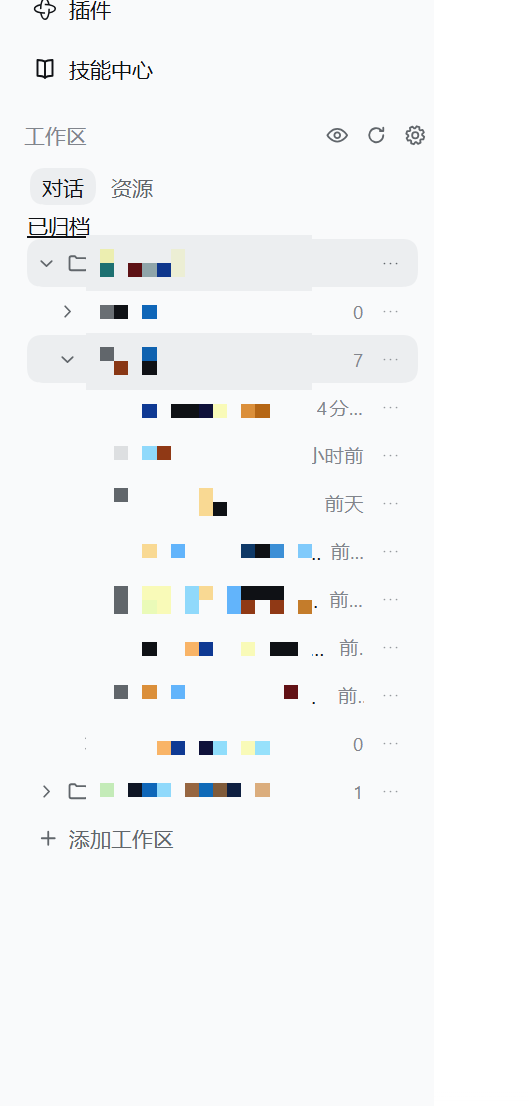
把侧边栏的工作区区域换成双选项卡浏览器:多个工作区根并列登记、各自固定不变,对话按每个会话真实的工作目录归入目录树,资源是只读文件树、点击即用右侧栏预览。两个选项卡各自独立隐藏、只影响显示且完全可逆;资源文件夹或文件可复制路径,也可拖进输入框成为原生引用块;@ 补全覆盖全部已登记工作区,而不只是当前工作目录。
A Workspace Explorer for DeepSeek Harness: it replaces the sidebar's workspace region with a two-tab browser — Conversations grouped by each session's real working directory, and a read-only Resources tree that previews files in the native right sidebar.
中文说明 | English
Status: preview. The automated suite passes, but live-runtime acceptance on every DSH build has not been done. See Known limitations before you install.
cwd, with direct conversations first and child folders after them, recursively. Sessions whose cwd is outside your roots stay reachable as their own anchor; sessions with no cwd get a separate group.··· on any folder to start a new session in that directory, open it in the system file manager, or (for resources) copy its absolute path. A new session is left unnamed on purpose: the title is DSH's own titler's job, and it names the conversation from your first message.text/plain, text/uri-list, plus a format private to this plugin) with an always-copy effect. A drop inside the conversation input is promoted into a native atomic reference — file icon, filename, business colour — which is exactly what picking a candidate from the @ menu produces. When the promotion cannot run (the drop landed against a word, or no completion menu opened for that text) the readable reference text stays behind and says why; the draft is never left broken.@ reaches every workspace. DSH's own file completion indexes the session working directory only, so the plugin registers its own @ source covering every registered root, backed by a bounded Host index that follows the shipped exclusion rules, walks in background slices, and never blocks a query.>= 0.2.0-rc.1 (declared as dsh.engines.dsh).element.showPopover). Menus and hover cards render in the top layer; without it the plugin reports the problem and closes the menu instead of misplacing it.Host headers, and cross-site requests.The plugin ships with no runtime dependencies — only the react that DSH's client module loader already provides.
Four routes — pick whichever matches how you manage DSH. All of them end with a DSH restart (app and Host) and a page refresh: Host routes do not hot-reload, so a refresh alone is not enough.
💡 Routes 2 and 3 need a
dshcommand on your machine. Desktop-app users who get "command not found" should use route 1 or route 4 — neither needs a command line.
Open Settings → Plugin market, search for dsh-multi-root-explorer, and install it. The market does the profile wiring and tells you when to restart. Before it is listed in the community catalog (nothing found), use route 2 or 4.
dsh plugin --profile <your-profile> add dsh-multi-root-explorer
Naming the package rather than a git URL makes the package manager take the newest published version, so future releases are picked up automatically. Current version: see the npm page.
3a. Prebuilt tarball (always the latest release)
dsh plugin --profile <your-profile> add https://github.com/Nethur-auro/dsh-multi-root-explorer/releases/latest/download/dsh-multi-root-explorer.tgz
latest is resolved at request time and the asset name deliberately carries no version, so this always points at the newest release and never rots. (The plugin has no build step — lib/ is committed built output and scripts holds only test — so the prebuilt tarball and a source install contain the same thing.)
3b. Source (tracks main)
dsh plugin --profile <your-profile> add git+https://github.com/Nethur-auro/dsh-multi-root-explorer.git
This installs the current commit on main. Every release here leaves main parked on its release commit, so the main head and the newest tag are always the same commit — a source install is the latest release. The trade-off is that package managers cache by commit, so upgrading means reinstalling.
The plugin manager ultimately edits your profile's package.json at
$DSH_HOME/profiles/<your-profile>/package.json (default ~/.dsh). Add the
dependency and the bundle entry:
{
  "dependencies": {
    "dsh-multi-root-explorer": "^0.1.4"
  },
  "dsh": {
    "profile": {
      "bundles": ["dsh-multi-root-explorer"]
    }
  }
}
Then install the profile's dependencies with pnpm install inside that
directory and restart DSH. Doing this by hand is equivalent to what the plugin
manager does, so prefer route 1 or 2 unless you have a reason not to.
Open the sidebar. The workspace region should now show 对话 / Conversations and 资源 / Resources tabs with the panel's own header row. If the region looks unchanged, the Host has not picked the plugin up yet: restart DSH rather than only refreshing the page — host-side routes are not hot-reloaded.
···, to start a session there, open it in the file manager, or copy a resource path.node_modules, and dsh-acl-recovery, which are hidden by default.Everything the plugin owns lives under $DSH_HOME/storages/workspace-explorer/:
config.json — version 3: roots, directory aliases, the two independent hidden lists, expansion state, and preferences. Version 1 and 2 files are backed up before migration; a damaged or newer-version file is protected from overwrite rather than silently replaced.native-bridge.json — the plugin's own idempotency and progress receipts. It is bookkeeping, not a copy of your sessions or native workspace state.Writes are serialized and atomically replaced. Removing the bundle does not delete this directory; clean it up manually only after resolving any pending session-creation operation, and never delete DSH session data as part of plugin cleanup.
Resource browsing is read-only at every level: the plugin never creates,
writes, moves, or deletes files inside your workspaces. Requests are fenced by
registered root, realpath containment (including intermediate links), and a
loopback/same-origin trust check.
Permanent deletion is a pre-existing, deliberately separate feature and it is irreversible. The target DSH builds expose no official session-deletion API, so that one action removes the session's own persistence artifacts directly. It is version-sensitive, it is not a supported DSH surface, and it should be treated as a last resort. Prefer archive.
Disabling the plugin, uninstalling it, or clearing its configuration never invokes that code path.
text/plain as plain text, and a reference chip can only be minted by the input pipeline when a completion candidate is picked, so the plugin asks that pipeline for the pick its own gesture would have made, after the text has landed. Every step is feature-detected, and a step that no longer matches leaves the readable reference text in place — the drag's original behaviour. A DSH upgrade that renames those internals silently disables the promotion; lib/client.js marks the exact fields it depends on with an ADAPTATION POINT comment so adapting is quick.No dependencies and no install step:
node test/run.mjs
# or: npm test
The runner discovers every *.test.mjs plus selftest.mjs and executes them
with the same Node executable (currently 160 + 172 + 16). Coverage is directory
listing and pagination, configuration, migration and every ceiling, the route
family and its trust fence, path namespaces and cross-platform spellings, the
conversation tree model, visibility scoping and hidden-target boundaries,
reference text plus the @ candidate index and its ranking, every degrading
path of the drop promotion, working-state folding (subagents and goals),
resource-level staleness comparison, and the native bridge's
create/rename/durability contracts.
MIT © 2026 Nethur-auro
DeepSeek Harness(DSH)Web 插件聚合生态包 · 一切皆插件,创意工坊分发(dsh-market.com)
把回答做成一页可视化 HTML:模型只写简短的 Markdown 草稿,随包附带的 `am` 命令行生成页面,支持流程图、时序图、树、时间线、ER 图、表格和提示框。
在 dsh 里装上这个插件即可,无需登录、注册或填 API Key,就能使用包括 Muse Spark 1.3、MiMo V2.6 在内的前沿模型——完全免费,不限量。 All you do is install this plugin in dsh: no login, no sign-up, no API key — the frontier models are just there, Muse Spark 1.3 and MiMo V2.6 among them. Completely free, with no usage cap.

