
dsh-web
zhu1090093659/dsh-webDeepSeek Harness(DSH)Web 插件聚合生态包 · 一切皆插件,创意工坊分发(dsh-market.com)

One DeepSeek Harness web server per project, inside WSL2 — started, stopped and opened from a panel in the Windows app.

One DeepSeek Harness web server per project, inside WSL2 — started, stopped and opened from a panel in the Windows app.
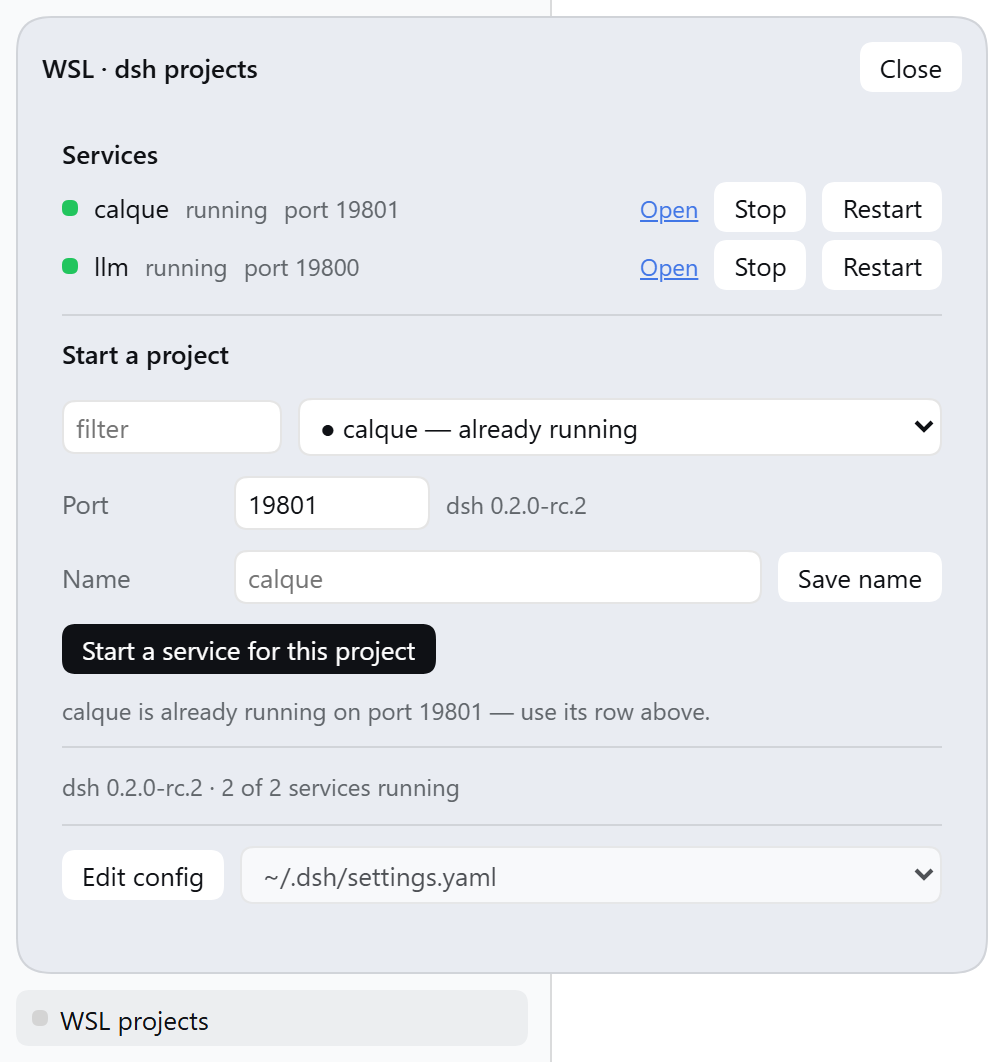
dsh web serves one workspace — the one its dsh home opened last. Point it at a
second project and the two fight over one home, one port and one token: links
open the wrong project, sessions mix, restarts kill your logins. Running several
projects at once means juggling terminals and ports by hand.
This plugin gives every project a place of its own — and one panel to drive them all.
/wsl-projects/api/, and the
wsl_dsh agent tool that gives the model the same operations.
dsh in that distribution, reachable in PATH.systemctl --user.bash in that distribution.~/projects by default, configurable.Run this command in a terminal on Windows:
dsh plugin --profile desktop add <path-or-github-spec>
Use --profile web for a plain dsh web profile. A path to a local clone
works too.
Quit the DeepSeek Harness app and start it again.
A page reload is not sufficient. The app loads the two halves of the plugin at different times: the panel arrives with the client half, and the host half is part of the start sequence.
Add the settings to a profile patch:
- id: wsl-projects
  name: dsh-wsl-projects
  config:
    distro: Ubuntu
    projectsRoot: ~/projects
    unit: dsh-web.service
    defaultPort: 19800
    configFiles:
      - ~/.dsh/settings.yaml
      - ~/.dsh/profiles/web/cordis.patch.yml
| Key | Meaning | Default |
|---|---|---|
distro | The distribution to use. | the WSL default |
projectsRoot | The folder with your projects. | ~/projects |
unit | The systemd user unit that owns the WSL dsh. | dsh-web.service |
defaultPort | The first port for a new service. | 19800 |
configFiles | The files the panel can edit. | the standard dsh files |
The panel sits in the sidebar foot by default. Two other positions are available — set a global before the bundle starts:
window.__DSH_WSL_PROJECTS_SURFACE__ = 'settings'  // a page in Settings
window.__DSH_WSL_PROJECTS_SURFACE__ = 'floating'  // a movable panel
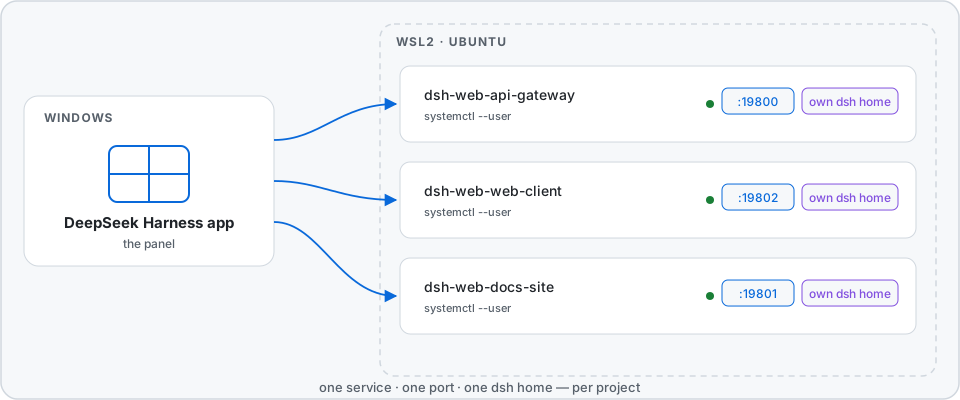
A project is the unit of control. Each project gets its own dsh home at
~/.dsh/dsh-wsl-projects/homes/<folder>-<tag>/. The tag comes from the path, so
two projects with the same folder name get separate homes. At the first start,
the launcher makes the home, copies the account from ~/.dsh one time, and
writes the project into that home's workspace storage.
The isolation is the point, and three rules follow from how dsh behaves:
dsh opens the workspace that $DSH_HOME/storages/workspace.json names — it
does not compare it with the folder that started it. One home per project is
what keeps every service on its own project.dsh identifies a browser session by host and port. One port per project is
what keeps sessions from bleeding across projects.The REST surface is at /wsl-projects/api/ — state, units, projects,
distros, start, stop, restart, stop-unit, restart-unit,
remove-unit, config, alias. The agent tool wsl_dsh offers the same
operations to the model.
The app runs the host half from the moment it starts. Quit the app and start it again. A page reload is not sufficient.
Look at the address. One port serves one project, and each project has its own home. Start the project again, then push Open in its own row.
The link is old. Push Stop, then Start. The panel checks a link before it shows it.
The home of that project holds a copy of the account, and the copy does not
follow a later change in ~/.dsh. Remove the copy, then start the project:
rm ~/.dsh/dsh-wsl-projects/homes/<folder>-<tag>/.credentials.yaml
Look at its log:
journalctl --user -u dsh-web-<folder>-<tag>.service -n 40
npm run check            # every check, in one sequence
npm run check:offline    # only the checks that need no distribution
The panel images above are screenshots of the real panel:
node scripts/capture-panel.mjs <url> takes them again from a running app.
The banner and the architecture diagram are drawings, each in a light, a dark
and a narrow variant, in docs/.
CI runs the offline checks on Node 20, 22 and 24. What each check covers, and how to run the ones that need a real distribution or a browser, is in CONTRIBUTING.md.
systemctl --user, and it reads and
writes files in the distribution.MIT — see LICENSE.
DeepSeek Harness(DSH)Web 插件聚合生态包 · 一切皆插件,创意工坊分发(dsh-market.com)
把回答做成一页可视化 HTML:模型只写简短的 Markdown 草稿,随包附带的 `am` 命令行生成页面,支持流程图、时序图、树、时间线、ER 图、表格和提示框。
在 dsh 里装上这个插件即可,无需登录、注册或填 API Key,就能使用包括 Muse Spark 1.3、MiMo V2.6 在内的前沿模型——完全免费,不限量。 All you do is install this plugin in dsh: no login, no sign-up, no API key — the frontier models are just there, Muse Spark 1.3 and MiMo V2.6 among them. Completely free, with no usage cap.

