

dsh-web
zhu1090093659/dsh-webDeepSeek Harness(DSH)Web 插件聚合生态包 · 一切皆插件,创意工坊分发(dsh-market.com)
MCP server and CLI for workspace metabolism: human-authored lifecycle rules keep agent workspaces useful across runs through policy-bounded cleanup, verified restore and an auditable history. Python 3.11+, zero dependencies, Windows / Linux / macOS.
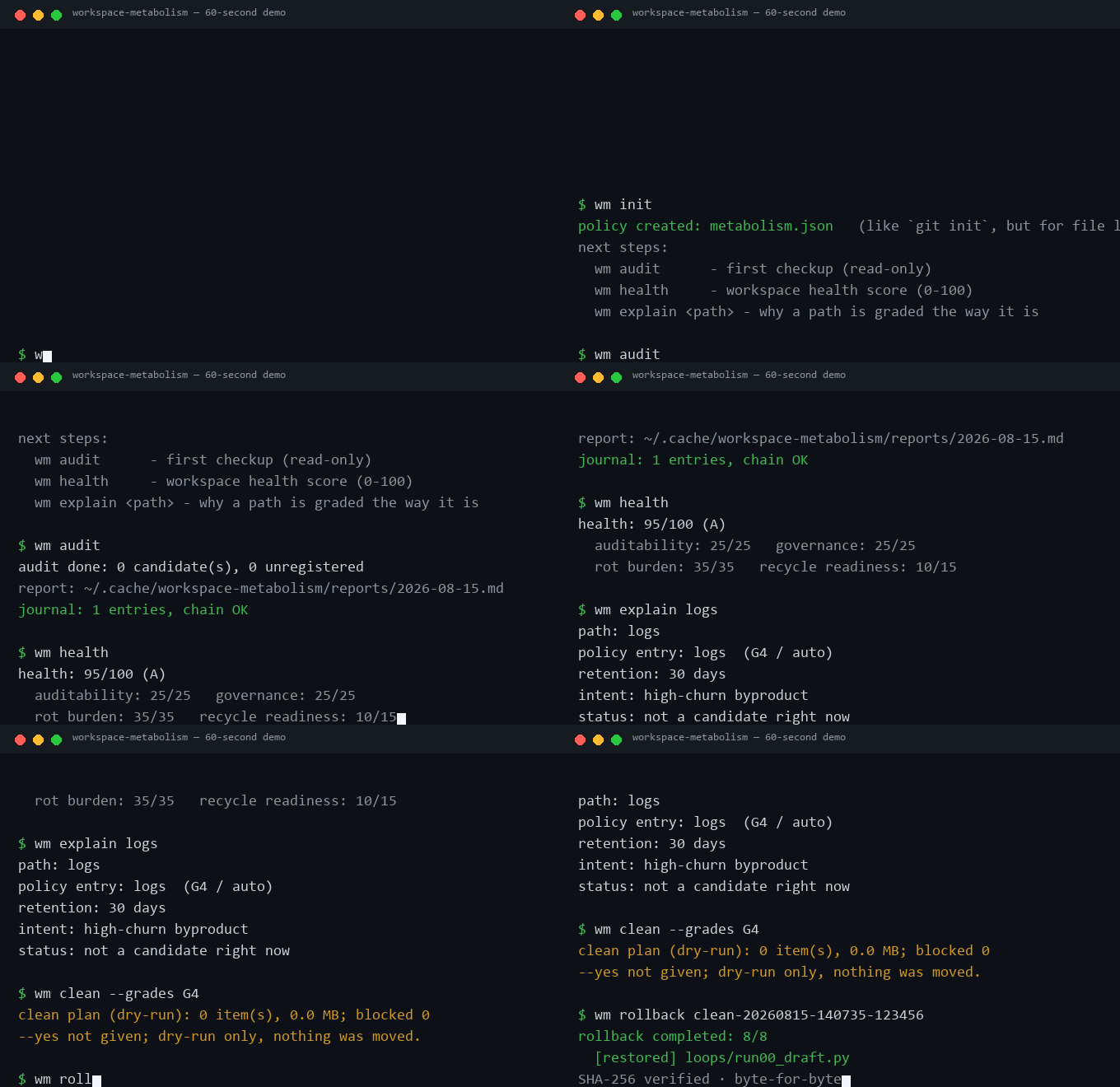
▶️ Watch the 60-second GIF demo · try the interactive workspace-metabolism demo (download it and open it in a browser).
AI coding agents (Claude Code, Codex, DeepSeek Harness, …) share one thing — your workspace — and they leave a trail of scratch files, caches and staged directories behind. Nobody owns the cleanup: deleting by hand is irreversible, scheduled scripts have no audit trail, and the next agent run works in the garbage the last one left.
workspace-metabolism is the policy layer for that: one metabolism.json
decides what every path is worth (G1 never touch → G4 auto), nothing is ever
deleted by pattern — items move to a recycle area with per-file SHA-256 hashes
and rollback restores them exactly — and every action lands in a
hash-chained journal that verify can audit.
Try it in 30 seconds:
python -m pip install https://github.com/metabolism-tools/workspace-metabolism/releases/download/v0.8.0/workspace_metabolism-0.8.0-py3-none-any.whl
wm doctor --residue                  # what agent byproducts your policy doesn't govern yet
wm doctor --residue --apply-policy   # adopt the suggestions as policy entries (creates the file if missing)
wm audit                             # read-only checkup with health score
Distribution (v0.8.0): GitHub release and installable wheel.
GitHub and PyPI publication are verified separately. Use the exact release wheel below.
See v0.8.0 release notes for installation.
The current source is 0.8.0. To run its recovery and
maintenance checks from source, clone this release and run python -m pip install -e ..
Use wm doctor --json to confirm the version, Python executable and module
location actually in use. See upgrade notes.
Listed in awesome-mcp-servers under Developer Tools (merged 2026-09-21).
See the Glama tool-definition assessment
for interface quality; it does not establish production reliability or lower supervision.
Honest: no large production deployments yet, and the policy schema may shift
before v1.0. Early adopters are welcome to break it on weird directory
structures.
Honest boundaries — what this is not:
wm gate is a governance/audit layer for cooperative
agents; a compromised or malicious agent can bypass it and call the target
server directly. OS-level sandboxing is a different layer.doctor only suggests
entries; nothing is governed until you adopt them.This repo has two linked ideas:
wm applies that method with policy files and commands.v0.6.0 新增:先认领再写入、清理避让未完成认领、精确绑定 SQLite 路径及不建库的只读 检查。复用现有任务和数据入口,不另建 AI 调度系统。见接入指南、 认领使用说明和数据库检查。
AI 编程(Claude Code / Codex / Aider 等)会在工作区留下大量草稿、缓存和 废弃文件,越堆越多,下一轮 AI 还得在垃圾堆里干活。这个工具用一份策略文件 管理文件的整个生命周期:检查(只读)→ 回收(可回滚)→ 验证(防篡改记录) → 清理。
python -m pip install https://github.com/metabolism-tools/workspace-metabolism/releases/download/v0.8.0/workspace_metabolism-0.8.0-py3-none-any.whl
python examples/demo.py                 # 已下载源码时可运行:盲删 vs 回收+回滚
wm init                                 # 生成策略文件 metabolism.json
wm audit                                # 只读体检,给文件贴营养标签
wm clean --grades G4 --yes              # 回收过期项(默认 dry-run,确认后加 --yes)
wm rollback <run_id>                    # 删错了?一键原样找回
wm govern write --path src/main.py      # 写文件前先问策略:允许吗?(AI 执行点拦截)
wm slim --db data/app.db --yes          # 数据库也会膨胀:策略驱动的库内瘦身(v0.3)
默认只读、绝不直接删文件;每步操作都有防篡改记录;Windows / Mac / Linux 通用。 项目处于早期,认领和受控编辑仍为实验能力;策略格式在 v1.0 前可能调整。完整英文文档见下文。
Most disk tools either show you space (ncdu, duf) or delete things
(rmlint). workspace-metabolism is different: a policy file defines what
every path is worth (grades G1–G4), and the tool only ever does what the policy
allows — nothing more. It is the policy layer for multi-agent workspaces:
Claude Code, Codex, Aider, OpenClaw and every other agent share one thing —
your workspace — and the policy governs the byproducts all of them leave
behind, regardless of which tool created them. It fixes no vendor and judges
no file; see What this is not before you judge it.
rollback
restores them after a per-file SHA-256 integrity checkverify detects any editaudit reports candidates, unregistered paths, disk alerts, growth
trend and possible duplicates — plus residue on memory-backed mounts
(tmpfs/ramfs: it costs RAM, not just disk)examples/A scheduled task — or asking Codex to "clean up old files" on a timer — gets
you at some point, files get removed. workspace-metabolism gets you:
metabolism.json), versioned and reviewablerollbackScheduling and metabolism are complementary, not rivals: this repo ships cron,
Windows Task Scheduler and CI templates that run wm itself. The scheduler
answers when; the policy answers what, how, and how to undo it.
Four objections come up so often they deserve their own page (docs/positioning.md). The short version:
/tmp leak, OpenClaw's
staged-dir residue: those belong upstream. We govern the workspace, which
is the one thing every agent shares.wm explain <path> shows the rule.wm mcp + session-end hooks make that safe and audited.rollback restores them.
purge deletes file-recycle batches. The explicit retain policy can remove
unreferenced database rows after writing a complete recovery export.This repo ships a reproducible benchmark: two identical workspaces run 30
simulated agent loops; one ends every loop with wm clean, the other never
cleans. The result — 2 active files vs 242 — is a number you can reproduce
yourself:
python examples/metabolism_benchmark.py
A recorded run (2026-08-16, wm 0.2.0) is in docs/publish/benchmark-run-20260816.json (raw log: docs/publish/benchmark-run-20260816.txt).
wm slim was born from a production incident, and the dogfooding round
produced the most honest review the tool has had. Read
docs/case-studies/research-engine-db-rot.md:
three failure modes (dead work units, database rot, silently-dead jobs), the
fixes, and what we found when we used wm slim to verify them — a policy
stripping the wrong field, two path-matching bugs, a CLI flag-order pitfall
that failed the first scheduled run, and the first successful run reclaiming
10.15 GB (21.7 GB → 11.3 GB) before uncovering a third real problem: the
dead-position exclusion rule forgot itself once "clean" epochs diluted its
learning window. Real usage is the final test.
workspace-metabolism treats your AI-generated workspace as a finite system:
audit → clean → verify → rollback, with recyclable cleanup and a hash-chained
audit trail. Cleanup is the means; metabolism is the frame. The one-liner:
loops keep the agent running; metabolism keeps the workspace usable. We
call this framing Agentic Metabolic Engineering — managing the byproducts
of agent-driven software workspaces. Full write-up:
docs/philosophy.md · the story ·
competitive analysis ·
academic anchors.
# install the release that includes retain (PyPI is a separate channel)
pip install https://github.com/metabolism-tools/workspace-metabolism/releases/download/v0.8.0/workspace_metabolism-0.8.0-py3-none-any.whl

# or run without installing anything:
#   PYTHONPATH=src python -m workspace_metabolism --help

# try it on a throwaway workspace (builds demo files; shows the usual
# blind-delete fix vs the wm way: recycle + rollback + journal)
python examples/demo.py
Point the tool at your own workspace:
cd /path/to/workspace
wm init            # scaffold metabolism.json (like `git init`)
wm doctor          # check readiness before the first audit or cleanup
wm audit           # first checkup (read-only)
wm health          # workspace health score (0-100)
wm explain logs    # why a path is graded the way it is
wm clean --grades G4 --yes   # recycle expired G4 items (dry-run without --yes)
wm rollback <run_id>
wm init scans your workspace and registers common directories (source and
docs as G2 keep, logs/tmp/cache as G4 auto, archive/staging as G3 approve).
Edit metabolism.json and commit it like any source file. The tool
auto-discovers metabolism.json (or .wm.json) in the workspace root, so
--registry is optional. Nothing is cleaned unless it is registered in the
policy file. Advanced users can start from
examples/registry.example.json.
An executed clean that cannot move every planned item exits with an error.
Its run manifest records both successful moves and failures, so successful
moves can still be rolled back. The journal separates planned bytes from
bytes actually moved and records zero reclaimed bytes: recycling does not
free disk space. wm evidence reports these incomplete runs as failures.
| Command | What it does |
|---|---|
audit | Read-only health check; writes a report and a journal entry (also flags sensitive files and git-tracked content) |
clean --grades G4 | Move expired items to the recycle area (dry-run by default) |
clean --grades G3 | Same, but requires --approve + --approver |
rollback <run_id> | Restore one cleanup run after an integrity check |
purge --older-than 30 | Delete expired file-recycle batches |
retain --db data/objects.db | Preview removal of excess, unreferenced row versions under an explicit policy |
retain --db data/objects.db --restore RUN_ID | Preview verified row restoration; add --yes to execute |
verify | Check the journal hash chain and run manifests |
status | Overview of workspace, recycle area and pending candidates |
init | Scaffold a metabolism.json policy file (like git init) |
explain <path> | Show what the policy says about a path (the nutrition label) |
health | Workspace health score (0-100), with --json and --badge output |
doctor | Read-only readiness check (workspace, policy, state, locks); --residue also lists common agent byproducts (.cursor, .claude, caches, logs) the policy does not govern yet — each with the exact policy entry that would govern it, --apply-policy adopts them |
govern <action> | Check whether an AI action is allowed by policy and record the decision |
gate --target ... | MCP governance proxy: every tool call of the wrapped server is checked against the policy first |
slim --db PATH | Policy-driven in-place trimming of heavy JSON fields in a SQLite database (journaled; dry-run by default) |
mcp | MCP stdio server so agents can run micro-metabolism themselves |
Global flags:
| Flag | Meaning |
|---|---|
--root PATH | Workspace to govern (default: current directory) |
--state-dir PATH | Journal / recycle / runs / reports (default: system cache directory, outside the workspace) |
--registry PATH | Policy JSON (optional; auto-discovers metabolism.json / .wm.json) |
--protected-window HH:MM-HH:MM | Weekday window; entries marked protected are skipped while active |
The default state directory lives outside the workspace on purpose — a
git add . in your project can never sweep the audit journal into version
control.
wm doctor is a read-only preflight check. It reports whether the workspace
and state directory are writable, whether the policy exists and is valid, and
whether another wm operation currently holds the state lock. The lock
serializes audits, cleanup, rollback and purge so concurrent scheduled or
agent-triggered runs cannot interleave journal and recycle operations.
It also reports interrupted recovery batches, the active installation, and
the freshness and scope of explicitly registered maintenance receipts.
See maintenance checks. Configuration alone does
not establish that an executor has permission or completed its work.
The optional ai_governance section is the concrete implementation of this
repository's AI governance layer. It uses the same policy file to check AI
actions before they happen. Unknown actions are denied by default; write
actions can require a preview, while execute, delete and network actions can
require a named approver. wm govern only makes and records a decision; it
does not perform the action for the caller.
wm govern write --path src/main.py
wm govern write --path src/main.py --preview
wm govern execute --path scripts/release.ps1 --approve-by "name"
wm govern network --approve-by "name" --json
wm gate turns decisions into enforcement. It wraps any MCP stdio server
and checks every tools/call against the policy before forwarding it;
denied calls never reach the target and every decision lands in the journal:
wm gate --target "python -m my_mcp_server"
Map tool names to actions with tool_patterns (glob), e.g.
"fs_write*": "write", "shell*": "execute". Unmatched tools default to the
execute action. For tools whose calls carry a preview mode, pass
"preview": true in the call arguments to satisfy requires_preview.
Every decision includes the policy hash and is written to the same
hash-chained journal; govern returns a decision_id that clean /
rollback / slim accept via --decision-id, so the journal shows the full
intent → decision → execution chain. The approver value is an auditable
declaration, not an authentication mechanism.
Honest boundary:
wm gateis a governance and audit layer, not a sandbox. A compromised or malicious agent can bypass the proxy and talk to the target directly. Gate governs the cooperative agent; OS-level sandboxing governs the hostile one.
First run, guided: wm doctor --residue scans for the byproducts agents
usually leave behind (.cursor, .claude, node_modules/.cache,
__pycache__, logs …) that your policy does not govern yet. Every hit shows
the exact policy entry that would govern it; --apply-policy adopts the
suggestions into metabolism.json (creating it if needed). Nothing is ever
deleted — the suggestions become policy, and the policy still decides
everything afterwards:
wm doctor --residue               # what is ungoverned, and the suggested entries
wm doctor --residue --apply-policy  # adopt them as policy entries, then audit
{
  "version": 1,
  "defaults": {
    "recycle_retention_days": 30,
    "max_item_mb": 2560,
    "disk_alert_free_gb": 20,
    "disk_alert_free_pct": 15,
    "dupe_scan_dirs": ["tmp", "cache"]
  },
  "never_clean": [".git", "README.md", "src"],
  "entries": [
    {"path": "logs", "grade": "G4", "cleanup": "auto", "retention_days": 30},
    {"path": "archive", "grade": "G3", "cleanup": "approve", "retention_days": 60},
    {"path": "**/__pycache__", "grade": "G4", "cleanup": "auto", "retention_days": 30}
  ]
}
| Field | Meaning |
|---|---|
path | Path or glob (*, **/) relative to --root |
grade | G1 never / G2 keep / G3 approve / G4 auto |
cleanup | never, auto or approve |
retention_days | Idle days before the item becomes a candidate (required unless cleanup=never) |
scope | Optional: files_only (top-level files of a directory) |
protected | Optional: skip while a --protected-window is active |
remote_authoritative | Optional: display marker for data with a remote source of truth |
category | Optional free-form label for your own classification |
owner | Optional: who is accountable for this rule |
intent | Optional: why this rule exists |
review_after | Optional: when this rule should be revisited |
The policy format is versioned and validated against schema/metabolism.schema.json, so editors and agents can check your file before the tool does.
wm health combines the audit summary into one number from 0 to 100: 25
points for journal auditability, 25 for governance (unregistered paths, disk
alerts), 35 for rot burden (expired candidates), and 15 for recycle
readiness. Grades: A (90+), B (75+), C (60+), D (below).
wm health --json
wm health --badge   # shields.io endpoint JSON for a README badge
The badge above is generated from docs/health.json. A CI template that fails when the score drops below a threshold is in examples/ci-audit.yml.
wm mcp runs a zero-dependency MCP stdio server. Agents can init a policy,
audit, explain, verify, and dry-run clean plans themselves; clean only
executes when the caller explicitly passes execute=true, rollback restores
a previous run from the recycle area (SHA-256 verified), and the policy file
still decides everything. The end-of-loop ritual is automated in
examples/micro_metabolism.py — wire it into a
session-end hook so every loop ends with a checkup.
DSH is an agent harness where everything is a plugin (Cordis). Its official
third-party tool channel is MCP, and wm mcp already speaks it — one
cordis.yml row exposes all nine wm tools to the DSH agent (audit, health,
explain, verify, wm_db_check registered-SQLite checks, wm_govern pre-action
policy checks, clean, init, rollback):
- insert:
    - id: workspace-metabolism
      name: '@deepseek-ai/dsh-mcp-client'
      config:
        serverName: wm
        transport: stdio
        command: wm
        args: [mcp]
        cwd: !!js process.cwd()
Full walkthrough (project cordis.yml vs --patch overlay, pinned
--root/--state-dir, safety notes):
docs/dsh-integration.md. A policy tuned for
DSH-style workspaces (.agents/notes, scratch plugins, generated artifacts):
examples/registry.dsh.example.json.
The optional Metabolic Maintenance skill plugin
adds consequence-aware maintenance rules and downstream recovery verification to
DSH's skill catalog. It loads instructions on demand and can pair with the MCP
tools above. Download the plugin.
Releases are also mirrored to the plugin's distribution repository,
metabolism-tools/dsh-metabolic-maintenance,
which carries the dsh-plugin topic so plugin directories can index it as a plugin.
clean is dry-run unless --yes is given.--yes; G3 needs --approve and --approver (audit trail).audit flags secrets/keys/credentials
(.env*, *.pem, *.key, *token*, *secret*, *credential*, id_rsa, …) in a
dedicated report section, the policy validator refuses to register a sensitive path
as G4 auto-clean, and clean skips any candidate that contains sensitive files.clean
skips candidates that contain git-tracked files. Non-git workspaces fall back to pure
policy matching. (Git is optional; wm never depends on it.)rollback
verifies them before restoring and refuses to overwrite an existing path.purge deletes file batches only inside the recycle
area after retention.verify detects any tampering.Templates with {{PLACEHOLDERS}} are in examples/:
register_schedule.template.ps1: daily read-only audit (20:30),
weekly G4 clean (Saturday 10:00), monthly purge (1st, 10:30).register_cron.template.sh: same schedule via cron.Replace {{WM_CMD}}, {{ROOT}}, {{REGISTRY}}, {{STATE_DIR}} (and
{{USER}} in cron) with your values. The scripts deliberately do not
auto-detect your environment — your paths, your call.
python -m pip install -e . pytest
python -m pytest
CI runs the full test suite on Ubuntu, Windows and macOS with Python 3.11 and 3.12. Issues are handled on weekends; pull reques
DeepSeek Harness(DSH)Web 插件聚合生态包 · 一切皆插件,创意工坊分发(dsh-market.com)
把回答做成一页可视化 HTML:模型只写简短的 Markdown 草稿,随包附带的 `am` 命令行生成页面,支持流程图、时序图、树、时间线、ER 图、表格和提示框。
在 dsh 里装上这个插件即可,无需登录、注册或填 API Key,就能使用包括 Muse Spark 1.3、MiMo V2.6 在内的前沿模型——完全免费,不限量。 All you do is install this plugin in dsh: no login, no sign-up, no API key — the frontier models are just there, Muse Spark 1.3 and MiMo V2.6 among them. Completely free, with no usage cap.

