

dsh-web
zhu1090093659/dsh-webDeepSeek Harness(DSH)Web 插件聚合生态包 · 一切皆插件,创意工坊分发(dsh-market.com)
FreeDSH is the community-facing name for this repository (dsh-h-v1). It adds a practical distribution layer on top of DeepSeek Harness: free-model routing, a local provider gateway, a friendlier UI, pt-BR support, versioned configuration and rollback-safe updates.
Unofficial project. FreeDSH is not affiliated with or endorsed by DeepSeek.
Português: README.pt-BR.md
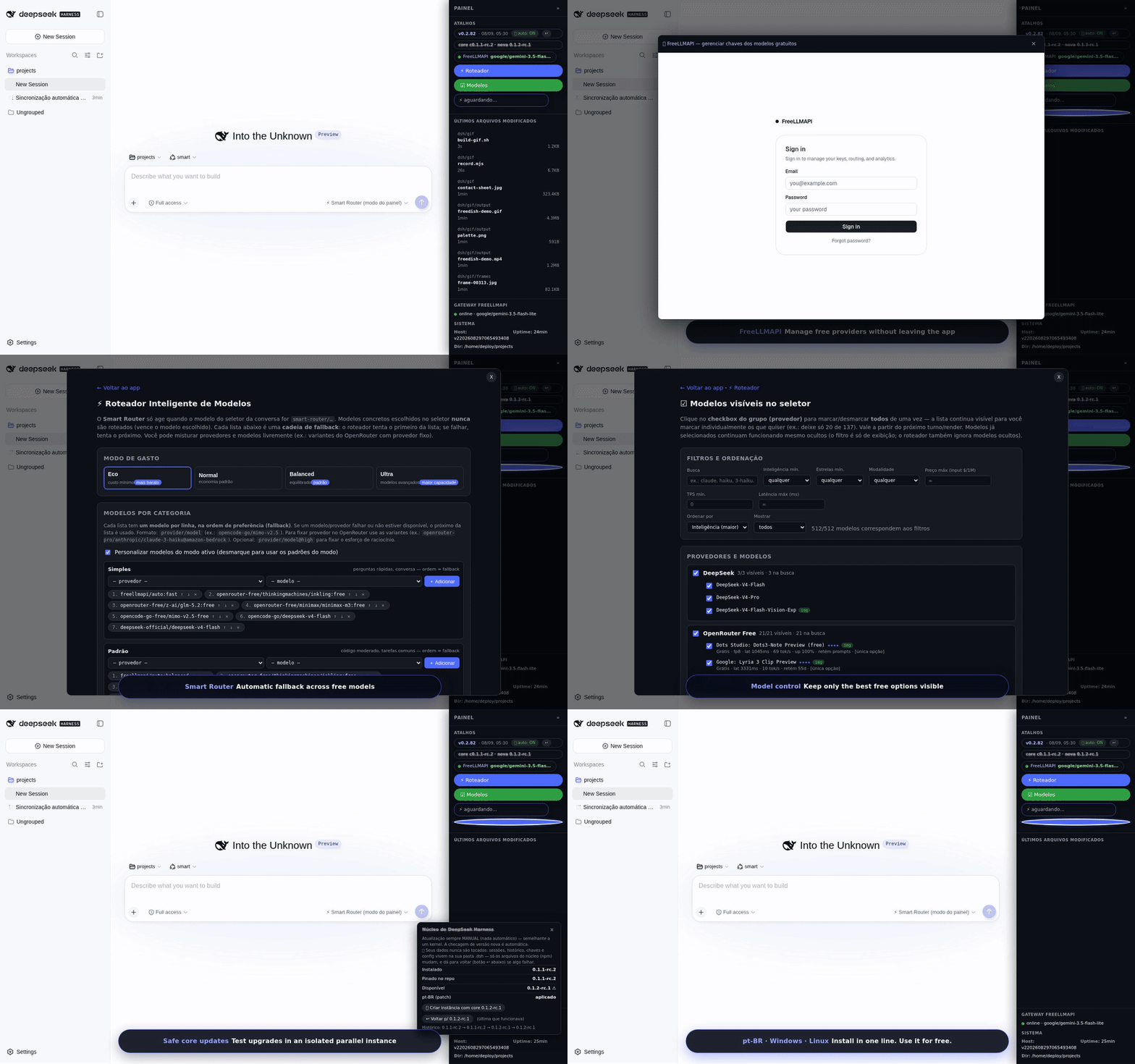
DeepSeek Harness is powerful, but a daily setup can become expensive or fragile when you depend on a single model/provider. FreeDSH focuses on a different experience:
| FreeDSH adds | |
|---|---|
| 🎁 Free-first routing | Use FreeLLMAPI, OpenRouter :free, OpenCode free/zen and other configured providers before paid fallback. |
| 🔁 Automatic fallback | If a provider fails or becomes unavailable, the router can move to another configured option. |
| 🧠 Task-aware routing | auto, eco and ultra profiles let the router choose different model tiers for different workloads. |
| 🖥️ Integrated panel | Provider/router/core status, recent files and model controls in the Harness UI. |
| 🛡️ Safer core updates | Test a new core in a parallel instance instead of overwriting the working environment. |
| ↩️ Rollback | Local snapshots + git history/tags make it possible to return to a known-good configuration. |
| 🌎 International UI | Brazilian Portuguese, English and Chinese support, following the OS language where available. |
| 💻 Windows + Linux | Interactive one-line installers for both platforms. |
flowchart LR
    U[You / DeepSeek Harness] --> R[FreeDSH Smart Router]
    R --> F[FreeLLMAPI]
    R --> O[OpenRouter :free]
    R --> C[OpenCode free / zen]
    R --> P[Optional paid fallback]
    F --> G[Groq / Cerebras / Mistral / others]
Free tiers change over time. FreeDSH does not bypass provider terms or create free access where none exists; it integrates and routes the providers/keys you configure.
Open PowerShell and run:
powershell -ExecutionPolicy Bypass -Command "$f=\"$env:TEMP\dsh-setup.ps1\"; irm https://raw.githubusercontent.com/marcosmmjr2023/dsh-h-v1/main/installer/dsh-setup.ps1 -Headers @{'Cache-Control'='no-cache'} -OutFile $f; & $f"
The interactive installer detects an existing installation and can install, update, preserve local configuration, manage parallel instances or open the GUI.
After installation, open a new PowerShell:
dsh up          # open the GUI
dsh update      # update repo/core/overlay
dsh doctor      # diagnostics
dsh env list    # list parallel instances
Debian/Ubuntu-like systems:
bash <(curl -fsSL https://raw.githubusercontent.com/marcosmmjr2023/dsh-h-v1/main/installer/dsh-setup.sh)
For manual/server installation, see docs/SERVER-MAP.md.
Provider credentials stay local and must never be committed. See SECURITY.md before exposing any FreeLLMAPI/admin interface beyond localhost.
FreeDSH also ships as a DSH bundle, for people who already have a working harness and only want the plugins (Smart Router, OpenRouter groups, model visibility, FreeLLMAPI shortcut, right-hand panel, version badge). No installer, no overlay copying:
dsh plugin --profile web add github:marcosmmjr2023/dsh-h-v1
Remove it with dsh plugin --profile web remove freedsh. The bundle registers plugins only — it never touches your keys, providers or settings. Requirements, what is included, where the state lives and common issues: docs/INSTALL-BUNDLE.md.
Technical overview: docs/ARCHITECTURE.md
| Topic | Guide |
|---|---|
| Windows | docs/WINDOWS.md · Português |
Install as a DSH bundle (dsh plugin add) | docs/INSTALL-BUNDLE.md |
| Linux / server | docs/SERVER-MAP.md |
| Core updates / parallel instances | docs/CORE-UPDATE.md |
| Two-way sync / rollback | docs/SYNC.en.md · Português |
| Architecture | docs/ARCHITECTURE.md |
| Roadmap | ROADMAP.md |
| Changelog | CHANGELOG.md |
You do not need to be an expert in the whole project. Useful contributions include:
Start with CONTRIBUTING.md, then look for issues tagged good first issue or help wanted.
Questions, ideas and "does this work with X?" belong in Discussions. Bugs and concrete proposals go to Issues — a minimal report (OS, PowerShell version, dsh doctor output) gets fixed much faster.
If you use FreeDSH and it helps you, a ⭐ on the repository helps other DeepSeek Harness users discover it.
Security reports: SECURITY.md · Community standards: CODE_OF_CONDUCT.md
DeepSeek Harness(DSH)Web 插件聚合生态包 · 一切皆插件,创意工坊分发(dsh-market.com)
把回答做成一页可视化 HTML:模型只写简短的 Markdown 草稿,随包附带的 `am` 命令行生成页面,支持流程图、时序图、树、时间线、ER 图、表格和提示框。
在 dsh 里装上这个插件即可,无需登录、注册或填 API Key,就能使用包括 Muse Spark 1.3、MiMo V2.6 在内的前沿模型——完全免费,不限量。 All you do is install this plugin in dsh: no login, no sign-up, no API key — the frontier models are just there, Muse Spark 1.3 and MiMo V2.6 among them. Completely free, with no usage cap.

