
packages/dsh-task-board
zhu1090093659/dsh-web侧边栏多列任务看板:卡片交给真实 DSH 智能体会话执行,支持 cron 定时(Host 侧到点执行,关浏览器也生效)。

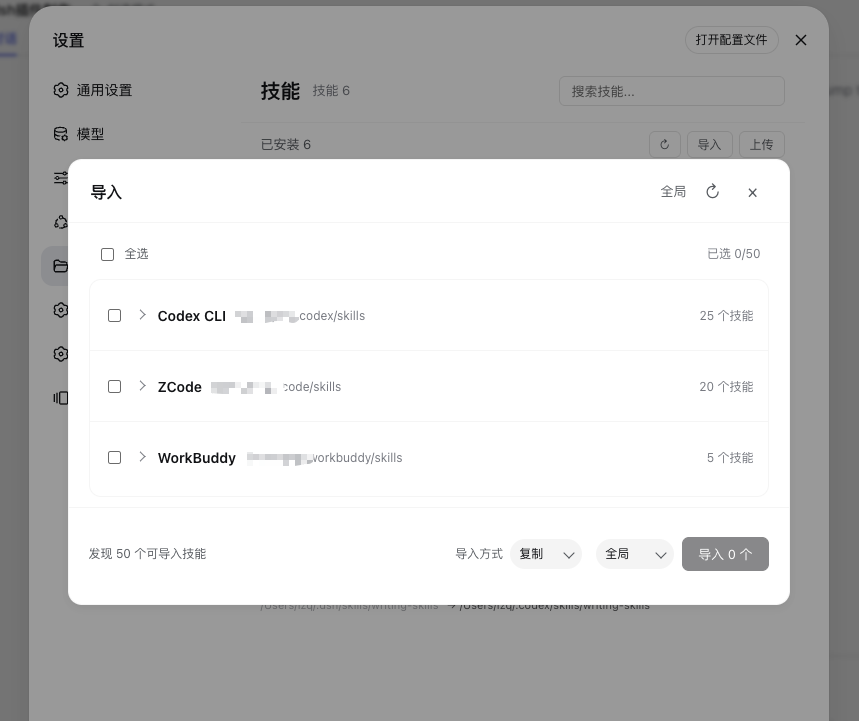
DSH 技能管理器:浏览、启用/禁用、从 Codex/Claude Code/ZCode/WorkBuddy/QCoderWork 导入,自动发现技能并支持软链接。
A DSH browser-client plugin for browsing and managing Skills stored in DSH's global directory and registered workspaces.
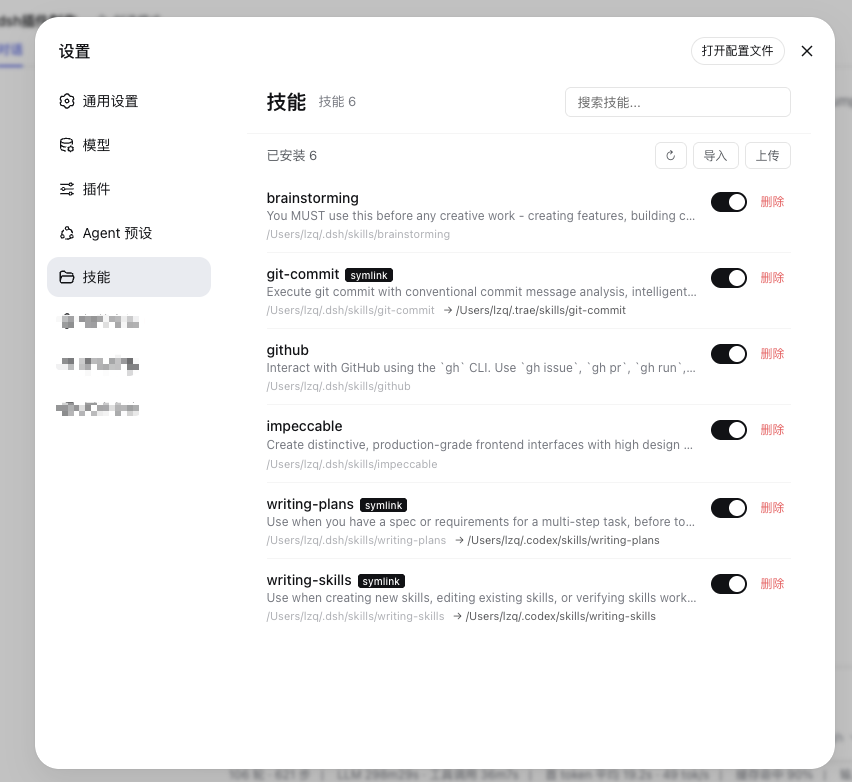
dsh-skills-hub adds Settings → Skills to a DeepSeek Harness (DSH) browser client. It manages Skill directories without changing the DSH core runtime or pretending to provide unsupported Skill lifecycle controls.
The plugin is intended for a DSH deployment with a browser client: either the desktop application with an embedded Web UI or the DSH Web version.
DSH currently does not support runtime enable/disable for an individual Skill. This plugin does not expose a display-only switch for that unsupported behavior.
cordis.yml.pnpm add @lcthe/dsh-skills-hub
Add the plugin at the same include level as the other bundle rows in your profile's cordis.yml:
- insert:
    - id: dsh-skills-hub
      name: '@lcthe/dsh-skills-hub'
Start the DSH Web client:
pnpm dsh web
Open Settings → Skills after DSH starts.
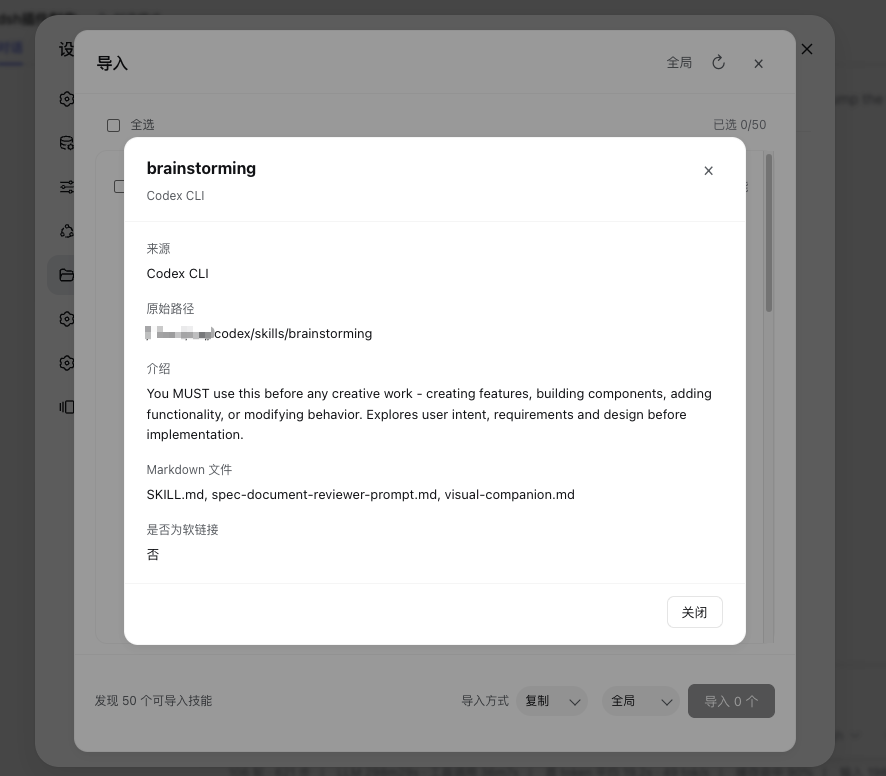
The main page scans the selected DSH Skill directory and displays each Skill's name, description, path, Markdown files, and symlink information. Use the search field to filter by name or description.
Use the scope selector to switch between:
~/.dsh/skills/<workspace>/.dsh/skills/Workspace options come from the DSH workspace registry. They are not a claim that DSH has one universal “current workspace”.
Source groups stay collapsed, but their counts are populated before the dialog is ready. Clicking the dialog's refresh button performs a new source detection and re-scans all detected sources so the displayed totals remain accurate.
Existing destination names are skipped; imports never overwrite an existing Skill directory.
Choose Upload on the main Skills page to open the upload dialog. Drag one local Skill folder into the drop zone, or click Choose folder to use the system folder picker. The dialog shows the selected folder, file count, and total size before uploading to the selected global directory or registered workspace. The upload is staged in a temporary directory and moved into the destination only after validation succeeds.
Choose Delete and confirm the path shown in the confirmation dialog. A recognized symlink is removed with the link itself only; its target is not followed or deleted. A normal Skill directory and its contents are removed recursively.
disable-model-invocation and user-invocable in SKILL.md are static invocation policies, not user-controlled runtime toggles.disabled setting controls an entire loader entry, not one Skill inside a provider.The plugin applies the following safeguards:
See SPEC.md for the complete behavior and security contract.
| Source | Scanned paths |
|---|---|
| Codex | ~/.codex/skills/, ~/.codex/vendor_imports/skills/, ~/.codex/plugins/cache/*/skills/ |
| Claude Code | ~/.claude/skills/ |
| ZCode | ~/.zcode/skills/, ~/.zcode/cli/plugins/cache/*/skills/ |
| WorkBuddy | ~/.workbuddy/skills/ |
| QCoderWork | ~/.qcoderwork/skills/ |
To load a local checkout instead of the published npm package, add a file: dependency to the DSH profile's package.json:
{
  "dependencies": {
    "@lcthe/dsh-skills-hub": "file:/path/to/dsh-skills-hub"
  }
}
Include @lcthe/dsh-skills-hub in dsh.profile.bundles, then build from the checkout:
pnpm install
pnpm run build
pnpm run build runs the TypeScript check before bundling the plugin.
@lcthe/dsh-skills-hubpackage.json.deepseek-harness source repository is not a development target for this plugin.Issues and pull requests are welcome. Keep documentation and published metadata aligned with implemented behavior.
MIT
侧边栏多列任务看板:卡片交给真实 DSH 智能体会话执行,支持 cron 定时(Host 侧到点执行,关浏览器也生效)。
DSH Web UI 插件与皮肤合集:任务看板、git 图、右侧面板、远程移动端 UI、桌宠、实时 token 统计与皮肤中心。
助手回复内渲染交互式 UI 组件:布局、图表、表单、测验、mermaid、3D 场景与回传事件循环。
