
packages/dsh-task-board
zhu1090093659/dsh-web侧边栏多列任务看板:卡片交给真实 DSH 智能体会话执行,支持 cron 定时(Host 侧到点执行,关浏览器也生效)。

面向长提示词的 Web Composer 布局:输入框可保留在底部,也可停靠到可调宽度的右栏,与长回答并排阅读和写作。

Switch the controls layout.
A dockable Composer for DeepSeek Harness Web.
English · 简体中文
Features · Install · Usage · Changelog
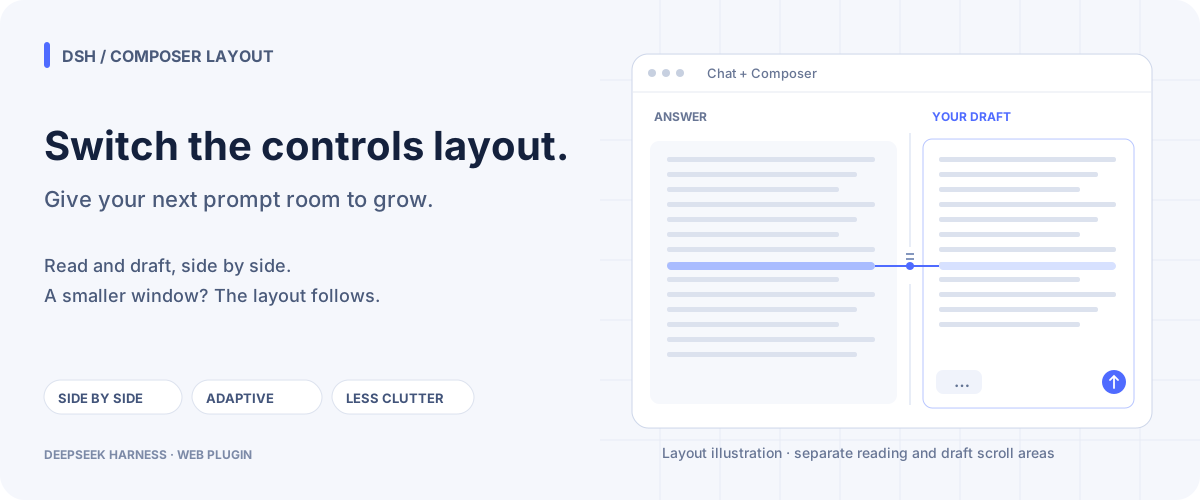
Long answers and detailed prompts deserve their own space. Dock Composer to the right to reference an answer while shaping your next message; keep it at the bottom for compact conversations, or let Automatic choose as the window changes. Models, permissions, sessions, tools, and token accounting continue to use DSH's native behavior.
Three small layout changes make the reading-and-writing workflow easier to manage:
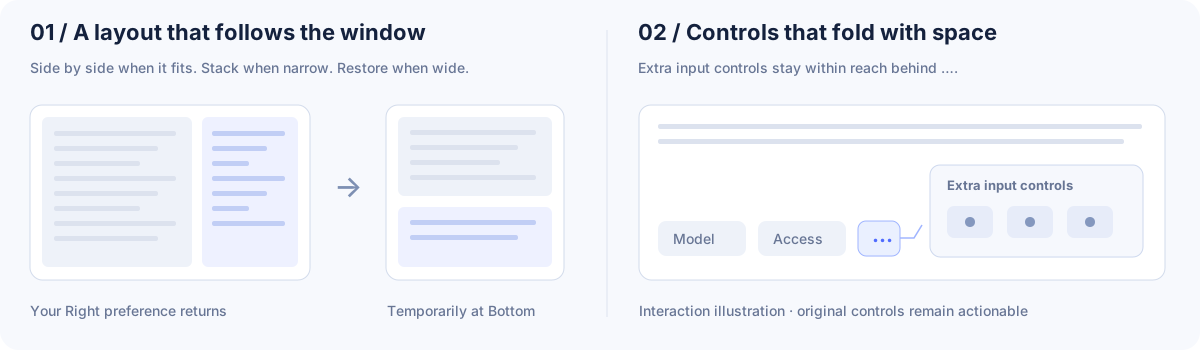
| ↔ Side-by-side drafting Give the answer and draft separate vertical space. Drag the divider to set their balance; scroll a long draft independently. | ▥ Adaptive layout Choose Bottom, Right, or Automatic. Narrow windows temporarily stack the panes; your Right preference returns when they fit again. | … Space-aware controls In Bottom and Right layouts, overflowing third-party input controls fold into a … popup, keeping their actions within reach. |
More everyday details:
See the changelog for version differences. Entries marked Unpublished describe development previews.
Use your intended Web profile in place of web. The npm package includes the prebuilt plugin bundle.
dsh plugin --profile web add dsh-composer-layout@latest
Follow the plugin manager's loading instructions. If it reports that a restart is needed, restart the target Web service using its usual launch method and refresh the page. Then open Settings → Built-in plugins → Composer Layout and choose Right or Automatic. If you launch DSH manually:
dsh web --profile web
Check the published version with npm view dsh-composer-layout version. Confirm the bundle is in the intended profile with dsh --profile web --dump-config. For dependency declarations, see package.json.
Choose a published release tag that matches your DSH version; supported ranges are declared in peerDependencies in package.json. Replace <release-tag> below with that tag:
dsh plugin --profile web add "github:lavapapa/dsh-composer-layout#<release-tag>"
The repository includes the host and browser artifacts needed for GitHub installs. Follow the plugin manager's loading instructions; if a restart is needed, use the target service's usual launch method and refresh its page.
Stop the Web service using that profile with its usual service controls, then check the npm version and replace the plugin in the same profile:
npm view dsh-composer-layout version
dsh plugin --profile web remove dsh-composer-layout
dsh plugin --profile web add dsh-composer-layout@latest
Start the target Web service again with its usual launch method and refresh the page.
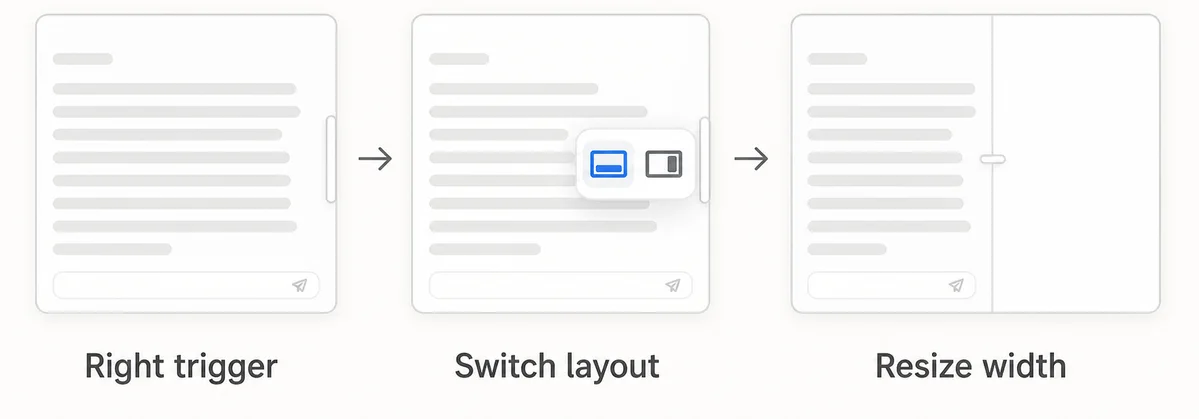
Set your default in Settings → Built-in plugins → Composer Layout, or use the rail at the conversation's right edge to switch between Bottom and Right. In Right layout, drag the divider to resize the Composer pane.
| Mode | When to use it | Behavior |
|---|---|---|
| Bottom | Short messages or a narrow window | DSH's compact bottom editor. |
| Right | Read a long answer while drafting a detailed prompt | Two columns when they fit; temporary Bottom layout when space runs out. |
| Automatic | Change window size often | Uses the conversation main area's width-to-height ratio and the minimum width needed by both columns. |
The Automatic threshold is editable in the plugin settings. Enable session memory to keep each conversation's layout and width. The Home/new-session screen retains DSH's native layout.
Chat uses the available left-column width; the plugin divider adjusts its reading space. DSH's two native transcript-width handles are hidden in Right layout. Returning to Bottom restores those handles and preserves DSH's saved width preference.
The changelog separates published work from development previews. Its scroll/overflow entries cover native reading-position restoration, extra-control folding in Bottom, native menu surfaces and positioning, original control sizing, and unclipped inline tooltips. Check the corresponding release entry before expecting those refinements in an npm installation.
The plugin owns its implementation under src/ and commits the generated lib/ artifacts used by GitHub installs. Before publishing:
pnpm typecheck
pnpm build
pnpm test
pnpm test:dsh-matrix
For contributions, see CONTRIBUTING.md.
Find the plugin in Awesome DSH Plugin, Awesome DeepSeek Harness Plugins, Awesome DSH Plugins, and Oh My DSH.
Report a bug or suggest a feature · DSH plugin topic · DSH Market
More room for the next thought.
MIT · License
侧边栏多列任务看板:卡片交给真实 DSH 智能体会话执行,支持 cron 定时(Host 侧到点执行,关浏览器也生效)。
DSH Web UI 插件与皮肤合集:任务看板、git 图、右侧面板、远程移动端 UI、桌宠、实时 token 统计与皮肤中心。
助手回复内渲染交互式 UI 组件:布局、图表、表单、测验、mermaid、3D 场景与回传事件循环。
