

dsh-web
zhu1090093659/dsh-webDeepSeek Harness(DSH)Web 插件聚合生态包 · 一切皆插件,创意工坊分发(dsh-market.com)
Git status badges for DeepSeek Harness
Most agent workflow failures happen quietly: branches drift, uncommitted files are left behind, and approved PRs or failed builds sit unnoticed. This plugin brings repository awareness directly into your workflow:
git worktree, the badge follows that tree rather than the main checkout.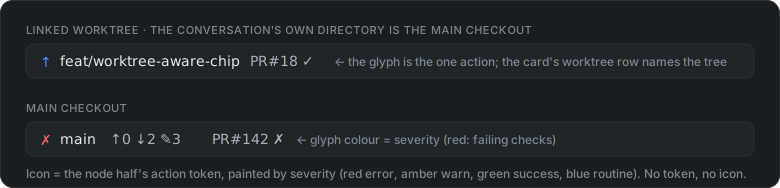
↑ push — no upstream configured). The chip leads with the same icon, and a checkout with nothing to do shows an in sync disc — green when nothing is outstanding, amber when commits are not yet merged — so a session is never iconless.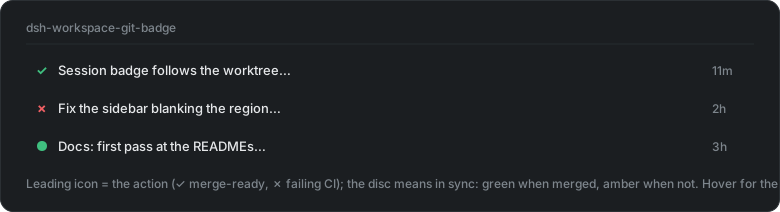
Both are updated within seconds of any commit, checkout, stage or file edit — including inside a linked worktree for safe isolation of parallel dhs working session.
Use the plugin market place or install manually:
dsh plugin --profile web add dsh-git-badge # marketplace Install does this step
Then restart the web process and refresh the browser. That is the whole install: every surface rides an upstream slot, so there is nothing to patch and no second step.
The status icon renders using the upstream
sidebar.session.row.leading seat — a 16px cell in the row's leading cluster,
rendered only while the session is idle. The hover-card provenance line rides
upstream's own sidebar.session.row.hover seat as well.
See TESTING.md — clean-profile boot (customer simulation) and the
gotchas list. cd dsh-git-badge && npm test
runs the whole suite (parser, real temp repositories, resolution, SSE, the
watcher, every gh degradation path and the rendered surfaces) with no DSH, no
network and no restart.
A worktree isolates each session to ensure it does not step on another sessions work, e.g., change or delete the branch, modify the same file.
A DSH session remembers the directory it was created in and that value can't be changed. After moving a session to a worktree there is no native method for the status badge to identify which worktree the session maps to. This means the status badge reports the wrong branch, the wrong counts, the wrong pull request.
When we switch to a worktree, we create an entry in the register, that is stored on disk. To ensure this is done properly we use the included worktree skill
git on PATHweb profile (any install)gh on PATH, authenticated, for the PR/CI token and the row's merge/review
actions — otherwise those are silently absent and everything else still worksDeepSeek Harness(DSH)Web 插件聚合生态包 · 一切皆插件,创意工坊分发(dsh-market.com)
把回答做成一页可视化 HTML:模型只写简短的 Markdown 草稿,随包附带的 `am` 命令行生成页面,支持流程图、时序图、树、时间线、ER 图、表格和提示框。
在 dsh 里装上这个插件即可,无需登录、注册或填 API Key,就能使用包括 Muse Spark 1.3、MiMo V2.6 在内的前沿模型——完全免费,不限量。 All you do is install this plugin in dsh: no login, no sign-up, no API key — the frontier models are just there, Muse Spark 1.3 and MiMo V2.6 among them. Completely free, with no usage cap.

