
dsh-web
zhu1090093659/dsh-webDeepSeek Harness(DSH)Web 插件聚合生态包 · 一切皆插件,创意工坊分发(dsh-market.com)

把官方 DSH Web UI 安全地开放到局域网:不改动 DSH 自身的回环绑定,另开一个带密码门禁、自签 HTTPS 与可逐个吊销的设备配对的反向代理端口,并提供手机扫码入口。
Expose the desktop DSH Web UI to your LAN safely: a gated reverse proxy with self-signed HTTPS by default and a QR code to open it on a phone. DSH's own loopback binding and the official UI stay untouched.
English | 中文
What it does · Quick start · Settings · Compatibility · Security boundary · Troubleshooting · Changelog
DSH LAN Guard is a DeepSeek Harness community plugin. It registers one section in the official settings page (
settings.section), replaces no official layout, and modifies neither DSH source nor DSH's own listen binding.
DSH serves its Web UI on 127.0.0.1 only, and it deliberately refuses to bind 0.0.0.0. This plugin leaves that binding alone and opens a second, gated listener on another port, proxying the official UI outward as-is: a password gate, self-signed HTTPS by default, a QR code to open it on a phone, and device pairing you can approve or block one by one. One restart after install is all it takes — no hand-written configuration.
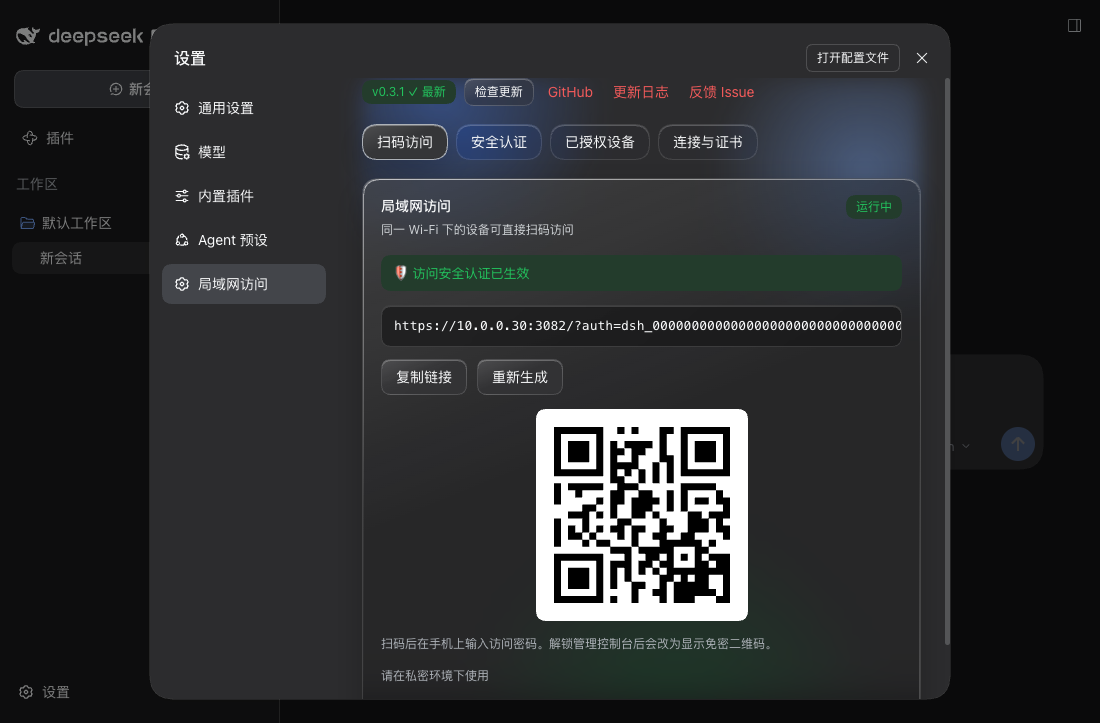
/api/remote.mux long connection), rewrites Host/Origin, strips hop-by-hop headers, and answers 502 when the upstream is down. DSH's own binding and configuration are never touched.0.0.0.0, so one restart after install is enough. The gate is on by default and refuses every device until you set an access password, and TLS is self-signed by default — nothing travels in clear. Switch to "this machine only" in the settings page if you prefer.dsh_ passwordless link, persistent visitor sessions, per-IP lockout and CSRF checks.DSH LAN Guard CA and signs a leaf certificate for the current NIC addresses. Changing IP only re-signs the leaf, so each device trusts the CA once.127.0.0.1 access is physically unlocked (whoever can use this computer could change these settings anyway). Remote access follows adminPolicy: read-only (default), password-unlocked, or open.native: tapping "添加工作区" on a phone actually opens the folder dialog on the host's screen. This plugin shadows the official pick flow from the browser half at a lower slot priority, so the local browser keeps the OS dialog while a remote device gets an in-page directory browser (breadcrumbs, shortcuts, directory list). The chosen path still goes through DSH's own workspace flow — this plugin only reads directories, never writes anything.3081 (DSH's port + 1) and walks up to ten ports when that one is taken, with an availability check in the settings page. The listen scope toggles between "LAN (default)" and "this machine only"; both need a DSH restart._dsh-lan-guard._tcp when enabled.Requirements:
0.2.1-rc.3 (API review, type checking and automated regression; phone/browser acceptance on rc.3 is pending).Install from npm:
dsh plugin --profile web add dsh-lan-guard@latest
Install from GitHub:
dsh plugin --profile web add "github:idoall/dsh-lan-guard"
Install from a local clone:
git clone https://github.com/idoall/dsh-lan-guard.git
cd dsh-lan-guard
pnpm install && pnpm run build
dsh plugin --profile web add "link:$(pwd)"
Then restart DSH once and open Settings → 局域网访问. After that restart the plugin is already listening on the LAN (default 0.0.0.0:3081, self-signed HTTPS + gate); all you do is:
DSH LAN Guard CA once on the phone, enter the access password, and name the device. The phone then runs the official DSH UI.Remote devices are read-only by default (
adminPolicy: local_only): they can use DSH but cannot change plugin settings. Switch the policy on the desktop if you want a phone to manage them.
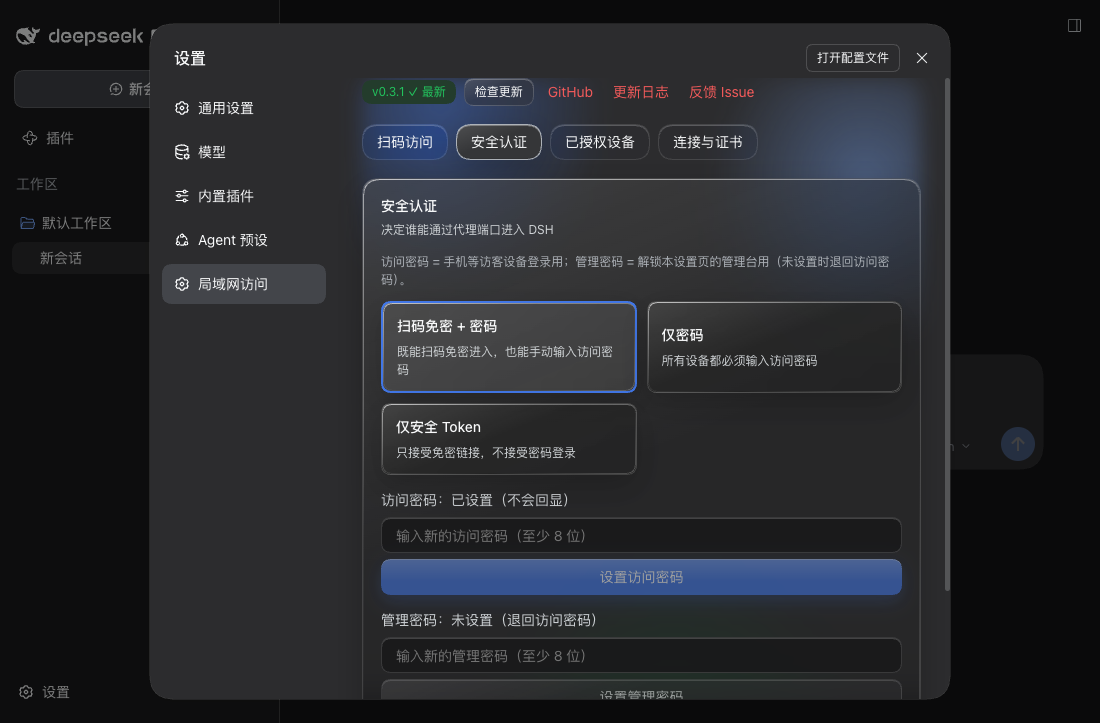
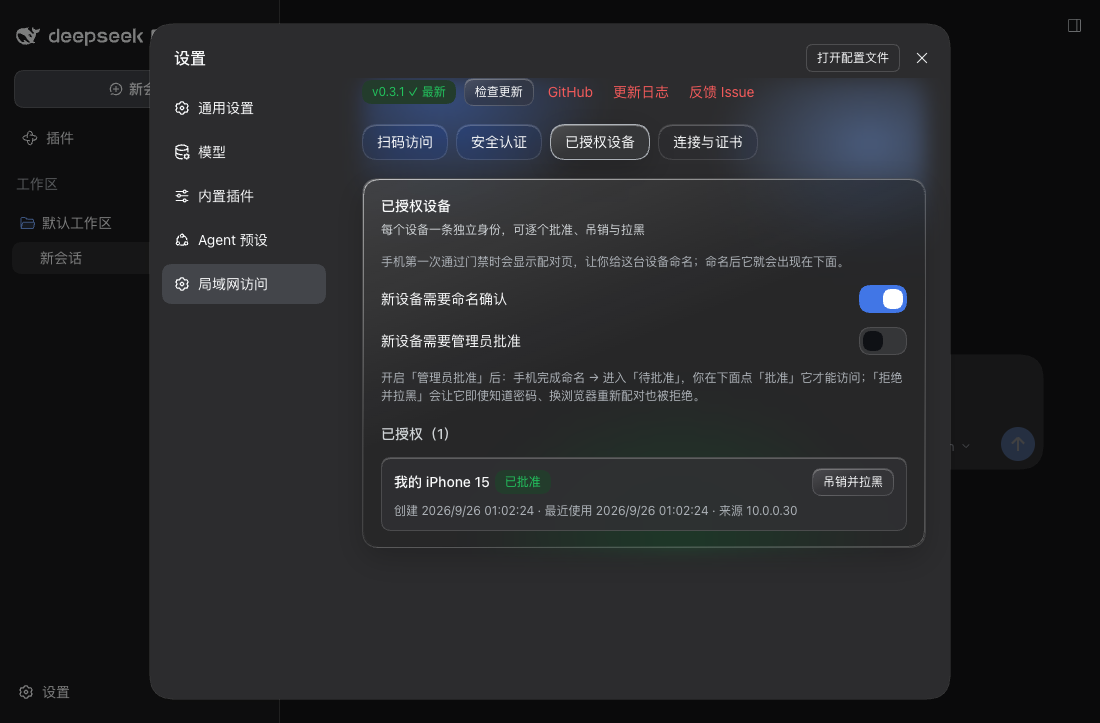
Everything lives under Settings → 局域网访问, in four tabs. The non-sensitive switches (enabled, listenPort, listenHost, networkInterface, settingsUnlock, answerHeartbeat, socketWatchdog, mobileCompat, mobileScrollFix, mobileTurnRail, auth.mode, auth.adminPolicy, auth.adminProtection, auth.allowLoopback, auth.requirePairing, auth.requireApproval) are editable directly; listenPort and listenHost take effect on the next DSH restart; settingsUnlock, socketWatchdog, mobileCompat, mobileScrollFix and mobileTurnRail take effect on the next page load while answerHeartbeat also applies to connections that are already open; dataDir and tls.* are startup fields that need a profile-patch edit.
| Setting | Default | Effect |
|---|---|---|
| Listen scope | LAN 0.0.0.0 | Whether the LAN can reach the port. "This machine only 127.0.0.1" is more conservative; needs a DSH restart. Both choices keep the gate and self-signed HTTPS in force. |
| Proxy port | 3081 | DSH's port + 1; walks up to ten ports when taken, with an availability check. Needs a DSH restart. |
| NIC to publish on | automatic | Decides which IP the QR code / access URL uses and which addresses the certificate covers; virtual NICs are de-prioritised and labelled. |
| Auth mode | passwordless QR + password | Also "password only" or "secure token only". Switching revokes every existing visitor session. |
| Access password | unset | The login password for visitor devices. While unset, the gate refuses every device. |
| Admin password | unset | Unlocks this settings page's management console; falls back to the access password. |
| Loopback exempt | on | Direct 127.0.0.1 access skips the gate (physically unlocked). |
| Remote management rights | this machine only | Whether LAN devices may manage: "this machine only" is read-only; "password unlock" needs an unlock first; "not locked" adds no requirement. Browsing directories and adding a workspace remotely needs one of the latter two. |
| Management needs an unlock | on | Turned off, a remote session that satisfies the policy may change settings directly — except under "this machine only", which never allows remote management. |
| Official settings page on the LAN | on | DSH opens its official settings surface only to loopback pages, so a LAN device opening Settings → Models reports settings are unavailable in this browser. With this on, any device that passes the gate (phones included) can use those pages after a page refresh. It is a UI unlock, not a new privilege: the settings RPC is gated by the visitor gate either way, and DSH still redacts secret reads. Refresh the page to apply; no restart needed. |
| Answer the host heartbeat | on | DSH pings every WebSocket every 2 s and drops it after two unanswered pings (measured: 6 s). A suspended phone cannot answer, and the session transcript — the only part of the UI that rides that socket — then loads incompletely or disconnects. With this on the proxy answers instead; the phone's own Pong, when it arrives, is a harmless duplicate. Applies immediately, including to open connections. |
| Socket watchdog | on | Page patch: a WebSocket still in CONNECTING after 8 s is closed, and a page resumed with nothing open reloads itself once (at most three in a row per tab, backing off from 20 s). Only a page that genuinely cannot connect is affected. Applies on page refresh. |
| Mobile compatibility shims | on | Page patch: fills in AbortSignal.any/AbortSignal.timeout/Promise.withResolvers/Iterator and the mobile metas. Without those APIs DSH's client throws inside its session-stream path and the UI just sits on 「载入历史…」 with no error at all. On a modern engine every branch is a no-op. Applies on page refresh. |
| Narrow-screen scroll fix | on | DSH's own shell clips the conversation column on a phone (pI_x6G_frame, measured 844/1688) and the page cannot scroll, so content is visible but cannot be dragged. The patch only acts when narrow screen + mobile UA + page cannot scroll + a clipping overflowing layer exists; healthy pages are untouched. ?lgdiag=1 prints a layout report. Applies on page refresh. |
| Require naming | on | A new device must name itself once before it appears in the device list. |
| Require approval | off | When on, a named device still needs your 批准 before it is let in. |
| TLS | self-signed HTTPS | Turning it off sends the gate password in clear; a non-loopback bind with TLS off is refused at startup unless you set tls.allowInsecureLan: true. |
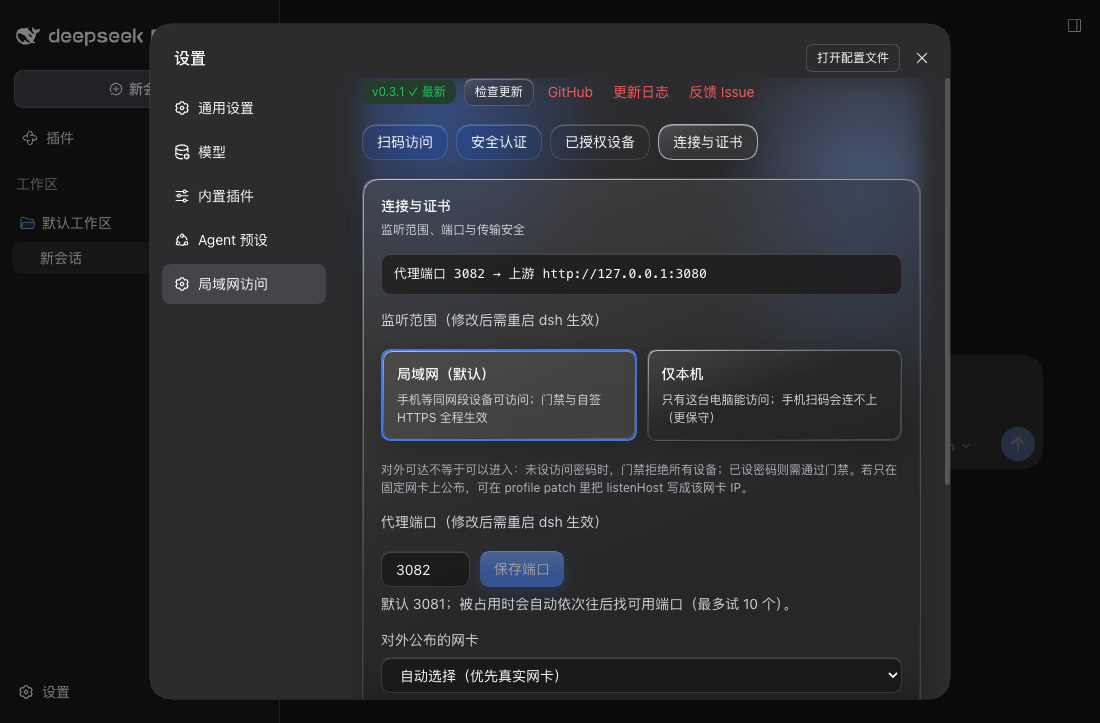
The plugin reads its config from its Cordis entry. Every key has a usable default, so a fresh install works as-is:
# ~/.dsh/profiles/web/cordis.patch.yml (optional: write only what you want to change)
- id: dsh-lan-guard
  config:
    listenHost: 0.0.0.0              # LAN-facing by default; '127.0.0.1' = this machine only, or one NIC IP
    listenPort: 3081                 # DSH port + 1; auto-walks up to 10 ports when taken
    networkInterface: en0            # optional: publish on one NIC (empty = automatic)
    settingsUnlock: true             # LAN devices may use the official settings page (default on)
    answerHeartbeat: true            # proxy answers the WebSocket heartbeat (default on)
    socketWatchdog: true             # page-side socket watchdog (default on)
    mobileCompat: true               # mobile compatibility shims (default on)
    mobileTurnRail: false            # show DSH's own turn rail on narrow screens (default off)
    dataDir: ~/.dsh/profiles/web/data/dsh-lan-guard   # optional; this is the derived default
    tls:
      mode: self-signed              # 'self-signed' (default) | 'provided' | 'off'
      allowInsecureLan: false        # required acknowledgement for LAN plain HTTP
    mdns:
      enabled: false                 # advertise _dsh-lan-guard._tcp
    auth:
      mode: token_and_password       # 'token_and_password' | 'password' | 'token'
      adminPolicy: local_only        # 'local_only' (default) | 'password_unlock' | 'open'
      adminProtection: true          # admin console needs the admin password
      allowLoopback: true            # 127.0.0.1 visitors skip the gate (physically unlocked)
      requirePairing: true           # new remote devices must name themselves once
dataDir is the only key that needs explaining: omit it and the plugin uses <active profile>/data/dsh-lan-guard (e.g. ~/.dsh/profiles/web/data/dsh-lan-guard); set it and your value wins (a leading ~ is expanded). It only decides where the plugin's private state (password hashes, device-token hashes, sessions, self-signed CA) lives — never whether the plugin works.
Current version: plugin 0.7.6, compatible with DeepSeek Harness 0.2.1-rc.3. Each row below is one plugin release: the DSH versions it was verified against, and what that release did.
| Plugin | Verified DeepSeek Harness | What this version is |
|---|---|---|
0.7.6 (latest) | 0.2.1-rc.3, 0.2.1-rc.2, 0.2.1-alpha.5, 0.2.1-alpha.4, 0.2.1-alpha.3, 0.2.1-alpha.1, 0.2.0-rc.2, 0.2.0-rc.1, 0.1.7-rc.2, 0.1.7-rc.1 | Compatibility release for DSH 0.2.1-rc.3; no runtime code change. API/type/automated checks only; phone/browser acceptance pending. |
0.7.5 (published) | 0.2.1-rc.2, 0.2.1-alpha.5, 0.2.1-alpha.4, 0.2.1-alpha.3, 0.2.1-alpha.1, 0.2.0-rc.2, 0.2.0-rc.1, 0.1.7-rc.2 | Keeps up with DSH 0.2.1-rc.2: compatibility statement only, no code change. |
0.7.4 | 0.2.1-alpha.5, 0.2.1-alpha.4, 0.2.1-alpha.3, 0.2.1-alpha.1, 0.2.0-rc.2, 0.2.0-rc.1, 0.1.7-rc.2 | Keeps up with DSH 0.2.1-alpha.5: compatibility statement only, no code change. |
0.7.3 | 0.2.1-alpha.4, 0.2.1-alpha.3, 0.2.1-alpha.1, 0.2.0-rc.2, 0.2.0-rc.1, 0.1.7-rc.2 | Keeps up with DSH 0.2.1-alpha.4: compatibility statement only, no code change. |
0.7.2 | 0.2.1-alpha.3, 0.2.1-alpha.1, 0.2.0-rc.2, 0.2.0-rc.1, 0.1.7-rc.2 | Keeps up with DSH 0.2.1-alpha.3: compatibility statement only, no code change. |
0.7.1 | 0.2.1-alpha.1, 0.2.0-rc.2, 0.2.0-rc.1, 0.1.7-rc.2 | Documentation release: the README and past release notes were rewritten in plain language. Behaviour is identical to 0.7.0. |
0.7.0 | 0.2.1-alpha.1, 0.2.0-rc.2, 0.2.0-rc.1, 0.1.7-rc.2 | The phone turn rail finally works: no more drifting card, and previews follow your finger while you hold and slide (off by default). Blank pages after a restart are fixed too. |
0.6.0 | 0.2.1-alpha.1, 0.2.0-rc.2, 0.2.0-rc.1, 0.1.7-rc.2 | Fixed "you can see the rail but not its content" on a phone: holding a tick for ~0.3s now opens a card with that turn's prompt and reply. |
0.5.0 | 0.2.1-alpha.1, 0.2.0-rc.2, 0.2.0-rc.1, 0.1.7-rc.2 | Keeps up with the new DSH release (declaration only) and adds the phone turn rail, off by default. |
0.4.6 | 0.2.0-rc.2, 0.2.0-rc.1, 0.1.7-rc.2 | Keeps up with DSH 0.2.0-rc.2: declaration only, plus confirmation that the old mobile scroll compensation is no longer needed. |
0.4.5 | 0.2.0-rc.1, 0.1.7-rc.2 | Fixes long sessions that still would not scroll when the transcript hydrated a beat late and the fix stopped early. |
0.4.4 | 0.2.0-rc.1, 0.1.7-rc.2 | Fixes iOS sessions opening away from the newest message and barely dragging. |
0.4.3 | 0.2.0-rc.1, 0.1.7-rc.2, 0.1.7-rc.1 | A different approach: repair the mobile height chain instead of patching the content layer, and drop the self-made back-to-bottom button. |
0.4.2 | 0.1.7-rc.2 | Brings back DSH's own back-to-bottom button and fixes the grey sidebar it fought with. |
0.4.1 | 0.1.7-rc.2 | The first mobile scroll fix: it only acts on pages that really cannot scroll, and adds the ?lgdiag=1 report. |
0.4.0 | 0.1.7-rc.2, 0.1.7-rc.1 | The phone connection stops dropping (the proxy answers DSH's heartbeats), plus a disconnect watchdog and a connection check-up. |
0.3.6 | 0.1.7-rc.2, 0.1.7-rc.1 | Add a workspace over LAN, and fix remote device management and a few UI problems. |
0.3.5 | 0.1.7-rc.2, 0.1.7-rc.1 | http on the TLS port now redirects to https and logs it, and deleting a device no longer locks the browser out. |
0.3.4 | 0.1.7-rc.2, 0.1.7-rc.1 | LAN devices can use DSH's own settings pages (on by default; it unlocks the UI and grants no new permissions). |
0.3.3 | 0.1.7-rc.2, 0.1.7-rc.1 | Both first-visit steps are explained up front, expired links can sign in again, and the block-list wording matches the code. |
0.3.2 | 0.1.7-rc.2, 0.1.7-rc.1 | Install and go: LAN-facing default + derived dataDir; Liquid Glass settings page at official sizes; single-line scrolling access URL |
0.3.1 | 0.1.7-rc.2, 0.1.7-rc.1 | Verification release for 0.1.7-rc.2: no code change, only compatibility metadata |
0.3.0 | 0.1.7-rc.1 | Device approval and permanent blocking; fixed the blank page when opening a shared ?auth= link |
0.2.0 | 0.1.7-rc.1 | Update check; removed the corner status pill; spacing fixes |
0.1.1 | 0.1.7-rc.1 | Documentation release: bilingual user READMEs |
0.1.0 | 0.1.7-rc.1 | First release: gated reverse proxy, self-signed HTTPS, device pairing, settings page, QR access |
>=0.1.7-rc.1 <0.3.0 (dsh.engines.dsh); verified releases: 0.1.7-rc.1, 0.1.7-rc.2, 0.2.0-rc.1, 0.2.0-rc.2, 0.2.1-alpha.1, 0.2.1-alpha.3, 0.2.1-alpha.4, 0.2.1-alpha.5, 0.2.1-rc.2, 0.2.1-rc.3 (10 releases; the rc.3 verification scope is described above). DSH versions not listed are unverified — verify them yourself before use. The upper bound was widened from <0.2.0 in 0.4.3 because profile load refuses a bundle whose range excludes the running release, and a plain <0.2.0 would exclude the 0.2.0 stable.webServer.register / webServer.tapIndex (indexTaps), connection.requestRejection, connection.authenticatedUrl, the additive settings.section seat, @deepseek-ai/schemastery, and profileContext (for deriving the default data directory).0.3.2): listenHost now defaults to 0.0.0.0 instead of 127.0.0.1, so one restart after install is enough; 0.3.1 and earlier default to loopback only. The gate and self-signed TLS defaults are unchanged (with no password the gate still refuses every device). See the CHANGELOG.0.4.0 verification status: all three changes carry measurements, not just specs.
close 1006, no Close frame); with the answerer on the same link survived 20 s (10 pings answered). An end-to-end spec reproduces the pair against a DSH-shaped upstream (40 ms pings, destroy after two misses): reaps without the answerer, survives with it./api/remote.mux handshake 3 ms; the session/follow snapshot arrives in 43–110 ms as a single 2.1 MB frame; 310 frames over 12 s with no interruption; and with the page's main thread frozen for 12 s a connection without the answerer received close 1006.
The suite is green at 349 specs (330 in 0.3.6). The real-DSH install verification follows the release (this machine runs the installed 0.3.6, so the code takes effect after a reinstall plus a DSH restart).The session transcript — the 「载入历史…」 part of the UI — rides the WebSocket only; the session list, the goal chip and the statistics arrive over HTTP, which is why the failure looks like "everything is there except the conversation". Three facts define it:
| Fact | Source |
|---|---|
| The host pings every 2 s and drops a socket after two unanswered pings | websocketHeartbeatIntervalMs: 2000, MAX_MISSED_HEARTBEATS: 2 |
A client that stops sending Pongs is dropped after 6.0 s (close 1006, no Close frame) | measured three ways: direct on 3081, through a forward, and with a frozen browser main thread |
| A phone that switches away or locks its screen cannot answer | iOS suspends the page; WebKit additionally has a case where new WebSocket() stays in CONNECTING forever after a resume while HTTP keeps working |
Three layers ship in this release, all on by default and each individually switchable:
answerHeartbeat — while relaying, the proxy reads the upstream→browser control frames and answers a Ping with a masked Pong on the client's behalf. RFC 6455 allows an unsolicited Pong and the host only resets its counter on "a Pong arrived", so the phone's own duplicate is harmless. This is the only layer that stops the host from reaping a suspended phone.socketWatchdog — the page-side half: close a socket that is stuck in CONNECTING, and reload once when a resume leaves nothing open.mobileCompat — AbortSignal.any/timeout, Promise.withResolvers, Iterator and the mobile metas. DSH's client calls AbortSignal.any on its session-stream path, and Session.doOpen re-throws non-transport errors, so a missing API shows up as a permanent 「载入历史…」 with no error text.Settings → 局域网访问 → 连接与证书 → 手机连接与自愈 carries a connection health check: it inspects which APIs this browser lacks, which patches the page received, runs a real WebSocket handshake against the current origin, and shows the proxy-side counters (open connections, upgrades, refusals, answered heartbeats) plus the last connection's duration, bytes and whether it died abnormally.
0.3.6 verification status: the change spans the host side (a new directory-listing route and cookie relaying) and the client side (the directory browser, tDeepSeek Harness(DSH)Web 插件聚合生态包 · 一切皆插件,创意工坊分发(dsh-market.com)
把回答做成一页可视化 HTML:模型只写简短的 Markdown 草稿,随包附带的 `am` 命令行生成页面,支持流程图、时序图、树、时间线、ER 图、表格和提示框。
在 dsh 里装上这个插件即可,无需登录、注册或填 API Key,就能使用包括 Muse Spark 1.3、MiMo V2.6 在内的前沿模型——完全免费,不限量。 All you do is install this plugin in dsh: no login, no sign-up, no API key — the frontier models are just there, Muse Spark 1.3 and MiMo V2.6 among them. Completely free, with no usage cap.

