
dsh-web
zhu1090093659/dsh-webDeepSeek Harness(DSH)Web 插件聚合生态包 · 一切皆插件,创意工坊分发(dsh-market.com)

An animated companion that shows live DSH agent progress in the macOS notch.

Your DSH agent, living in the MacBook notch.
A native companion that shows the current session, the exact step the agent is on,
and how far the turn has come — without opening a window.
Jump to: Screenshots · Highlights · Install · Controls · Settings · Architecture · Troubleshooting · License

Collapsed: the title and live step sit beside the notch, with a progress hairline underneath. It never adds height to the strip.
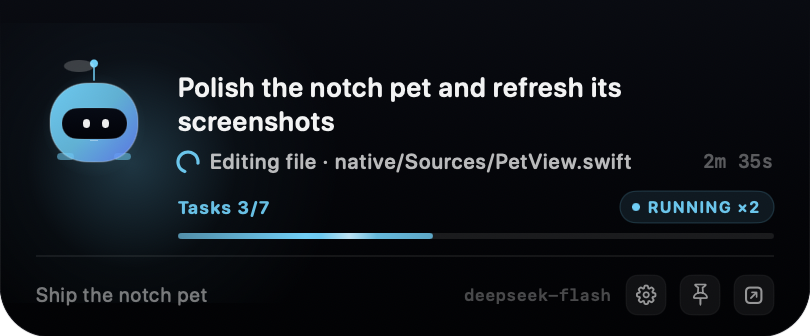
Expanded: up to two title lines, live step, elapsed time, Tasks 3/7, active
agents, the session's token usage and cache hit, the goal, the model, and the
controls.
Editing file · native/Sources/PetView.swift while a tool runs, and
elapsed turn time on the right. It deliberately avoids the finished assistant
reply.todo_write completion when
DSH has tasks, and falls back to goal rounds when it does not. With no
countable unit, the bar shimmers indeterminately while the agent works, then
freezes or disappears when it stops.tokenUsage projection as DSH's own Usage pill: cumulative
billed input plus output, with the cache-hit share beside it. No estimator and
no extra model calls.A notched MacBook is not required: on other Macs the panel floats at the top center of the main display with rounded top corners.
dsh-notch-pet into the dialog:Prefer the terminal? The same bundle installs from a public repository with:
dsh plugin --profile web add github:hyzmm/dsh-notch-pet
web is the DSH Desktop profile; keep the profile you actually run.
The pet appears at the top of the display a moment later. If it does not, make sure the plugin is enabled in Plugins, disable and re-enable it, or restart DSH.
The package ships a prebuilt ad-hoc-signed universal helper, so nothing is compiled on install. DSH launches the helper itself; there is no app to open. When the plugin is disabled or DSH quits, the helper stops with it.
| Input | Result |
|---|---|
| Hover the panel | Expands, and stays open while the pointer is inside. |
| Click the robot | Pins or unpins the panel. A pinned panel ignores hover-out and Only while working. |
| Gear in the footer | Opens settings. |
| Pin / Open DSH in the footer | Pin the panel, or focus DSH (falling back to the web origin). |
| Right-click the panel | Open DSH, pin or unpin, open settings, or quit. |
| Pawprint in the menu bar | Appears while the panel is hidden: Settings, Open DSH, the Only while working switch, and Quit. |
| Launch | Peeks open for about three seconds, then settles back to the collapsed strip. |
The panel focuses one session: a running root session when there is one, preferring the most recently active. If only subagents are running, the most recent subagent takes the spotlight. Running subagents count toward the active-agent total.
The title is DSH's own session title, so an auto-generated or user-renamed title wins. The first prompt is a fallback, then the workspace folder name.
The narrow line mirrors the live step, not the final answer. While the model is
thinking it is Thinking · <latest reasoning>, built from reasoning deltas and
trimmed to a sentence-aligned preview that keeps changing. While a tool runs it
is Editing file · native/Sources/PetView.swift, Running command · Build the native app, and so on. The elapsed time on the right is the current turn's
duration.
The collapsed strip has room for two compact lines under the hardware notch, so it shows the session title plus the live step. The new information uses the empty width beside the notch instead of adding height.
With a todo_write list, the bar tracks Tasks 3/7. Without tasks but with a
goal that has rounds, it tracks Goal 2/6 rounds. Without either, it becomes an
indeterminate band while the agent is busy. When the agent is idle, the
indeterminate band is hidden and any determinate bar is frozen, so the notch does
not keep flashing.
The expanded footer shows the focused session's cumulative provider-reported
tokens — the same tokenUsage projection behind DSH's own Usage pill — as
21.9K tok · 94% hit. The total is billed input (uncached, cache read, and cache
write) plus output; hit is the cache-read share of prompt-side input, and a
partial hit never rounds up to 100%. Hover the readout for the exact breakdown.
If dsh-token-meter is not mounted, the host falls back to folding each
assistant/message usage record.
The expanded panel also shows the goal objective, the last error, or a short status hint in the footer. The step text itself does not move; the loading arc and the progress shimmer animate while the agent works.
Everything stays on your Mac. The host writes the current state to a per-process
Unix socket (0600) under ~/Library/Application Support/DSHNotchPet/, and the
panel reads it. The plugin makes no network calls, collects no telemetry, and
needs no account.
MIT © 2026 WengXiang. See LICENSE.
Built with AppKit, SwiftUI, and a Unix socket.
DeepSeek Harness(DSH)Web 插件聚合生态包 · 一切皆插件,创意工坊分发(dsh-market.com)
把回答做成一页可视化 HTML:模型只写简短的 Markdown 草稿,随包附带的 `am` 命令行生成页面,支持流程图、时序图、树、时间线、ER 图、表格和提示框。
在 dsh 里装上这个插件即可,无需登录、注册或填 API Key,就能使用包括 Muse Spark 1.3、MiMo V2.6 在内的前沿模型——完全免费,不限量。 All you do is install this plugin in dsh: no login, no sign-up, no API key — the frontier models are just there, Muse Spark 1.3 and MiMo V2.6 among them. Completely free, with no usage cap.

