
dsh-web
zhu1090093659/dsh-webDeepSeek Harness(DSH)Web 插件聚合生态包 · 一切皆插件,创意工坊分发(dsh-market.com)

在 DSH 对话里划词即得大白话解释,浮窗显示,并自动带上这段话所在的那条完整消息作为语境。三档讲解深度(小白 / 通识 / 专业),切换后当场重讲;可选联网搜索与本地文件查找(默认交给模型自己判断,也可一键强制查一次,查完只补充新内容而不复述);可继续追问;还能把整段问答「待命式」交接给一个新会话——背景放好即止,不唤醒模型、不耗额度。设置保存在宿主侧 settings.json,不点保存不落盘。仓库内另含一个 OpenAI 兼容端点与一个浏览器扩展(源码)。
简体中文 | English
Made for people who don't speak AI. Select a passage in a DeepSeek Harness conversation — a term, an error message, a wall of jargon — and get it explained in plain words, right where you are reading.
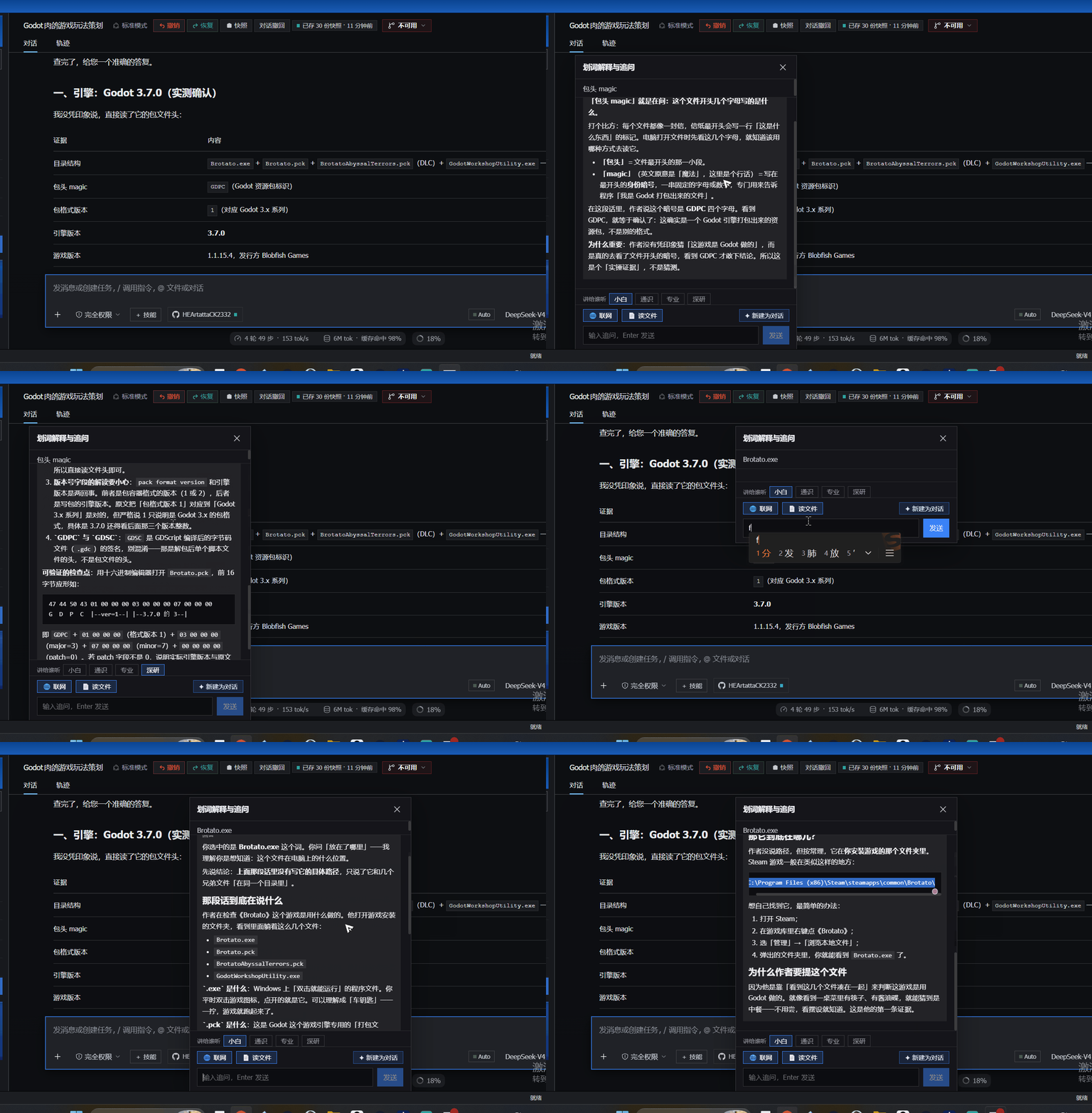
40 seconds, unedited: a Godot build file explained as 「.exe is the cow, .pck is the suitcase — the cow and the suitcase have to travel together」, followed by two follow-up questions.
AI output is full of words you are expected to already know. The usual advice is "just ask the model" — but you have to know what to ask, and the answer often comes back in the same jargon you were stuck on.
This plugin removes that step: select the confusing part, click once, read the plain-words version. No prompt engineering, no second tab, no API key.
web_search / web_fetch for current information, and search_files /
read_file to look things up in your local docs.dsh plugin --profile web add github:HEArtattaCK2332/dsh-text-explain
Then restart the Web profile so the new bundle layer is loaded.
dsh plugin --profile web add file:<path-to-dsh-text-explain>
Settings live on the host, in <DSH_HOME>/text-explain/settings.json
(DSH_HOME defaults to ~/.dsh). The settings page keeps a draft: every
click only edits that draft, 保存 writes the whole file, 刷新 throws the
draft away and re-reads what is stored. Nothing you did not save is ever
written to disk — not to the config file, not to browser storage (this plugin
stores nothing in the browser at all).
The same backend also powers a browser extension: select any passage on any web
page and read the explanation in a floating panel (three depths, switchable on
the spot). Source lives in extension/ with its own
README.
You do not need DSH to use it. The extension offers three backends:
The three depth levels work identically in all three.
Load it unpacked: open chrome://extensions/, turn on Developer mode, click
Load unpacked, and pick the extension/ folder.
The host half also speaks the OpenAI chat-completions protocol, so any client that accepts a custom API base URL can use this plugin as its backend — Obsidian plugins, browser extensions, your own scripts.
Base URL : http://127.0.0.1:3080/api/text-explain/v1
API key  : anything (or leave it empty)
Model    : text-explain-plain | text-explain-general | text-explain-pro
GET /models lists the three depths.POST /chat/completions takes the standard shape and supports stream: true (SSE).text-explain-plain is the default voice
(for people who don't speak AI), text-explain-pro the most technical.system message from the caller is ignored on purpose — the whole point
of this plugin is that the explanation style is not up to the caller.Origin header (curl, local scripts) work out of the
box. Callers with one must be listed in allowedOrigins (see Design notes) —
desktop apps included: Obsidian sends Origin: app://obsidian.md, so that
exact line belongs in the allowlist.Three stub-based self-check suites ship in the box. They need nothing but Node's
built-in modules — no test framework, no npm install:
node test/run-all.mjs # all three; or run any single file
test/host.test.mjs — drives the real HTTP endpoints against a fake
llm / webServer: the three depths must produce three different system
prompts; an unknown level must fall back to plain (never an error);
context must still be injected; an empty selection must be rejected. It also
checks the settings endpoint creates no file until you save, sanitizes dirty
input, and leaves stored settings untouched on a bad payload. Everything is
written to a temp DSH_HOME, never your real one.test/settings.test.mjs — loads lib/client.js against React / fetch stubs:
module shape, slot registration, settings normalization, cache behaviour,
failure fallbacks, and the rule that matters — only Save issues a POST.
The window stub deliberately has no localStorage, proving browser storage
is really gone.test/render.test.mjs — renders both components on a React stub: the settings
page (loading / ready / error, collapsed and expanded) and the popup with a
full Markdown answer, exercising the hand-written renderer.deepseek-official / deepseek-v4-flash by
default; no separate API key is stored by this plugin.lib/index.js) registers POST /api/text-explain and
GET/POST /api/text-explain/settings as exact routes. The four depth
prompts share one skeleton (「语境」/「格式」are common; only 「读者 + 怎么讲」
differ), so a single code path serves all four.format=rss) — no API key, and
reachable on networks where DuckDuckGo is not. web_fetch strips HTML to
plain text; it works for static pages, not JavaScript-rendered ones.search_files returns only document files (README / SKILL.md /
package.json / …) and skips runtime directories such as undo, snapshots
and logs. read_file refuses files over 512 KB, truncates long text,
and never writes.Origin first. No origin, or same-origin as the host, behaves
exactly as before; only origins listed in the allowedOrigins allowlist get
CORS headers, everything else gets a flat 403 — so a random web page
cannot burn your quota. The allowlist defaults to an empty array, so the
default behaviour is unchanged.MIT — see LICENSE.
DeepSeek Harness(DSH)Web 插件聚合生态包 · 一切皆插件,创意工坊分发(dsh-market.com)
把回答做成一页可视化 HTML:模型只写简短的 Markdown 草稿,随包附带的 `am` 命令行生成页面,支持流程图、时序图、树、时间线、ER 图、表格和提示框。
在 dsh 里装上这个插件即可,无需登录、注册或填 API Key,就能使用包括 Muse Spark 1.3、MiMo V2.6 在内的前沿模型——完全免费,不限量。 All you do is install this plugin in dsh: no login, no sign-up, no API key — the frontier models are just there, Muse Spark 1.3 and MiMo V2.6 among them. Completely free, with no usage cap.

