ysr666/dsh-vision-router
ysr666/dsh-vision-router为纯文本 Agent 提供视觉能力:内置免 Key 视觉链 + 像素级视觉工具(看图问答、定位、裁剪、像素对比、取色、OCR、矢量化、抠图、截图);粘贴图片即可用。

为纯文本模型提供的图像识别转发:后台调用你配置的 GLM 兼容视觉接口分析图片,原模型在同一会话继续作答,你的消息、图片、模型与历史全程不变。需先运行仓库自带的 patches/apply-core-patch.cmd 给 DSH 打核心补丁,否则带图消息会在入库前被原版 DSH 拒绝(可用 restore 脚本还原)。
English | 中文
Give a text-only model in DeepSeek Harness the ability to work with images - without switching the model, starting a new session, or changing a single visible message.
Paste an image into the chat as usual. If the active model cannot accept images, this plugin sends the image to your own GLM-compatible vision endpoint, and hands the analysis to the original model as hidden context. The original model keeps answering, in the same session, with its history intact.
| DeepSeek Harness | 0.2.0-rc.2 or newer within 0.2.x |
| Node.js | >= 22.19 (the runtime DSH ships is fine) |
| Core extension | required for image admission - see Core extension |
| Provider account | A Zhipu (智谱) open-platform API key, or any GLM-compatible vision endpoint |
The plugin itself has zero dependencies and no build step. Its settings page is hand-written and uses only the platform's own React.
Stock DSH rejects a prompt that carries an image before the message is stored, whenever the active model
does not declare image support
(@deepseek-ai/dsh-api-session-controller/lib/index.js:870-874). No public plugin hook can influence that
check, and pretending the model supports images is deliberately out of bounds.
This repository therefore ships one small, separate core patch that adds a single public waterfall -
session/image-admission - around that check:
patches/0001-session-image-admission.patch
{ admit: true } only when the relay is enabled and an API key is configured.git apply -p1 patches/0001-session-image-admission.patchpatches/apply-core-patch.cmd, then close DeepSeek
Harness so it can swap the archive, then start it again. patches/restore-core-patch.cmd puts the original
back. Both stage and verify before touching anything.node patches/verify-patch.mjs <dsh-src-root>Until this extension ships upstream, the hidden-vision-context half still works on a stock install (nothing breaks) but images never reach a text-only session. **Minimum DSH version for the full experience: 0.2.0-rc.2
session/image-admission.Install from GitHub (recommended), or from a local clone:
# from GitHub
dsh plugin --profile web add github:ethanweave/dsh-vision-better

# or from a released tarball
dsh plugin --profile web add https://github.com/ethanweave/dsh-vision-better/releases/latest/download/dsh-vision-better-1.0.0.tgz

# or from a local clone (an absolute path is accepted by the plugin manager)
dsh plugin --profile web add /absolute/path/to/dsh-vision-better
The same operations are available in the Web UI on the Plugins page, which accepts a path or a spec. Restart DSH afterwards the first time, so the new bundle and its settings page are registered.
Then open Settings -> 图像识别 / Vision Better.
Important — image admission needs a small core patch. Stock DSH rejects an image before it reaches a text-only model (see Core extension). Without it the settings page and the API key work, but image turns are refused. Apply it with
patches/apply-core-patch.cmd(double-click, then close DeepSeek Harness so it can swap the archive) and restart again.
Settings → 图像识别 (Vision Better) — API key status, endpoint presets, model id, enable toggle and a connection test that never touches your conversation images:
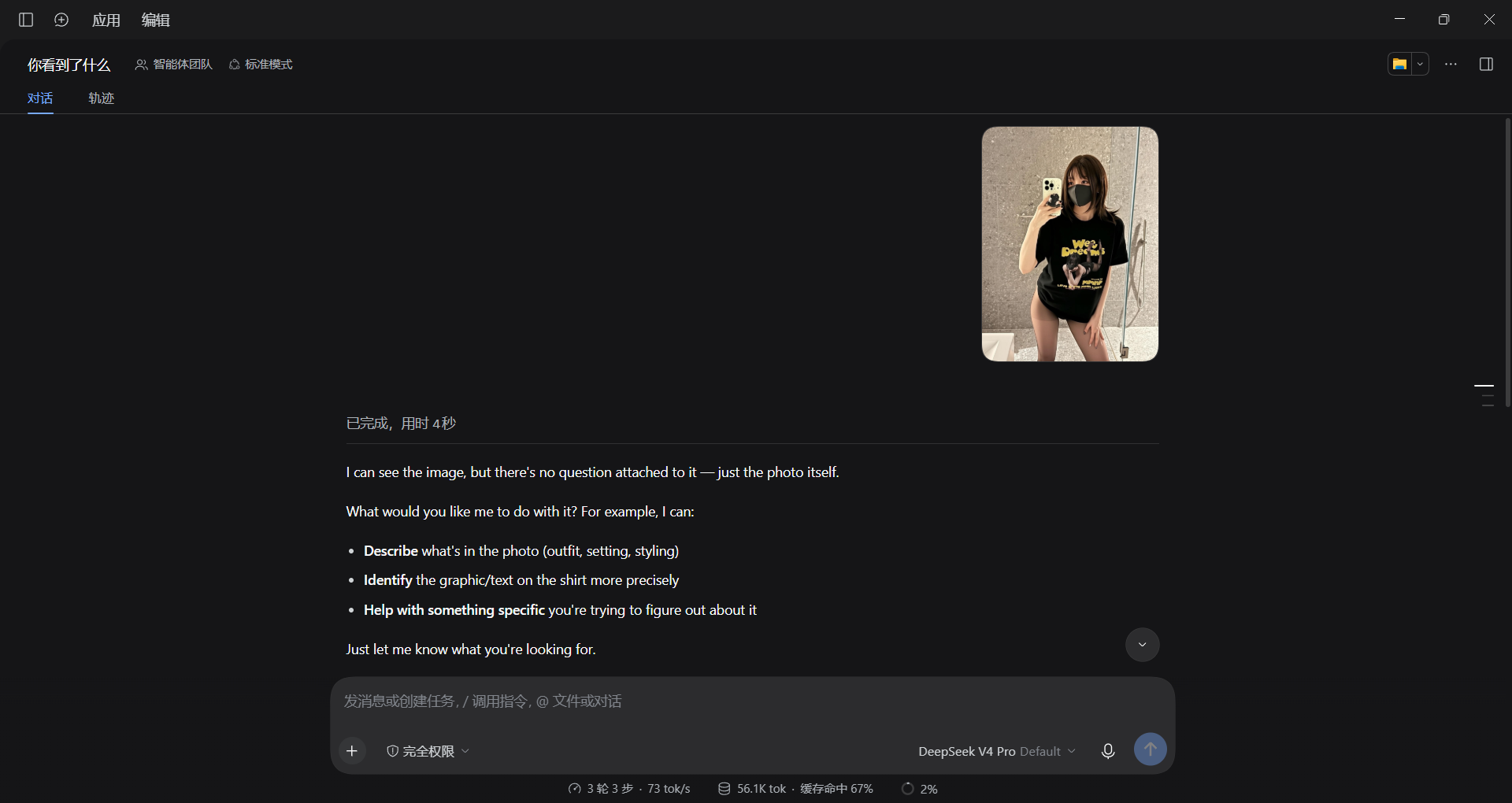
The same session, the same model — an attached image is analyzed in the background and the original model answers from that analysis; your message and the image stay untouched:
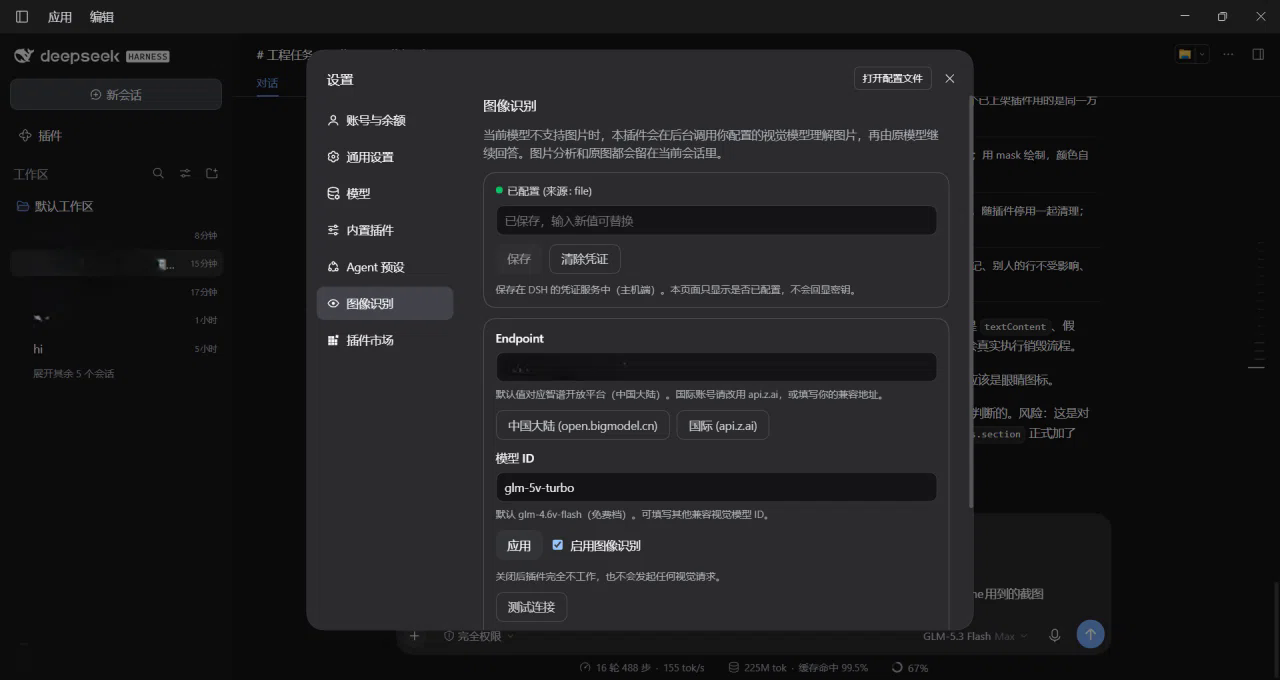
| Field | Default | Notes |
|---|---|---|
| API key | (empty) | Stored in DSH's credential store on the host (~/.dsh/.credentials.yaml, reference GLM_API_KEY). The page only ever shows configured / not configured. |
| Endpoint | https://open.bigmodel.cn/api/paas/v4 | Mainland China (智谱开放平台). Use https://api.z.ai/api/paas/v4 for an international account, or your own compatible base URL. /chat/completions is appended. |
| Model ID | glm-4.6v-flash | Free tier at the time of writing; any compatible vision model id works. |
| Enable | on | Turning it off makes the plugin inert; it makes no request and does not touch admission. |
| Test connection | - | Sends a built-in 16x16 sample image, never anything from your conversation. |
Defaults were verified against the official Zhipu documentation on 2026-10-10:
mainland base URL,
international base URL,
glm-4.6v-flash (listed as 完全免费 / completely free).
Free quota and rate limits are set by the provider and can change. This plugin does not promise that free access is permanent or unlimited, and it does not ship invented size or pixel limits: the provider's own error is the authority.
You can also export GLM_API_KEY in the environment DSH launches with; the credential store gives the
environment precedence, and the settings page will report the key as configured (read-only).
you paste an image -> DSH session/prompt
                |- model declares image support -> native image request (sidecar silent, 0 calls)
                `- model is text-only -> core patch asks session/image-admission
                        `- plugin: enabled and key configured -> admit
                               `- agent/pre-step: read this turn's authorized attachments
                                     `- one batched vision request (GLM)
                                           `- hidden context message (source.kind = "vision-better")
                                                  `- the original model answers: same session, same model, same history
The hidden context is a normal durable user/message whose source kind is not "user". DSH's own client
classifies exactly that shape as a context node, which is excluded from the visible transcript
(dsh-client-ui-chat -> isVisibleChatNode). The same mechanism DSH already uses for its runtime-context
snapshot. The user's own message - including the image - is never rewritten, and it survives restore.
| Active model capability | Images in the turn | Vision requests |
|---|---|---|
| Declares image support | any | 0 |
| Declares text only | none | 0 |
| Declares text only | >= 1 | 1 per turn (all images batched) |
Not declared (undefined) | >= 1 | 1 per turn - unknown is never treated as support |
Capability is read from the session's live selection (the projection DSH publishes to its model picker) on every step, so a model switch takes effect on the very next turn; nothing is cached across turns.
The plugin never throws inside the turn - a throw at that point would drop the user's message before DSH logs it. Instead it injects an explicit, hidden notice with a stable code, and the original model tells you what went wrong while your text and image stay in the conversation:
| Code | Meaning |
|---|---|
VISION_RELAY_UNCONFIGURED | No API key saved (no network request was made) |
VISION_RELAY_UNAUTHORIZED | Endpoint rejected the key (401/403) |
VISION_RELAY_MODEL_NOT_FOUND | Wrong endpoint path or model id (404) |
VISION_RELAY_RATE_LIMITED | 429; retried within the bounded budget, honouring Retry-After |
VISION_RELAY_UPSTREAM_ERROR | 5xx; retried with bounded exponential backoff |
VISION_RELAY_TIMEOUT / _NETWORK | Deadline or transport failure |
VISION_RELAY_BAD_REQUEST / _BAD_RESPONSE | The request or the reply was rejected/unusable |
VISION_RELAY_IMAGE_TOO_LARGE / _UNSUPPORTED | Local pre-flight validation failed (includes the request-body cap) |
VISION_RELAY_ABORTED | You stopped the turn; the vision request was cancelled with it |
Invalid keys, wrong model ids and invalid images are never retried. Every request uses
redirect: "error", so a credential can never be replayed to another origin.
null origin and cross-origin requests are refused),
JSON-only, size-capped, and validate the key's character set. They never return a secret.See SECURITY.md for reporting a vulnerability.
| Symptom | What to do |
|---|---|
| Image is refused with "does not support image input" | The core extension is not applied, or the relay is disabled/unconfigured. Apply patches/0001-session-image-admission.patch and check Settings -> 图像识别. |
VISION_RELAY_UNCONFIGURED | Save an API key in Settings -> 图像识别. No request is made until you do. |
VISION_RELAY_UNAUTHORIZED | Re-check the key, and that the endpoint matches the account's region (mainland vs api.z.ai). |
VISION_RELAY_MODEL_NOT_FOUND | Check the model id and that the endpoint is a base URL ending in the API version (e.g. /api/paas/v4). |
VISION_RELAY_BAD_REQUEST | The endpoint may not accept the image encoding used. Try another compatible endpoint or model; the plugin already retried the alternative base64 encoding once. |
VISION_RELAY_IMAGE_TOO_LARGE | The image or the whole request is above this plugin's local cap (5 MiB per image, 24 MiB per request). |
No Settings -> 图像识别 entry | Restart DSH after installing; confirm the bundle is enabled on the Plugins page. |
| Nothing happens at all on a stock install | Expected: image admission needs the core extension. The plugin is inert until it can be asked. |
disabled: true for the vision-better row in
the profile's cordis.patch.yml). DSH's original text and multimodal behaviour returns immediately.dsh plugin --profile web remove dsh-vision-better, or remove it on the Plugins page.GLM_API_KEY reference).<DSH_HOME>/vision-better.json holds only endpoint/model/enabled.node scripts/check.mjs --dsh-src <path-to-dsh-source> # everything that can run here
node scripts/verify-host-path.mjs # end-to-end on a simulated DSH host (43 checks)
node scripts/verify-client-bundle.mjs # browser-half contract + render smoke test (24 checks)
node patches/verify-patch.mjs <path-to-dsh-source> # core patch applies + behaves (8 checks)
node test/run.mjs # unit/integration suite (129 tests, mocked vision API)
All automated tests use a stubbed or loopback vision API. A real API key is never required, read, or printed; real-endpoint tests are opt-in only.
lib/            host half: routing, config, image access, GLM client, cache, relay, settings routes
client/         browser half: the hand-written Settings page bundle
patches/        the separate core extension (patch + generator + verifier)
scripts/        local verification (syntax gate, end-to-end host path, browser-half smoke test)
test/           unit/integration suite
awesome/        ready-to-submit entry for the awesome-dsh-plugin list
docs/           implementation plan and publishing checklist
为纯文本 Agent 提供视觉能力:内置免 Key 视觉链 + 像素级视觉工具(看图问答、定位、裁剪、像素对比、取色、OCR、矢量化、抠图、截图);粘贴图片即可用。
让纯文本模型处理视觉任务:粘贴图片后自动切换到 Vision Toolkit 变体,支持图片问答、多图比较、长截图 OCR、截图还原前端 UI、元素定位与像素对比。默认无需 API Key——图片经作者自建的免费服务处理,每台机器每天 100 张;也可改为指向自己的服务商。
为纯文本模型架起视觉桥梁:粘贴图片,输出结构化 JSON 证据(OCR、版面、语义)。