
dsh-web
zhu1090093659/dsh-webDeepSeek Harness(DSH)Web 插件聚合生态包 · 一切皆插件,创意工坊分发(dsh-market.com)

Dependency-ordered multi-agent team orchestration plugin for DeepSeek Harness (dsh): per-role model routes, an independent review gate with bounded rework, a durable run ledger, and a live progress panel in the web UI.
English | 中文
A multi-agent team plugin for DeepSeek Harness. Define roles, wire them into a node graph, run it — and watch it work.
One agent is fine until the job has parts. Then you want a planner, a coder, a reviewer, and someone to check the numbers. This gives you those, runs them in dependency order, lets a reviewer send work back, and shows you which step is stuck.
team_create_agent.dependsOn; everything that is ready runs in the same wave, in parallel.Seven team_* tools drive all of it from the chat: team_create_agent, team_create_workflow, team_create_task, team_run_workflow, team_delegate_agent, team_list_agents, team_task_status.
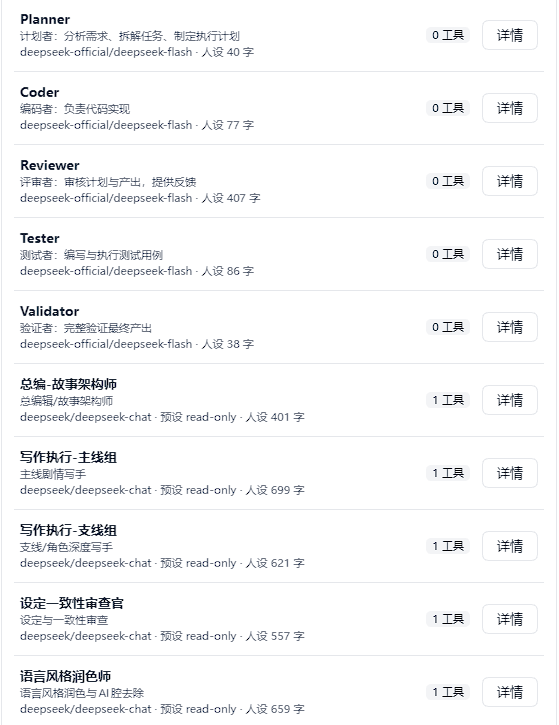
Roles. Every stored role, with the model route it will run under.
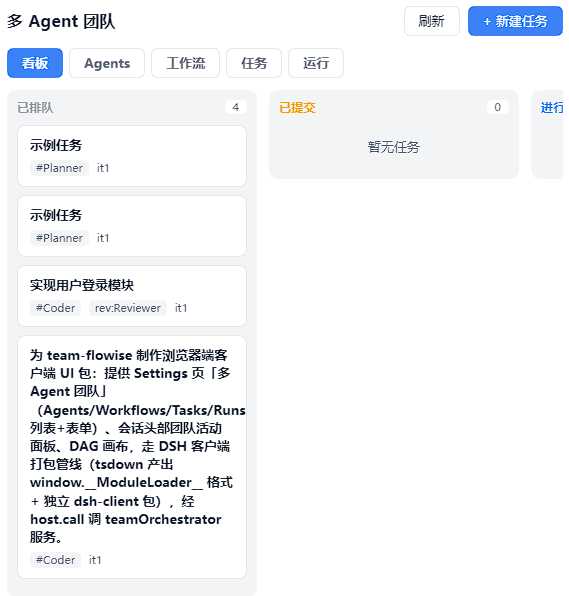
Task board. Each node of a run becomes one ledger task, so the board is the run's state. it1 means first attempt.
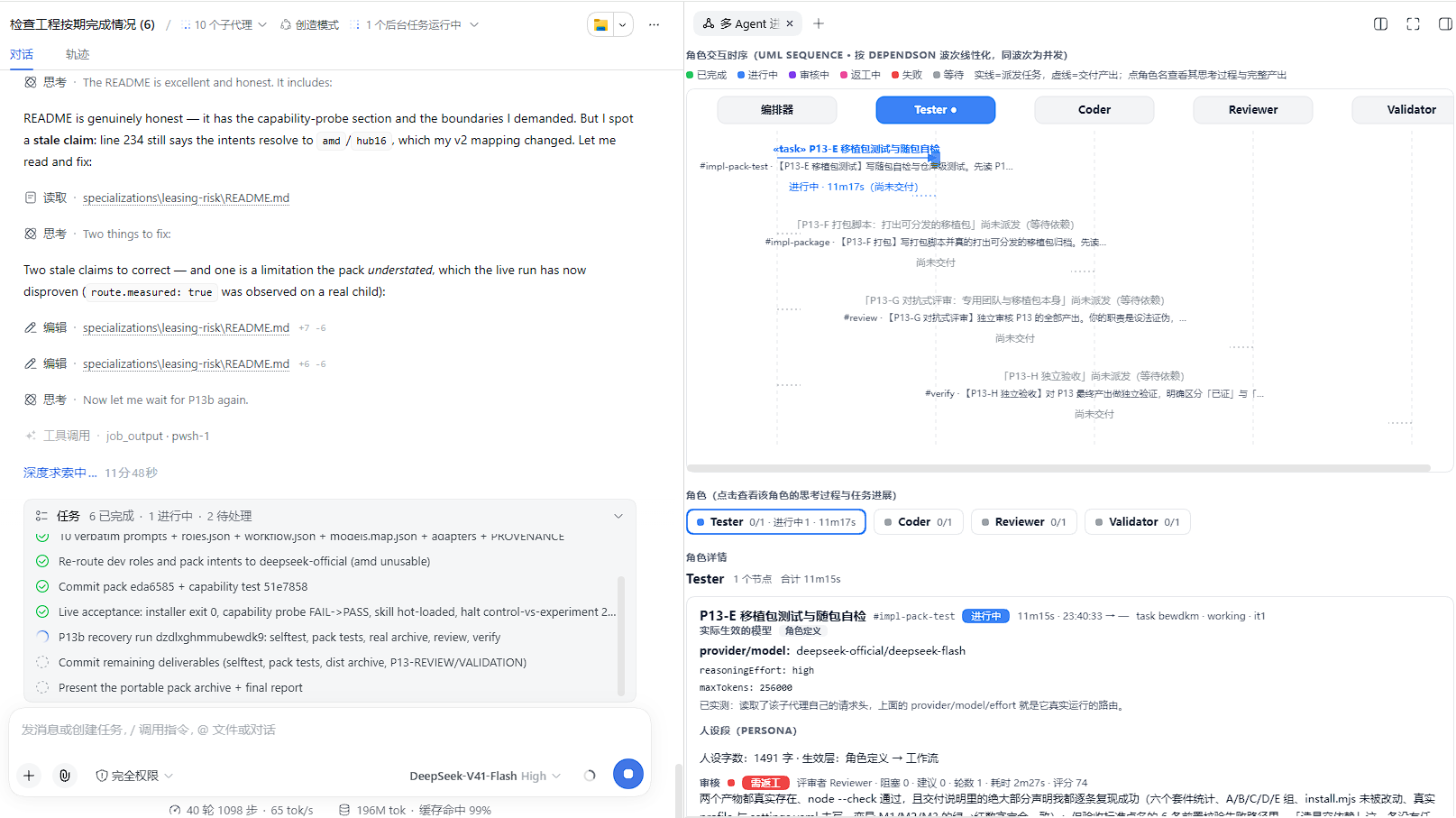
Run progress. The graph and its waves, each role's progress, and what the selected node actually ran with. The run below is this plugin building its own UI.
Two clients, two different ways in. Use the one you have.
dsh on your PATH (the CLI, or dsh web)dsh plugin --profile web add "git+https://github.com/Drkoh-wz/team-craft.git#path:packages/team-flowise"
Or the prebuilt package, which needs no git — but install it from the path you downloaded it to, not from its URL:
dsh plugin --profile web add "/path/to/team-flowise.tgz"
That distinction is not pedantry. On pnpm 10 an https tarball-URL dependency fails permanently once pnpm's store holds that URL:
ERR_PNPM_MISSING_TARBALL_INTEGRITY its lockfile entry has no integrity field
It is not a network blip: it reproduces on a second install into a second profile sharing the store, for a version-free latest/ URL and a version-pinned one alike, and deleting the lockfile does not recover it (only a fresh store does). Local files and git specs are unaffected. That is why every command on this page uses the git spec.
There is no build step, and nothing to approve. Install into a profile that has a web app, so you actually get the UI. (The plugin mounts in a bare profile too; you just get no browser half.) Now restart dsh — host code and the client bundle are both read at startup, so nothing is live until you do.
There is no dsh command to run here: the app carries the harness inside itself and owns its profile, so its own plugin panel is the install surface — this plugin shows up there once the catalog lists it. The market's own button installs github:Drkoh-wz/team-craft#path:/packages/team-flowise, which pnpm resolves to an ssh URL (git+ssh://git@github.com/...); on a machine without GitHub's ssh host key that fails with Host key verification failed inside resolveGit, and if git is not on the path the Desktop process inherits, it fails with 'git' is not recognized in the same place. When that happens, one script does the work and never invokes git. Quit Desktop first, then:
.\scripts\install-desktop.ps1
It finds the app, refuses to run while Desktop is up (that is what stops its own profile maintenance from reconciling the change away), picks up the pnpm the app ships, installs this project's published release package, and lists what to check when you start Desktop again. If Desktop is running but using a different harness home than the one you target, it says so and proceeds — only a real collision is refused. -Action uninstall, -Action check, -Spec <anything pnpm accepts>, -DryRun and -Force are the rest; Get-Help .\scripts\install-desktop.ps1 -Full prints them. It is in the release archive too, under scripts/.
It downloads that package over plain HTTPS and then installs from the file it landed in, and it keeps that file (<harness home>\.plugin-cache\team-flowise.tgz). Both details are load-bearing. A tarball-URL dependency is not reliable: with dsh's own pnpm workspace config (nodeLinker: hoisted) it fails with ERR_PNPM_MISSING_TARBALL_INTEGRITY on the second use of any given store, for every catalog entry that declares one, not just this plugin. And because installing from a path records file:<path> as the profile's dependency, deleting the download afterwards leaves the profile pointing at nothing — the next profile maintenance then dies with ENOENT. If the download cannot reach GitHub, the script says so and asks you to fetch the file yourself and pass -Spec <path> — the local-file route is the one that works regardless.
If the market's own install button fails, that is the github: spec, and the error to look for is git ls-remote git+ssh://git@github.com/... HEAD ending in Host key verification failed or a Command failed with exit code 128. pnpm resolves github:owner/repo to an ssh URL and shells out to git, so that command needs git to be reachable from the Desktop process and GitHub's ssh host key to be known. Two ways out, easiest first: run the script above, or paste the git+https command in the block below.
Three things worth knowing, all of them ways this goes wrong by hand:
lib/bin.js lives inside app.asar, so plain node cannot load it. The harness has to be driven through the app's own binary in Node mode, which is what the script does.missing peer lines for the @deepseek-ai/* packages. That is expected, not a failure: the harness supplies those itself at import time, and this package deliberately vendors none of them.running scripts is disabled, or not digitally signed — the file carries the mark of having been downloaded. Unblock-File .\scripts\install-desktop.ps1 clears it, or run it once as powershell -ExecutionPolicy Bypass -File .\scripts\install-desktop.ps1.Rather see the command than run a script? It is the app's own three files, and --dump-config is a read-only way to try it:
$exe = (Get-Process 'DSH Desktop' | Select-Object -First 1).Path   # resolve it before quitting
$Desktop = Split-Path $exe

$env:DSH_HOME = "$env:APPDATA\dsh-desktop\harness"
$env:ELECTRON_RUN_AS_NODE = '1'
& "$Desktop\DSH Desktop.exe" "$Desktop\resources\harness-node-entry.mjs" `
  "$Desktop\resources\app.asar\node_modules\@deepseek-ai\dsh\lib\bin.js" `
  plugin --profile web add "git+https://github.com/Drkoh-wz/team-craft.git#path:packages/team-flowise"
Start Desktop again afterwards.
If the market button failed with the git ls-remote git+ssh:// error, that is the difference between the two commands above: the market's github:Drkoh-wz/team-craft#path:/packages/team-flowise resolves to an ssh URL, while the block above uses git+https:// explicitly, which needs no ssh key and no GitHub host key. Use the block above. If git itself is not installed, use the script instead — it never invokes git.
Desktop also gates a plugin on the @deepseek-ai/dsh-* peers it declares. A range that does not include the running harness means the plugin stays installed but profile startup denies it until you grant an exemption for those exact versions. This build declares >=0.2.0-rc.2 <0.3.0-0, which matches, so there is nothing to grant.
Verified end to end on DSH Desktop 0.2.0-rc.2 and the dsh CLI 0.2.0-rc.2, on Node 24. The peer ranges in packages/team-flowise/package.json say >=0.2.0-rc.2 <0.3.0-0, and the harness checks that declaration before it imports the plugin — so a harness that is too old refuses this plugin in one clear line instead of failing in a confusing way later.
Two things worth knowing, because each of them broke this plugin once.
The harness supplies the @deepseek-ai/* packages itself, and a copy sitting in the plugin's own directory is found first. A leftover dsh-tools@0.1.x from an old local install therefore shadowed the harness's copy, crashed on import, and took the whole Desktop bootstrap down with it. That is also why the floor is 0.2.0-rc.2: the supply arrived in the 0.2 line, and on 0.1.5 a peers-only plugin cannot import at all. Installing from a checkout? Make sure packages/team-flowise/node_modules holds no @deepseek-ai/* — npm install --omit=peer in that directory is the command that keeps it right.
The repository's own installer additionally drops the agent-facing skill into a skill root, and needs no network:
git clone https://github.com/Drkoh-wz/team-craft.git
cd team-craft
node scripts/install.mjs
It is idempotent, it backs up every file it rewrites, and --help lists the rest:
node scripts/install.mjs --check           # exit 0 = installed and consistent, 3 = drifted
node scripts/install.mjs --dry-run         # show the planned changes, write nothing
node scripts/install.mjs --profile <dir>   # a different profile
node scripts/install.mjs --link-mode copy  # copy instead of link (read the note below)
node scripts/install.mjs --skill-root none # skip the skill
On Windows, read this before using the default link mode. The installer links your checkout into the profile, which is fast and keeps the two in sync — but a recursive delete of a directory containing that link follows it and empties your checkout. That is not a guess:
tree/node_modules/@local/team-flowise   ->  junction to this checkout
rmSync(tree, { recursive: true })       ->  OK, and the target is now empty
So anything that removes the profile tree — DSH Desktop rebuilding its profile, a package manager pruning, a manual delete — can take the checkout with it. --link-mode copy removes the hazard entirely, and the registry install above (dsh plugin ... add) never has it, because pnpm copies the package in.
In this order. Do not trust the browser cache.
| # | Check | Expected |
|---|---|---|
| 1 | A new agent session's tool list | the seven team_* tools |
| 2 | Settings | a team-flowise section: roles, workflows, runs |
| 3 | Right sidebar | a 多 Agent 进度 tab |
On the CLI, curl -s http://127.0.0.1:<port>/api/team-flowise/ping should also answer {"ok":true,"pong":true,"domains":[…4…]} — <port> being whatever dsh web printed.
On DSH Desktop skip that one: the port is chosen per launch, and a local HTTP request is answered 401 unless it carries the boot token from the URL the app opened, so the three checks above are the honest ones. A 404 where you expected the ping means it never mounted; the harness log says why, and the most common reason is a duplicate flowise-team row.
A 404 on 1 means it is not mounted — the host log says why, and a duplicate flowise-team row is the usual answer. If 1 works but 2 or 3 does not, it mounted and contributed nothing; the log will say that too.
dsh plugin --profile web remove @local/team-flowise
On DSH Desktop, the same command with add swapped for remove, through the app's own binary — take the block in the DSH Desktop section above and change that one word — or just remove it from the app's plugin panel.
Or, from a clone, node scripts/uninstall.mjs — which also takes the skill back out with --remove-skill, and leaves everything it did not write alone.
Restart afterwards, for the same reason as before.
Host half — packages/team-flowise/src/index.js | Registers the team_* tools, publishes the teamOrchestrator service, owns the four storage domains, serves /api/team-flowise/*. |
Client half — packages/team-flowise/src/client/index.js | The Settings section, the sidebar entry, the progress page. |
Skill — skills/team-flowise/SKILL.md | Tells an agent when this is worth reaching for. |
A node is dispatched as a worker subagent carrying the persona, model route and tool preset its role declares. When it reports back, the node's reviewer is asked for a verdict, and blocking findings become the next round's feedback. A reviewer that cannot produce a readable verdict is recorded as an error — and an error never counts as a pass.
A worker that dies for an infrastructure reason — an adapter error, a spawn that hit its ceiling, a dropped connection — is re-dispatched automatically (twice by default, with backoff), so one network blip no longer costs the whole pipeline. The classification is a deliberately narrow allow-list: a work failure (a bad prompt, a real tool error) is not retried, because a second dispatch would only buy the same answer at the price of another full timeout. Set maxRetries on a node or a workflow to tighten the bound (0 disables it); it can only ever be lowered, never raised.
A run that ended without everything succeeding can be continued instead of started over: its completed nodes are reused and only the failed ones and whatever was cut off behind them are dispatched again. It lands as a new run record linked to the old one by resumedFrom, so the previous attempt's evidence survives. In the UI, "继续运行" sits on every unfinished run in the run list, and next to the failure explanation on the progress page.
Every list in the Settings section has a delete control — roles, board cards, tasks, workflows, runs — with a confirmation step, since these records are not undoable and the same row also carries the open/edit action. Two removals are refused on purpose, and the button renders disabled with the reason: a task a worker is still writing, and a run whose scheduler is still advancing. Deleting either would be undone by the next state write, so reporting success would be a lie.
| Path | What it is |
|---|---|
packages/team-flowise/ | The plugin: host half, client half, its patch layer |
skills/team-flowise/ | The skill |
scripts/install.mjs, scripts/uninstall.mjs | The clone-path installer and its inverse |
deploy/ | How the plugin is wired into a profile, plus a portable profile snapshot |
specializations/leasing-risk/ | A ready-made ten-role team for lessee repayment-risk assessment |
validation/ | The test suites |
React.createElement and has to keep the window.__ModuleLoader__.load({ id, factory }) shape. Neither half may add a runtime dependency.deploy/web-profile/package.json is a portable template — its dependency path is relative to itself. Do not hand-edit a live profile; run the installer.node validation/preflight-install.mjs is the release gate: it installs the package every published way into throwaway profiles, then boots one and drives its whole HTTP surface. It needs network access and starts a temporary host on a free port. It finds a harness to test against by itself (--dsh <bin> or --desktop <dir> to pick one), so it also works on a machine that only has DSH Desktop.p8 and p10–p17 files) import the plugin source directly, and the plugin imports its @deepseek-ai/* peers, which no test process has. Run node validation/dev-host-packages.mjs once and they resolve those from .dev-host-packages/ — deliberately outside the package directory, which has to stay free of them: a copy inside it wins over the harness's own supply, which is exactly the outage this release fixes.validation/p17-mutations.mjs and validation/p17-client-mutations.mjs are not extra feature tests: they break one behaviour at a time and assert that the named check goes red. A suite that cannot be made to fail is not evidence, and "it failed somewhere" does not credit a specific assertion. They are written in Node rather than PowerShell on purpose — a Get-Content/Set-Content round trip re-encodes the file, so every mutation would then "fail" with a SyntaxError and credit nothing.p8-acceptance, client-ui-validation, write-path-check, plus ui-form-payload-check) need a live host on 127.0.0.1:3080 and crash rather than skip without one. That is a pre-existing gap, not a regression; the offline battery is the p10–p17 files.MIT — see LICENSE.
DeepSeek Harness(DSH)Web 插件聚合生态包 · 一切皆插件,创意工坊分发(dsh-market.com)
把回答做成一页可视化 HTML:模型只写简短的 Markdown 草稿,随包附带的 `am` 命令行生成页面,支持流程图、时序图、树、时间线、ER 图、表格和提示框。
在 dsh 里装上这个插件即可,无需登录、注册或填 API Key,就能使用包括 Muse Spark 1.3、MiMo V2.6 在内的前沿模型——完全免费,不限量。 All you do is install this plugin in dsh: no login, no sign-up, no API key — the frontier models are just there, Muse Spark 1.3 and MiMo V2.6 among them. Completely free, with no usage cap.

