
dsh-web
zhu1090093659/dsh-webDeepSeek Harness(DSH)Web 插件聚合生态包 · 一切皆插件,创意工坊分发(dsh-market.com)

在 Windows 资源管理器文件夹右键菜单中加入「用 DeepSeek Harness 打开」,点击后把该文件夹登记为 DSH 项目;设置 → 通用 里有一个开关用于添加或移除该菜单项。仅支持 Windows,无需额外安装任何组件。
Current version: 1.4.0 — see Changelog. If you installed an earlier version, update: 1.2.0 brings the DSH window to the front, and 1.3.x can start the app from a non-default install directory and no longer fails silently.
A DSH plugin for Windows: it adds 用 DeepSeek Harness 打开 ("Open in DeepSeek Harness") to the Explorer folder context menu, and registers the clicked folder as a project in DSH's sidebar. One switch in DSH's Settings → General adds or removes that menu entry.
It is a two-half DSH plugin:
| Half | File | Role |
|---|---|---|
| Host | lib/index.js | Registers two exact routes on DSH's web server: one that registers a directory as a project, one that reads/toggles the context-menu entry. |
| Client | client.js | Renders one row in the General settings page with a switch that calls the toggle route. |
| Windows helpers | cli/ | The registry writer (context-menu.ps1), the shared executable lookup (app-path.ps1), and the launcher the context-menu entry actually runs. |
In Explorer. Right-click a folder — or the empty area inside a folder — and the menu contains 「用 DeepSeek Harness 打开」. Choosing it adds that folder to DSH's project list, brings the DSH window to the front (restoring it from the tray or from minimised), and shows a Windows notification:
Opened as a DSH project — the folder was registered (the notification's second line is the
project title);Already a DSH project — a project for that directory already existed, and nothing changed.Bringing the window forward is part of the action on purpose: registering a project changes nothing on screen, so without it a click looks like it did nothing.
If DSH is not running, the action starts it first: it locates the executable (DSH_DESKTOP_APP_EXE,
then a running instance, then the dsh:// handler the installer registers, then the default
install locations), launches it, waits for the window and brings it forward, then registers the
folder once the host answers. The whole wait is bounded (180 s).
In DSH. Settings → General gains one row — 「用 DeepSeek Harness 打开」 in a Chinese browser, Open in DeepSeek Harness otherwise. Its description says that the switch writes the current user's registry (no administrator rights), and reminds you to turn it off and on again after DSH moves, which re-registers the entry against the new path. The row sits between the code-workspace row and the version row. Turning the switch on writes both registry keys; turning it off deletes them. On a non-Windows host the row is not rendered at all.
Screenshots. Windows 11, DSH desktop 0.2.1-rc.2.
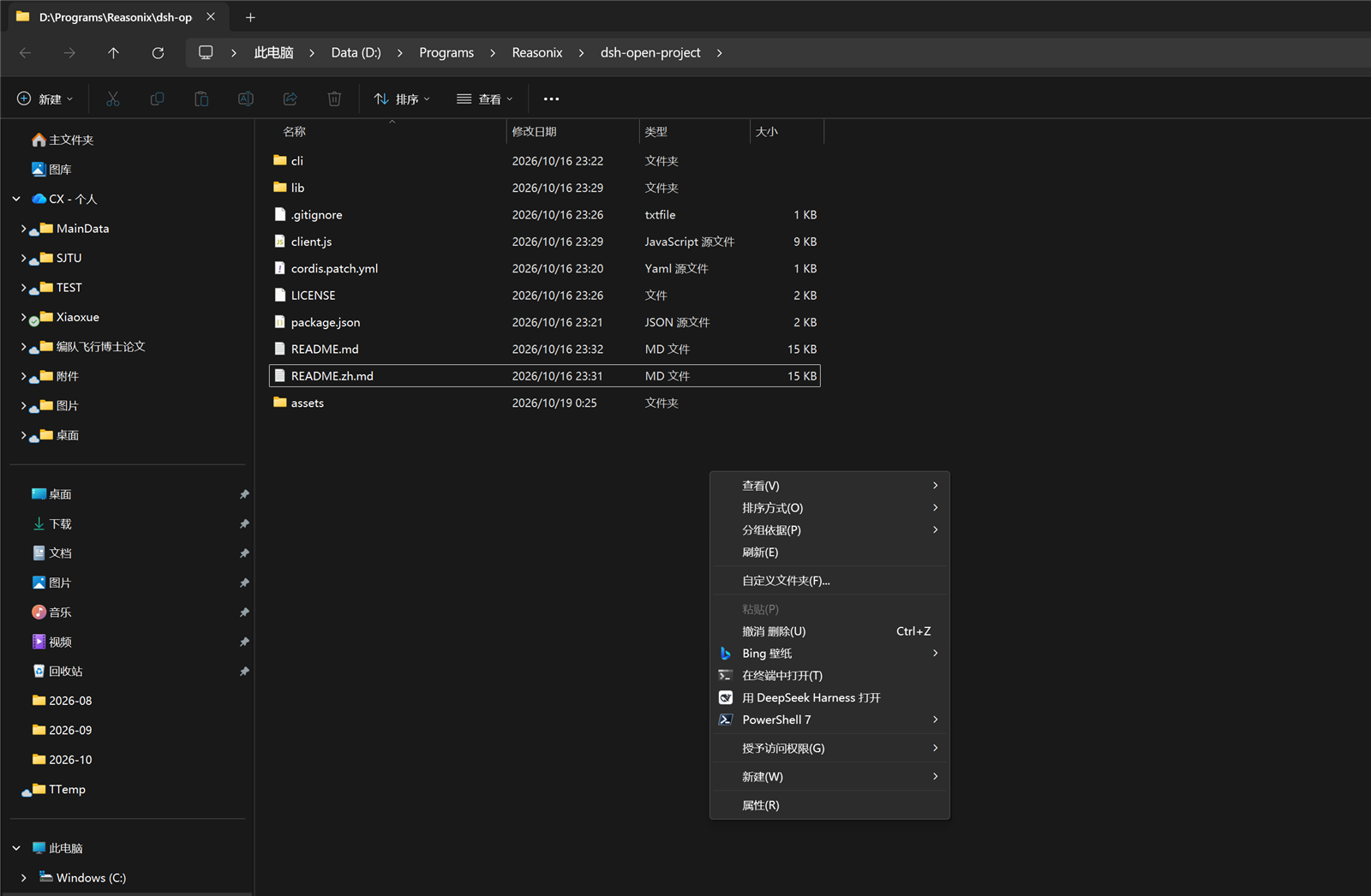
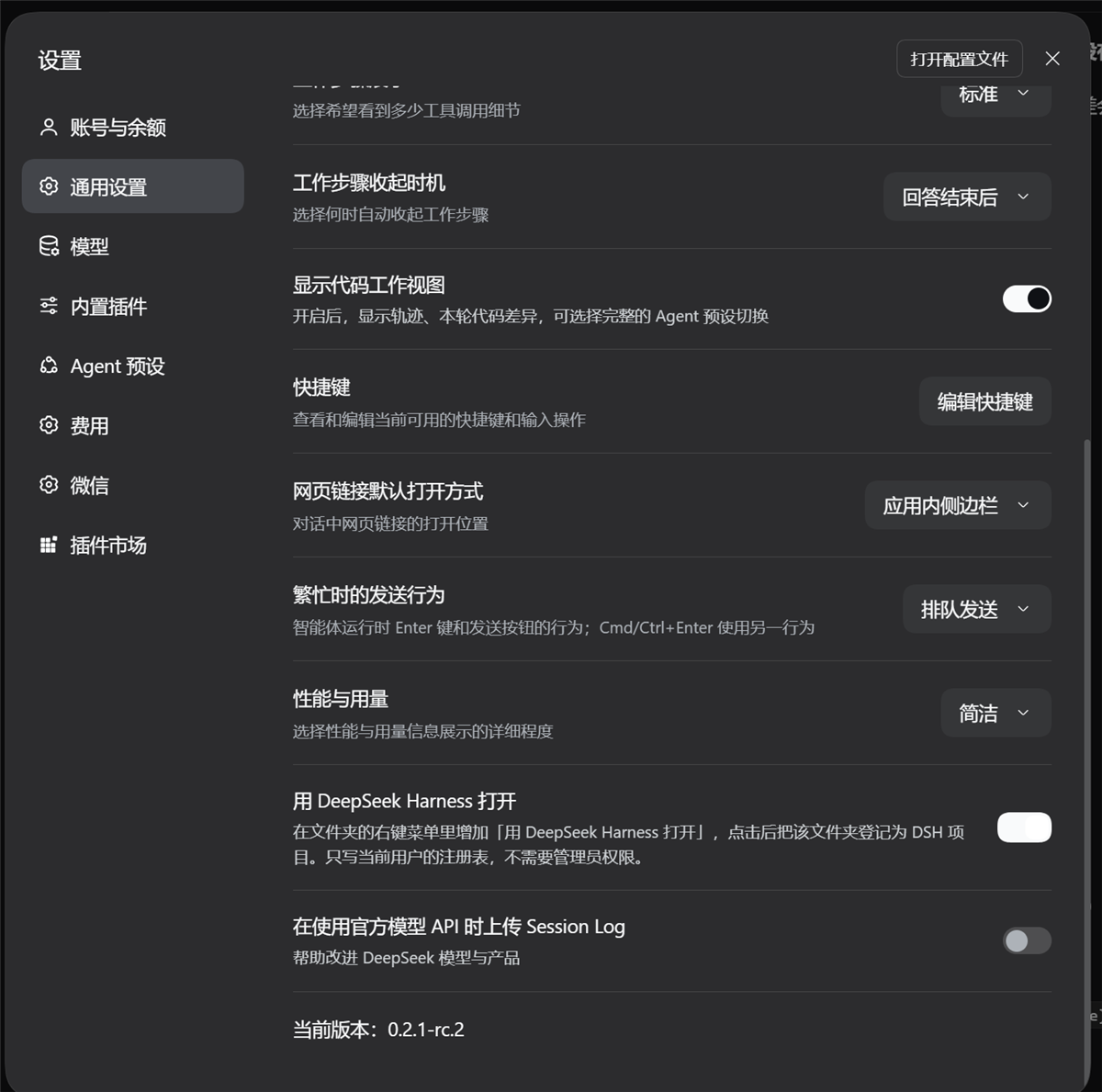
HKCU registry mechanism.wscript.exe (ships with Windows) — the menu command runs through it so no console
window flashes.webServer and
workspaceRegistry services — the ones the DSH desktop application itself uses (its sidebar
project list is built on the workspace registry). If either service is missing, the plugin
stays pending instead of half-mounting.From the DSH app (recommended). Open the sidebar Plugins page → Add plugin, and enter one of:
dsh-open-project
github:dongfangxy/dsh-open-project
The plugin manager installs the bundle and enables it by default. The first form resolves from the npm registry the profile uses (the package must be published there); the second fetches the repository.
From the dsh CLI, for a profile you boot yourself:
dsh plugin --profile <profile> add dsh-open-project
dsh plugin --profile <profile> add github:dongfangxy/dsh-open-project
--profile is required — dsh plugin forwards its arguments to pnpm inside
$DSH_HOME/profiles/<profile>. (The app's install dialog describes the package name as "the
part after dsh plugin add in a README"; that is the name, not the whole command.) The DSH
desktop application loads its own reserved profile, so install into it from the Plugins page.
If the settings row does not appear on its own, restart DSH.
The registry toggle can also be driven directly:
powershell -NoProfile -ExecutionPolicy Bypass -File cli/context-menu.ps1 -Action status            # human-readable report
powershell -NoProfile -ExecutionPolicy Bypass -File cli/context-menu.ps1 -Action status -Json      # one JSON line (what the host reads)
powershell -NoProfile -ExecutionPolicy Bypass -File cli/context-menu.ps1 -Action enable
powershell -NoProfile -ExecutionPolicy Bypass -File cli/context-menu.ps1 -Action disable
-Title 'Open in DeepSeek Harness' sets another menu label. The settings switch does not pass
a title, so it always writes the default Chinese label.
Nothing here is more than it looks; this is the exact chain.
Context-menu click. The registry command runs wscript.exe //nologo with the absolute path
of cli/open-project-in-dsh.vbs and the clicked folder (%V) as its argument; that starts
cli/open-project-in-dsh.ps1 in a hidden window. That script:
DSH_WEB_URL if the session provides it, otherwise the
loopback port a running DeepSeek Harness process is listening on, otherwise
http://127.0.0.1:19387;cli/app-path.ps1
($env:DSH_DESKTOP_APP_EXE → a running instance's own image path → the default per-user and
per-machine install locations). If none is found the action stops with a message that says so
(exit code 3);POSTs {"path": "<folder>"} to /.dsh-open-project, retrying until its deadline (30 s
when the app was already running, 180 s after it started the app). A 4xx other than 403 is
treated as final and is not retried;Registration. POST /.dsh-open-project is handled by the host half, which calls
ctx.workspaceRegistry.create(<folder>). That is DSH's own workspace registry: it writes a
workspace record — on a default desktop install, $DSH_HOME/storages/workspace.json is the
registry's durable store (unit workspace, version 2). Registration is idempotent: if the
directory already has a project, the existing record is returned unchanged. The record is a
project — an entry in the sidebar's project list; it holds no file contents and no session
data of its own.
The settings row. client.js registers into the settings.general.item slot and calls
GET /.dsh-open-project/menu to read the current state, and
POST /.dsh-open-project/menu with {"enabled": true|false} to change it. The host route runs
cli/context-menu.ps1 -Action status -Json for reads and -Action enable|disable for writes.
If a write fails, the row re-reads the real state instead of showing the requested one.
The registry entry. cli/context-menu.ps1 writes exactly two keys:
HKCU\Software\Classes\Directory\shell\OpenInDeepSeekHarness
HKCU\Software\Classes\Directory\Background\shell\OpenInDeepSeekHarness
Each gets a default value (the menu label), an Icon value when the app executable can be
found, and a command subkey whose default value is the wscript.exe line above. disable
deletes both keys recursively.
process.cwd()), which is fixed when the application starts.
The plugin never sets or changes a cwd, never retargets the app, and cannot move a session
that is already running. What it does is make the folder available as a project; a session
you then start from that project runs in that folder because DSH does that, not because the
menu item changed anything.HKCU, and no
wscript.exe. The host reports supported: false there, and the client row is not rendered
at all — so nothing appears in Settings rather than a switch that cannot work.cli/app-path.ps1 checks
DSH_DESKTOP_APP_EXE, then a running instance, then the dsh:// protocol handler the
installer registers, then the default Electron install locations. The protocol record covers
custom install directories; an installation that registers neither needs
DSH_DESKTOP_APP_EXE. Only the starting step is affected — registering works with any
running instance.Icon is removed), and the menu still works.navigator.language starts with zh, English otherwise.
The success/failure notifications and dialogs come from cli/open-project-in-dsh.ps1 and are
hard-coded English. The folder-menu label is written by cli/context-menu.ps1, defaults to
Chinese, and can be changed with -Title; the settings switch does not pass a title.HKCU only. No administrator rights are needed, and nothing outside the two
keys above is read or written. powershell -NoProfile -ExecutionPolicy Bypass -File cli/context-menu.ps1 -Action disable
removes them completely.127.0.0.1) — verified on this machine as 127.0.0.1:19387. The plugin adds two exact
paths; it does not start a server or open a port.POST /.dsh-open-project requires the custom header x-dsh-open-project (403 without
it), refuses any Origin that is not loopback http (403), refuses bodies over 64 KiB
(413), refuses a non-JSON body (400), requires a non-empty path string (400), and answers
405 to any method other than POST. Another page cannot forge this request: a cross-origin
fetch that adds the header triggers a preflight the route does not answer, and a plain
request carries an Origin the route rejects.C:work, missing paths, and files
are rejected without creating anything. No shell is involved, and nothing from the request is
interpolated into a command line.GET/POST /.dsh-open-project/menu takes no free-form input either: a write must be a
boolean, and it selects one of two fixed actions in cli/context-menu.ps1. This route is
called by the DSH settings page itself and therefore does not require the custom header.127.0.0.1. The plugin downloads nothing and executes nothing
that came in over HTTP.Every click writes one line to %LOCALAPPDATA%\dsh-open-project\last-run.log, so a click that
seemed to do nothing can be explained afterwards:
2026-10-19 15:53:50 ok; folder=D:\work\app; coldStart=False; exe=; endpoint=http://127.0.0.1:1583; created=False; title=app
coldStart=True plus an exe= path means the app was started for that click. A line ending in
no executable found means the app could not be located; set DSH_DESKTOP_APP_EXE.
Moved or reinstalled the plugin? The menu entry stores an absolute path to this copy's
launcher, written when you turned the switch on. If that copy moved, the entry stays in the menu
and does nothing; status reports it via "stale": true (and a STALE line in the readable
report). Toggle the switch off and on — or run -Action enable — to rewrite both keys against
the new location.
Nothing happens at all, no dialog either? That was a bug before 1.3.0: the failure dialogs
referenced System.Windows.MessageBox without loading WPF, threw, and the error was swallowed.
Re-run the action after updating.
powershell -NoProfile -ExecutionPolicy Bypass -File cli/context-menu.ps1 -Action disable. Either one deletes both
registry keys.dsh plugin --profile <profile> remove dsh-open-project.Do step 1 first: the switch belongs to this plugin. Uninstalling first leaves the menu entry in the registry, and clicking it then fails because the script it names is gone. Removing the plugin also removes its settings row and both routes.
Projects that were registered stay in the sidebar; delete them there if you want them gone. Deleting a project in DSH never touches the folder or its session history.
package.json                 Package metadata: dsh.bundle.patch, dsh.client, files list
cordis.patch.yml             Host bundle patch: inserts the single row named dsh-open-project
lib/index.js                 HOST HALF: the two routes, the launch of cli/context-menu.ps1
client.js                    CLIENT HALF: the Settings → General row (no import/export)
cli/context-menu.ps1         Reads/writes the HKCU context-menu keys (enable|disable|status)
cli/app-path.ps1             Shared lookup for the DSH executable (override, running, defaults)
cli/open-project-in-dsh.ps1  The menu action: find port, start app if needed, POST the path
cli/open-project-in-dsh.vbs  Hidden-window launcher for the .ps1 (kept pure ASCII on purpose)
screenshots.json             Storefront screenshot order (marketplace reads it from the repo)
assets/                      The two screenshots this README shows
Host half vs client half. cordis.patch.yml contributes exactly one host plugin row,
whose id matches the package name; the host half declares inject: ["webServer", "workspaceRegistry"] and registers its routes through ctx.effect, so unloading the plugin
removes them. The client half is a browser bundle: DSH concatenates client.js (per
dsh.client in package.json) into the /plugins combo script and registers it through
window.__ModuleLoader__.load, which is why that file uses no import/export and receives
React through the injected require. Both halves carry the same plugin name, and the package
name, the host row id, and the client module id are kept identical on purpose.
There is no build step: the files are shipped as they are, straight from the repository.
status reports a stale menu entry (stale: true) instead of the entry silently
doing nothing after the plugin is moved or reinstalled.dsh:// protocol record, so a non-default install
directory works; failure dialogs actually appear; every loopback port is tried instead of just
the first; the window is focused while a cold start is still coming up; and every run appends a
line to %LOCALAPPDATA%\dsh-open-project\last-run.log.MIT — see LICENSE. Copyright (c) 2026 Chengxi Zhang.
DeepSeek Harness(DSH)Web 插件聚合生态包 · 一切皆插件,创意工坊分发(dsh-market.com)
把回答做成一页可视化 HTML:模型只写简短的 Markdown 草稿,随包附带的 `am` 命令行生成页面,支持流程图、时序图、树、时间线、ER 图、表格和提示框。
在 dsh 里装上这个插件即可,无需登录、注册或填 API Key,就能使用包括 Muse Spark 1.3、MiMo V2.6 在内的前沿模型——完全免费,不限量。 All you do is install this plugin in dsh: no login, no sign-up, no API key — the frontier models are just there, Muse Spark 1.3 and MiMo V2.6 among them. Completely free, with no usage cap.

