
dsh-web
zhu1090093659/dsh-webDeepSeek Harness(DSH)Web 插件聚合生态包 · 一切皆插件,创意工坊分发(dsh-market.com)

在设置页增加「重启」卡片:一键把重启交给 DeepSeek Harness 启动器(`Launch-DeepSeekHarness.ps1`)替换正在为页面提供服务的 web 进程,新实例就绪后页面自行重连。仅支持 Windows;缺少该启动器时按钮会报错,而不是完成重启。
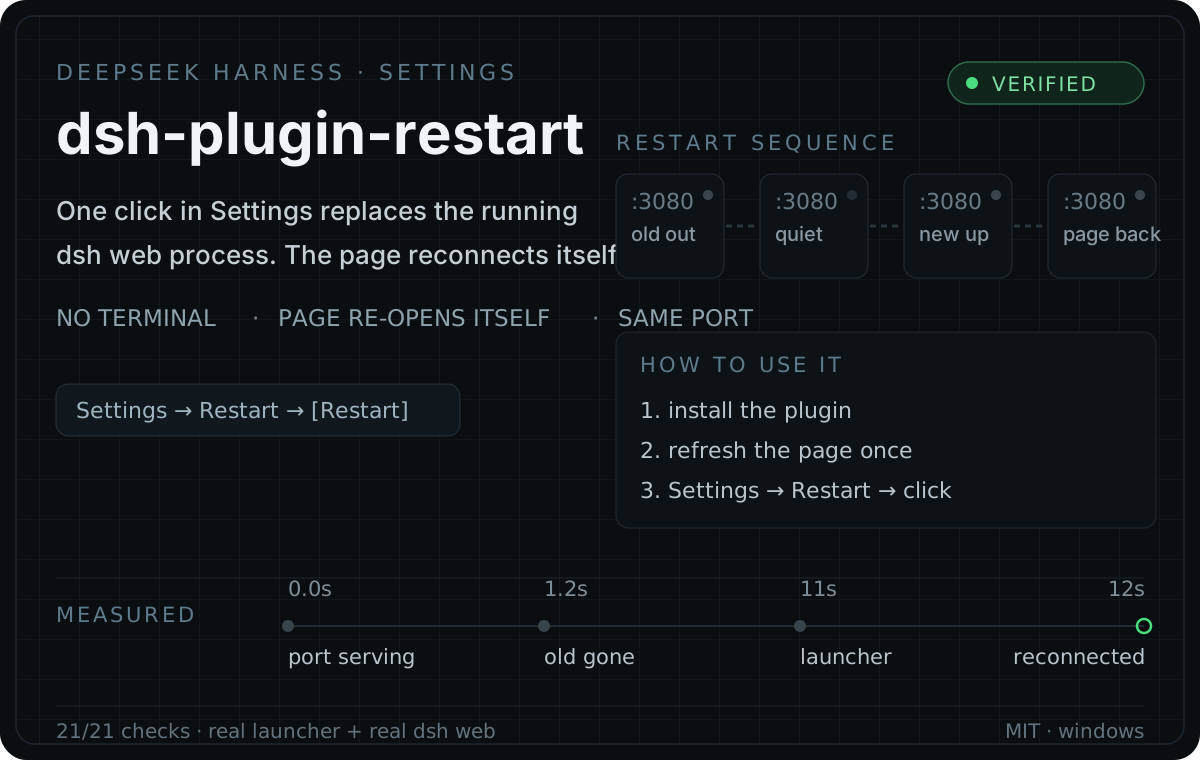
A Restart card in DeepSeek Harness Settings. One click replaces the dsh web process that is
serving your page — and the page reconnects by itself. No terminal, no re-opening the desktop icon.
That matters because some changes cannot hot-reload:
config.json, the port, or the workspace;Today those mean walking back to a terminal. This plugin turns them into one click.
dsh plugin --profile web add github:chenkui-luo/dsh-plugin-restart
Then refresh the page once and open Settings → Restart.
Without the dsh CLI (no pnpm, or a patched profile): copy the package into
<profile>/node_modules/dsh-plugin-restart and add this row to <profile>/cordis.patch.yml:
- insert:
    - id: restart
      name: 'dsh-plugin-restart'
The bundled installer does both steps with a backup and a read-back check before it writes:
powershell -NoProfile -ExecutionPolicy Bypass -File .\scripts\Install-RestartPlugin.ps1
powershell -NoProfile -ExecutionPolicy Bypass -File .\scripts\Install-RestartPlugin.ps1 -Action disable
powershell -NoProfile -ExecutionPolicy Bypass -File .\scripts\Install-RestartPlugin.ps1 -Action uninstall
| Step | What runs |
|---|---|
| 1 | The page sends POST /dsh-restart/restart — same origin, authenticated |
| 2 | The host half starts a detached helper and answers the request before anything is stopped |
| 3 | The helper waits for the port to stop accepting connections, then hands over to your launcher |
| 4 | The launcher starts a fresh dsh web with a new launch token and writes its token file |
| 5 | The helper confirms the replacement is up, then lets the old process exit — gracefully |
| 6 | The page sees a new instance id on its next poll and reloads itself |
Nothing is force-killed in the middle of the response, and the old process is stopped last, by itself. A restart that fails leaves a diagnosis in the log instead of failing silently.
This part was measured on a real Windows machine, not assumed:
| how a background helper is started | does it run | does it outlive the process it must replace |
|---|---|---|
PowerShell, detached: true | no — exits 0, silently | — |
| PowerShell, attached | yes | no — dies with its parent |
node, detached: true | yes | yes |
| node, attached | yes | no |
On Windows a "detached" PowerShell child gets no console and never runs the script — the same trap
dsh-market documents. An attached helper dies together
with the process it is supposed to replace. So the helper is a detached node process, and it gives
its own children a hidden console through powershell -WindowStyle Hidden.
Force-killing the whole tree is the other half of the story: it leaves a Windows port unbindable
long enough for the replacement to die with EADDRINUSE. Waiting for the port to go quiet and only
then starting the replacement is what makes the handover reliable.
| Check | Result |
|---|---|
Helper generation, offline (runtime-test/CheckHelperScript.mjs) | 11/11 |
End to end, real plugin code (runtime-test/VerifyRestartPlugin.mjs) | 21/21 |
Real launcher + real dsh web, full restart cycle (runtime-test/SmokeRestartReal.ps1) | pass |
The end-to-end runs cover: the installer writing a managed patch row, the host half claiming its routes, an unauthenticated request being fenced off, the restart being accepted before the port goes away, a second click inside the guard window being refused, the port wait, the launcher handover, the successor process appearing, and the page noticing it.
These live in the toolkit this plugin was built in; this repository is the packaged plugin.
Every route passes the connection trust fence (loopback peer + matching Origin + login cookie), so
only an authenticated same-origin page can reach them.
| Method | Path | Meaning |
|---|---|---|
| GET | /dsh-restart/status | instanceId (this server's pid), port, workspace, launcher path and availability, whether a restart is in flight |
| POST | /dsh-restart/restart | Arms a restart. A second request within 15 s gets 409. The response carries no launch token |
| GET | /dsh-restart/log | Tail of the shared restart log |
If the automatic reload comes back unauthenticated — a fresh launch token is minted on every start —
the page's own token is handed back to the same browser connection once, so it can reopen itself
with ?token=….
%LOCALAPPDATA%\DeepSeekHarness\restart-plugin\logs\restart.log — append-only, so the record of a
restart survives the process that performed it. The helper writes the launcher's exit code, whether
the port is still being served, and whether a fresh token file appeared, because the process that
would normally log a failure is the one that just exited.
| Variable | Purpose |
|---|---|
DSH_RESTART_INSTALL_DIR | Launcher runtime directory (default %LOCALAPPDATA%\DeepSeekHarness) |
DSH_RESTART_DATA | Plugin-private data directory (default <INSTALL_DIR>\restart-plugin) |
DSH_RESTART_LAUNCHER | Point at another launcher script (portable installs, tests) |
Restart target. By default it delegates to the launcher a hosted install already has
(%LOCALAPPDATA%\DeepSeekHarness\Launch-DeepSeekHarness.ps1), which owns the reliable
stop/start/readiness sequence. When that file is missing the button reports a clear error instead of
pretending to work, and the status card shows the path it looked for. Making the plugin fully
standalone is the next step on the roadmap.
dsh web you started by
hand), the restart takes that port over, including its terminal's process tree.dsh.bundle + cordis.patch.yml declaration, the dual host/browser plugin shape, and the
webserver's trust fence. deepseek-ai/deepseek-harness · MIT.restart.js is the reference for the approach used here: delegate to a detached helper, wait for
the port instead of guessing with a fixed delay, and make a failed restart leave evidence.MIT
DeepSeek Harness(DSH)Web 插件聚合生态包 · 一切皆插件,创意工坊分发(dsh-market.com)
把回答做成一页可视化 HTML:模型只写简短的 Markdown 草稿,随包附带的 `am` 命令行生成页面,支持流程图、时序图、树、时间线、ER 图、表格和提示框。
在 dsh 里装上这个插件即可,无需登录、注册或填 API Key,就能使用包括 Muse Spark 1.3、MiMo V2.6 在内的前沿模型——完全免费,不限量。 All you do is install this plugin in dsh: no login, no sign-up, no API key — the frontier models are just there, Muse Spark 1.3 and MiMo V2.6 among them. Completely free, with no usage cap.

