
dsh-web
zhu1090093659/dsh-webDeepSeek Harness(DSH)Web 插件聚合生态包 · 一切皆插件,创意工坊分发(dsh-market.com)

oh-my-pi advisor subsystem ported to DeepSeek Harness — independent reviewer models watch your agent and advise it (nit injects, concern/blocker steer)
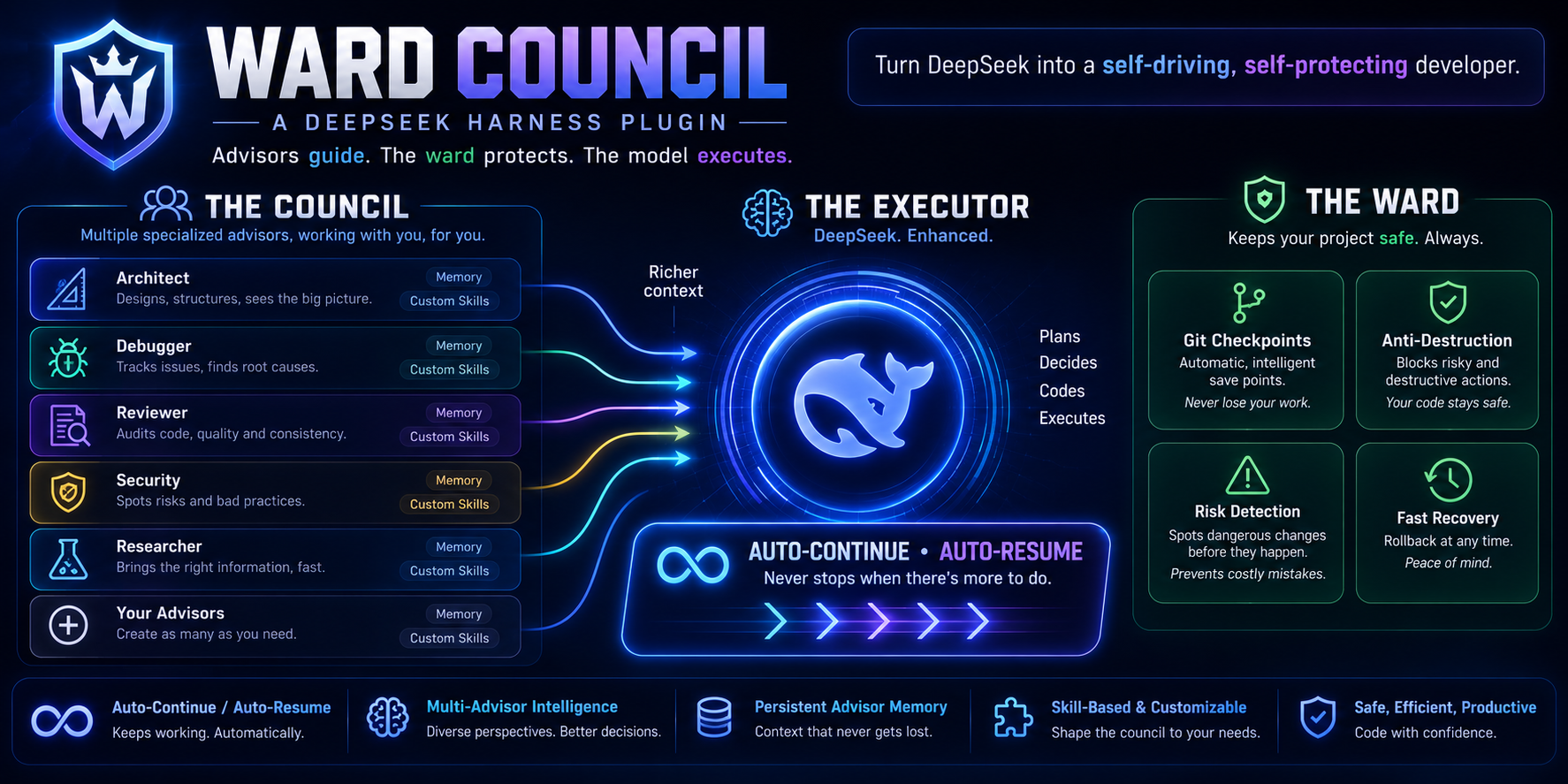
Advisors guide. The ward protects. The model executes.
Package name:
dsh-omp-advisor— the name under which it installs and stores settings.
Your coding agent is good, but on a long session it can tunnel-vision: miss a security hole, claim "done" before the tests actually pass, or plow ahead after a wrong turn. Ward Council gives it a second set of eyes — one or more independent advisor models that watch the session in real time and speak up when something matters.
Each advisor reads the transcript as it grows, may investigate your workspace with read-only tools (read / grep / glob), and hands over concrete advice through a dedicated advise tool. Advice arrives as a clearly-labeled note the primary agent weighs — never a command it must obey:
<advisory advisor="The Red Teamer" severity="concern" guidance="weigh, don't blindly obey">
  The SQL in search.py interpolates the user query directly — parameterize it before this ships.
</advisory>
You pick each advisor's model from DSH's model list, scope it to specific workspaces, and give it a persona (25 presets included) plus curated domain skills (250 packaged). It is the advisor-watchdog design from can1357/oh-my-pi, rebuilt natively on DeepSeek Harness (DSH) plugin seams.
primary agent ──► session log ──► delta renderer ──► advisor model (your pick from the DSH model list)
      ▲                                                     │ read/grep/glob (read-only)
      │                                                     ▼
      └──── agent.inject / agent.steer ◄── advise tool ── dedupe + quarantine
nit / concern / blocker) and the guidance "weigh, don't blindly obey"; the primary agent decides what to do.tools/pre-execute waterfall refuses the call before its body runs (deny), or holds it for your approval (ask). Bounded, so an advisor can never deadlock the agent.dsh-model-search plugin.user/message, assistant/message, tool/call, tool/result) into a compact markdown update the advisor model reviews.Advice, not orders. Notes arrive as
<advisory advisor="…" severity="…" guidance="weigh, don't blindly obey">…</advisory>
messages. The primary agent decides what to do with them.
Severities. nit (default) · concern · blocker. Escalation-rank dedupe: the same note only re-delivers at a strictly higher severity.
Delivery channels (DSH-native).
| Severity | Primary running | Primary idle |
|---|---|---|
non-interrupting (default: nit) | agent.inject — rides the next step boundary, never wakes | agent.inject |
interrupting (default: concern, blocker) | agent.steer — nearest step boundary | concern downgrades to inject; blocker still steers (may wake a turn) |
Mid-turn deferral. With reviewTrigger: step, non-blocker notes raised while the turn is still running are withheld and flushed deterministically when the turn completes, so partial work is not interrupted and no advice is lost.
Coalescing (optional). With several advisors attached, notes can land in rapid succession. Set Coalesce advice to a window in ms (e.g. 1500) and the runtime buffers notes from all advisors for that window, then emits them as one multi-<advisory> message per delivery channel instead of one message per note. Semantics:
0 (default) — every note is delivered individually, exactly as above.concern/blocker (per your interrupting set) flushes the whole batch immediately, so urgent advice never waits out the window.turn/end with reason.kind: "error") receives an automatic "continue from where you left off" followup message after the same delay, bounded per failure episode and reset by any completed turn.1–999, or 0 = unlimited (the message labels the cap ∞). User aborts and permanent errors (unknown model/provider) never retry — even with an unlimited cap. Toggle the whole feature off with Auto-retry failures.tools/pre-execute waterfall whose listeners return a PreToolDecision — allow, deny, or ask — before the tool body runs. Calling next() lets the call proceed; returning a decision instead ends the chain, so a deny means the tool genuinely never executes. Ward Council's gate turns an advisor finding into exactly that decision:
blocker). The runtime records it as the session's armed finding.bash, write, edit) is intercepted. In deny mode the call is refused and the model gets the advisor's reason plus your optional extra guidance; in ask mode the call is held for your decision, with a localized prompt.maxDenials calls (default 2); after that the gate stands down for that finding and the call proceeds, so a disagreeing advisor can never deadlock the agent. A new finding re-arms the gate and resets the bound. Set 0 to never stand down.gate-denied, gate-ask, gate-stood-down), and an armed finding appears in the sidebar as a chip (tool gate: <advisor> <severity> (n/max)) with a Clear gate button — the clearToolGate RPC releases gated calls immediately. The same data rides the session snapshot as a toolGate field.PreToolDecision already carried allow / deny / ask in the alpha line (verified in dsh-tools@0.1.0-rc.6) and the same union is in 0.2. The info error identity and localized displayReason Ward Council sends are additive fields that older hosts simply ignore.next()), exactly as in earlier releases — enabling the gate is the only thing that changes tool-call behaviour.blocker while the primary agent is running, the plugin calls agent.cancel on the running step — tool calls not yet dispatched abort, already-running calls commit — then wakes the agent with the advisory as a followup so it sees the reason and can react. Use Blocker intervention when you want the running step abandoned, and the Tool gate when you want a specific call refused before it runs. A call already in flight is never killed. Without either opt-in, advice stays advice..gitignore), stored as commit objects under the hidden namespace refs/dsh-omp-advisor/**. Your index, HEAD, branch, and worktree are never touched, and no reset/clean/stash command is ever run. Snapshots happen at turn boundaries and (optionally) before mutating tools via pass-through fs/write-intent / fs/edit-intent / tools/pre-execute listeners with a bounded wait that never blocks your tools. Advisors gain read-only list_restore_points / diff_restore_points tools; after a destructive or wrong step an advisor can call advise with rewindTo — the advisory then carries the exact worktree-only restore recipe (git restore --source=<sha> --worktree --staged .) plus the advisor's classification of which steps must not happen again and which were progress. The primary model executes the restore itself; the plugin never rewinds anything. Files created after a point are kept, never deleted. Non-git workspaces are skipped.acceptance advisory reminds the agent to commit the accepted state to the branch it is working on (the plugin marks the latest restore point accepted; the agent runs the commit).conversation.input.model). This plugin registers a searchable
variant for it, so the seat becomes a search box over the same per-session model
directory the stock selector and the /model popup read — a choice made in either
place stays in sync, and nothing else about model selection changes.↑/↓ move, Enter
picks, Esc closes, and the active row is kept scrolled into view.try/catch-guarded contribution inside the
client entry, it needs only the host page's react/react-dom, and it declares no
extra dsh.client.inject package — so if anything about it is unavailable the
settings section still loads and the stock seat simply renders instead. It lives in
src/client/model-select.ts, vendored from dsh-model-search v0.1.0.workspaces field), Memory (persistent advisor memory — pluggable engines, write gate, per-advisor engine toggles), and Monitor (live status + activity feed).! when one is halted/errored, hidden when none are attached here). Since v0.7.5 it is also a workspace advisor manager: it lists every configured advisor split into Active in this workspace and Not active here (reason: off, disabled here, or not in this workspace), with inline Enable here / Disable here buttons and a single theme-aware Add advisor ▾ dropdown that lists the built-in presets (a self-rendered menu, not a native <select>, so it follows the light/dark scheme; new advisors are scoped to this workspace and use the first available model). Since v0.7.6 the toggle is truly workspace-scoped: "Disable here" appends an exact =<workspace> entry to a new orthogonal disabledWorkspaces exclusion list — it never flips the advisor's global enabled switch and never deletes authored workspaces inclusion patterns, so an always-on advisor can be switched off in just this workspace and keeps running everywhere else; "Enable here" clears the exclusion (and turns the advisor on / adds an inclusion pattern if needed). Writes go through narrow host-side RPCs (setAdvisorWorkspace, addWorkspaceAdvisor) that load-modify-save the current settings atomically — the sidebar never read-modify-writes its (up-to-2s-stale) cache, so a concurrent edit in the settings dialog is not clobbered. The host's workspace matcher honors disabledWorkspaces, so a disabled-here advisor actually stops attaching/reviewing in that workspace (not just in the tab's rendering). Since v0.9.0 a session whose tool gate is armed shows a tool gate: <advisor> <severity> (n/max) chip with the finding's note on hover and a Clear gate button that releases gated calls through the clearToolGate RPC. Detection is a bounded runtime probe — never a hard dependency: without the sidebar the plugin loads and behaves exactly as before.Prerequisites
dsh web) — verified on 0.2.0-rc.2 and on the 0.1.2-alpha.4 line. v0.9.0 adds 0.2 support, which changed two things the plugin had to follow:
settings.register / settingsScope API; a plugin's settings are its Loader entry Config, edited through the host's settings service (update/replace) and described by the entry's schema. Ward Council binds settings adaptively: it uses settings.register when the host provides it (alpha line) and the config + settings-service path when it does not (0.2). Either way the settings document and the UI are the same.internal/update, which disposes and re-applies the plugin. Ward Council treats that as normal: session runtimes are rebuilt in place on the write path, and any session is re-attached lazily on its next event, so advisors resume without a restart.
The rest of the consumed surface is unchanged and was re-verified on 0.2.0-rc.2: Service(ctx, name), createUserMessage + the plugin source kind, llm.stream, agents.get, the session/turn/fs event names, the two-argument connection.rpc.handle, the tools/pre-execute / fs/write-intent / fs/edit-intent waterfalls, the settings.section slot, the __ModuleLoader__ client wrapper, and the dsh.bundle.patch / dsh.client package.json manifest shape.Install
# from GitHub
dsh plugin --profile web add github:AndrasSama/dsh-omp-advisor
# or from a local checkout
dsh plugin --profile web add "file:/path/to/dsh-omp-advisor"
Then restart DSH Web and hard-refresh the browser (Ctrl+Shift+R). The restart is mandatory: a running server computes plugin bundle revisions at startup, so a freshly installed or updated plugin never appears until the server process restarts.
Verify
Upgrade / uninstall
# upgrade: re-run add with the same spec, then restart DSH Web
dsh plugin --profile web add github:AndrasSama/dsh-omp-advisor
# uninstall (settings in the dsh-omp-advisor namespace stay on disk)
dsh plugin --profile web remove dsh-omp-advisor
Rate-limit guidance. Each advisor makes one model call per reviewed transcript update. On tight free tiers (e.g. 5 req/min), keep Review trigger on turn, keep the roster small, and leave Auto-retry on with a delay at least as long as the provider's rate window.
Hand this to an AI agent with shell access to the DSH host — it is self-contained:
Install the dsh-omp-advisor plugin into the DSH web profile.

Context:
- DSH CLI: `dsh` (must be on PATH; often ~/.npm-global/bin/dsh). Version must be
  0.1.2-alpha.4+ (the alpha line). The web profile directory is ~/.dsh/profiles/web (pnpm-managed).
- `dsh plugin --profile web <cmd>` delegates to pnpm inside that profile dir.
- A `dsh web` server may currently be RUNNING and hosting live user sessions.
  NEVER kill it yourself unless the user explicitly says they will restart it;
  the plugin only activates after a server restart, so finish the install and
  then ask the user to restart `dsh web` and hard-refresh the browser.

Steps:
1. Install from GitHub:
     dsh plugin --profile web add github:AndrasSama/dsh-omp-advisor
   (or from a local checkout: dsh plugin --profile web add "file:/abs/path/to/dsh-omp-advisor")
2. Verify it registered:
     dsh plugin --profile web list | grep dsh-omp-advisor
   Expect one line showing dsh-omp-advisor.
3. Sanity-check the installed copy at ~/.dsh/profiles/web/node_modules/dsh-omp-advisor:
   package.json version matches the release, and lib/index.js + lib/client.js +
   skills/ exist. KNOWN PITFALL with `file:` installs: pnpm hardlinks files at
   first install, so later edits to the source checkout can leave the installed
   copy partially stale. If anything looks stale, mirror the checkout over it:
     rsync -a --delete --exclude node_modules --exclude .git \
       /abs/path/to/dsh-omp-advisor/ ~/.dsh/profiles/web/node_modules/dsh-omp-advisor/
4. Ask the user to restart `dsh web` and hard-refresh the browser (Ctrl+Shift+R).
5. Post-restart verification in the GUI: Settings shows a "Ward Council"
   section. The plugin is INERT until the user enables "Attach advisors to
   sessions" (off by default) and adds at least one advisor with a model picked
   from the DSH model list — tell them this.
6. If the section is missing after restart: check the server log for plugin
   load errors, confirm step 2/3, and confirm the browser was hard-refreshed.

Do not edit ~/.dsh/settings.yaml by hand for this plugin; configuration lives
in the dsh-omp-advisor settings namespace and is edited through the GUI section.
Open Settings → Ward Council. The section has five inner tabs — General, Advisors, Workspaces, Memory, Monitor — patterned after the Plugin Market's sub-tab bar. Settings live in the dsh-omp-advisor namespace and apply live — no restart needed when you edit the roster. Advisor m
DeepSeek Harness(DSH)Web 插件聚合生态包 · 一切皆插件,创意工坊分发(dsh-market.com)
把回答做成一页可视化 HTML:模型只写简短的 Markdown 草稿,随包附带的 `am` 命令行生成页面,支持流程图、时序图、树、时间线、ER 图、表格和提示框。
在 dsh 里装上这个插件即可,无需登录、注册或填 API Key,就能使用包括 Muse Spark 1.3、MiMo V2.6 在内的前沿模型——完全免费,不限量。 All you do is install this plugin in dsh: no login, no sign-up, no API key — the frontier models are just there, Muse Spark 1.3 and MiMo V2.6 among them. Completely free, with no usage cap.

