
dsh-web
zhu1090093659/dsh-webDeepSeek Harness(DSH)Web 插件聚合生态包 · 一切皆插件,创意工坊分发(dsh-market.com)

Local OpenAI-compatible model-server discovery + tiered reasoning-metadata resolution for DeepSeek Harness (dsh).
 modelspoke
English | 中文
A plugin for DeepSeek Harness for managing connections to local, OpenAI-compatible model servers. It is an improved replacement for the stock dsh custom provider setup: it discovers your servers and models instead of requiring hand-written provider blocks and per-model fields, and provides the capabilities the stock setup lacks.
First-class llama-swap and Ollama support
The router llama-swap is highly recommended for local model hoarders since it can serve as a source of truth for model capabilities across harnesses. modelspoke understands the capability data that llama-swap adds to its extended OpenAI-compatible endpoint. Capability discovery also supports Ollama's API extensions.
Presets for common models
To help out with endpoints that don't have full capability discovery (e.g. llama-server, vLLM, sglang) modelspoke includes a table of capabilities for common base models to use in initial configuration.
Full-featured setup UI
Setup is easy to use and covers all the day-to-day fields (the deep template-contract fields — compat — stay hand-edited in the file). Allows for overriding presets and discovered capabilities and maintaining multiple setting profiles of the same underlying model.
Reasoning effort levels
dsh custom provider functionality doesn't afford any way to set reasoning effort. Modelspoke can discover the supported effort levels and allows customizing the map from the UI effort setting to the model supported setting.
Image input
Models with multimodal capabilities are great but if you add them via the dsh custom provider setup that functionality is not available. Modelspoke can discover image input capability or allow you to specify it. dsh 0.1.5 renders the read_image tool's inline results in session chat natively — modelspoke's role is surfacing which models accept images at all.
Prerequisite: dsh 0.1.7 (verified against 0.1.7-rc.1) with the
dsh plugin command.
Install: dsh installs plugins with a tool called pnpm. If you don't have it yet, install it first:
npm install --global pnpm
Then one command for each profile where you will use local models:
dsh plugin --profile web add modelspoke
dsh plugin --profile headless add modelspoke
Restart dsh if it is running, so it picks up the plugin.
Open the Modelspoke settings card. In the dsh web UI, select Plugins in the left sidebar, open the modelspoke row in the Installed group — the Modelspoke card renders on its bundle detail page, then + Add provider:
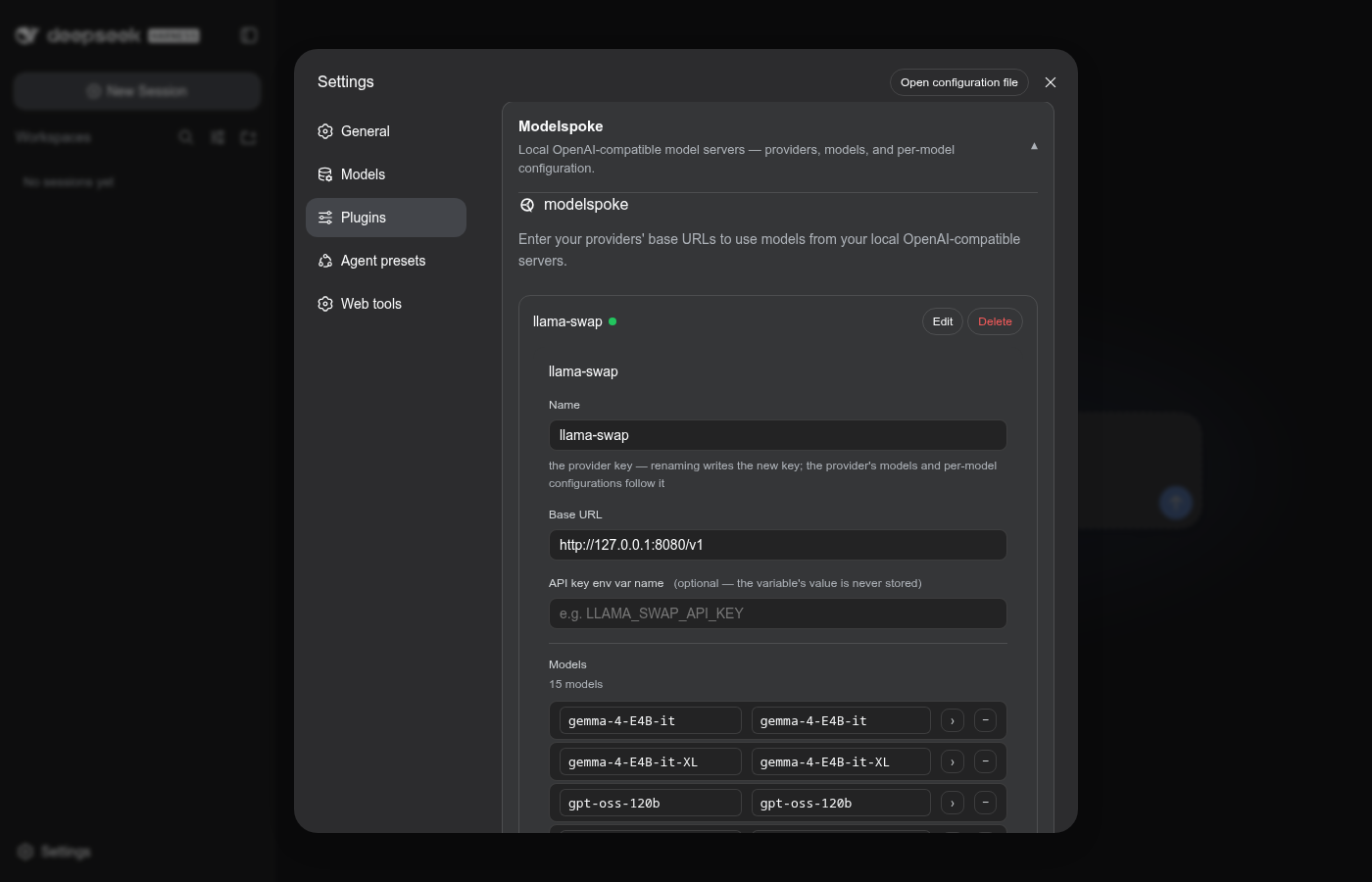
Point it at your server. Set the provider's name, its base URL, the
environment variable name holding the API key (omit for keyless local
servers — no auth header is sent in that case), and an optional default
effort (minimal … max) — then commit with the card's Apply
button. The row's status dot goes green once the model fetch succeeds.
Configure per model where you want to. Expanding a provider fetches its model list; each model row has a chevron that opens an editable detail (context window, max output tokens, the thinking-level map, nothink, image input, reasoning effort):
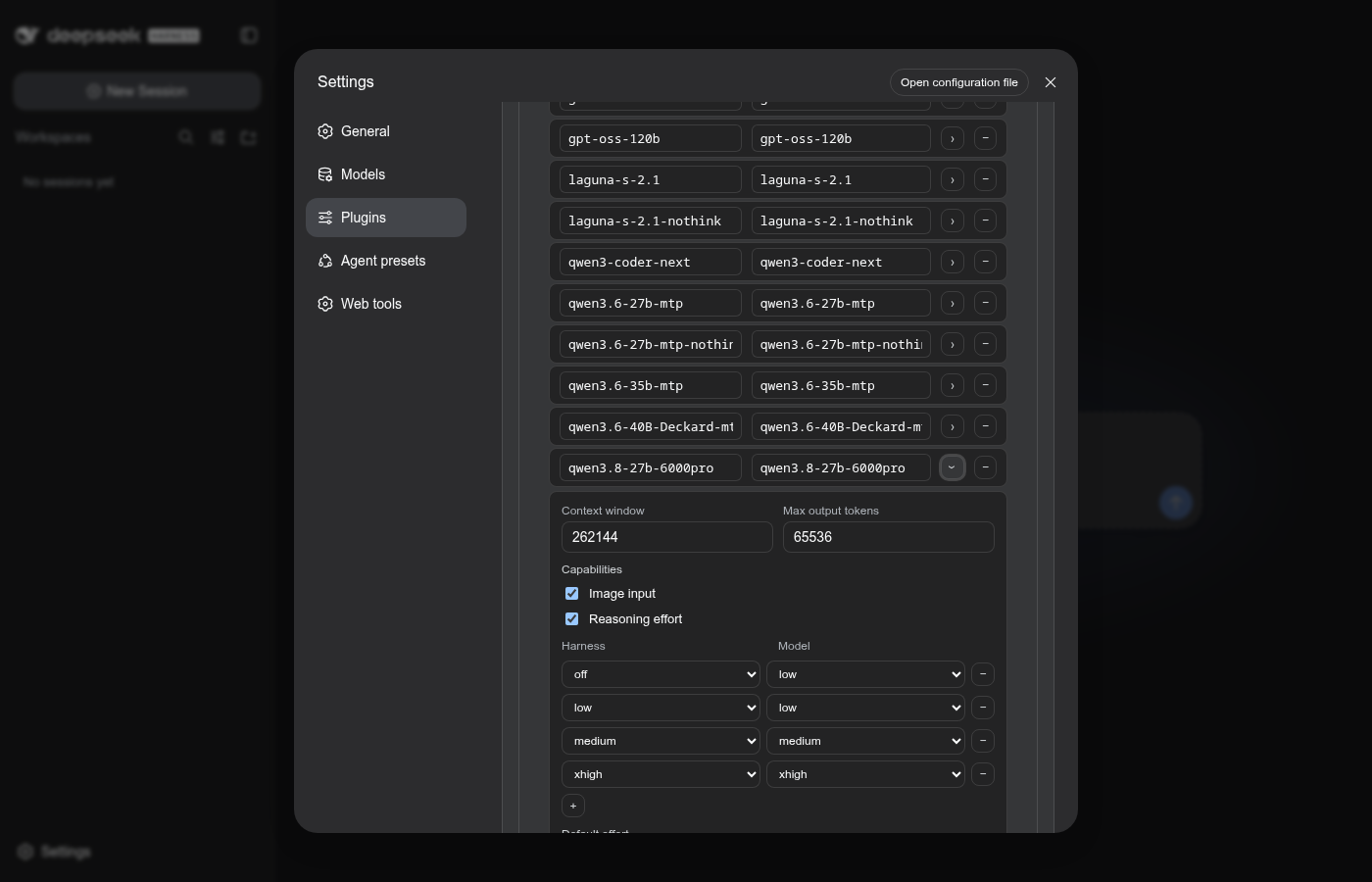
The model list is the curation — a model is addressable by the agent only while it is in the list; clearing a detail field releases that field back down the resolution chain.
preset-draft /
drift-check workflow)DeepSeek Harness(DSH)Web 插件聚合生态包 · 一切皆插件,创意工坊分发(dsh-market.com)
把回答做成一页可视化 HTML:模型只写简短的 Markdown 草稿,随包附带的 `am` 命令行生成页面,支持流程图、时序图、树、时间线、ER 图、表格和提示框。
在 dsh 里装上这个插件即可,无需登录、注册或填 API Key,就能使用包括 Muse Spark 1.3、MiMo V2.6 在内的前沿模型——完全免费,不限量。 All you do is install this plugin in dsh: no login, no sign-up, no API key — the frontier models are just there, Muse Spark 1.3 and MiMo V2.6 among them. Completely free, with no usage cap.

