

packages/dsh-task-board
zhu1090093659/dsh-web侧边栏多列任务看板:卡片交给真实 DSH 智能体会话执行,支持 cron 定时(Host 侧到点执行,关浏览器也生效)。
简体中文 · English
A persistent tmux control-mode cockpit for DeepSeek Harness Web. Create sessions or attach to existing ones with tmux -C, manage attached clients, render every pane with xterm.js, and keep the dock visible when you switch chats.
tmux owns the processes and layout; this plugin is only another view. It does not run tmux inside a browser terminal and does not require a PTY or native Node.js addon.
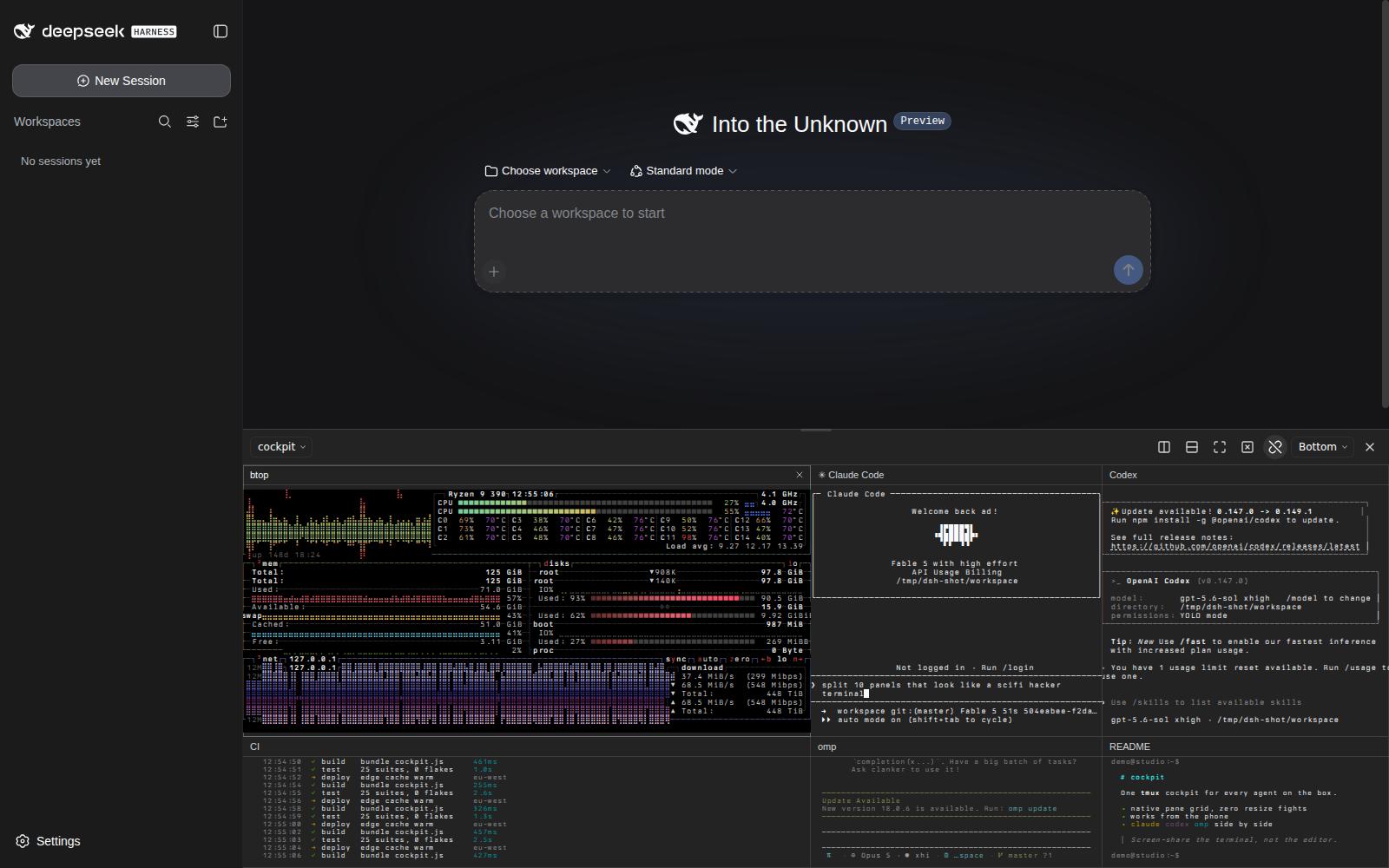
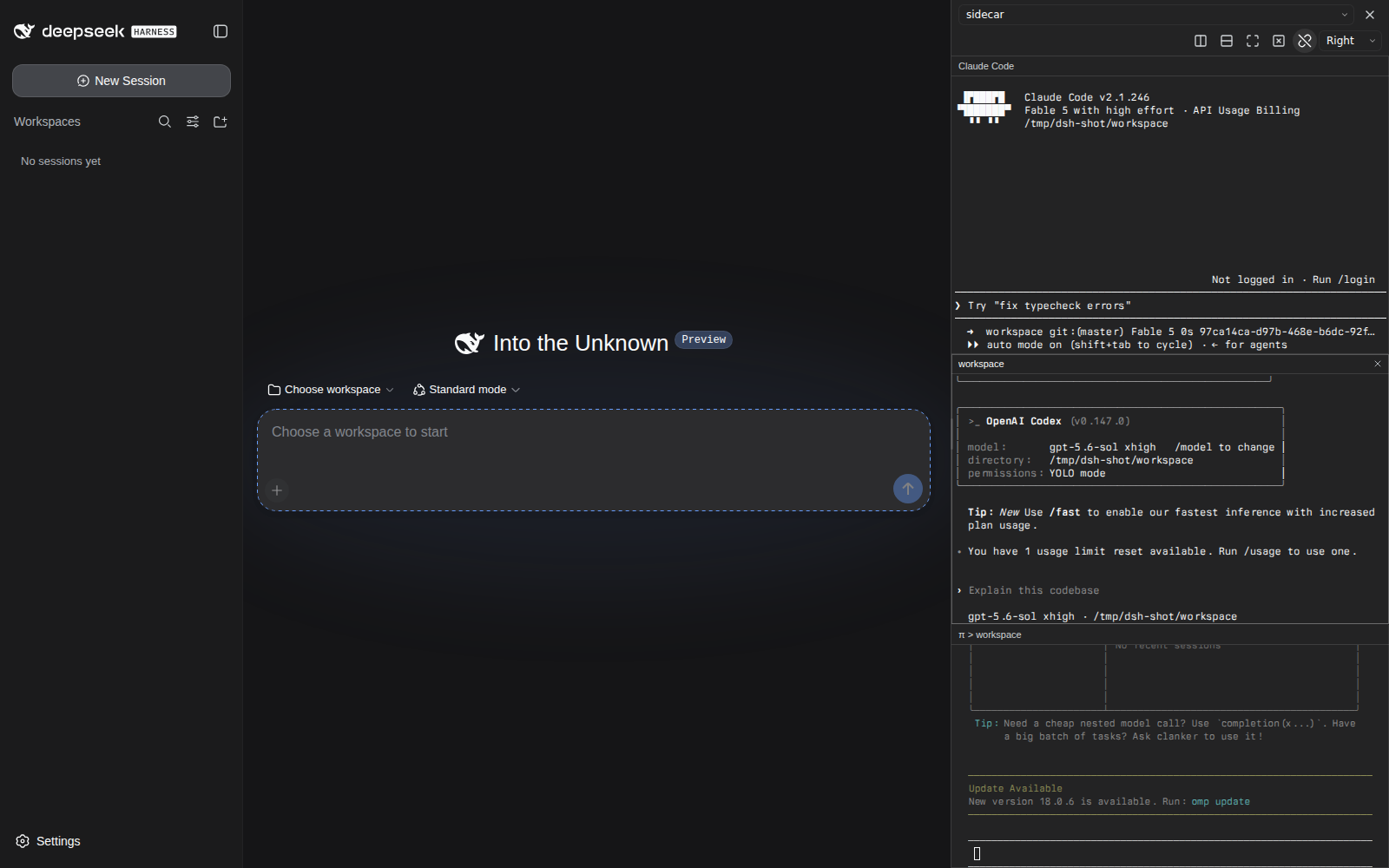
Desktop: bottom dock with six live panes — btop, Claude Code, Codex, a rolling CI log, omp, and a project README — mirrored without stealing window size (left); right-sidebar mode with three coding CLIs stacked (right).
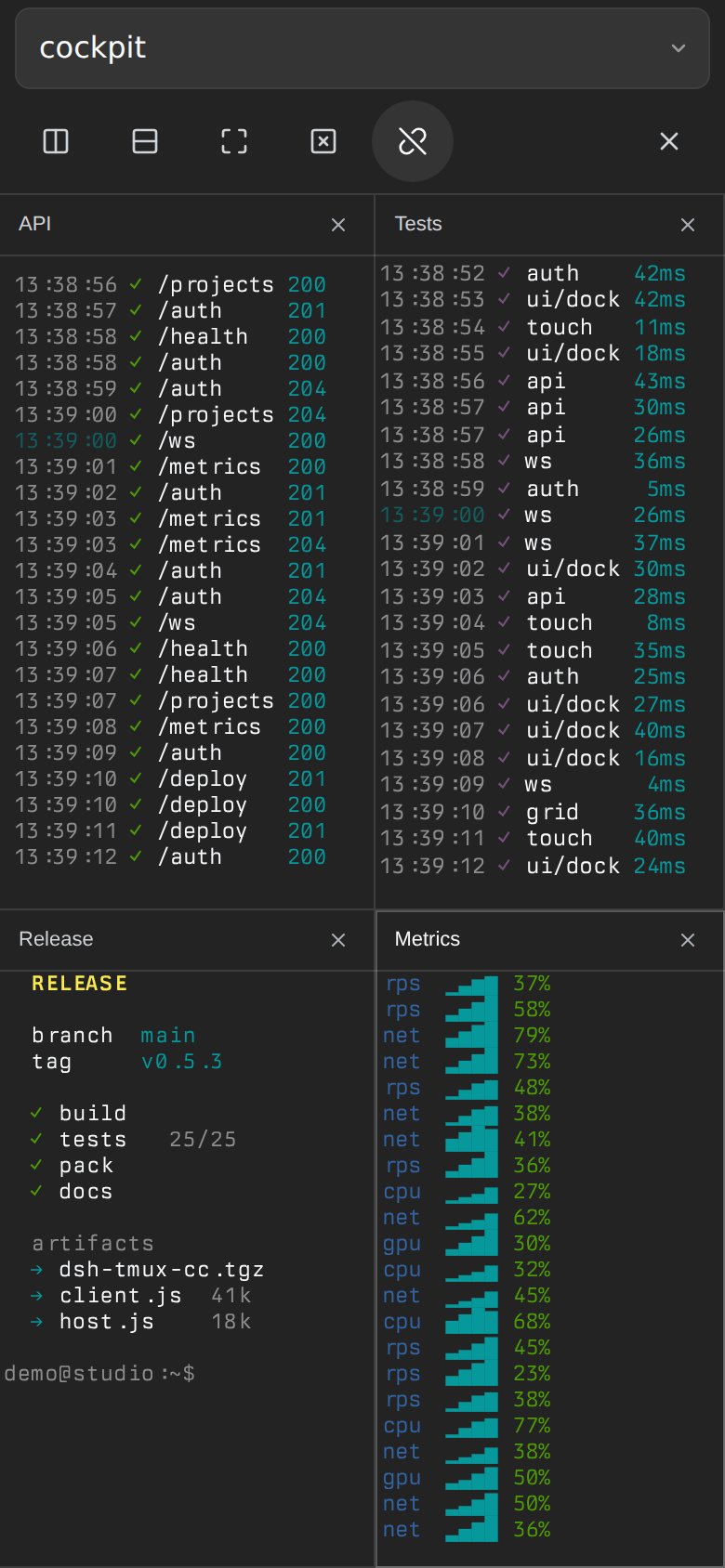
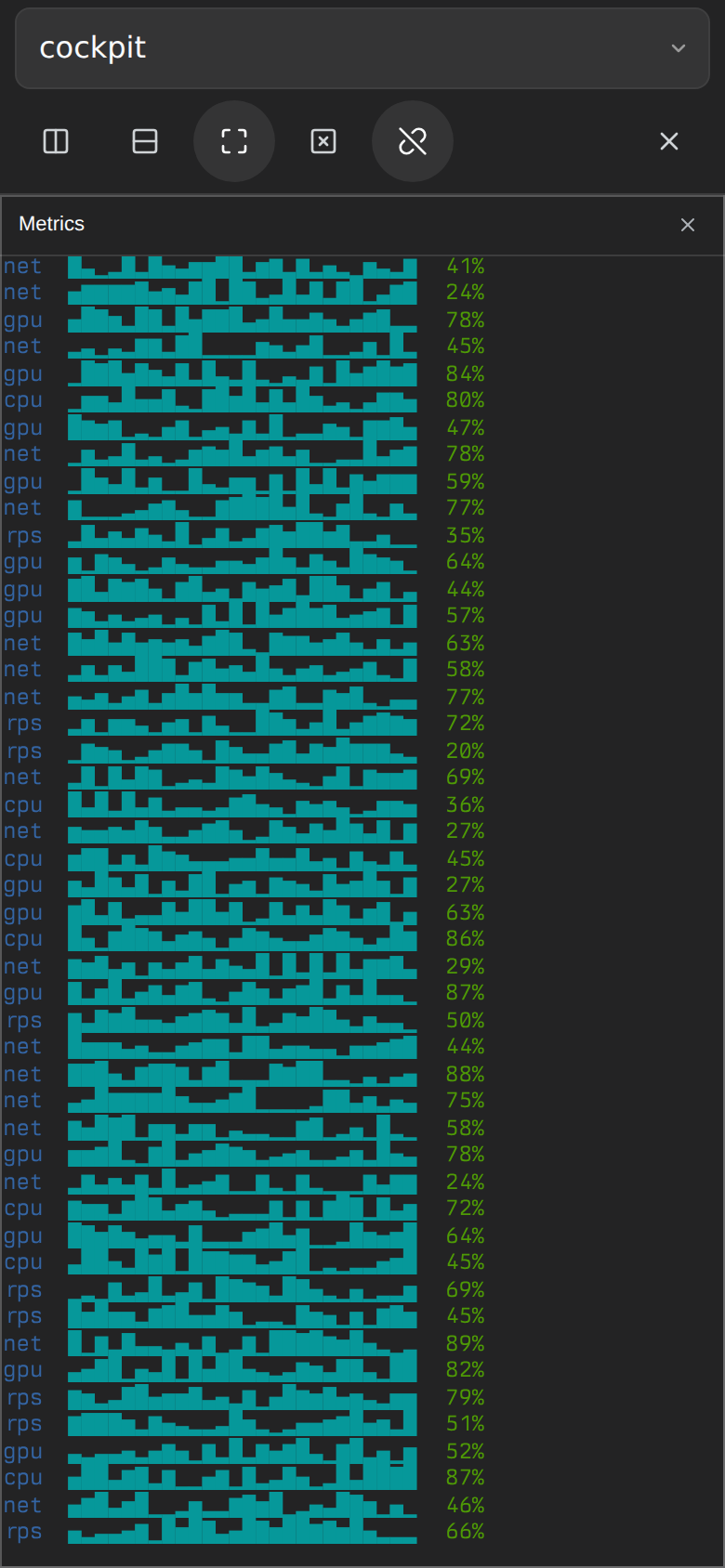
Mobile: the full-screen drawer preserves the real four-pane tmux grid (left); native resize-pane -Z zoom on the Metrics pane (right).
[!NOTE] All screenshots were generated from an isolated DSH profile and a dedicated tmux server containing synthetic demo data only. No prompts were ever sent to the agent CLIs shown; they sit at their welcome screens. Nothing pictured contains private conversations, workspaces, or terminal output.
ignore-size while another terminal is attached; takeover mode provides a crisp 1:1 grid when the dock is the only sizing client.send-keys -H, including Enter, paste, and Unicode.v0.7.1 is a GitHub-only release. Install its prebuilt package:
dsh plugin --profile web add https://github.com/adrianleb/dsh-tmux-cc/releases/download/v0.7.1/dsh-tmux-cc-0.7.1.tgz
The npm channel remains at v0.6.0:
dsh plugin --profile web add dsh-tmux-cc
From the GitHub source:
dsh plugin --profile web add github:adrianleb/dsh-tmux-cc
Or from a local clone:
git clone https://github.com/adrianleb/dsh-tmux-cc.git
cd dsh-tmux-cc

corepack enable
pnpm install
pnpm run check

dsh plugin --profile web add "$PWD"
Restart the existing dsh web process, then hard-refresh the Web GUI. A tmux button will appear in the bottom-right corner; Settings → tmux shows the dock's live state and another way to open it.
To update:
cd dsh-tmux-cc
git pull --ff-only
pnpm install
pnpm run check
# Restart dsh web, then refresh the browser.
The plugin refuses to kill the final pane in a session.
Open Sessions & clients from the dock toolbar (the grid/plus icon). It works even when the dock is detached or no sessions exist.
The manager refreshes every five seconds while visible and idle; Refresh reloads immediately. Errors stay visible without clearing form input. If a connection drops or a request times out, refresh before retrying: the operation may already have completed and mutations are never automatically replayed. Done or Escape closes the manager.
Shortcut interception is active only while an xterm pane has focus; dock controls, the DSH composer, and the rest of the browser keep their normal keys.
Press Ctrl+B, then:
| Key | Action |
|---|---|
| Arrow | Select the pane in that direction |
c | Create a tmux window |
n / p | Select the next / previous tmux window |
0–9 | Select the tmux window with that index |
x | Close the active pane, using the configured confirmation policy |
z | Toggle native tmux zoom |
d | Detach |
" / % | Split top/bottom / side-by-side |
Ctrl+B | Send a literal Ctrl+B to the active pane |
A pending prefix expires after 1.5 seconds and is then forwarded literally. Unsupported follow-ups also forward the pending Ctrl+B before passing the follow-up to xterm.
The following exact iTerm2 menu chords do not overlap DSH or documented Chrome shortcuts, so the plugin adapts them while an xterm is focused:
| Shortcut | Action in this plugin |
|---|---|
⌃⇧⌘D | Detach |
⌃⇧⌘N / ⌃⇧⌘T | Create a tmux window (shown as a dock tab) |
⌥⇧⌘N / ⌥⇧⌘T | Create a tmux window, adapting iTerm2's current-profile variants |
⌥⌘X | Close the focused pane using the configured confirmation policy |
⇧⌘Return | Toggle native tmux zoom |
⌃⌘Arrow | Resize the active pane one cell in that direction |
⌥⇧⌘H / ⌥⇧⌘V | Split top/bottom / side-by-side |
For a more comfortable optional pair, enable Compact split shortcuts under Settings → tmux → Behavior & safety: ⌥⌘D splits side-by-side and ⌥⇧⌘D splits top/bottom. This is off by default and stored per browser because some macOS configurations reserve ⌥⌘D for showing or hiding the Dock; a chord intercepted by macOS cannot reach the page.
Browser-reserved iTerm2 defaults are intentionally not intercepted: ⌘D and ⇧⌘D bookmark pages/tabs; ⌘W and modifier variants can close a browser tab or window; ⌘[/⌘] navigate history; and ⌥⌘Arrow switches browser tabs. Pause Pane and Dashboard have no matching dock operation. See the official iTerm2 tmux integration documentation.
At viewport widths below 768px, the cockpit follows the narrow-layout pattern established by dsh-better-sidebar:
Ctrl+B z. This sends tmux's native resize-pane -Z; tapping it again restores the grid. Double-tapping (or double-clicking) a pane title performs the same native toggle.visualViewport resize/scroll tracking keeps the terminal above the on-screen keyboard.The mode changes automatically and is re-evaluated every five seconds:
tmux attach or iTerm2 -CC client. The dock keeps ignore-size, never changes that client's geometry, renders each pane at its real cell size, and scales the font to fit (on mobile only down to the readable floor; beyond that the grid pans).ignore-size clients are present. The dock reports its available grid with refresh-client -C and renders at the native font size. Only desktop-width viewers report a grid; mobile viewers always mirror.Opening another tmux client moves the dock back to mirror mode; closing it returns the dock to takeover mode when the host-wide policy is Auto. Choose Mirror only in Settings → tmux → Behavior & safety if this plugin should never resize tmux windows. Mobile viewers remain mirror-only under either policy.
Settings → tmux separates browser-local presentation from the one behavior shared by the host:
Browser-local settings are versioned in local storage and never broadcast to other viewers. Reset preserves whether the dock is open and the browser's selected session. The sizing policy is registered through DSH's settings service, so a writable loopback settings provider persists it in the normal settings document.
Scrollback defaults to 2,000 lines and is bounded to 20,000 lines and 800 KB per pane. The value controls both xterm retention and tmux history requested after reconnect or a window switch. History replies return only to the browser that requested them; capture work is serialized and repeated pending requests from one browser coalesce to the newest request.
Pane-close confirmation is enabled by default. A single activation opens an explicit confirmation dialog; cancel leaves the pane untouched. Disable confirmation for one-click pane closing. The dock's Hide button always works on the first click and never kills a process. The host still refuses to kill the final pane in a session.
pnpm run check
pnpm exec playwright install --with-deps chromium webkit
pnpm test:browser
node --experimental-strip-types --test tests/native/*.test.ts
# Optional: verify the existing GUI's installed assets, with mocked tmux transport:
DSH_GUI_URL=http://127.0.0.1:3080 pnpm test:browser
Browser tests use real xterm in Chromium and WebKit with synthetic terminals; Chromium also receives trusted CDP touch input. Native tests create and clean up a separate tmux server. CHROMIUM_PATH can select an existing Chromium binary. No test sends input to an operator's panes. See UX verification for coverage and the physical-device keyboard checklist.
tmux-cc renders with xterm.js in the browser, so it can only use fonts installed on the computer viewing the GUI (or fonts served as @font-face). Fonts on the DSH host do not automatically appear in a remote browser.
With an empty font setting, the dock prefers this stack and lets CSS fall through to the first family the browser can resolve:
Berkeley Mono Nerd Font Mono, Berkeley Mono, JetBrainsMono Nerd Font Mono, FiraCode Nerd Font Mono, Hack Nerd Font Mono, then ui-monospace.
If Berkeley Mono is installed, the browser family names are typically Berkeley Mono and Berkeley Mono Nerd Font Mono (the Nerd cut is better if panes use powerline/nerd glyphs).
Set a custom stack in Settings → tmux → Terminal font, for example:
"Berkeley Mono", "Berkeley Mono Nerd Font Mono", ui-monospace, monospace
Leave the field empty to keep the default stack. Chromium can also list installed families via the Local Font Access API when you focus the input.
Optionally tick Also use this font for DSH code to set --ds-font-family-code (and --dsw-font-mono) so markdown, tool output, and sidebar terminals that follow the theme monospace pick up the same family. That does not restyle the whole DSH chrome; to change the UI sans-serif as well, inject CSS (dsh-better-sidebar custom scheme) such as:
:root {
  --dsw-font-family: "Berkeley Mono", ui-sans-serif, system-ui, sans-serif;
}
dsh-better-sidebar also has its own Terminal font family field under the side-card terminal settings; that applies only to sidebar PTY tabs, not to this tmux dock.
Add options to the plugin entry in your DSH Web profile:
- id: tmux-cc
  name: dsh-tmux-cc
  config:
    # Optional composition default. Settings → tmux can store a user override.
    sizePolicy: auto # auto | mirror

    # Optional. Defaults to $DSH_TMUX_BIN, then `tmux` from PATH.
    tmuxBin: /usr/local/bin/tmux

    # Optional named session recipes.
    layouts:
      - id: project
        label: Project cockpit
        session: project
        launch: /home/me/.local/bin/start-project-tmux
        launchArgs: ["--ensure-only"]
sizePolicy supplies the deployment default; a value saved through Settings is layered above it. auto permits takeover only when no external sizing client exists, while mirror always keeps this plugin out of tmux window sizing.
When a recipe's session does not exist, selecting it runs launch with launchArgs and then attaches. If launchArgs is omitted, it defaults to ["--ensure-only"]. Launcher configuration is trusted administrator input and runs with the DSH operating-system user's privileges. Host executable paths are never sent to the browser.
| Layer | Path | Responsibility |
|---|---|---|
| DSH host plugin | src/ | HTTP/WebSocket routes, tmux control client, layout and sizing state |
| Browser client | lib/client.js | DSH UI slots, dock, xterm.js panes, input and resizing |
| DSH bundle patch | cordis.patch.yml | Registers the host plugin in a profile |
| Tests | src/*.test.ts | Layout decoding, control protocol, safety, and client bundle invariants |
The host communicates with tmux over line-framed control mode. Command replies are paired using %begin/%end/%error tags, every command has a timeout, and unsolicited notifications trigger snapshot refreshes.
This plugin can send keystrokes to tmux sessions owned by the DSH operating-system user. Access to the DSH Web port is therefore shell-equivalent for that user's tmux sessions. The plugin does not add a separate login layer; it relies on DSH's network boundary and trusted-host configuration. Keep DSH loopback-only unless you have deliberately secured remote access.
Origin.attach -d and will not steal another attached client.Please report vulnerabilities privately as described in SECURITY.md.
web profile, run pnpm run build, restart the existing dsh web process, and hard-refresh.tmux list-sessions as the same OS user that runs DSH.tmux not found: set config.tmuxBin or DSH_TMUX_BIN to an absolute path.pnpm install
pnpm test
pnpm run typecheck
pnpm run build
pnpm run check runs all three validation steps. Contributions are welcome; see CONTRIBUTING.md.
侧边栏多列任务看板:卡片交给真实 DSH 智能体会话执行,支持 cron 定时(Host 侧到点执行,关浏览器也生效)。
DSH Web UI 插件与皮肤合集:任务看板、git 图、右侧面板、远程移动端 UI、桌宠、实时 token 统计与皮肤中心。
助手回复内渲染交互式 UI 组件:布局、图表、表单、测验、mermaid、3D 场景与回传事件循环。
