
dsh-web
zhu1090093659/dsh-webDeepSeek Harness(DSH)Web 插件聚合生态包 · 一切皆插件,创意工坊分发(dsh-market.com)

Automated backups of DSH sessions, config and custom directories — scheduled or manual, packed as tgz with rotation
Unofficial project: independently developed and maintained by a community member, not an official DeepSeek product.
Automated backups of your DSH data — sessions, profile config and any custom directories — packed into .zip archives with scheduled or manual runs and automatic rotation.
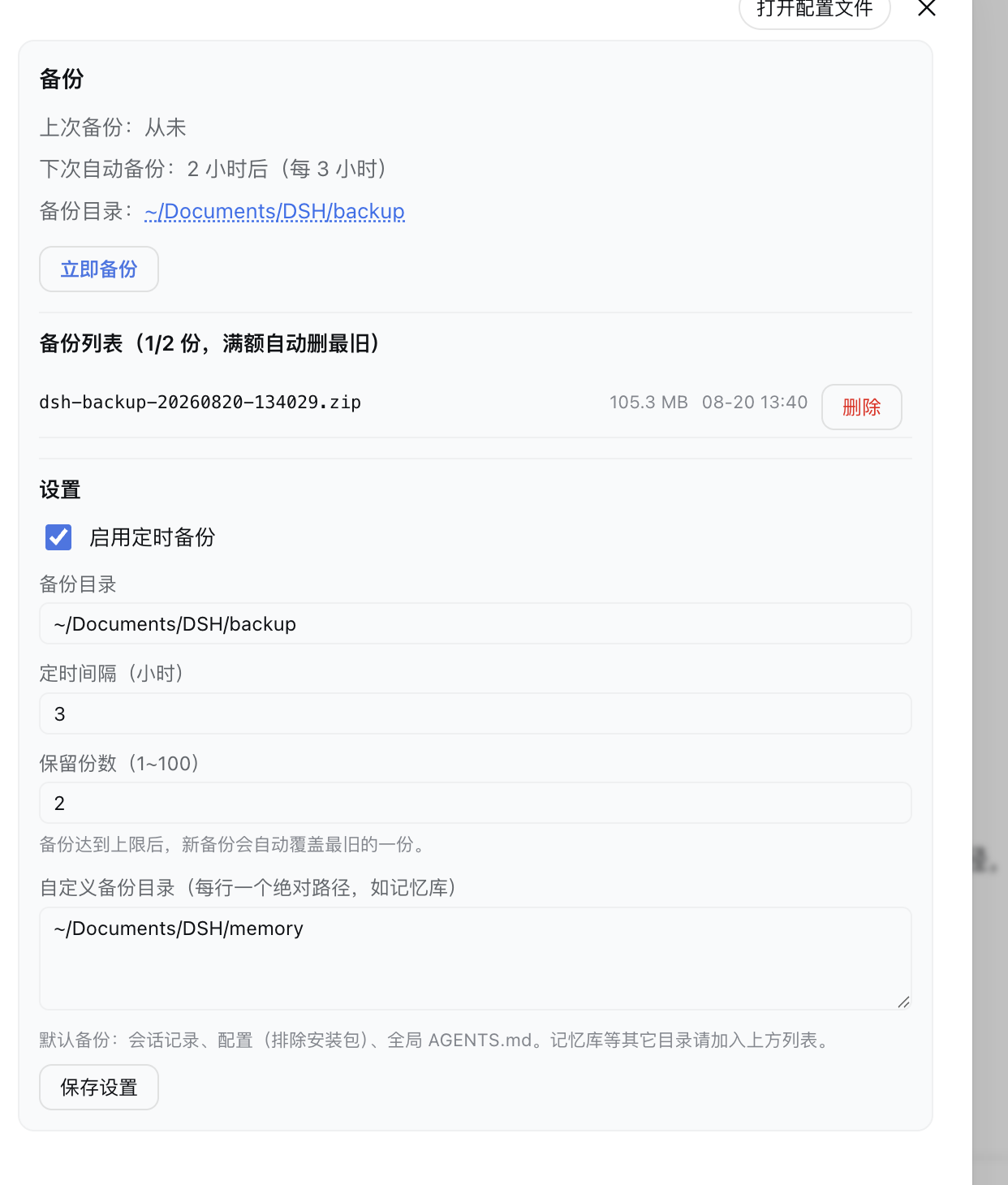
| Action | Effect |
|---|---|
| Scheduled backup | Packs DSH data on a timer (default every 6 h) |
| Manual backup | One-click "Back up now" from the Settings page |
| Custom directories | Add extra paths (e.g. your memory library) per line |
| Rotation | Keeps only the latest N archives (default 10), old ones are deleted |
| Restore | Manual only — extract an archive back to its original location (steps in docs/install.md) |
What is backed up by default (expanded in v0.4.0): ~/.dsh/sessions (conversation history), ~/.dsh/profiles (config, excluding node_modules), ~/.dsh/AGENTS.md (global conventions), ~/.dsh/cordis.patch.yml (global patch layer), ~/.dsh/storages (scheduled tasks / workspaces, excluding the projection cache), ~/.dsh/bin (your own scripts), root-level small configs (*.json/yml/yaml/txt, < 1 MB), ~/.dsh/attachments (uploaded originals — on by default, toggle it off in Settings), and credentials (.credentials.yaml / llm-deepseek, on by default; ⚠️ the zip is not encrypted — turn it off and a restore needs you to sign in / re-enter keys). Everything else — like your memory library — goes into the custom directory list.
Skipped automatically (noise / rebuildable): .DS_Store, *.lock, *.bak-fix, *-shm/*-wal, storages/session_projcache*. Never backed up (reinstall/rebuild): session-index.sqlite, cache/, dsh-runtimes/, speech-to-text/.
# DSH 0.1.7 and later:
dsh plugin --profile web add "github:a903067276-rgb/dsh-backup#main"
# DSH 0.1.5 and older (this release needs 0.1.7+):
# dsh plugin --profile web add "github:a903067276-rgb/dsh-backup#v0.1.4"
Then restart dsh web. Manual fallback: docs/install.md.
Open Settings → Backup:
| Platform | Status |
|---|---|
| macOS | ✅ tested |
| Linux | ✅ expected (pure Node, no system zip required) |
| Windows | ✅ expected (pure Node, no system zip required) |
key+id registration to satisfy both rc.6 (id) and rc.7+ (key); verified locally on rc.6/rc.8/0.1.1-rc.2/0.1.5-rc.1, not guaranteed on every DSH version):
main (default).Config schema (all .volatile()), so Settings saves go through the official settings service and apply immediately, no restart. Host config the plugin writes lands in its own profile entry (settings.update(entryId, patch)); needs @deepseek-ai/schemastery ≥ 3.18.3 (ships with 0.1.7).settings/shell and touches none of the contracts changed in 0.1.5. The end-to-end backup/restore flow was not re-tested on 0.1.5.v0.1.2 (dsh plugin add github:a903067276-rgb/dsh-backup#v0.1.2); DSH 0.1.0-rc.6 → frozen rc6-compat tag (no maintenance).v0.3.2): it declares peerDependencies: {"@deepseek-ai/dsh": "^0.1.7-rc.1 || ^0.2.0-rc.1"}, so a mismatched host refuses to load it with an explicit reason instead of failing quietly. Settings move to the 0.1.7 model (plugin Config, live-editable .volatile() fields), so changes apply without a restart.^0.1.7-rc.1 || ^0.2.0-rc.1) and dsh.compatibility.dshReleases adds "0.2.0-rc.1": "compatible" — verified on a real 0.2.0-rc.1 host and a shadow instance. Since 0.2 the host gates profile bundles on peer compatibility and skips the whole bundle when the declared range misses the running host, so this range is what keeps the plugin loading.v0.1.4: that line keeps the old behavior and uses no 0.1.7-only API.v0.1.4) are not supported on 0.1.7 — settings silently become defaults (settings.register/get are gone). Upgrade the plugin together with the host.lib/zip.js, pure Node streams — no system zip, no shell, immune to the session sandbox), a timer-driven schedule, and a /api/dsh-backup/* route for the Settings page.settings.section, "备份") that lists backups and edits configuration; saving goes through the official settings service into the plugin's profile-entry config (volatile fields — takes effect immediately, no restart; a restart is only needed on pre-0.1.7 hosts, which fall back to writing the patch file).~/Documents/DSH/backup and can be changed in Settings.dsh-backup-*.zip) are listed/deleted — other files in the folder are left alone.MIT
DeepSeek Harness(DSH)Web 插件聚合生态包 · 一切皆插件,创意工坊分发(dsh-market.com)
把回答做成一页可视化 HTML:模型只写简短的 Markdown 草稿,随包附带的 `am` 命令行生成页面,支持流程图、时序图、树、时间线、ER 图、表格和提示框。
在 dsh 里装上这个插件即可,无需登录、注册或填 API Key,就能使用包括 Muse Spark 1.3、MiMo V2.6 在内的前沿模型——完全免费,不限量。 All you do is install this plugin in dsh: no login, no sign-up, no API key — the frontier models are just there, Muse Spark 1.3 and MiMo V2.6 among them. Completely free, with no usage cap.

