
dsh-web
zhu1090093659/dsh-webDeepSeek Harness(DSH)Web 插件聚合生态包 · 一切皆插件,创意工坊分发(dsh-market.com)

通过 UI Automation 控制 Windows 桌面:九个工具读取窗口控件树、按 id 走控件自身的 UIA 模式操作,每次写入都受审批策略、动作日志与设置面板约束。
Windows desktop control for DeepSeek Harness (DSH) through UI Automation: read a window's control tree, drive elements by id, approve every write, and watch it all in the settings panel.
No screenshots, no guessed coordinates. The control tree comes straight from Windows UI Automation (UIA), so every element has a stable id, a control type, a name, a rectangle, and the list of UIA patterns it supports. Clicking prefers the element's own Invoke/Value/Selection pattern, which means covered windows still work and your mouse never moves.
Agent ──▶ desktop_* tools (host plugin: approval + audit + rendering)
        ──▶ UiaSidecar.exe (C#/.NET: UI Automation + input injection + GDI capture)
        ──▶ target application
                 │
                 └─▶ browser panel (Settings → Desktop control): windows / tree / action log / policy
Docs: English user guide · 中文使用说明 · 中文技术说明
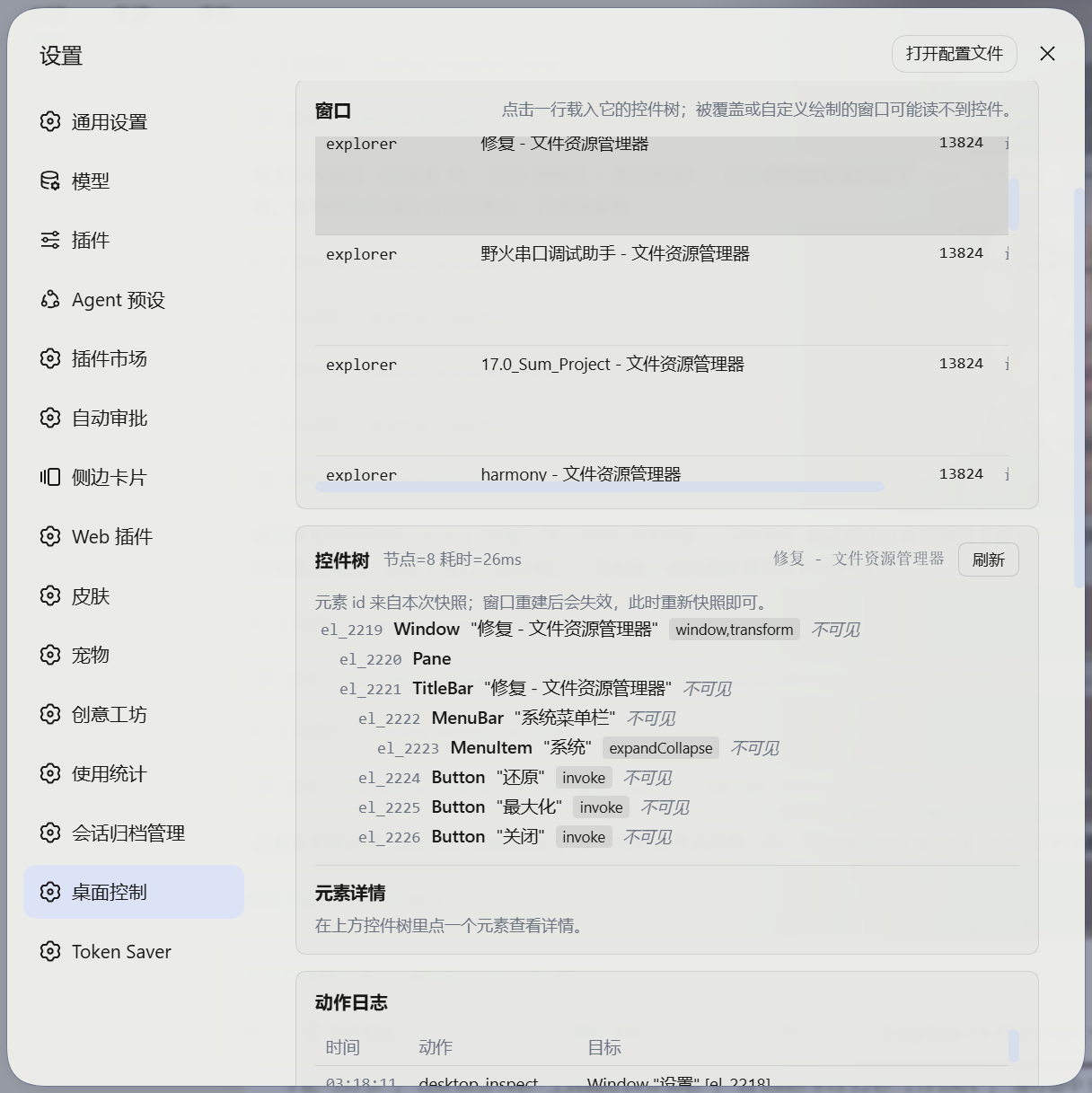
Settings → Desktop control: service state, the live window list, the control tree with element details, and the action log.
| OS | Windows 10 or 11 (x64) |
| DSH | a profile-based install that accepts third-party bundles (verified against the 0.1.2‑rc.1 / 0.1.5‑rc.1 plugin contracts) |
| Toolchain | none — the sidecar is compiled by the in-box .NET Framework C# compiler (%WINDIR%\Microsoft.NET\Framework64\v4.0.30319\csc.exe). No .NET SDK, no NuGet, no MSVC, no network. |
Easiest, no command line: download the zip from
Releases, unzip it anywhere and
double-click install.cmd. That package already contains a compiled sidecar, so nothing is built;
the script installs the plugin into your DSH profile and runs a self-check. Restart DSH Desktop afterwards.
From npm (published as dsh-desktop-uia):
dsh plugin --profile web add dsh-desktop-uia
The published package also carries the compiled sidecar, so this needs no compiler either. It is listed as
win32-only, so a non-Windows machine refuses the install instead of ending up with a plugin that cannot work.
From a clone or the source folder:
powershell -ExecutionPolicy Bypass -File install.ps1
The script:
sidecar\UiaSidecar.exe with the in-box compiler — skipped when a compiled exe is already there, and forced with -Rebuild,pnpm add file:<this folder> inside the profile, so the plugin lands in the profile's own node_modules,dsh-desktop-uia to the profile's dsh.profile.bundles layer list,Then restart DSH Desktop (or reload the profile). The desktop_* tools and the panel appear.
# options
install.ps1 -Profile web -DshHome "D:\dsh-home" -AppRoot "D:\DSH\resources\app" -NoBuild -SkipDoctor

# update after editing the source (the profile holds a real copy, so re-run it)
install.ps1 -Rebuild

# uninstall (-Purge also deletes stored settings and the action log)
uninstall.ps1 [-Purge]
Why file: and not link: — with link: the module stays at its original path, where Node cannot resolve @deepseek-ai/dsh-tools (harness packages exist only inside the profile's node_modules chain) and DSH fails to boot with ERR_MODULE_NOT_FOUND. file: places a real copy inside the profile, which resolves correctly. install.ps1 drives pnpm directly because dsh plugin add forwards arguments through a shell, which splits a path containing spaces.
| Tool | What it does | Approval |
|---|---|---|
desktop_windows | List top-level windows (hwnd/pid/process/title/rect/state) and manage one: focus, minimize, maximize, restore, show, hide, move, resize, always-on-top, close | only list and focus are free |
desktop_snapshot | Read a window's control tree; with query, find elements by name/type/automation id; patterns is auto (budgeted probing, default), all, or none (fastest) | read-only |
desktop_inspect | Every property of one element: framework, class, focus/enabled state, supported patterns, plus value, toggle state, selection, table rows, text | read-only |
desktop_act | click, rightClick, doubleClick, hover, focus, invoke, setValue, select, addToSelection, toggle, expand, collapse, scrollIntoView, scroll, drag | required |
desktop_input | Type Unicode text (CJK works) or send key combinations (ctrl+s, alt+f4) | required |
desktop_wait | Wait for a window, an element, a value, or an element to disappear instead of sleeping | read-only |
desktop_launch | Start a program, open a document or a URI (notepad, ms-settings:, a path) | required |
desktop_clipboard | Read or replace clipboard text | write requires approval |
desktop_screenshot | Capture a window or the whole desktop to PNG; returns the image itself when the current model accepts image input, otherwise the file path | read-only |
Two parts of a result matter most:
via InvokePattern means a pattern was used (no cursor movement); via mouse means coordinate clicking.no structural change usually means the action did not take effect: re-read the window instead of clicking again blindly.Element ids (el_12) are keyed on the UIA runtime id, so they stay stable across re-snapshots of the same window and go stale only when the window rebuilds itself — in which case the tool reports STALE_ELEMENT and tells the model to snapshot again, rather than failing silently.
Four behaviours exist because an agent that cannot see the screen makes predictable mistakes. All four are in the tool text, not in the docs, so the model reads them exactly when they apply.
new window appeared: "另存为" (notepad pid=111) — snapshot hwnd 0x22 to work there. A dialog opened by a click, or a second window opened by a launch, is therefore visible to the model instead of silently swallowing the next action. desktop_launch additionally waits up to 5 s for the window it opened and reports its hwnd.desktop_snapshot with a query {name|type|aid} instead of a whole tree, and — from the next read on — silently capped (maxNodes 300, maxDepth 5) unless the call asks for more.click/doubleClick/invoke calls on the same element that both end in no structural change are allowed but labelled (this is no-op click number 2…); the third identical one is refused with instructions to inspect the element, scroll it into view, or use setValue/select/expand/toggle. State-bearing controls (checkbox, combo box, slider, scroller — toggle, expandCollapse, selectItem, rangeValue, scroll, value) are exempt, because their change can be invisible to a structural diff. A fresh desktop_snapshot clears the counter, and desktop_act {force: true} overrides the guard.A write action passes two layers:
denyActions → denyProcesses → allowProcesses (when non-empty, everything else is refused) → trustedProcesses (skip the prompt).ctx.approval), according to the mode:| Mode | Behaviour |
|---|---|
ask (default) | Follow DSH: prompt while DSH prompts (the same UI as shell-escalation approval); run directly while DSH has prompts switched off (e.g. the danger-full-access preset). |
always | Independent of the DSH preset: refuse whenever nobody can be asked. |
never | No prompts at all. |
ask is the default because a session whose DSH policy is never would otherwise fail every click: a plugin-local "refuse when nobody answers" rule cannot be satisfied when the deployment has deliberately disabled prompting. Set always to gate independently of the DSH preset.
Every action is written to the action log (<DSH_HOME>\storages\dsh-desktop-uia\audit.jsonl, reads included, so "what did the model look at" is answerable) with time, tool, target window, outcome and refusal reason. Turn Log read-only calls too off in the panel when a long control-tree exploration should not crowd the log — writes alone decide what happened. A refusal is a normal result: the tool returns refused with the reason and tells the model not to retry the same call unchanged.
Boundaries — reported explicitly instead of pretending to work:
point) cannot be attributed to a process in advance, so the process lists do not apply to them — prefer element ids.The panel only observes and configures: it cannot click or type, so every state change still goes through a tool call and the approval policy.
Ask in plain language — the model picks the tools:
Open Calculator, work out 1234 × 56, and tell me the result.
Is Wi-Fi currently on? Check the Settings window.
Type "tomorrow's todos" into Notepad and press Ctrl+S.
Practical rules: name the target window, keep to one step at a time, and when something looks wrong ask it to re-read the current state. The user guide goes further — including what to do when a window exposes no controls at all. 中文说明:使用说明.md。
node --import ./test/helpers/register.mjs --test "test/*.test.mjs"   # 84 cases: format, policy, store, runtime, all 9 tools, panel render + real DOM
node scripts/doctor.mjs                                              # machine + sidecar + live desktop + the whole tool layer
$env:DSH_UIA_LIVE=1; node --test "test/sidecar.live.test.mjs"        # real-desktop integration
sidecar\build.ps1 -SelfTest                                          # sidecar only
The panel suite runs twice: once against a hook stand-in that captures what the component returns, and once mounted by real React into jsdom, which additionally exercises the mount load, window selection, tree selection and a settings save (react, react-dom and jsdom are development dependencies; both suites skip themselves when they are absent).
What was verified on a real Windows 11 machine:
scripts/doctor.mjs is green end to end: sidecar at PerMonitorV2, 22 windows enumerated, foreground window read in ~100 ms, element query hits, screenshot, clipboard, the coordinate invariant below, all 9 tools registered and exercised against the live desktop.WindowFromPoint and must land on that element's own window. A DPI or virtual-screen mistake otherwise stays invisible, because a click at the wrong point still reports success.0x1310B8, found within the 5 s budget), the window-set diff reported it, the new window read 52 nodes, closing it reported WindowPattern.Close, and the repeat guard blocked the third identical no-op click./plugins/dsh-desktop-uia/state answers 401 without the browser cookie and 200 with it, the client bundle appears in the boot graph, and driving it through its own routes starts the sidecar and lists 19 real windows.Invoke clicks (7, +, 8, =), each reporting its own diff → the display reads 15 → desktop_inspect confirms the element → the window is closed with WindowPattern.Close and a gone wait confirms it in 11 ms.Measured performance (same machine): Windows Terminal 23 elements 30–150 ms, Explorer 10–20 ms, VMware Workstation 77 elements ≈1 s, an Electron/Chromium window ≈1–2 s (its provider is simply slow; patterns:"none" is the fastest read there).
Publishing runs in CI with npm trusted publishing:
.github/workflows/publish-npm.yml compiles the sidecar, runs the suite, verifies the tarball, and
publishes with a short-lived OIDC token — no npm token is stored in the repository, in a secret, or
on anyone's machine, and npm attaches a provenance attestation to the release. Creating the GitHub
release is the whole procedure; the workflow does the rest.
pnpm run publish:npm still exists for local publishing (it runs the same preflight checks and needs
an npm login), but it is not the normal path: npm requires 2FA or a bypass-2FA token for publishing,
and bypass tokens stop working for direct publishing in January 2027.
| Symptom | Cause and fix |
|---|---|
| Access denied / elevation hints | The target runs as administrator. Start DSH elevated. |
STALE_ELEMENT / UNKNOWN_ELEMENT | The window rebuilt; snapshot again. |
| Terminals, games, Paint expose almost no controls | They draw themselves; UIA only sees the shell. Use desktop_screenshot, or coordinate clicks for that window. |
WINDOW_MINIMIZED / WINDOW_OCCLUDED on capture | A minimized window has no pixels; a fully covered window that does not support PrintWindow must be brought to the front first. |
| Coordinate clicks land in the wrong place | Mixed-DPI multi-monitor setups. The sidecar declares PerMonitorV2 in its manifest; prefer element ids over coordinates. |
| Electron/Chromium windows are slow to read | The provider itself is slow (roughly 1–2 s regardless of element count). The tool now says so and caps the next read automatically; use patterns:"none", or query to fetch just the element you need. |
| The agent keeps clicking the same control with no effect | The third identical no-op click is refused on purpose. Re-snapshot the window, desktop_inspect the element, or act differently (setValue/select/toggle); desktop_act {force: true} bypasses the guard. |
| A copy of the plugin is edited but nothing changes | DSH loads the copy under <DSH_HOME>\profiles\<profile>\node_modules\dsh-desktop-uia, not your checkout. Run scripts/dev-sync.ps1 and restart DSH; node scripts/doctor.mjs reports when the installed copy is stale. |
| Sidecar hangs or dies | Requests each run on their own thread behind a watchdog: a hang returns TIMEOUT and the sidecar stays usable; after five consecutive hangs it exits and the host starts a fresh one on the next call. |
| Panel 404 | The host half is not mounted: the profile's bundle list lacks dsh-desktop-uia, or DSH was not restarted. |
| Panel 401/403 when opened directly | Working as intended — the routes require the DSH browser-auth cookie. |
dsh-desktop-uia/
├── package.json            # dsh.bundle.patch + dsh.client (platform: web)
├── cordis.patch.yml        # inserts the plugin row into the profile composition
├── lib/
│   ├── index.js            # host entry: config, prompt section, lifecycle
│   ├── tools.js            # the 9 desktop_* tools (schemas, rendering, approval wiring)
│   ├── service.js          # runtime: sidecar calls, snapshot cache, element→window map, rendering
│   ├── approval.js         # policy: process lists + the three approval modes
│   ├── format.js           # tree text, structural diff, element/window descriptions
│   ├── store.js            # settings + audit trail (atomic writes, JSONL append)
│   ├── routes.js           # panel HTTP routes (behind the DSH connection fence)
│   ├── sidecar.js          # sidecar lifecycle: line JSON-RPC, timeouts, self-healing
│   └── client.js           # browser half (module-loader classic script, no build step)
├── sidecar/
│   ├── UiaSidecar.cs       # UI Automation read/act/input + GDI capture (C# 5)
│   ├── Program.cs          # line protocol, watchdog, error codes, --selftest
│   ├── UiaSidecar.manifest # PerMonitorV2 + asInvoker
│   └── build.ps1           # compiles with the in-box csc.exe
├── scripts/
│   ├── doctor.mjs          # end-to-end diagnostics (incl. stale-installed-copy and coordinate-invariant checks)
│   └── dev-sync.ps1        # copy this checkout into the profile DSH actually loads
├── test/                   # node:test suites + fake ctx / fake sidecar / React shim / real-DOM panel suite
├── install.cmd / uninstall.cmd        # double-click entry points (release package)
├── install.ps1 / uninstall.ps1
└── README.md · GUIDE.md · README.zh-CN.md · 使用说明.md
CacheRequest and issuing a single FindAll returns the entire subtree with its properties in one cross-process round trip. Two API facts cost real debugging time and are documented in the source: the cache scope must be Subtree (Descendants returns the collection but every Cached read throws), and TreeScope.Parent is rejected outright — including it silently pushed every read onto the explicit-walk fallback.desktop_inspect fills in one element on demand). The same window went from ~20 s to ~2 s.el_57 across turns.DeepSeek Harness(DSH)Web 插件聚合生态包 · 一切皆插件,创意工坊分发(dsh-market.com)
把回答做成一页可视化 HTML:模型只写简短的 Markdown 草稿,随包附带的 `am` 命令行生成页面,支持流程图、时序图、树、时间线、ER 图、表格和提示框。
在 dsh 里装上这个插件即可,无需登录、注册或填 API Key,就能使用包括 Muse Spark 1.3、MiMo V2.6 在内的前沿模型——完全免费,不限量。 All you do is install this plugin in dsh: no login, no sign-up, no API key — the frontier models are just there, Muse Spark 1.3 and MiMo V2.6 among them. Completely free, with no usage cap.

