
dsh-web
zhu1090093659/dsh-webDeepSeek Harness(DSH)Web 插件聚合生态包 · 一切皆插件,创意工坊分发(dsh-market.com)

DSH WebUI plugin for managing custom LLM providers, model parameters, thinking budgets, and request settings.
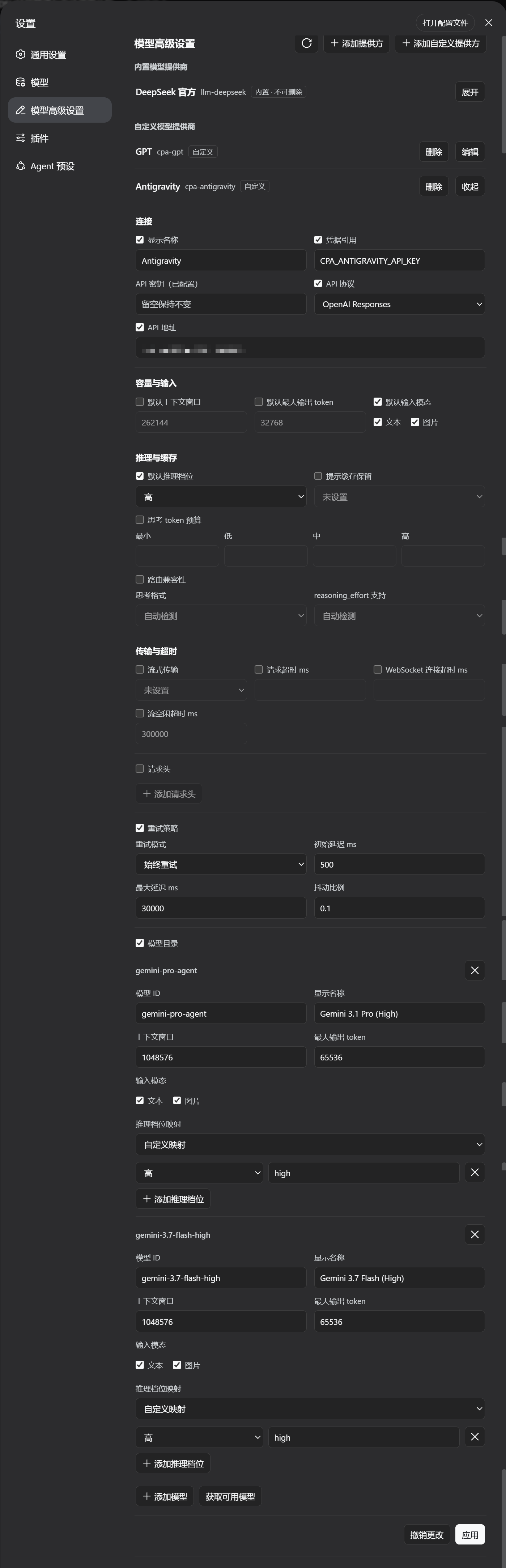
A DeepSeek Harness WebUI plugin that adds an Advanced Model Configuration section to the
Settings page. It manages LLM provider profiles across the settings namespaces — the
custom provider namespace (llm-pi-ai) and the official provider namespace
(llm-deepseek) — including built-in and custom providers, model lists,
reasoning/thinking options, headers, retry policy and more, with the same validation
and conflict rules as the official settings UI.
Reads and writes ride DSH's shared settings services (ctx.configForms /
ctx.settingsSchema), so this page and the official Models page share one document
mirror and one revision queue instead of racing each other. The section appears only
while one of its namespaces is actually served, and it shows the provider facts DSH
0.2.1 reports — the endpoint a profile inherits (defaultBaseURL / baseURLEnv), the
route's own authentication (nativeAuth, including OAuth) and any catalog diagnostic —
so a keyless route no longer reads as a missing credential.
>= 0.2.1-rc.2 — only the current release is supported. There is no
backward-compatibility layer for older DSH versions.^22.19 || >=24.Install directly from the GitHub dist branch (pre-built by CI, no manual clone or compilation required):
dsh plugin --profile web add github:u9521/dsh-advanced-model-editor#dist
Then restart web (dsh web) and hard-refresh your browser (Cmd+Shift+R). The plugin appears as Advanced Model Configuration in Settings.
Use the dsh plugin update command to pull the latest dist release:
# upgrade to the latest dist release
dsh plugin --profile web update @local/dsh-advanced-model-editor

# or re-add the dist branch
dsh plugin --profile web add github:u9521/dsh-advanced-model-editor#dist
Then restart web and hard-refresh your browser.
npx get-pnpm (see https://pnpm.io/installation; alternatives:
corepack enable or npm install -g pnpm). Required both for building and because
dsh plugin --profile web add forwards to pnpm internally.^22.19 || >=24.Clone the repository into the recommended location:
git clone https://github.com/u9521/dsh-advanced-model-editor.git ~/.dsh/plugins/dsh-advanced-model-editor
cd ~/.dsh/plugins/dsh-advanced-model-editor
The build output (lib/) is not committed to the source branch — build it yourself for local development:
pnpm install
pnpm run build
pnpm run build runs tsc (type check + emit lib/types/) and tsdown (bundle
lib/index.js + lib/client.js) with the project's own dependencies — no DSH source
checkout is needed. The browser half is a self-contained closure factory for the DSH
client module table; the whole platform-module contract lives in tsdown.config.mjs.
Verify the build with:
pnpm test
dsh plugin --profile web add ~/.dsh/plugins/dsh-advanced-model-editor
Then restart web (dsh web) and hard-refresh the browser (Cmd+Shift+R).
| Command | Description |
|---|---|
pnpm run build | Full build (runs tsc type check + generates lib/ bundles) |
pnpm run check | Type check only (tsc --noEmit) without emitting files |
pnpm test | Full build, then run the test suite (node --test) |
pnpm run lint | ESLint, type check, test suite, and Prettier check in one pass (CI gate) |
pnpm run lint:fix | Apply ESLint fixes, then rewrite the files with Prettier |
pnpm run fmt | Format source and config files with Prettier |
pnpm run fmt:check | Check code formatting compliance |
When installed locally, the plugin is linked via link: into the profile. Upgrading local sources only requires pulling the latest commit and rebuilding — no need to re-run dsh plugin add:
cd ~/.dsh/plugins/dsh-advanced-model-editor
git pull
pnpm run build
(If dependencies changed, run pnpm install before building)
Then restart web (dsh web) and hard-refresh the browser (Cmd+Shift+R).
Whether installed from GitHub or linked from local sources, uninstall with:
dsh plugin --profile web remove @local/dsh-advanced-model-editor
Restart web and hard-refresh the browser afterwards. If local sources are no longer needed, you can delete the cloned directory:
rm -rf ~/.dsh/plugins/dsh-advanced-model-editor
DeepSeek Harness(DSH)Web 插件聚合生态包 · 一切皆插件,创意工坊分发(dsh-market.com)
把回答做成一页可视化 HTML:模型只写简短的 Markdown 草稿,随包附带的 `am` 命令行生成页面,支持流程图、时序图、树、时间线、ER 图、表格和提示框。
在 dsh 里装上这个插件即可,无需登录、注册或填 API Key,就能使用包括 Muse Spark 1.3、MiMo V2.6 在内的前沿模型——完全免费,不限量。 All you do is install this plugin in dsh: no login, no sign-up, no API key — the frontier models are just there, Muse Spark 1.3 and MiMo V2.6 among them. Completely free, with no usage cap.

