
dsh-web
zhu1090093659/dsh-webDeepSeek Harness(DSH)Web 插件聚合生态包 · 一切皆插件,创意工坊分发(dsh-market.com)

DeepSeek Harness sidebar plugin: shows the owning workspace name on a second line under each session title in the In one list view.
See which workspace a session belongs to, without leaving the sidebar's In one list view.
┌──────────────────────────────────┐
│ Fix the sidebar labels        3h │
│ 📁 claude-usage-esp32            │
├──────────────────────────────────┤
│ Add the cost pill              2h │
│ 📁 focus-desk                    │
└──────────────────────────────────┘
The flat session list mixes sessions from every workspace, so a title alone does not say where the session lives. This plugin puts the owning workspace on a second line under the title, and keeps the full, untruncated name in the row's hover card.
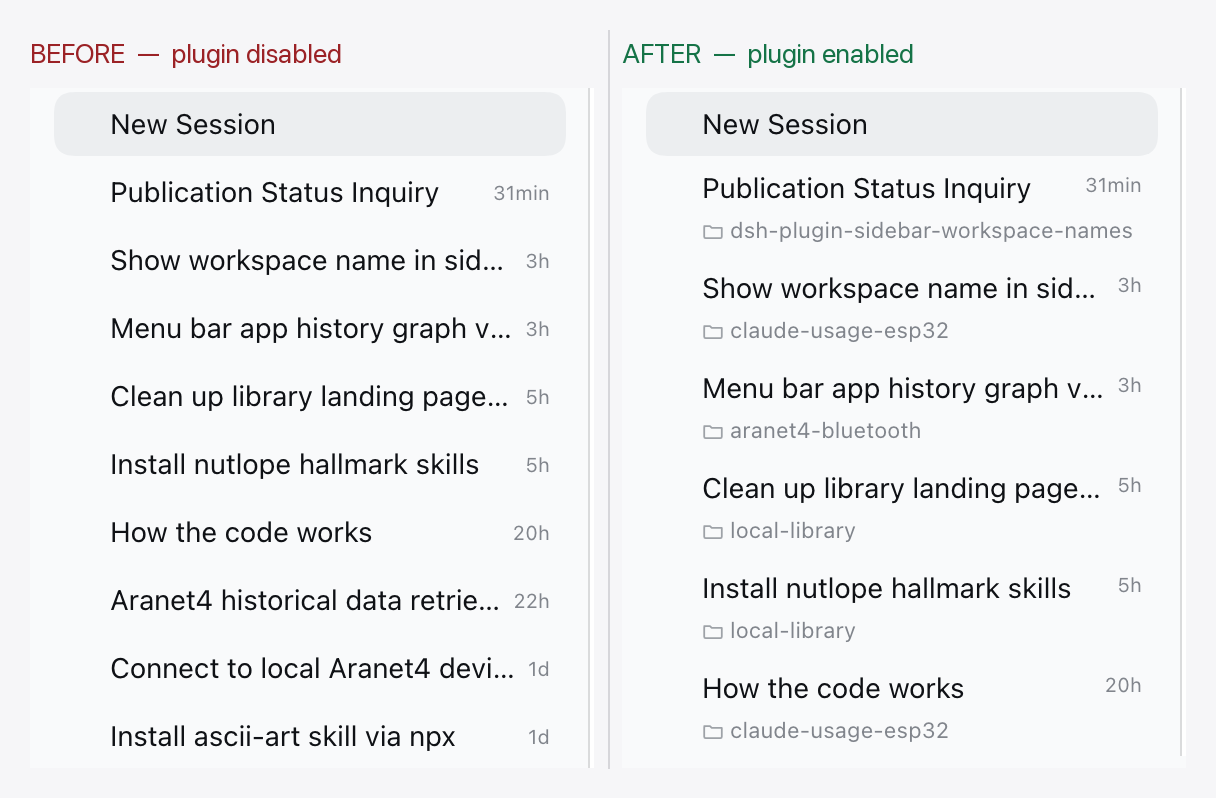
View options → Group by → In one list) renders each session as a
two-line row: title and relative time on top, the workspace name below.From npm:
dsh plugin --profile desktop add dsh-plugin-sidebar-workspace-names
You can also install it from the Plugins page in the desktop app. Restart the profile and refresh the page once.
From a checkout instead (no build step, no dependencies):
git clone https://github.com/The-Focus-AI/dsh-plugin-sidebar-workspace-names
dsh plugin --profile desktop add ~/The-Focus-AI/dsh-plugin-sidebar-workspace-names
It is an ordinary Cordis client plugin bundle — no harness source is patched, forked, or monkey-patched:
sidebar.workspaces.session.row.action hosts the workspace chip.sidebar.session.row.hover hosts the full name inside the hover card.client.js ships as plain JavaScript on purpose: the harness injects client plugin
bundles into the page as a classic script, so the file reaches the JS engine verbatim.
There is no build step and no runtime type stripping in the browser.
[data-row-key="session:…"]) and the always-mounted row action strip. That is a
decoration contract, not a public API; engines.dsh pins the tested range, and a
harness change should get a plugin version bump.:has() is required for the flat-view scoping (Chromium 105+, Safari 15.4+).
Without it the chip simply stays hidden.mise trust
mise install
mise test # node --test
npm pack --dry-run # verify the published file list
The package has no runtime dependencies and no build step.
MIT — see LICENSE.
DeepSeek Harness(DSH)Web 插件聚合生态包 · 一切皆插件,创意工坊分发(dsh-market.com)
把回答做成一页可视化 HTML:模型只写简短的 Markdown 草稿,随包附带的 `am` 命令行生成页面,支持流程图、时序图、树、时间线、ER 图、表格和提示框。
在 dsh 里装上这个插件即可,无需登录、注册或填 API Key,就能使用包括 Muse Spark 1.3、MiMo V2.6 在内的前沿模型——完全免费,不限量。 All you do is install this plugin in dsh: no login, no sign-up, no API key — the frontier models are just there, Muse Spark 1.3 and MiMo V2.6 among them. Completely free, with no usage cap.

