
dsh-web
zhu1090093659/dsh-webDeepSeek Harness(DSH)Web 插件聚合生态包 · 一切皆插件,创意工坊分发(dsh-market.com)

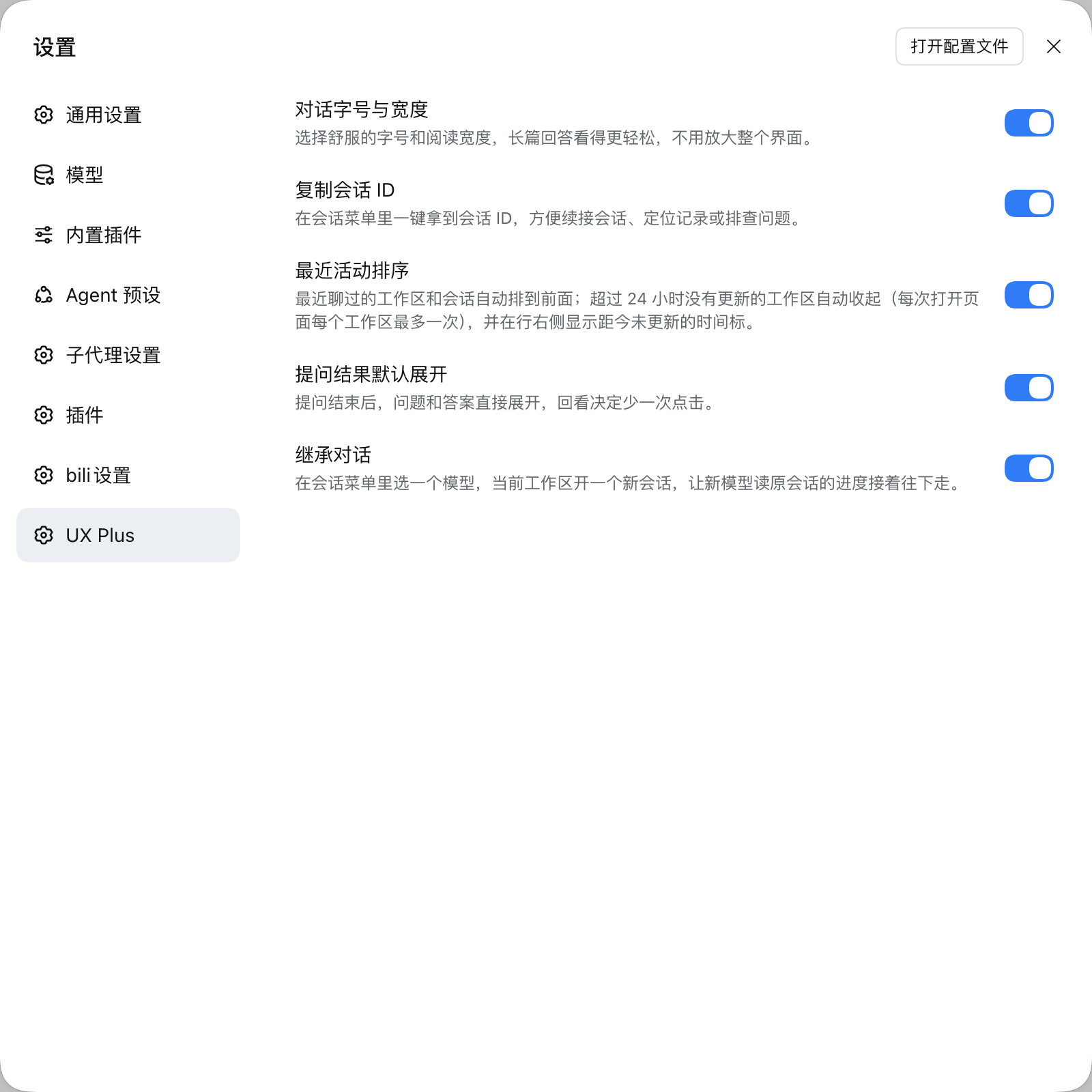
DSH Web 对话界面的 UX 增强包:一个插件持续收纳各种界面小改进,每项都有独立开关,位于 设置 → UX Plus,改动即时生效——对话字号与阅读宽度(设置 → 通用 → 对话区)、会话行菜单可复制会话 ID 或把当前对话继承到所选模型的新会话里继续、工作区与会话行按最近活跃排序(闲置超过 24 小时自动收起并显示上次更新时间)、已结束的提问卡片默认展开。开关列表由插件自身的功能注册表生成,功能会持续增加,不固定在某个数量。
 dsh-ux-plus
Small interface improvements for the DSH Web chat. Each feature has its own switch under Settings → UX Plus and applies instantly.
English · 简体中文
Targets the Web UI of DeepSeek Harness 0.2.1-rc.1.
You just want to look something up, and the price used to be: create a workspace, then invent a name for it. That step is gone. A search box now lives under Automated tasks in the sidebar: type, press Enter, and you get exactly the session UI you already know — except this session files itself into a hidden workspace instead of your sidebar.
.dsh-ux-plus/search under your home directory, created on first use and never shown in the sidebar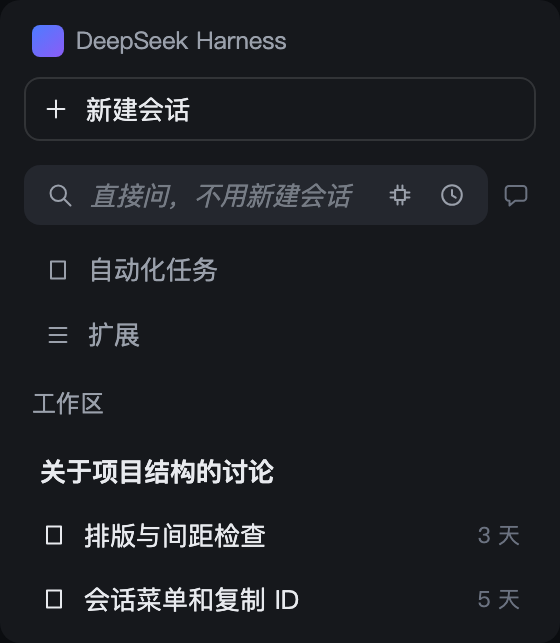
The whale favicon keeps its shape and carries three signals while you sit on another tab:
The signals are independent and compose freely; plain whale when nothing is up. Details →
Each row lists only what you can see and do in the interface.
| Feature | Interaction detail | Preview |
|---|---|---|
| Quick ask | • Below 【New session】, always one row; yields when the sidebar collapses to the rail • Type one line, press Enter: an ordinary Session starts — no workspace, no name to invent • Model: the small icon on the right; leave it alone to follow the host default • History: the clock icon, last 50 searches, one click back to that Session • Bubble: one click returns to your newest search Session; a dot lights inside while it runs — green when an answer is unread, amber when a turn waits on you • Search Sessions stay out of the sidebar; switch the feature off and they come back | |
| Tab attention marker | • A Session is working: the whale on the tab breathes slowly • Something finished unseen: the whale turns green, the same green as the list dot • Something waits for you: an orange dot blinks in the corner • Neither: the host's own icon comes back; subagents and blank Sessions never light it | — |
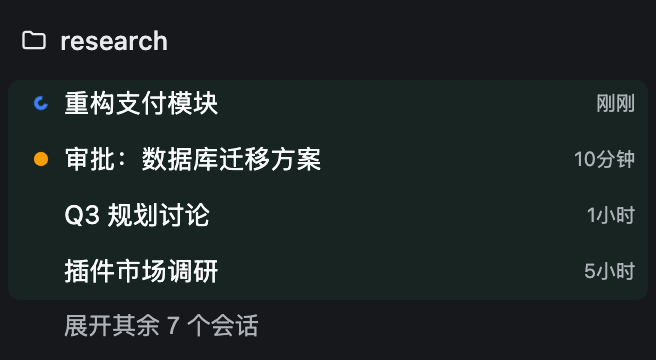
| Recency order | • Sessions running or touched today fold into a pale-green Active block, history below it • State dots: orange (waiting for you), blue (running), green (finished unseen) • Expand through the host's own 【show N more】, pinned right under the block • Re-opening a closed workspace starts from the Active block again; with no Active row it opens like the host • Newest on top; a workspace with running or waiting members moves up too • 【Ungrouped】 always sinks to the bottom, however new it is • Idle for more than a day: the workspace folds away; hover a row to see how long ago • Only the visible order changes; the host's grouping and sort settings stay put | 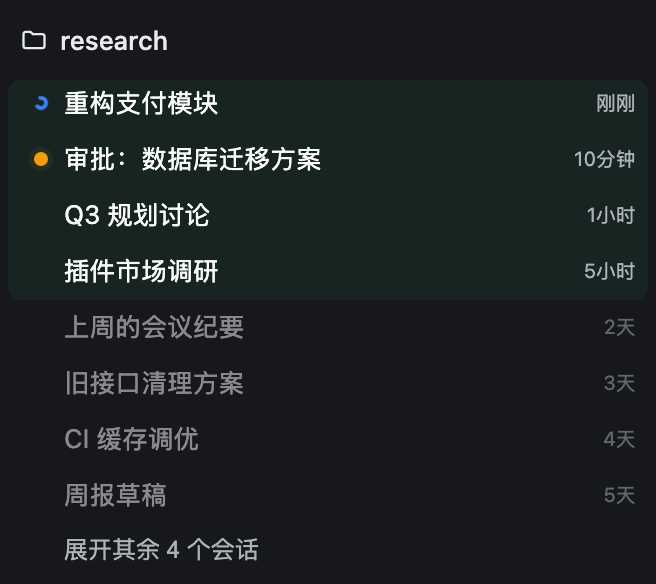 |
| Conversation type size and width | • Settings → General → Conversation • Five type sizes, four reading widths • Applies at once and only to conversation content | 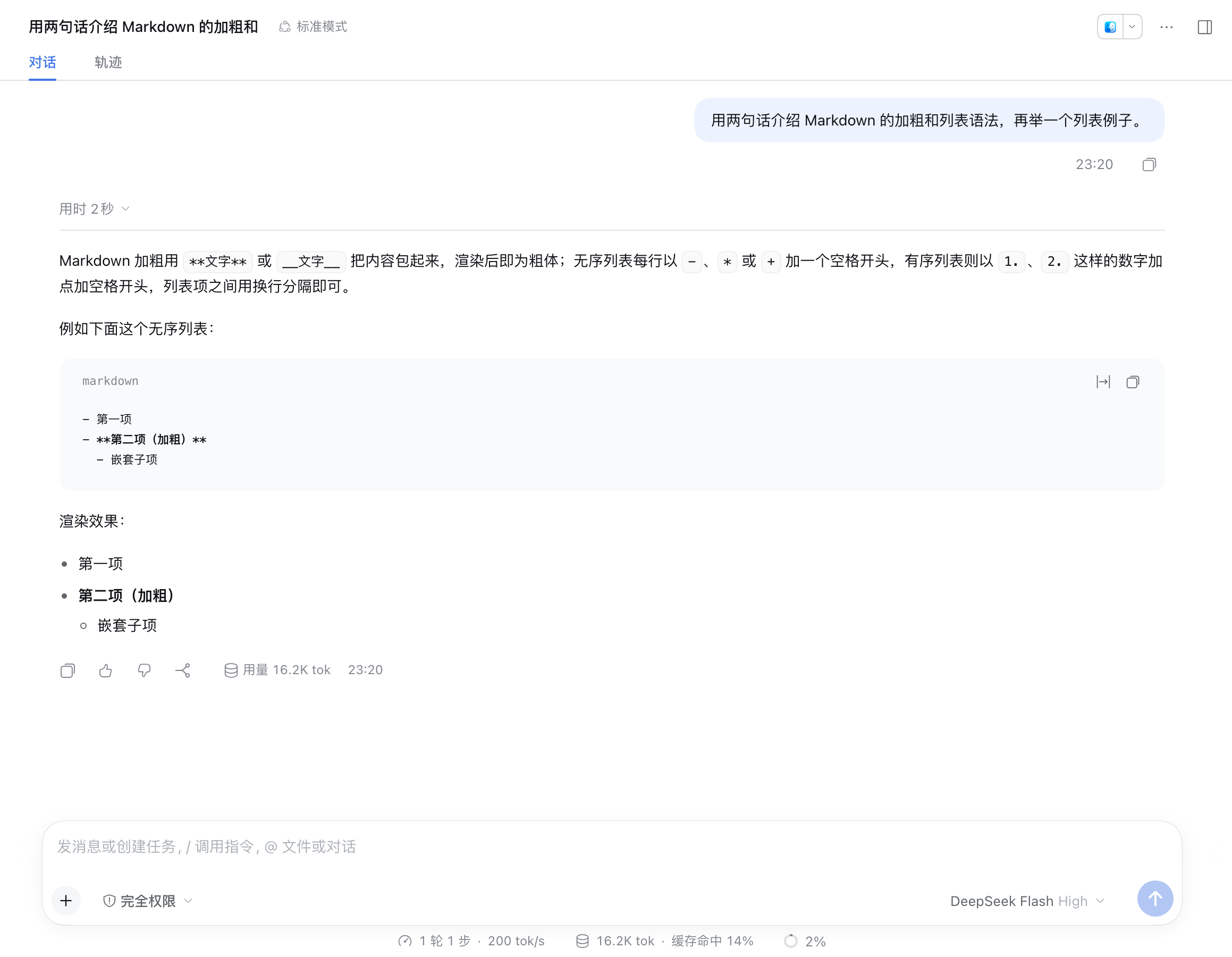 |
| Copy Session ID | • One click in the Session row menu • If the browser refuses, the menu says so in place; click again | 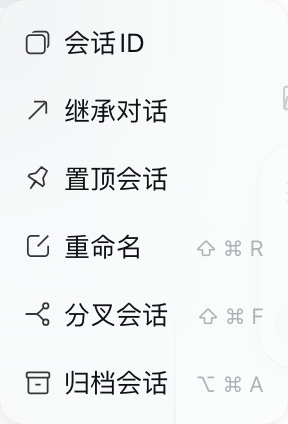 |
| Inherit conversation | • Same menu: pick 【Inherit conversation】, choose a model • A new Session opens in the current workspace and carries on from the old one; the original is untouched • On failure the picker stays open so you can retry | 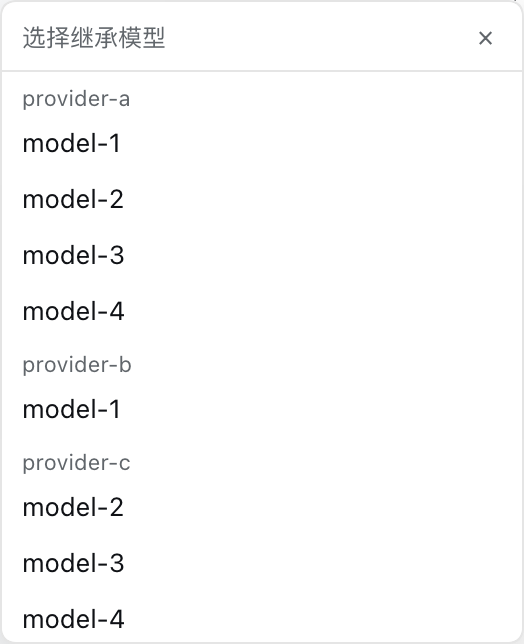 |
| Ask result expanded | • When the question is answered, question and answer open themselves • Collapse it yourself and it stays closed • That card is the only pale-blue block in the conversation | — |
A box sits permanently under New session in the sidebar and drops both "create a workspace first" and "start a new session" steps: ask or search right away — type, press Enter, and an ordinary session opens (same UI as any other session) while filing itself into a hidden workspace, out of your sidebar.
| Element | Behaviour |
|---|---|
| Input (magnifier on the left) | Enter searches straight away (the field is single-line); an Enter that ends an IME composition never submits by accident |
| Model picker | A small chip icon on the right: click it for the model list (the current pick is ticked). Leave it alone to use the host default; a non-default pick puts a dot on the chip and is remembered locally |
| Session bubble (far right) | One click returns to the newest search session, finished or not. While a search is running a dot lights inside the bubble and breathes — never a number. A small corner dot carries the state: green = the answer arrived and is unread, amber = a turn is waiting for your reply. Dim and inert while there is no search session yet |
| Clock icon (right) | Opens history: the last 50 searches, one click reopens that session, one button clears the list. Each row carries the same dot — green for an unread answer, amber for a pending question |
| Sidebar | Search sessions never show up — they all live in the hidden workspace |
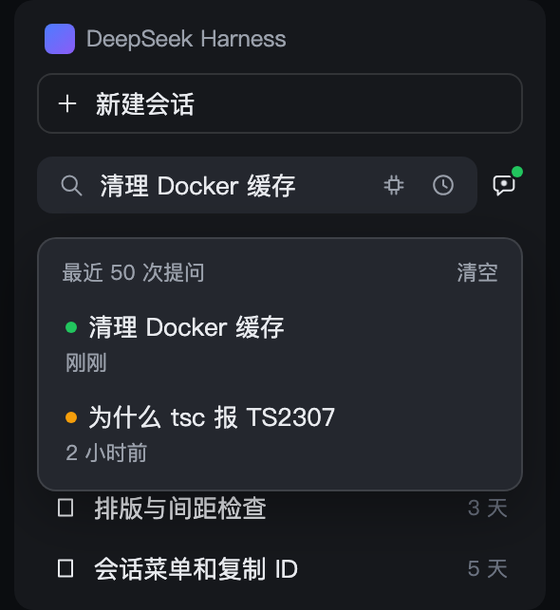
.dsh-ux-plus/search in your home directory, created on first use. It is not in the workspace list and has no group in the session tree, yet the history popup still takes you back to any old search session.Type a question in that box, the icons on the right stay put, Enter opens an ordinary session:
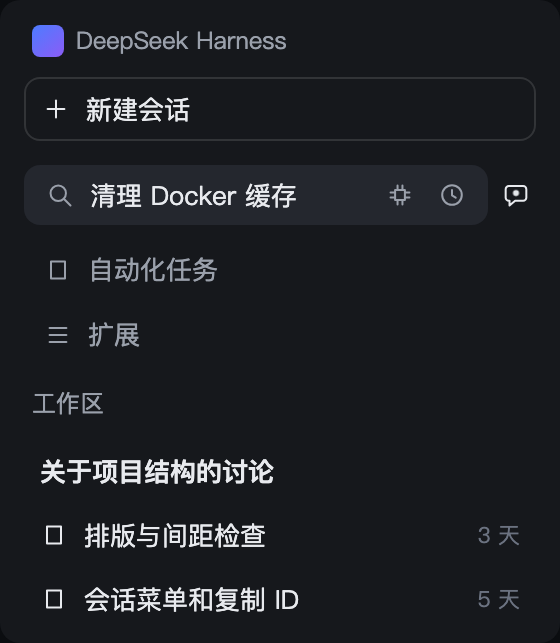
While a search is running, a dot lights up inside the right-hand bubble; a click returns to the newest search session — finished or not.
The tab icon stays the host's whale. This feature only tints it, breathes it, or adds one dot — and only while there is something to say.
| Tab signal | Meaning |
|---|---|
| whale breathes (slow fade) | any counted session is computing |
| green whale | a finished session has not been opened — exactly when the workspace list shows its green dot |
| blinking orange dot | something is waiting for your click (approval, question, plan review) |
| plain whale | nothing is up; the host's icon is restored untouched |
The breath has a 35% opacity floor and the blink is asymmetric, so a background tab throttled to ~1 tick/s still shows the alert on whatever frame it freezes on; returning to the tab restarts the cycle from the visible frame. Subagent and blank sessions never light the tab. Both host themes (light / dark) are kept; if the host's whale cannot be re-tinted, the feature quietly does nothing. Switching off leaves no residue.
Most recent first — the project you were just in stays at the top. Visual order only; the host's sort settings and data are untouched.
Active block. Running, or touched within 24 hours: one continuous green-backed band of compact 26px rows, each led by its status dot — orange breathing (awaiting you), blue spinner (running), solid green (finished, unread). A workspace header carries up to three pure-colour dots while that attention is hidden from view; the counts stay in its tooltip.
History stays hidden. No fold bar of its own — the host's own "Expand N more sessions" button is the one control, pinned directly below the Active block. One press opens the section: every row appears, the button returns to the list's native bottom, and the section reads exactly like the host's own expanded list. 收起 folds it back. Closing the whole workspace and opening it again restarts from the fold — the Active block only, never the history.
 | |
The ungrouped bucket sinks. Sessions that belong to no workspace share the 【Ungrouped】 section, which always sits at the very bottom — a fresh, even running, stray session never pushes a workspace down.
Idle tidying. A workspace with no activity for over 24 hours collapses once when the page opens, and shows its age on hover (now / Nm / Nh / Nd). Workspaces holding a running or awaiting session are never auto-collapsed.
Reordering pauses while your pointer is in the list or a menu is open — and pierces on your own actions: view-option changes and the expand button restyle on the click's own frame. Rows glide (FLIP, off under prefers-reduced-motion), zones re-check on a timer so rows fall asleep across the 24-hour line, and a section that briefly sees rows it cannot explain keeps its last consistent look instead of flickering.
The chat area defaults to 14px. Bump the font size and narrow the reading width under Settings → General → Chat area — conversation content only, never the whole interface.
Each session row's overflow menu gains two items, before the native Pin / Rename entries:
--session resumes and log digging.When an ask_user_question card finishes, the question and its answer stay expanded — reviewing a decision costs one less click.
Settings → UX Plus: six independent switches, on by default, applied instantly.
Requires Node.js ≥ 22, pnpm on PATH, and a DSH Web profile.
dsh plugin --profile <name> add github:plyflai/dsh-ux-plus
Restart the profile afterwards. Toggle each feature under Settings → UX Plus (on by default, instant). Conversation font size and width live under Settings → General → Chat area.
npm install
npm test        # node --test, incl. static assertions on the built artifact and injected deps
npm run build   # tsdown emits lib/client.js (classic script, committed to the repo)
features/<name>/ module (host + client halves) registered in the feature lists of src/index.js and src/switches.js — not a standalone plugin.window.__ModuleLoader__; external dependencies are strictly limited to the module seeds the host provides, enforced by the build script.The five most recent entries; full history in CHANGELOG.md.
MIT © 2026 plyflai
DeepSeek Harness(DSH)Web 插件聚合生态包 · 一切皆插件,创意工坊分发(dsh-market.com)
把回答做成一页可视化 HTML:模型只写简短的 Markdown 草稿,随包附带的 `am` 命令行生成页面,支持流程图、时序图、树、时间线、ER 图、表格和提示框。
在 dsh 里装上这个插件即可,无需登录、注册或填 API Key,就能使用包括 Muse Spark 1.3、MiMo V2.6 在内的前沿模型——完全免费,不限量。 All you do is install this plugin in dsh: no login, no sign-up, no API key — the frontier models are just there, Muse Spark 1.3 and MiMo V2.6 among them. Completely free, with no usage cap.

