

dsh-web
zhu1090093659/dsh-webDeepSeek Harness(DSH)Web 插件聚合生态包 · 一切皆插件,创意工坊分发(dsh-market.com)
Know how far a long agent session has actually got — without digging through the logs. dsh-session-progress is a real-time session progress and task tracking plugin for DeepSeek Harness (DSH / DSH Desktop): the agent keeps a live checklist of the work, the completion percentage is computed from the ticked boxes, and each session stores it as a single JSON progress document.
Topics: DSH plugin · DeepSeek Harness · session progress · weighted checklist · task tracking · JSON progress document
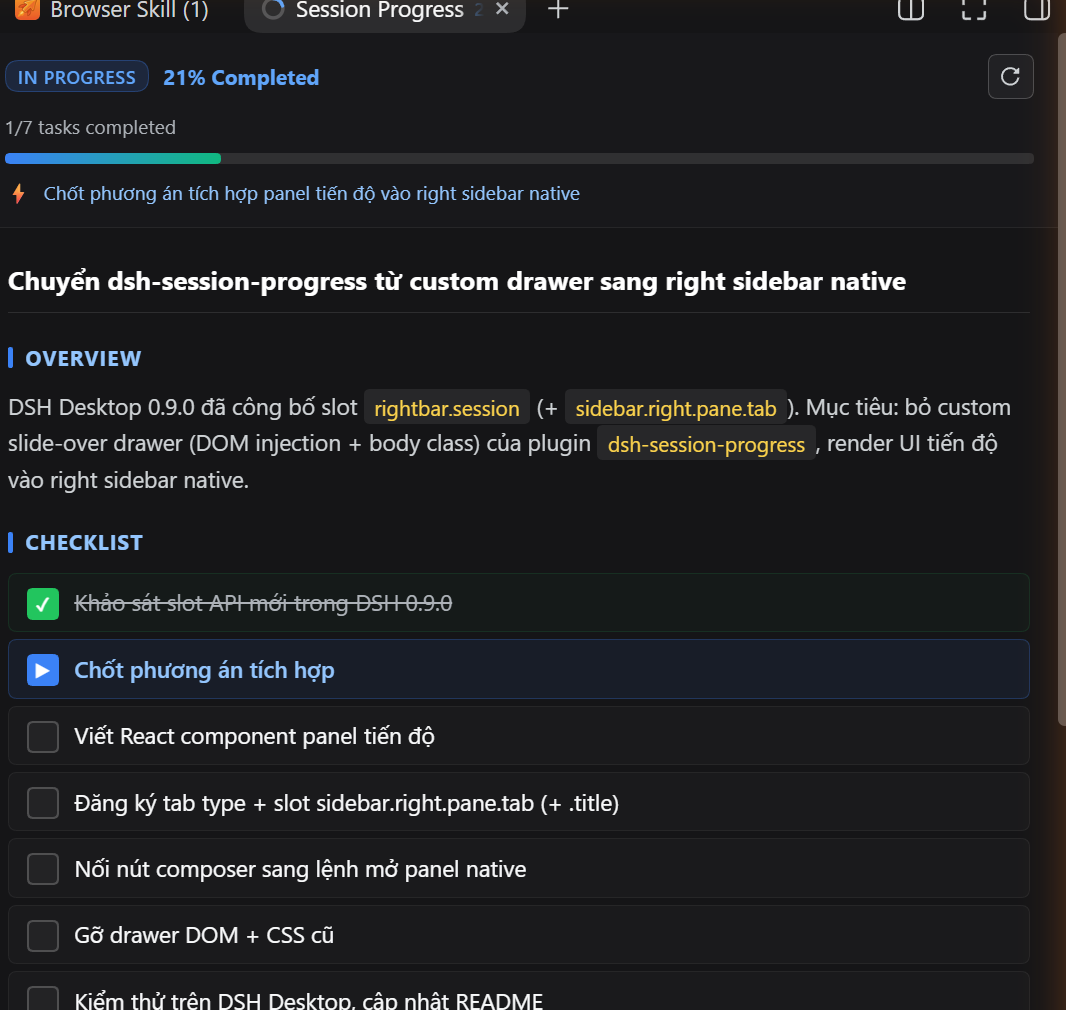
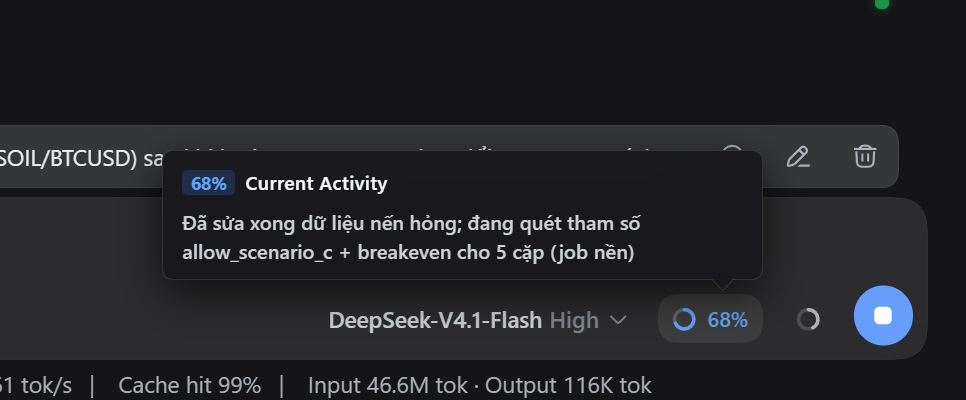
Both images are rendered from the plugin's own HTML/CSS by npm run shots.
In long-running or complex agentic sessions it is hard to tell the overall completion status, the subtask running right now, or what comes next without sifting through a long conversation log. This plugin keeps that answer one click away:
% pill in the composer dock row are computed from the boxes (done 1 · running ½ · pending 0), so nobody does the arithmetic and the agent never writes a number.- bullets, backticks around a path or command, or a small table, instead of one wall of text.The plugin renders inside DSH's own right sidebar — it does not draw an overlay of its own, so it never fights the frame for space:
| Surface | Where it lives |
|---|---|
Progress ring + % pill | The composer dock row under the input card, beside the context meter (hidden until a session exists) |
| Progress panel | A native right sidebar tab named Session Progress |
Clicking the composer control (or the Click to open the progress panel hint in its popover) opens that tab and reveals the right column. Being an ordinary sidebar tab, it docks, floats, splits, and follows the session exactly like Files or the document preview.
Requirement: the right sidebar tab slots (
rightbar.session,sidebar.right.pane.tab) must exist in your DSH build — DSH Desktop 0.9.0 or newer.Compatibility note (v0.11.1): progress is now stored as a JSON document instead of Markdown, and the checklist is a nested, weighted tree. Every item declares a
weight, so the percentage on the ring is computed from the boxes — the agent never writes a number again. A v0.10.x Markdown progress file is migrated to JSON automatically the first time its session is read, checklist included. The composer trigger is hidden on the new-conversation screen (there is nothing to report yet), and the panel sections are drawn with the original accent-bar headings.Compatibility note (v0.10.6): DSH Desktop 0.10.0 (harness 0.1.7) renamed the session id source and prefixed session ids with
session-. The client now reads the current session throughuiSessionand the host accepts either id spelling, while the 0.9.x/0.10.0 shapes both stay supported.
One JSON file per session (dsh-progress-<session>-<uuid>.json, in the system temp directory) holds the whole document:
{
  "version": 2,
  "title": "Ship the weighted JSON progress format",
  "status": "in_progress",
  "currentActivity": "Rewrite the host",
  "overview": "Storage moves from Markdown to JSON.",
  "checklist": [
    { "text": "Design the schema", "weight": 20, "state": "done",    "children": [] },
    { "text": "Rewrite the host",  "weight": 30, "state": "running", "children": [] },
    { "text": "Ship the panel",    "weight": 50, "state": "pending", "children": [
      { "text": "Render the tree",  "weight": 25, "state": "pending", "children": [] },
      { "text": "Show the weights", "weight": 25, "state": "pending", "children": [] }
    ] }
  ],
  "nextSteps": "1. Update the README",
  "notes": "schema = v2"
}
weight is an item's share among its siblings, normalized so every group is worth 100%:
share(item) = share(parent) × weight(item) / Σ weight(siblings)
Both readings of the example above therefore agree: three top-level weights (20 / 30 / 50, i.e. percent of the job) and two sub-weights (25 / 25, summing to their parent's 50). An item with no weight counts as 1, and a group may not mix declared and defaulted child weights.
Progress of a node: a leaf counts 1 when done, ½ when running, 0 when pending; a group is the weighted average of its children and its own state is derived — checking a group off cascades done into its whole subtree. status is derived too (all leaves done ⇒ completed, any progress ⇒ in_progress, nothing started ⇒ starting); blocked is the only status a caller sets.
| Tool | Purpose |
|---|---|
session_progress_status | Cheapest first look of a turn: the current activity, the step in progress, the pending steps after it and the plan. |
session_progress_check_done | Finish the step in progress: tick it, promote the next [ ] step to running, recompute the percentage. |
session_progress_write | Create the document (content) or patch it (checklist + checklist_mode, add, update, check, start, uncheck, remove, and the prose fields). |
session_progress_read | Read the whole document, or only the sections you name. |
No tool accepts a percentage — it always follows the boxes.
weightPercent back from session_progress_read / session_progress_status when an exact split matters.#3 = displayed row, #2.1 = path, or a text snippet) must resolve to exactly one item. An unknown or ambiguous matcher is refused, with the full item list, and nothing is written.% badge, so a declared weight and the number on screen can never disagree.cd "$env:APPDATA\dsh-desktop\harness\profiles\web"
& "$env:APPDATA\dsh-desktop\harness\.desktop-bin\pnpm.cmd" add https://github.com/nguyenduclong-ict/dsh-session-progress
cd "$HOME/Library/Application Support/dsh-desktop/harness/profiles/web"
"$HOME/Library/Application Support/dsh-desktop/harness/.desktop-bin/pnpm" add https://github.com/nguyenduclong-ict/dsh-session-progress
cd "$HOME/.config/dsh-desktop/harness/profiles/web"
"$HOME/.config/dsh-desktop/harness/.desktop-bin/pnpm" add https://github.com/nguyenduclong-ict/dsh-session-progress
Note: Restart DSH Desktop after installation to activate the plugin.
Run the following command in your terminal:
dsh plugin --profile web add https://github.com/nguyenduclong-ict/dsh-session-progress
Or install directly within your Cordis workspace profile:
pnpm add https://github.com/nguyenduclong-ict/dsh-session-progress
Does the agent have to report a percentage? No. No tool call ever carries a number — the percentage follows the boxes, so re-weighting an item or ticking one updates the ring immediately.
Where is the progress stored? One JSON file per session in the system temp directory. Nothing is written into your repository, and that same file is what the panel reads back.
What happens to my v0.10.x Markdown progress file? It is migrated to the JSON schema the first time that session is read — checklist, weights and ticked boxes preserved.
Which DSH builds does it need?
The right sidebar tab slots (rightbar.session, sidebar.right.pane.tab) must exist: DSH Desktop 0.9.0 or newer, or a DSH CLI/web build with the right sidebar. The composer trigger hides itself while there is no session to report on.
MIT © nguyenduclong-ict
DeepSeek Harness(DSH)Web 插件聚合生态包 · 一切皆插件,创意工坊分发(dsh-market.com)
把回答做成一页可视化 HTML:模型只写简短的 Markdown 草稿,随包附带的 `am` 命令行生成页面,支持流程图、时序图、树、时间线、ER 图、表格和提示框。
在 dsh 里装上这个插件即可,无需登录、注册或填 API Key,就能使用包括 Muse Spark 1.3、MiMo V2.6 在内的前沿模型——完全免费,不限量。 All you do is install this plugin in dsh: no login, no sign-up, no API key — the frontier models are just there, Muse Spark 1.3 and MiMo V2.6 among them. Completely free, with no usage cap.

