
coding-agents
vectorize-io/hindsightHindsight:会学习的 Agent 长期记忆系统,自动召回/保存、知识页、深度反思与按仓库隔离的记忆银行。

分层跨会话记忆,只推变化的部分:首轮注入全部有效条目,之后只推新增 / 已更新 / 已失效,没有任何变化时一个字都不注入;与条目 id 重复的 key 不再写进正文,基线体积因此小约 26%。事实与决策带语义键(一个 key 只有一个有效结论),模型只能写收件箱、由人确认后才成为常驻事实;条目可以带复核时间,到期后提醒一次;检索按相关度排序、流水行被降权,中文按 bigram 匹配。侧边栏页签不再只是列文件,而是讲清流程:条目按「待你确认 / 已在用 / 已归档」分组,每个阶段都能按四个维度(主题——一级、由人归类,类型,标签,日期)查看;可逐条勾选做批量提升 / 撤回 / 归档 / 取回 / 删除 / 归类,主题可全库改名、也可只在该主题内搜索。「已归档」分三层:分类说明它为什么退场(已蒸馏 / 已废弃 / 暂时不用,前两个是默认分类,也能自己新建一个),分类下面是主题行、点开才列出条目,没写主题的条目直接列在分类下。页签同时显示全局与工作区规范文件以及当前注入体积。附带零依赖 CLI,不装 DSH 也能用这套记忆库。
English | 中文
Layered, auto-injected cross-session memory for AI coding agents. A DSH (DeepSeek Harness) plugin, plus a zero-dependency standalone CLI. It borrows the spec / change / archive discipline from OpenSpec — but pushes instead of pulls.
Canonical repository: GitHub · Gitee is a read-only mirror — please file issues and pull requests on GitHub.
Status: M1–M4 done; M3/M4 (differential injection, both tools, the distillation nudge) were verified inside a real DSH session, and the later improvements are covered by 1283 assertions plus a real-machine preflight. See Verification.
Questions? → FAQ — "is the whole memory re-sent on every turn?", "what happens when a store goes over budget?", "archive vs withdraw vs supersede", "does this duplicate
AGENTS.md?". 中文版:常见疑问。
AI coding assistants have two recurring problems:
Existing spec-driven tools (OpenSpec and friends) solve "the code drifts away from the plan". But they are pull-based: the agent has to be told to go read the specs, so a fresh session does not spontaneously remember anything. dsh-memory-delta is push-based: at session start the agent is handed what it should know — but only the distilled part, and only what changed. Details stay retrievable on demand.
        ┌─ PUSH: injected automatically at session start (hard byte budget)
        │    T0 identity & conventions   user preferences / machine facts / accounts
        │    T1 index & next actions     what to pick up
store ──┤
        └─ PULL: retrieved on demand (costs nothing by default)
             inbox/      candidate entries — **the only layer the model may write**
             facts/      current truth (only status=active is injected)
             decisions/  choices plus their reasons (append-only)
             archive/    superseded entries
             journal.md  activity log (never injected)
Read the directory names along two axes (this was unclear before — facts especially invites the wrong
guess: it is a kind of content, not a stage of the flow):
| Directory | Stage in the flow | What it holds | Who may write | Injected? |
|---|---|---|---|---|
inbox/ | candidate (unconfirmed) | conclusions the model thinks are worth keeping | only the model (memory_write) | ❌ never |
facts/ | standing | pitfalls hit + how to avoid them: environment limits, tool behaviour, real failures and their fixes | only the human (promote) | ✅ every turn |
decisions/ | standing | conventions you decided: business / process / taste calls — so you never have to answer twice | only the human (promote) | ✅ every turn |
archive/ | archived | retired entries: superseded, or no longer applicable | moved on supersede/archive | ❌ never (still searchable, restorable) |
The main flow: the model may only write inbox/ → the human promotes into facts/ or decisions/ →
retired entries move to archive/. Unsure which side an entry belongs to? Ask: "if the world changes
tomorrow, does this stop being true?" Yes → facts/; only you can invalidate it → decisions/.
Two writing habits that make these layers actually useful: a facts/ entry should say when it applies
(a pitfall is worth recording so it is not hit twice, not because it once happened); a decisions/ entry should
say why it was decided — with the reason, the agent can judge by itself instead of asking you again.
mem initwrites the full explanation of these four directories (plusjournal.md/index.md/memory.config.json) into the store's ownREADME.md— open the memory directory and it is right there.
Seven rules:
createEntry names the file after the key, so on a real store 30 of 31 keys were byte-identical to the id —
repeating them cost 15% of the budget for nothing). Each line is also clipped at 90 characters.dsh-agent-instructions plugin has no diffing: any file
change re-injects the whole file — measured at ~58k wasted tokens for 15 edits of one 8.5 KB file.)<harness home>/storages/dsh-memory-delta/inject-state/<session-id>.json
(the directory resolves through config.stateDir → the kernel's ctx.dshHomePath service → $DSH_HOME →
~/.dsh. Fixed 2026-10-01: it used to read $DSH_HOME only, but the official desktop build's home is
the default ~/.dsh, so that variable is absent in its host process — the side-car was silently never
written and every restart re-injected the full memory).
⚠️ Changed 2026-09-30: the {id: hash} map used to ride inside the injected message's source, which
violates the DSH session-format v0 whitelist (a plugin source may only carry
kind/plugin/form/sections/summary). The format migration then refuses the whole session, leaving it
permanently unreadable (14 sessions were lost that way on the author's machine and had to be repaired by
hand). The state is also written only after the message has actually entered the context, so a queued
message that gets dropped again cannot silently advance the baseline.promote.key, and only one active entry may
exist per scope+key. A new conclusion must explicitly --supersedes the old one — that gate is what
keeps memory rot out of the injected layer.active / superseded / expired. Superseded entries get bidirectional links
and are archived, never appended forever.⚠️ This section is the result of real trial and error — both wrong turns below are silent failures:
❌ Adding the package to package.json's dsh.profile.bundles
   → DSH regenerates that list from the market registry (.generations/desired.json) at boot;
     entries it does not know about are dropped.

❌ Writing a bare entry in cordis.patch.yml
   → silently ignored (a patch entry only targets an existing id for config/disable).

✅ Wrapping it in `- insert:` inside cordis.patch.yml
Steps (DSH_HOME is usually %APPDATA%\dsh-desktop\harness):
Copy this package into the profile's node_modules:
<DSH_HOME>\profiles\web\node_modules\dsh-memory-delta\
    package.json
    bin\mem.mjs
    src\plugin.mjs  src\hook.mjs  src\planner.mjs
Append to <DSH_HOME>\profiles\web\cordis.patch.yml:
- insert:
    - id: dsh-memory-delta
      name: dsh-memory-delta
      config:
        root: ''              # empty = <session cwd>/memory
        # maxBytes: 4096      # optional. Omit = the store's memory.config.json#injectBudget decides (then 3072)
        enabled: true
        dueWithin: 0          # remind this many days before verify_when (0 = only when due)
        panel: true           # the memory tab's state/action routes
        allowWrite: true      # let panel buttons write the store (promote / rename)
        skill: true           # register the bundled skill (/dsh-memory-delta documents usage + boundaries)
Save. The patch layer is watched (watchUserPatches) — it hot-reloads, no restart needed.
Uninstall: remove that - insert: block and delete node_modules\dsh-memory-delta.
Listed in the plugin market (
lpf20200901/dsh-memory-delta) — installing from there goes through the bundle patch shipped in this package, which deliberately does not setmaxBytes(the store's own config decides). The manual steps above remain the local-development path.
Also published on npm as
dsh-memory-delta:npm i -g dsh-memory-deltagives you thememCLI (same store, same ranking code as the plugin), and DSH can install straight from the registry withcd ~/.dsh && dsh plugin --profile web add dsh-memory-delta.
⚠️ Known hazard: installing or removing another plugin through the market rewrites the profile's
cordis.patch.yml, and a hand-written- insert:block — comments included — is dropped. Observed 2026-10-08: installing a third-party plugin silently removed this plugin's block, leaving it in a "files present, never loaded" state — the files were still innode_modules, but nothing was injected any more and/dsh-memory-deltahad vanished from the skill catalog, with no log line anywhere. Check: doescordis.patch.ymlstill contain- id: dsh-memory-delta? Fix: paste the- insert:block back and save — it hot-reloads (refresh the page for the client tab).
| Capability | Detail |
|---|---|
| Differential injection | First round injects every active entry (baseline); afterwards only added / updated / removed; nothing at all when unchanged |
memory_search | Relevance-ranked search across facts / decisions / inbox / archive / journal / session index. Field weights (key/id > tags > conclusion > body), a whole-phrase bonus, and Chinese matched by bigram so a query like 沙箱禁管道 hits 沙箱禁止命名管道 without spaces. Each hit carries a score, a snippet from its best-matching line, its tags/date, and the path of its file (read it for the full conclusion and reason, since the snippet is clipped); truncated tells the model when limit cut the list short. Every hit is rendered into the tool's text output — DSH only ever shows the model what render returns (see the regression note below), and the tool's default limit is 10 because each rendered hit costs ~300 bytes |
memory_write | Record a candidate into the inbox — the model cannot touch the standing layer |
| Distillation nudge | Once a session has run a few steps and memory is already current, it reminds the model to record conclusions with memory_write; one nudge per session, and the nudge message carries no state, so it cannot corrupt the diff baseline |
| Due-for-review reminder | verify_when is no longer a dead field: when an entry reaches its review date, the session is told once — "this conclusion may be stale, re-check it" — with the commands the user should run to supersede or expire it — retiring a standing entry is a human action, so the model is told to hand it over (it may only add the new conclusion to the inbox as a candidate). Prose values (等换机器时) never trigger it, so the reminder can always be resolved; it fires only on a step that injects nothing else, and it carries no state either |
| Bundled skill | On apply the plugin registers a skill named dsh-memory-delta through ctx.skills.register() — runtime registration, so nothing is written into your skill directories and uninstalling/reloading the plugin removes it again. In any workspace that has the plugin, typing /dsh-memory-delta brings up the usage rules and the permission boundary (the model may only write the inbox; promoting/archiving is a human action), and the model itself can load it when the description matches. Set skill: false if you do not want that extra line in the skill catalog |
| Sidebar memory tab | With dsh-better-sidebar installed, a 记忆 tab groups entries by stage in the flow (待你确认 → 已在用 → 已归档, each with one plain-language line plus a flow strip on top), collapsible (a drawn caret), with a search box (entries and the journal, Chinese run-together queries included — the same scoring as mem recall and the model's memory_search). The standing layer can be viewed along four axes — topic (the default: a human-assigned label stored as topic: in the frontmatter and set from the panel's 归类 button or mem set --topic), type (facts/decisions — "which side does it belong to"), tag (by topic keyword) and date (when it was recorded, labelled today / yesterday / weekday) — and all four apply to every stage, so the inbox and the archive are grouped too instead of being flat dumps (an earlier attempt suppressed the group header when a layer produced a single group; on real data that made the inbox look like it only grouped by type — its candidates shared one tag and one date — so every stage now always groups). Every group header carries 选本组 N 条 and, in the topic view, 改主题名 (rename that topic everywhere it appears, archive included) and 搜这组 (search scoped to that topic). Ticking entries (per-row checkbox) raises a batch bar — 归类… / 提升 / 撤回 / 归档 / 取回 / 删除候选 / 清空勾选 — where a button is enabled only when every ticked entry belongs to the stage that action needs, destructive ones go through the same inline confirm strip, and partial failures are reported per entry (a batch promote that trips "one key one truth" names the ids that failed and why) instead of being silently skipped. Clicking an entry opens its .md through better-sidebar's official openFile (preview/edit in the sidebar editor). Both directions: candidates can be promoted, standing entries can be withdrawn (back to candidates) or archived, archived ones restored, candidates deleted — every destructive action goes through an inline confirm bar (never window.confirm, which blocks the page and would hang headless screenshots). The standing layer also shows the global instructions (~/.dsh/AGENTS.md, injected by DSH into every workspace — read-only preview, collapsed by default) and the workspace instructions (AGENTS.md / AGENTS.local.md, with an Edit button that opens them in the sidebar editor). The client half is a hand-written, zero-build browser bundle (a window.__ModuleLoader__.load({id, factory}) wrapper, no bundler); its data comes from this plugin's own read-only POST /dsh-memory-delta/state and POST /dsh-memory-delta/search routes — loopback-only, JSON in / JSON out, reading nothing but the memory store. The one route that writes is POST /dsh-memory-delta/action (promote / withdraw / archive / restore / delete candidate / safe rename / assign topic / rename topic / batch); turn it off with allowWrite: false |
| Why editing/deleting memory is not built into the panel | The sidebar already ships an editor (opening an entry is enough) and a file tree with confirmed rename/delete. Re-implementing full CRUD in the panel would be duplication plus a permanent maintenance tax, so the panel offers entry points plus the two actions that genuinely need human judgement: open file, one-click promote of an inbox candidate (the human-confirmation step finally has a UI) and tidy the file name (mem rename: id + file name + references together). Pure "jump to the folder" buttons are deliberately not built — a caret to expand plus clicking an entry for detail is enough, and an extra button only adds noise plus a route that launches an external process. ⚠️ Do not rename memory entries through the file tree — the id lives in the frontmatter and must match the file name, or mem validate reports id 与文件名不一致; that is exactly why renaming is a dedicated safe operation instead of free-form editing |
The plugin never spawns the CLI: the DSH sandbox forbids named pipes (capturing a child's output fails
with EPERM), and there is no need — it imports the same store module directly (bin/mem.mjs only runs
the CLI when executed as the entry point). It also never requires the sidebar or the skill service:
webServer and skills are optional capabilities, registered through ctx.inject([...], cb) so the
callback runs once the service is ready — reading them with ctx.get at apply time silently yields
nothing (a real bug here: the tab opened to an HTTP 405). A headless or CLI-only composition therefore loads
the plugin unchanged and simply skips the panel routes and the bundled skill.
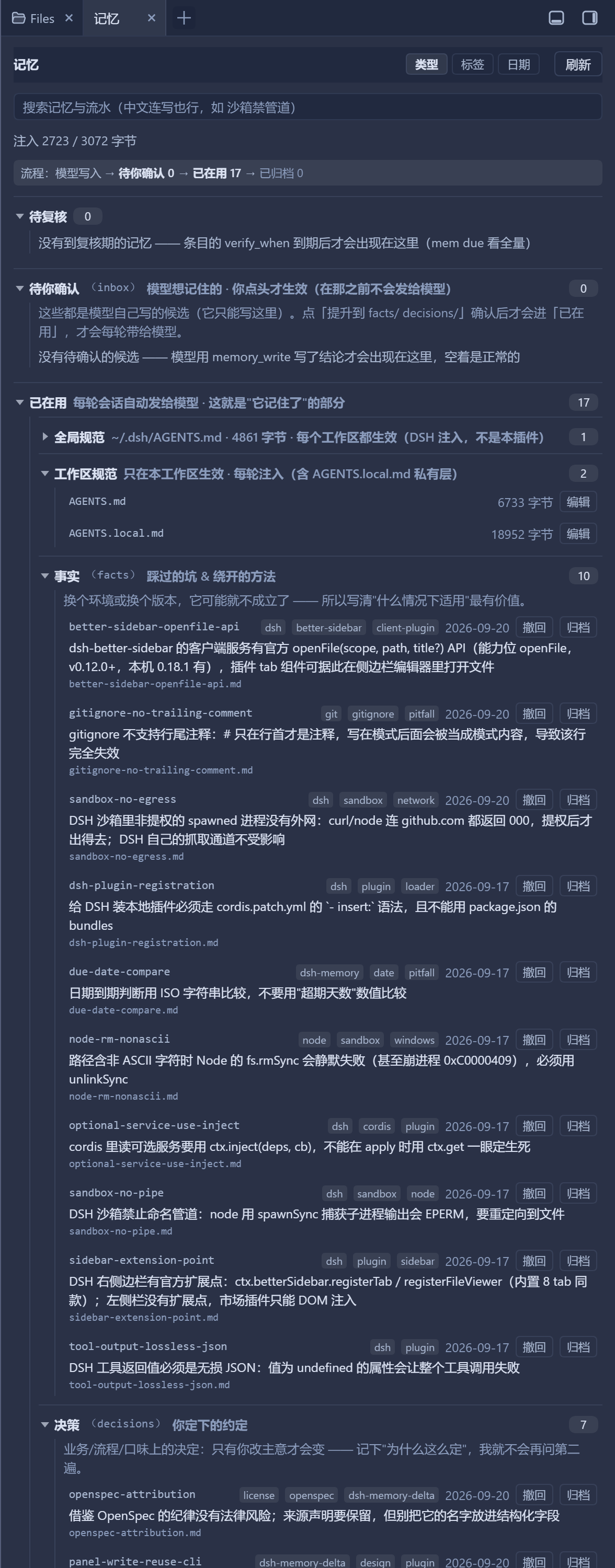
The 记忆 tab, opened from the sidebar's + menu: collapsible groups (the monospace text after a
title is the directory on disk), standing entries with their keys/tags/dates/file names, the
due-for-review section, the inbox candidates, and how many bytes the current store costs per session.
Clicking an entry opens it in the editor; the panel's own writes all go through one
whitelisted POST /dsh-memory-delta/action route (promote / withdraw / archive / restore / delete
candidate / safe rename / assign topic / rename topic / batch) — there is no generic edit back door,
and allowWrite: false turns the whole route off.
Two defaults that keep the tab calm: the archived stage is collapsed by default (retired conclusions
should not push the live entries out of view) and the archive reads in three levels —
archived → category → topic → entries. The category is why it left (the category field). Three of them
are always there (an empty one still shows 0): 已蒸馏 (distilled into the docs / superseded),
已废弃 (useless for good) and 暂时不用 (not needed right now, but this workspace or another business need
may want it again — restore → promote brings it back). Archiving lets you pick one or type a new one
(single or batch). 已蒸馏 is set automatically when an entry is superseded / distilled into the
docs, and the row's 分类 button changes it later. Below a category, topic rows (the entry's own topic)
are collapsed — click one to see its entries; entries without a topic are listed right under the category.
The archive still follows the header axis: switching to type / tag / date re-groups it too.
The old default name 已过期 (v1.2.x) is grouped as 已废弃 on read and write, so no migration is needed.
Topics have one level: the topic name is just a string (same name = same group; a / in it is an ordinary
character). Earlier versions split parent/child into two levels — that was dropped in favour of the simpler model.
# init (defaults to <cwd>/memory; override with --root or $DSH_MEMORY_ROOT)
mem init --root ./memory --scope "workspace:/path/to/project"

# record a candidate (lands in inbox, never injected)
#   --id  prefer an explicit short id; otherwise derived from the conclusion (capped at 20 chars)
#   --key semantic key: only one active truth per scope+key
mem new --type fact --id win-update-cache --key disk-cleanup \
        --conclusion "Cleaning the update cache reclaimed nothing measurable" \
        --reason "Directory emptied but free space did not move" --tags windows,disk --source session-abc
# with --key but no --id, the key *is* the id (and the file name): sandbox-no-pipe.md
# without a key the id falls back to "<date>-<truncated conclusion>" — prefer giving a key

# promote it once confirmed; when the key already has an active entry you must say who supersedes whom
mem promote win-update-cache
mem promote win-update-cache-v2 --supersedes win-update-cache

mem set <id> --key k --tags a,b --conclusion "…"   # edit an entry (add a key, reword, mark expired)
mem set <id> --topic "DSH plugin dev"   # assign the topic the panel groups by ("" clears it → 未归类)
mem rename <old-id> <new-id>   # safe rename: frontmatter id + file name + supersedes refs together
                               # (never rename through the file tree — id must match the file name)
mem list --status active --tag windows
mem list --topic "DSH plugin dev"      # or --untopic for the not-yet-classified ones
mem topics [--json]    # which topics exist, how many entries each, and how many are unclassified
mem topic-rename <old> <new>   # rename a topic across the whole store (the archive too)
mem recall <keywords> --topic "DSH plugin dev"   # search inside one topic only
mem show <id>
mem validate [--fix]   # format / ids / bidirectional links / cycles / same-key conflicts / index / budget
mem index              # rebuild index.md
mem inject [--json] [--budget 3072]   # render what should be injected; --json adds per-entry hashes
mem recall <keywords> [--where all|facts|decisions|inbox|archive|journal|sessions|index] [--limit N] [--json]
                       # relevance-ranked: Chinese is matched by bigram, no spaces needed
mem due [--within N] [--json]   # entries whose verify_when is due (--within N also warns N days ahead)
mem journal add "one line"
verify_when takes either a date (2027-03-01) or a relative phrase measured from the entry's own
date (3个月后, 2周后, 立即); anything else is treated as prose and simply never auto-fires.
Checked item by item inside a real DSH session:
| Capability | Live evidence |
|---|---|
| baseline injection | the session received every active entry |
| no change → zero injection | the next step injected nothing, only the one-time nudge |
| delta · added | "新增:", explicitly noting "the other N entries are unchanged" |
| delta · updated | after editing one entry, only "已更新:" was pushed |
| due-for-review reminder | adding an entry whose verify_when was 16 days overdue produced a one-time review reminder on the next no-change step, and the step after it injected nothing (the reminder did not reset the diff baseline) |
| sidebar 记忆 tab | the tab opened on a live store and showed the real root, the entry count, "注入 1792 / 3072 字节", the facts/decisions split and the (empty) inbox |
memory_search / memory_write | memory_write called successfully in a live session; memory_search failed — see the tool-output-contract entry below |
| tool output contract | test/preflight-import.mjs now replays the runtime's own step (validateJsonSchemaValue over each tool's declared output.schema) against the values both tools actually return |
| writes land only in the inbox | the written candidate did not enter the injection payload; it appeared as a delta only after promotion |
npm test # 1283 assertions, zero dependencies
| Suite | Assertions | Covers |
|---|---|---|
test/run-tests.mjs | 295 | CLI end-to-end (incl. a non-ASCII path regression, ranked recall, mem due, mem rename with reference sync, key-as-file-name, the topic lifecycle, reserved topic names, injection-text slimming, hand-written frontmatter fidelity, and reference cleanup on restore) |
| `test |
Hindsight:会学习的 Agent 长期记忆系统,自动召回/保存、知识页、深度反思与按仓库隔离的记忆银行。
面向 DeepSeek Harness 的 OpenViking 记忆与上下文插件:pre-step 自动召回与画像注入、会话捕获、`viking://` URI 防护,以及对接 OpenViking 服务端的 recall/write 记忆工具。
DeepSeek Harness 本地记忆插件:分层 L1/L2/L3 记忆,自动沉淀与手动 memos_* 检索工具并存,内置记忆浏览器。