
dsh-web
zhu1090093659/dsh-webDeepSeek Harness(DSH)Web 插件聚合生态包 · 一切皆插件,创意工坊分发(dsh-market.com)

Command Code plan usage for seven coding agents: one core, seven adapters. Runs locally, so checking your quota costs no quota.
See how much of your Command Code plan is left — 5-hour, weekly and monthly windows with reset times — inside the coding agent you already have open.
Runs on your machine. No model round-trip, so checking your quota costs no quota.
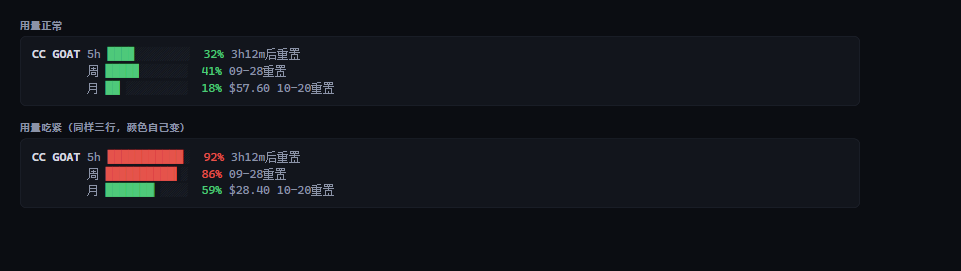
CC GOAT │ 5h █▎░░░░░░░░ 12% 4h27m后重置 │ 周 █▏░░░░░░░░ 11% 09-27重置 │ 月 ▋░░░░░░░░░ 6% $66.03 10-20重置
Each agent has its own way of loading plugins, so pick yours. Six of the seven end up running
the same core script (core/cc-usage.mjs); the DeepSeek Harness adapter keeps its own data
layer, for the reason given under Layout.
| Agent | How | Persistent? |
|---|---|---|
| Claude Code | /plugin marketplace add Jovan1666/commandcode-usage then /plugin install commandcode-usage@commandcode-usage, then node ~/.claude/plugins/marketplaces/commandcode-usage/plugins/claude-code/scripts/setup.mjs | ✅ status line |
| Codex CLI | plugin marketplace (.agents/plugins/marketplace.json) — the bundled hook runs each turn; Codex will ask you to trust it | ⚠️ per-turn line |
| Grok Build | grok plugin marketplace add Jovan1666/commandcode-usage, then run plugins/grok/scripts/setup.mjs | ✅ status line |
| opencode | run plugins/opencode/scripts/setup.mjs | ✅ sidebar |
| pi | pi install ./commandcode-usage/plugins/pi, or copy index.ts into ~/.pi/agent/extensions/ | ✅ above the input |
| DeepSeek Harness | clone this repo, then dsh plugin --profile web add ./commandcode-usage/plugins/dsh (needs dsh ^0.1.5-rc.1) | ✅ sidebar |
| ZCode | /plugin marketplace add Jovan1666/commandcode-usage then /plugin install command-code-usage (its marketplace and plugin name differ) | ⚠️ command only |
Nothing here asks for your API key up front. The script finds it — see Credentials.
The DeepSeek Harness card has its own three-state screenshot in
plugins/dsh/assets/screenshot.png — collapsed badge, light expanded,
and dark expanded. The other five platforms all render the same one line shown above, so they get text
rather than a picture.
Claude Code and Grok keep their status line in the user's config, and neither lets a
plugin declare it (settings.json accepts only agent / subagentStatusLine;
Grok's plugin format has no status-line slot). So the last step is a script that writes
that one setting for you. It backs up what was there, refuses to overwrite someone else's
status line unless you pass --force, and --remove puts yours back.
On Windows the Grok script writes one more file: a small cc-usage.cmd beside
cc-usage.mjs, with the config naming that batch and nothing else. Grok starts command
through CreateProcess, which refuses an argument that is an absolute path (os error 123)
and refuses a quoted program name just the same, so a bare executable path is the only form
that survives — the node call lives inside the batch, and the config names it unquoted,
which also keeps a path containing a space working.
| Window | Meaning | On GOAT |
|---|---|---|
| 5-hour | Rolling burst limit — one long session cannot drain the month | $14 |
| Weekly | Rolling 7-day limit | $35 |
| Monthly | The billing period's credit allowance | $70 |
Each window shows percent used, a bar, and when it resets (a countdown under a day, a date beyond that). The monthly one also shows the credit left.
Colors follow how full the window is — green under 60 %, amber to 85 %, red above. (The terminal and HTML panels use a slightly earlier 50 / 80 split; the status line is the one that had to be tuned for a glance, so it warns later.)
Plans with no rolling windows (Provider, Enterprise) show the balance alone. Plans without API access (Go) render nothing at all in the status line — no error, no empty box. Ask for the terminal panel on such a plan and it does fail loudly, because there you asked a direct question and silence would be the wrong answer.
If you configured Command Code but switched to another model, a permanent quota bar is noise. The script decides per turn whether this session is actually routed there:
cc-switch write
ANTHROPIC_DEFAULT_OPUS_MODEL / ..._MODEL_NAME pairs into the env; the script reads the
pair to learn the real upstream model. This is the router's own configuration, not a guess.
(This one is an inference rather than a measurement — see
what was verified — so if it ever comes up empty the script falls
through to the next level rather than guessing.)model in as a plain
string ("gpt-5.6-terra") — and gives an empty transcript_path, so without this level
Codex would never resolve. Claude Code sends an object here, so it skips to level 3.message.model, Grok's modelId).The resolved model is checked against Command Code's public model catalog
(/provider/v1/models, no auth needed). Not in the catalog → hidden.
Some model names are genuinely ambiguous (a bare claude-opus-5 exists both natively and in
Command Code's catalog), and those are deliberately not guessed — add your own with
--model <substring> instead.
Claude Code, Codex, Grok and ZCode also get a /quota command that prints the compact panel.
That one does go through the model — it is a prompt, so it costs a turn; the status line is
the free path, and /quota is for when you want the numbers in the transcript.
pi has /ccq-bar on|off|toggle|refresh|status instead (handled by the extension, no model
turn), and the opencode adapter has no command at all — its sidebar is the whole surface.
Found automatically, in this order:
COMMAND_CODE_API_KEY / COMMANDCODE_API_KEY / CMD_API_KEYcommandcode~/.commandcode/auth.json (the official CLI's login state)~/.zcode/…, ~/.config/opencode/…, ~/.claude/settings.json, ~/.pi/agent/…)dsh / Codex / Grok config.toml or settings.yaml, including apiKeyEnv indirectionIf nothing is found the status line simply does not render — it never prints an error into your editor.
One exception: the DeepSeek Harness adapter (
plugins/dsh) keeps its own data layer rather than importingcore/cc-usage.mjs. Its host/client halves and 141 offline checks are built against that contract, so it stays as-is for now. Seeplugins/dsh/README.md.
core/cc-usage.mjs        ← the only implementation; everything else is a synced copy
scripts/sync-core.mjs    ← copies core into every adapter (--check for CI)
docs/FINDINGS.md         ← what was measured, and what to revisit when things change
plugins/<agent>/         ← one thin adapter per agent
The adapters are copies, not imports, so each one is self-contained and can be installed
without a package manager. Edit core/, never a copy, then run node scripts/sync-core.mjs.
$1 Go tier does not have oneThe script computes a burn-rate projection. The status line and the Codex hook never show
it; the terminal panel, --compact, --md and --html still print it, and --json always
carries it.
It stays out of the status line for a reason: extrapolating from a short sample says "you will run out" almost every time — 25 minutes into a 5-hour window a normal burst projects to 140 % — and a warning that is always on is not a warning. Where it is printed you asked for a panel, so the extra line costs you nothing.
node scripts/check.mjs          # everything: sync, rendering, gating, secrets, dsh's 141 checks
node scripts/check.mjs --quiet  # one line per suite
That is the same script CI runs, so a local pass means a green build. The dsh suite needs React
first — see plugins/dsh/README.md.
core/cc-usage.mjs is the only file you edit. The per-adapter copies are generated; after a
change to the core run node scripts/sync-core.mjs (or let the check tell you).
MIT — see LICENSE.
DeepSeek Harness(DSH)Web 插件聚合生态包 · 一切皆插件,创意工坊分发(dsh-market.com)
把回答做成一页可视化 HTML:模型只写简短的 Markdown 草稿,随包附带的 `am` 命令行生成页面,支持流程图、时序图、树、时间线、ER 图、表格和提示框。
在 dsh 里装上这个插件即可,无需登录、注册或填 API Key,就能使用包括 Muse Spark 1.3、MiMo V2.6 在内的前沿模型——完全免费,不限量。 All you do is install this plugin in dsh: no login, no sign-up, no API key — the frontier models are just there, Muse Spark 1.3 and MiMo V2.6 among them. Completely free, with no usage cap.

