
dsh-web
zhu1090093659/dsh-webDeepSeek Harness(DSH)Web 插件聚合生态包 · 一切皆插件,创意工坊分发(dsh-market.com)

A compact mid-turn steering box for DeepSeek Harness with text + images, read receipts, and unfinished-draft rescue.
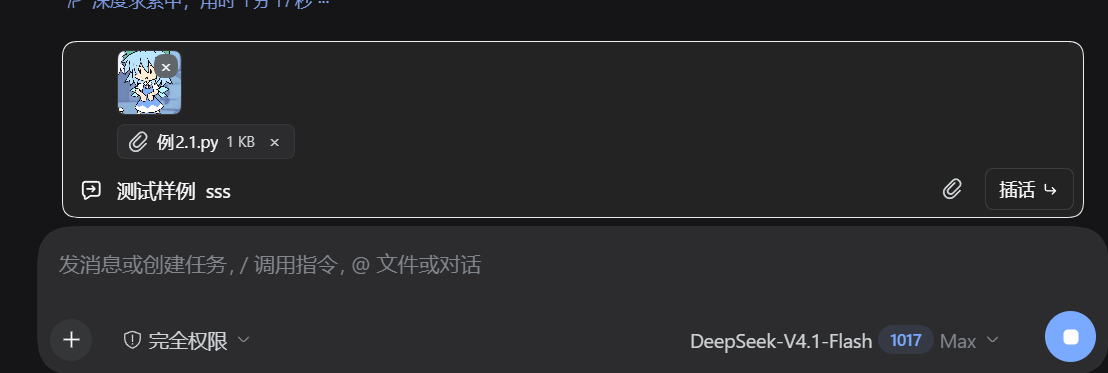
任务运行时,随时插一句话调整方向。文字、图片、文件都能发;没发出去的草稿,回合结束会自动回到主输入框。
从 npm 安装:
dsh plugin --profile web add dsh-steer-note
GitHub 备用:
dsh plugin --profile web add github:hffek/dsh-steer-note
Desktop 把 --profile web 换成 --profile desktop。安装后重启 DSH,Host 侧的 STEER_NOTE 系统提示词才会生效。
Enter 发送,Shift+Enter 换行。imageLimits;模型不支持视觉输入时会提示。conversation.createDrafts 注册并后台上传,发送时用 { type: 'file', receiptId };上传中显示进度,失败显示原因。steering 节点和 inbox.next-step / next-turn,回合结束仍没读到就标未读取。updateQueue({ action: { kind: 'remove' } });已读取/已失效会提示无法取消。STEER_NOTE 告诉模型中途消息是航向修正,不要当成新任务;它需要重启 DSH。dsh plugin --profile web add link:/absolute/path/to/dsh-steer-note。测试环境:DSH Desktop 2.0.18 / DSH 0.2.1-rc.2(Web profile)。
依赖:
conversation.input.dock,以及 useSessionStatus / useSession / useProjection / useInput / useChat / inputActionsctx.remote.session.prompt({ mode: 'steer' })、updateQueuecreateDrafts / releaseDraftAttachment(s)、fileUploads、serializeDraftAttachments降级:
updateQueue 不可用:不显示取消按钮fileUploads 不可用:普通文件不能发送/显示进度,图片和文字不受影响useChat 返回空或 inbox 不可用:历史状态停留在“已送达”注意:文件附件和图片搬家用了客户端内部服务,不是公开文档 API;DSH 升级后需要回归测试。文本/图片/文件发送、历史、取消都走原生公开接口。
文件结构:
client.js:插话栏、图片/文件预览、记录、拖拽、草稿救援index.js:Host 侧 STEER_NOTE 系统提示词cordis.patch.yml:profile 插件行locale/*.json:插件管理器文案开发者备注:package.json 的 exports 必须保留 "./package.json": "./package.json",否则 Desktop client-modules 可能把包缓存为“非客户端插件”。
| 版本 | 主要变更 |
|---|---|
| 0.2.4 | 新任务开始/草稿清空时,不再残留“任务已结束”提示与「放入输入框」 |
| 0.2.3 | 编辑中不自动搬草稿,避免两个输入框同时出现;失焦/输入法结束保存 |
| 0.2.2 | 图片和文件合并为一个回形针,更新首图 |
| 0.2.1 | 发布到 npm,补充安装说明和 badge |
| 0.2.0 | 支持文字、图片、普通文件插话与文件草稿救援 |
| 0.1.1 | 草稿/历史按会话持久化,未读取可取消 |
| 0.1.0 | 初版:输入框上方插话栏、图片、已读状态、草稿救援 |
dsh-steer-note is a compact mid-turn steering box for DeepSeek Harness.
While an agent is running, add direction without touching the main composer: text, images, and files are sent as native steering messages. If the turn ends before you send, the unfinished draft is moved into the main composer. Interjection history tracks read/pending status and lets you cancel messages that have not been read. Text and image drafts survive conversation switches and page reloads; file drafts are runtime-only.
dsh plugin --profile web add dsh-steer-note
For Desktop, use --profile desktop instead. Restart DSH once so the STEER_NOTE system-prompt section takes effect.
DeepSeek Harness(DSH)Web 插件聚合生态包 · 一切皆插件,创意工坊分发(dsh-market.com)
把回答做成一页可视化 HTML:模型只写简短的 Markdown 草稿,随包附带的 `am` 命令行生成页面,支持流程图、时序图、树、时间线、ER 图、表格和提示框。
在 dsh 里装上这个插件即可,无需登录、注册或填 API Key,就能使用包括 Muse Spark 1.3、MiMo V2.6 在内的前沿模型——完全免费,不限量。 All you do is install this plugin in dsh: no login, no sign-up, no API key — the frontier models are just there, Muse Spark 1.3 and MiMo V2.6 among them. Completely free, with no usage cap.

