dsh-plugin
DayuanJiang/next-ai-draw-iodsh 的 draw.io 绘图插件:通过 next-ai-drawio MCP 服务器作图,点回复里的链接在右侧栏打开实时预览,可以手动修改图,AI 的每次修改都是可以恢复的版本。需 Node.js 18+,首次使用由 npx 下载 MCP 服务器。

DeepSeek Harness 的 MCP 服务器安装与验证工具:交互式 init 会把真实 patch 条目写进 profile,list 与 validate 检查配置,CI 强制的验证器逐个连接精选服务器。
Install six curated MCP servers into DSH in one command — and find out which of them actually work on your machine.
Every curated server is started, handshaken and its tool count checked in CI — everything answers with 13 tools, memory with 9, filesystem with 14.

One install gives your dsh agent a set of MCP servers that are started and queried on every push — not a raw YAML you have to figure out. Every curated server has a machine-readable definition in servers/, and scripts/verify-servers.mjs checks each one's connectivity, so "verified" is a CI-guaranteed claim, not marketing.
Tools appear to the model as mcp__<serverName>__<toolName> (same server-qualified shape as Claude Code / Codex). The bridge itself is DSH's built-in @deepseek-ai/dsh-mcp-client: stdio + streamable-http, auto-reconnect, HMR hot-swap.
中文文档见 README.zh.md。
Installs are visible in the download counts; whether this helps is not. If you use it, one line about the actual task is worth more than a star — particularly if it did not work, which is the case that never gets reported:
Tell me in an issue — or if something is already broken, just open a normal bug report.
This package is a configuration layer, not a plugin of its own. Its cordis.patch.yml
inserts entries that point at @deepseek-ai/dsh-mcp-client, which the host provides.
@deepseek-ai/dsh-mcp-client must be installed in the profile you are adding this to,
at the version matching your DSH line.>=0.1.0-rc.6) rather than a dependency.
Pinning it previously forced an old copy into the tree whose own peers
(dsh-tools@^0.0.1-rc.1) conflict with current DSH releases, which made installation fail
on version resolution. Reported as issue #2.If installation fails, check that the client version in your profile matches your DSH version:
npm view @deepseek-ai/dsh-mcp-client versions --json | tail -20
npx dsh-mcp-bridge init          # pick servers interactively
npx dsh-mcp-bridge list          # catalog + verification status
npx dsh-mcp-bridge validate      # list the MCP entries already in a profile
init writes real insert: entries into the profile's user patch layer
($DSH_HOME/profiles/<name>/cordis.patch.yml), so your selection survives plugin
upgrades and coexists with your own patches. It warns about servers that need
environment variables or a placeholder path to edit.
Because the fiddly parts are not the YAML — they are everything around it.
patch: entry "x" not found. New servers need insert:.config: null, and the server silently never starts.This bundle ships working shapes, an installer that writes them correctly (init), inspectors
(list, validate) and a verifier that actually connects.
Prereqs: dsh and pnpm on PATH (dsh plugin forwards to pnpm; install with npm i -g pnpm).
dsh plugin --profile web add dsh-mcp-bridge
# local checkout:  dsh plugin --profile web add ./dsh-mcp-bridge
dsh web        # restart the profile
The demo server (MCP official everything) is enabled by default — no API key, pure local npx. After restart, ask your model to "call the everything server's echo tool with hello" and it should use mcp__everything__echo.
First run downloads the server packages via
npx; subsequent runs are cached.
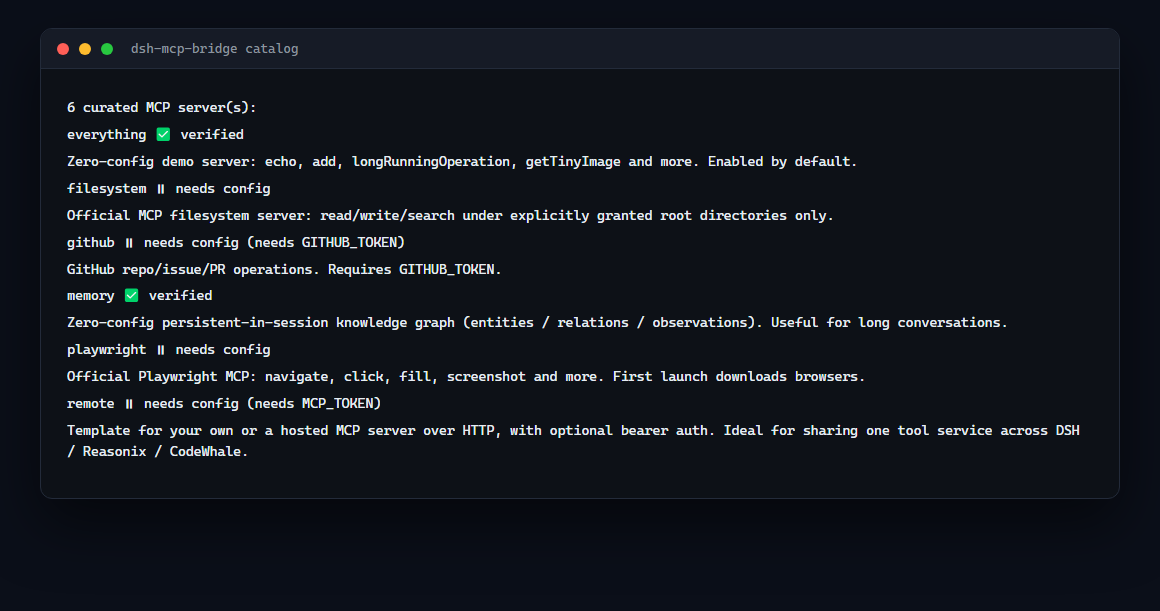
| Server | What it gives you | Config needed | Verified |
|---|---|---|---|
everything | Demo tools: echo, add, long-running ops, tiny image | none (default on) | ✅ 13 tools |
memory | In-session knowledge graph (entities/relations) | none | ✅ 9 tools |
filesystem | File read/write/search, scoped to explicit roots | root dir (edit args) | ✅ 14 tools (given a real dir) |
github | Repos / issues / PRs | GITHUB_TOKEN | ⏸ needs config |
playwright | Browser automation (navigate/click/screenshot) | first-run browser download | ⏸ heavy, excluded from CI |
remote-http | Your own / hosted HTTP MCP server | URL (+ optional token) | ⏸ needs config |
To enable a commented preset, uncomment its block in the profile's cordis.patch.yml (hot-reloaded via HMR) or edit cordis.patch.yml in this package.
npm install          # brings @deepseek-ai/dsh-mcp-client → the MCP SDK
npm run verify       # or: node scripts/verify-servers.mjs
Prints PASS / SKIP / FAIL per server; exits non-zero on any failure. VERIFY_TIMEOUT_MS=15000 tunes the per-server timeout. Single-server troubleshooting: node scripts/probe-server.mjs npx -y your-mcp-server.
Each server is one @deepseek-ai/dsh-mcp-client entry. Either add it to the profile's user patch layer (recommended, HMR applies it without restart):
# $DSH_HOME/profiles/<name>/cordis.patch.yml
- id: mcp-myserver
  name: '@deepseek-ai/dsh-mcp-client'
  config:
    serverName: myserver          # namespace, unique per process ([A-Za-z0-9_-]{1,32})
    transport: stdio              # or streamable-http
    command: npx
    args: ['-y', 'your-mcp-server']
    env:
      YOUR_TOKEN: !!js process.env.YOUR_TOKEN
…or drop a definition into servers/ (so verify covers it) and add the matching entry to cordis.patch.yml here.
| Field | Transports | Required | Meaning |
|---|---|---|---|
transport | both | yes | "stdio" or "streamable-http" |
serverName | both | yes | tool namespace, unique among live instances |
command / args / env / cwd | stdio | command yes | child process spec |
url / headers | http | url yes | endpoint + auth headers |
toolCallTimeoutMs | both | no | per-call timeout, default 60000 |
failOnStartupError | both | no | reject activation on connect failure (default false) |
reconnect.* | both | no | auto-reconnect backoff (default on) |
All three are agent harnesses — MCP is the shared language. Any server you run for Reasonix or CodeWhale can be added here, and a local streamable-http server you own can serve DSH, Reasonix and CodeWhale from one process. See servers/remote-http.json.
dsh --profile <name> "task"): the profile needs @deepseek-ai/dsh-headless in dsh.profile.bundles (add it manually; dsh plugin add @deepseek-ai/dsh-headless fails with 404 on its unpublished dependency). Without it the tree activates but no agent consumes the task.npx is fine on Windows: the MCP SDK uses cross-spawn, which resolves .cmd shims — no npx.exe needed.failOnStartupError: false means the entry activates without tools on failure.npm version patch (or bump package.json manually), commit, tag vX.Y.Z.git push origin main --tags.publish.yml) publishes to npm — requires npm trusted publisher (OIDC) linked to the repo. Setup: npm → Access Tokens → Generate new token → Publish with GitHub Actions.Give the repo the GitHub topic dsh-plugin so it shows up in the community lists (awesome-dsh-plugin, WhaleHub).
MIT — see LICENSE.
The catalog is a starting point, not a ceiling. add installs any npm-published MCP server into a
profile and then probes it, so the result is "it works" or "here is what broke":
npx dsh-mcp-bridge add @modelcontextprotocol/server-memory
npx dsh-mcp-bridge add some-mcp-server --name some --env SOME_API_KEY
Wrote memory (@modelcontextprotocol/server-memory) to ~/.dsh/profiles/web/cordis.patch.yml

Checking that it actually starts...
  OK — 9 tool(s) listed
If the probe fails, the entry stays written so you can fix it in place, and the message says where:
  FAILED at connect: MCP error -32000: Connection closed
  the entry is still written so you can fix it in place:
    ~/.dsh/profiles/web/cordis.patch.yml
Options: --profile <name> (defaults to the first profile), --name <serverName> (defaults to a
name derived from the package), --args a,b (extra arguments), --env KEY1,KEY2 (environment
variables passed through from the environment), --timeout <seconds>.
npx dsh-mcp-bridge remove memory --profile web
Removes one - insert: entry from the profile's patch layer, leaving every other entry and the
header comment alone. --dry-run shows what would be removed without writing; an unknown name exits
2 and lists the entries that are present. Restart the profile for it to take effect.
Installing is half the job. When a server never appears in your tool list, doctor starts each
one, completes the MCP handshake and lists its tools, so you can see where it broke:
npx dsh-mcp-bridge doctor
Diagnosing 7 curated server(s), 60s each…

  ✅ everything     16 tools
  ⏸  filesystem     needs configuration first — MCP error -32000: Connection closed
       → fill in its settings before diagnosing: npx -y @modelcontextprotocol/server-filesystem C:/path/to/allowed/root
  ⏸  github         needs GITHUB_TOKEN
  ✅ memory         9 tools
  ✅ playwright     25 tools
  ⏸  remote         needs MCP_TOKEN
  ✅ sequential-thinking 1 tools

4 ok, 3 skipped, 0 failed
Failed stages are reported separately because the advice differs:
| Stage | What it means | What to do |
|---|---|---|
| process could not be started | the command is not on PATH | check npx is installed |
| server did not complete the handshake | it started and died | run the printed command yourself and read the output |
| handshake worked, listing tools failed | protocol/version mismatch | try the newest release of that server |
Servers that are simply not configured yet are reported as skipped, not failed — a placeholder path is not a bug.
Other commands: list (catalog), init (install), validate (what is in a profile).
Part of the dsh-toolkit family — small, independently useful pieces for DeepSeek Harness:
dsh 的 draw.io 绘图插件:通过 next-ai-drawio MCP 服务器作图,点回复里的链接在右侧栏打开实时预览,可以手动修改图,AI 的每次修改都是可以恢复的版本。需 Node.js 18+,首次使用由 npx 下载 MCP 服务器。
把 WeKnora 知识库接入 dsh 的四个只读工具:列出知识库、混合检索原文片段、按顺序还原单篇文档,以及直接取用 WeKnora 自己带引用的 RAG 或 ReAct agent 回答(含可续聊的 session id)。
把腾讯云 CloudBase 后端接入 DeepSeek Harness——在对话里搭好并部署全栈应用,查询结果渲染为表格卡片(分页、排序、导出 CSV),部署后可预览真实域名,并提供 CloudBase MCP 工具集(`mcp__cloudbase__*`),登录走 device-code 流程。