
dsh
OpenPetsHQ/openpets将 DeepSeek Harness 的生命周期状态、错误与审批请求,桥接到本地运行的 OpenPets 桌面伙伴。

回合完成、需要你输入或执行失败时播放语音提醒并发送浏览器通知,还可把同样的摘要以卡片推送到飞书机器人 webhook。
DeepSeek Harness 插件:每次执行完成播放音频提醒,内置多款原神角色语音;agent 向你提问、等待输入时也会提醒。
A DeepSeek Harness plugin that plays an audio alert when an execution completes — or when the agent asks for your input, with a built-in library of Genshin Impact character voices.
插件名叫 dsh-genshin-lisa-notice(即 lisa-notice)。最初只是想用原神·丽莎的语音做个单纯的"执行完成提醒",所以按角色名(Lisa)起了名。后来一个版本一个版本地迭代,功能越来越多:加了交互提醒、配置文件、下拉选择内置语音库、自定义音频上传……但懒得改名字了,就一直沿用至今。名字里的 lisa 更多是个"起源彩蛋",并不代表现在只支持丽莎这一个语音。
The package is named dsh-genshin-lisa-notice (i.e. lisa-notice). It started as a plain "execution-complete reminder" using Genshin Impact Lisa's voice, named after that character. Over many releases the scope grew — interaction alerts, a settings page, a built-in voice library with a dropdown, custom audio upload — but the name stuck because renaming it was never worth the churn. The lisa in the name is now more of an origin easter egg than a statement that only Lisa's voice is supported.
ask_user_question)向你请求输入时,同样播放提醒并发送通知(+ 飞书)已同时发布到 npm 与 GitHub,优先用 npm(预构建包,无需构建授权、升级更简单):
dsh plugin --profile web add dsh-genshin-lisa-notice
不想经过 npm 也可以从 GitHub 源码安装:
dsh plugin --profile web add github:EagleClark/dsh-genshin-lisa-notice
装完重启 dsh web,刷新页面生效(客户端 bundle 随启动图注入)。
升级到 0.10.0 之后(配置模型迁移到 dsh ≥ 0.1.7-rc.2 的 Config / configForms),需要重新执行一次上面的安装命令再重启——profile 里记录的是安装时的快照。
1. 触发提醒 —— 装好后无需任何操作,两种时刻会自动提醒:
ask_user_question 向你提问时,播放"交互提醒语音" + 系统通知 + 飞书(若开启)2. 配置通知 —— 打开侧边栏的 插件,在「已安装」里点开 dsh-genshin-lisa-notice,页面里的 Genshin通知提醒 就是配置卡片:
schema: "2.0"),因此正文里的 markdown 表格会变成飞书的原生 table 组件:灰色表头、自适应列宽、每页 10 行分页、超长单元格省略可悬浮查看;# 标题转粗体,源码里原有的代码块保持不变3. 听不到声音? 浏览器自动播放策略要求页面有过一次用户交互(点击/按键)。重启后第一次提醒若被拦截,点一下页面任意处后下次提醒即可正常出声。系统通知需在首次交互时允许浏览器通知权限。
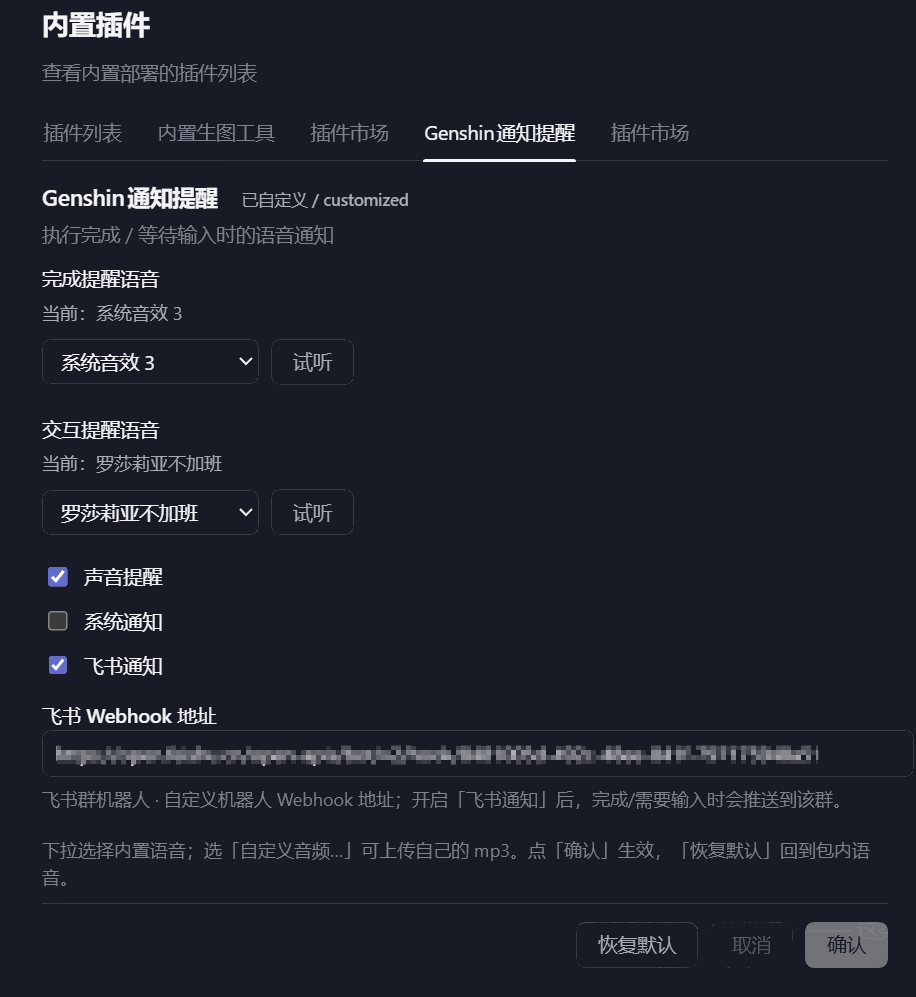
打开侧边栏的 插件,在「已安装」里点开 dsh-genshin-lisa-notice,页面里的 Genshin通知提醒 即配置卡片(见下方截图):
/voice.mp3,本地文件直接播放,无需先上传)$DSH_HOME/data/dsh-genshin-lisa-notice/cordis.patch.yml($DSH_HOME/profiles/<profile>/cordis.patch.yml 里 dsh-genshin-lisa-notice 行下的 config:),与 dsh ≥ 0.1.7-rc.2 的插件配置模型一致需要 dsh ≥ 0.1.7-rc.2:该版本用插件自身的 Config +
ctx.configForms取代了旧的settingsScope设置命名空间。旧版 dsh 上插件会因等待settingsScope而无法激活。
配置界面(插件 → dsh-genshin-lisa-notice 页内的 Genshin通知提醒 卡片;截图为旧版位置,内容一致):
assets/(文件名即下拉选项的 key,- 会显示为 ·;已知语音的友好名在 lib/index.js 的 VOICE_LABELS 里),重新提交/发布即可| 端 | 职责 |
|---|---|
Host (lib/index.js) | 监听 agent/turn-stopping(执行完成)与 tools/pre-execute 中的 ask_user_question(提问分发时触发,早于提问 UI 出现);事件沿作用域链向上流动,根级插件可收到所有会话的事件。导出本插件自己的 Config(语音 key/路径 + 通知开关 + 飞书 webhook,全部 volatile(),写入即生效、无需重载)。通过 webServer 提供 /voices、/voice.mp3(单条内置语音,供试听)、/alert.mp3、/interaction.mp3(按配置读取对应音频)、/upload(存自定义 mp3)与 /poll(返回计数 + 完成摘要);在 agent/status idle 时取最后一条助手消息作摘要并发送飞书交互卡片 |
Client (client/client.js) | 每 700ms 轮询 /poll,分别对完成/交互:声音(每次播放新建 Audio 元素,反映最新配置)+ 浏览器系统通知(含摘要);受「声音/系统通知」开关控制。首个用户手势解锁自动播放、申请通知权限,被拦截的提醒在点击/按键时补播。通过 ctx.configForms 绑定本条目,并用 whileServed 把配置卡片注册到三个席位(新版 settings.plugins.tab 页 + plugins.bundle.config bundle 页,旧版 settings.plugin.item),内容为语音下拉 + 试听 + 自定义上传 + 三路通知开关 + 飞书 webhook + 恢复默认,写入按 settings 文档的 revision 栅栏提交 |
npm publish 发布到 npm(需先 npm adduser 登录)将 DeepSeek Harness 的生命周期状态、错误与审批请求,桥接到本地运行的 OpenPets 桌面伙伴。
通过二维码或机器人凭据将 IM 机器人接入 DeepSeek Harness(支持飞书、微信、钉钉、企业微信、QQ、Slack、Telegram、Discord 和 WhatsApp 共 9 种渠道)。
通过 WebSocket V2 将 DeepSeek Harness 接入 Avernet Bot 协作网络,支持自动注册、Agent 会话隔离、工具调用事件和多 Bot 路由工具。

