
dsh-web
zhu1090093659/dsh-webDeepSeek Harness(DSH)Web 插件聚合生态包 · 一切皆插件,创意工坊分发(dsh-market.com)

DeepSeek Harness plugin: shows the current session's spend, priced by DeepSeek's peak and off-peak rate windows.
A DeepSeek Harness plugin that shows what the current session has cost so far, split by DeepSeek's peak and off-peak rate windows.
English | 中文
A pill in the composer dock, beside the shipped token-usage pill:
[shipped] 11 turns 191 steps · 226 tok/s 51.5M tok · 99.5% cached (¥) ¥2.75
Click it for the breakdown. A session that stayed inside one window shows a single block:
(¥) Cost                                          ¥1.09
───────────────────────────────────────────────────────
Off-peak · 110 requests
Uncached input                          187K tok · ¥0.187
Cache read                            20.77M tok · ¥0.415
Output                                  121K tok · ¥0.482
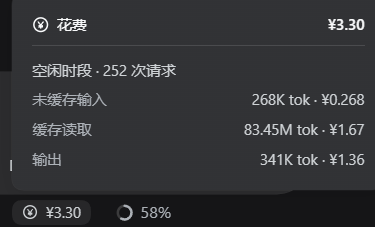
A session spanning both windows splits into two blocks, each with its own subtotal:
(¥) Cost                                          ¥3.30
───────────────────────────────────────────────────────
Peak · 3 requests
Uncached input                         1.00M tok · ¥2.00
Output                                  100K tok · ¥0.800
Subtotal                                          ¥2.80
Off-peak · 7 requests
Cache read                             5.00M tok · ¥0.100
Output                                  100K tok · ¥0.400
Subtotal                                          ¥0.500
The figure is the whole session, not the loaded window: paging, compaction, and resuming a session do not change it, and a retried model request is not billed twice.
git clone https://github.com/dtxovo/dsh-plugin-session-cost
cd dsh-plugin-session-cost
powershell -NoProfile -ExecutionPolicy Bypass -File .\install.ps1
The script does two things: copies the package to <profile>\plugins\session-cost\, and
appends the mount entry to <profile>\cordis.patch.yml (skipped when it is already there).
Then refresh the DSH page (Ctrl+R).
The profile directory is resolved in this order: the -ProfileDir argument, then
$env:DSH_PROFILE_DIR, then ~\.dsh\profiles\desktop.
-ExecutionPolicy Bypass is needed because Windows blocks unsigned .ps1 files by
default. On a machine whose execution policy already allows local scripts, .\install.ps1
works as-is. On macOS or Linux, do the same two steps by hand under PowerShell 7.
Edit the profile's cordis.patch.yml and save — the patch layer is watched, so no restart
is needed. Refresh the page afterwards so the browser picks up the new rates.
- insert:
    - id: session-cost-v2
      name: ./plugins/session-cost/host.js
      config:
        currency: "¥"     # display symbol
        per: 1000000      # the four rates below are per this many tokens
        input: 1          # uncached input     <- off-peak rate
        cacheRead: 0.02   # cache read         <- off-peak rate
        cacheWrite: 0     # cache write (DeepSeek does not bill this separately)
        output: 4         # output             <- off-peak rate
        holidays: []      # Beijing dates, e.g. ["2026-10-01", "2026-10-02"]
        # peak:           # omit to default to off-peak x 2
        #   input: 2
        #   cacheRead: 0.04
        #   cacheWrite: 0
        #   output: 8
The built-in defaults are DeepSeek deepseek-flash off-peak list prices in CNY per
million tokens, taken from the official pricing page on 2026-10-15:
| Off-peak | Peak | |
|---|---|---|
| Input (cache hit) | ¥0.02 | ¥0.04 |
| Input (cache miss) | ¥1 | ¥2 |
| Output | ¥4 | ¥8 |
Check them against your own bill. A third-party gateway does not bill these numbers,
and this table covers only deepseek-flash.
holidays defaults to empty. China's public holidays
are announced yearly and cannot be derived, so top the list up each year. Weekends that
are worked as make-up days stay off-peak: the published rule only looks at Monday-Friday
plus the holiday list.reasoningTokens is a subset of what output is
billed for, so adding it would double-count.The design behind the numbers, and the DSH internals this plugin had to work around, are in docs/IMPLEMENTATION.md.
node .\check.mjs         # 43 assertions on the client half, against ./client.js
node .\check-host.mjs "<profile>\plugins\session-cost\host.js"   # 33 assertions on the host half
check.mjs needs nothing but Node: it renders the client half through a small React
stand-in that covers exactly the API surface the component uses.
check-host.mjs imports the host half, which resolves @deepseek-ai/schemastery and zod
from its own location — both are supplied by DeepSeek Harness. Point it at an installed copy
(the normal case), or install those two packages first. Run it with no argument and it says
so instead of failing silently.
MIT © 2026 dtxovo
DeepSeek Harness(DSH)Web 插件聚合生态包 · 一切皆插件,创意工坊分发(dsh-market.com)
把回答做成一页可视化 HTML:模型只写简短的 Markdown 草稿,随包附带的 `am` 命令行生成页面,支持流程图、时序图、树、时间线、ER 图、表格和提示框。
在 dsh 里装上这个插件即可,无需登录、注册或填 API Key,就能使用包括 Muse Spark 1.3、MiMo V2.6 在内的前沿模型——完全免费,不限量。 All you do is install this plugin in dsh: no login, no sign-up, no API key — the frontier models are just there, Muse Spark 1.3 and MiMo V2.6 among them. Completely free, with no usage cap.

