
dsh-web
zhu1090093659/dsh-webDeepSeek Harness(DSH)Web 插件聚合生态包 · 一切皆插件,创意工坊分发(dsh-market.com)

Edge/Chrome extension that auto-groups every DeepSeek Harness (DSH) Web GUI tab, plus the DSH plugin that mirrors it to a fixed path, detects it inside the GUI and drives it. One package, two faces.
把浏览器里所有指向 DeepSeek Harness(DSH)Web GUI 的标签页自动收进同一个标签组。
你在 DSH 里同时开着好几个会话——侧栏每一行本身就是链接,中键一点就是一个新标签页——标签栏很快就乱了。
这个扩展会在 DSH 标签页出现的瞬间把它们归进一个名叫 DSH 的组,新开一个自动进去一个,
全部关掉后空组被浏览器自动清掉。本仓库是一个包、两张脸:浏览器扩展那一半做全部归组动作,
DSH 插件那一半负责把扩展镜像到固定路径、在 GUI 里检测它、引导安装并直接驱动它。
dsh-session-url 让侧栏每一行都是真链接(中键 / Cmd+点击直接开新标签),
于是"一个会话一个标签页"成了日常,而浏览器原生的标签组要一个个手动拖。chrome.tabs / chrome.tabGroups / chrome.runtime 都不存在),
宿主插件跑在 Node 里更碰不到浏览器。标签栏只对浏览器扩展开放,
所以"自动归组"这件事唯一的实现形态就是扩展。DeepSeek Harness:一条规则同时覆盖随机 --port、localhost vs 127.0.0.1、
局域网地址、以及 cloudflared 隧道域名(端口规则永远追不上后者)。前缀匹配刻意收紧,
另一个恰好叫 DeepSeek Harness Docs 的站点不会被误伤。manifest.json + src/),又是 DSH 插件
(lib/ + cordis.patch.yml);浏览器忽略插件文件,DSH 忽略扩展文件。key,ID 恒为 pnncehmieeobfabnbdepbldiknndjbhl,
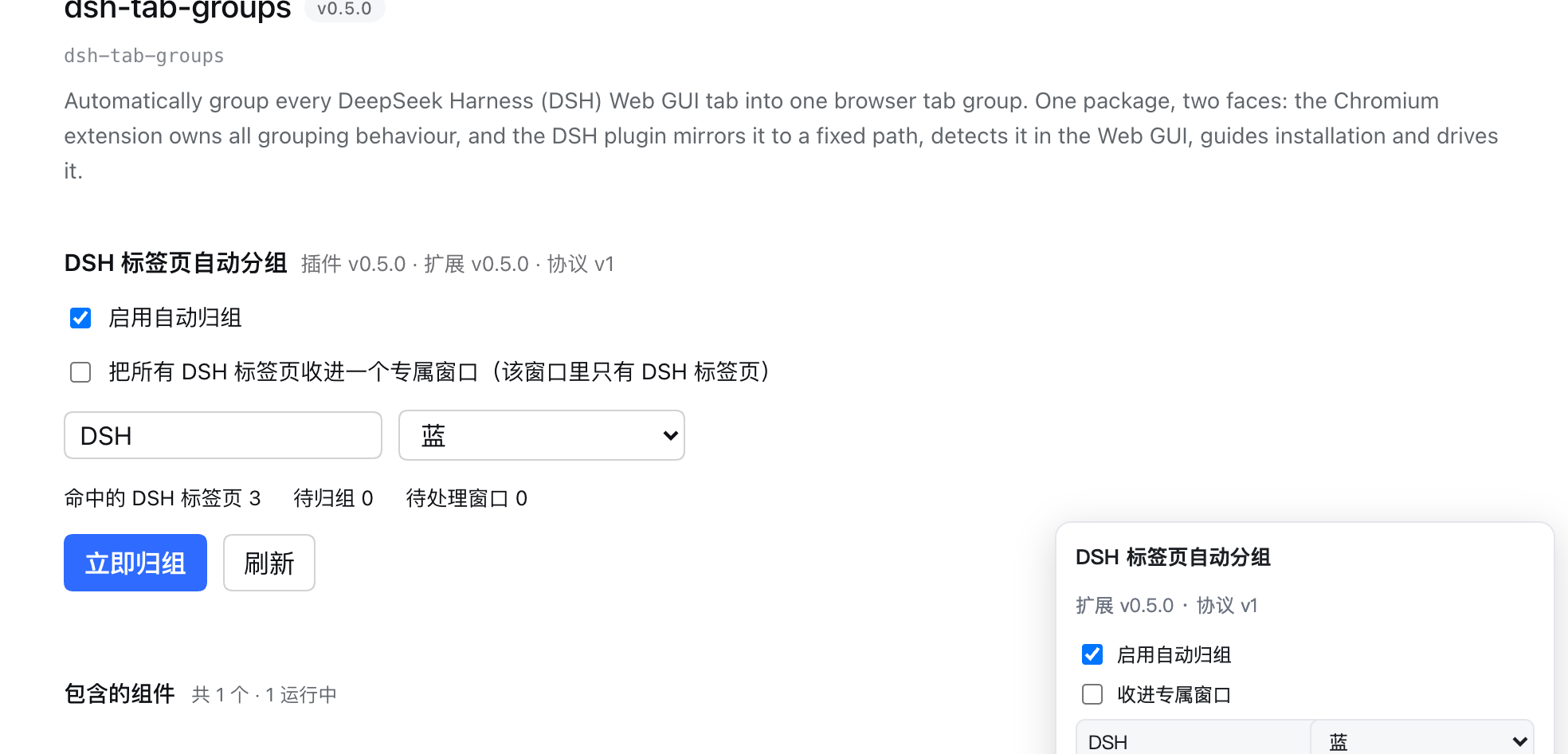
目录挪到哪都不变——这是两张脸能互相寻址的前提。插件 v0.5.0 · 扩展 v0.5.0 · 协议 v1——左边是本插件的版本,
右边是你浏览器里实际加载的那个扩展的版本。只写一个版本号时它必然被误读成插件版本(我自己就这么误读过)。tabs / tabGroups / storage)、没有任何 host 权限、不注入内容脚本、
不发网络请求、不采集数据。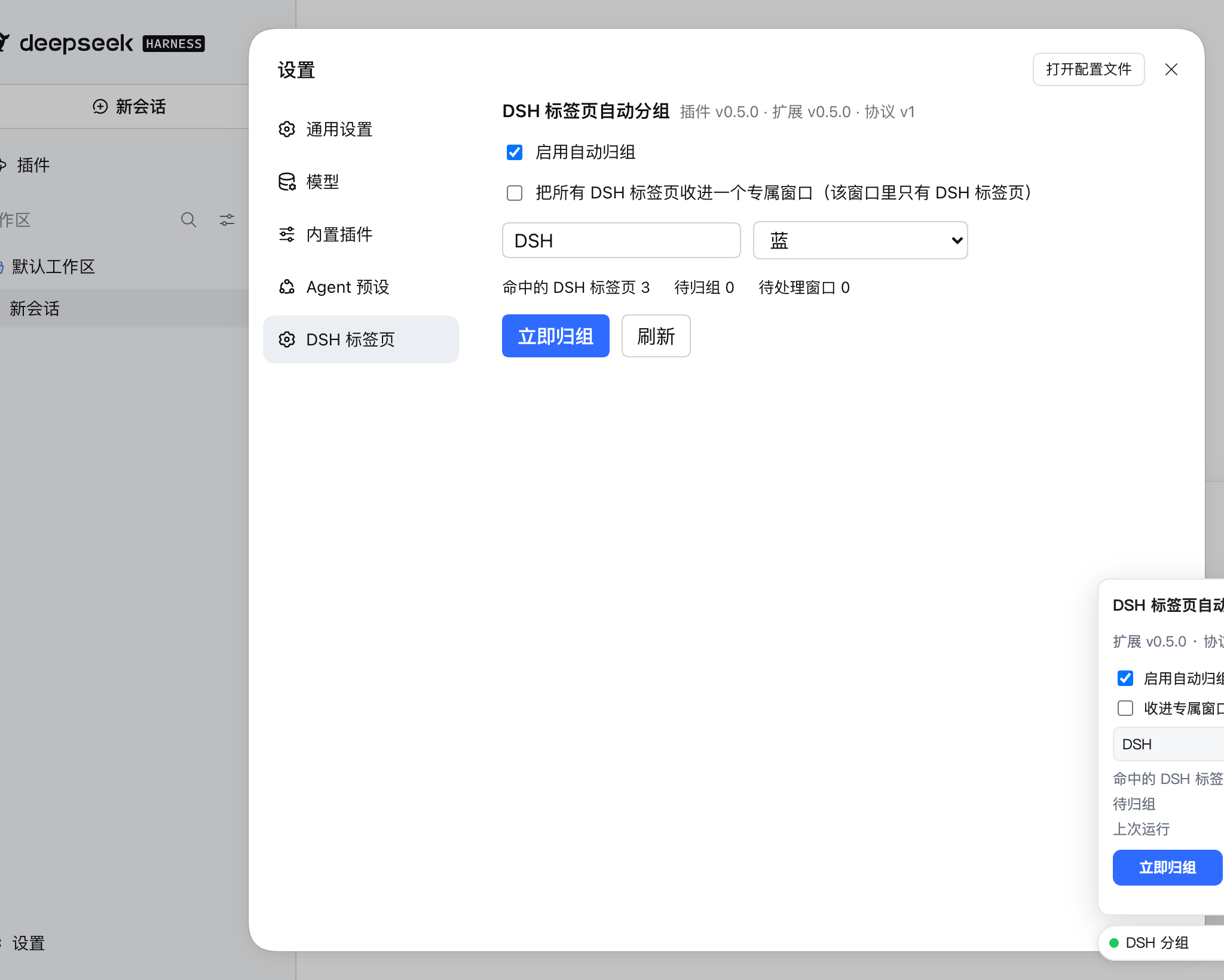
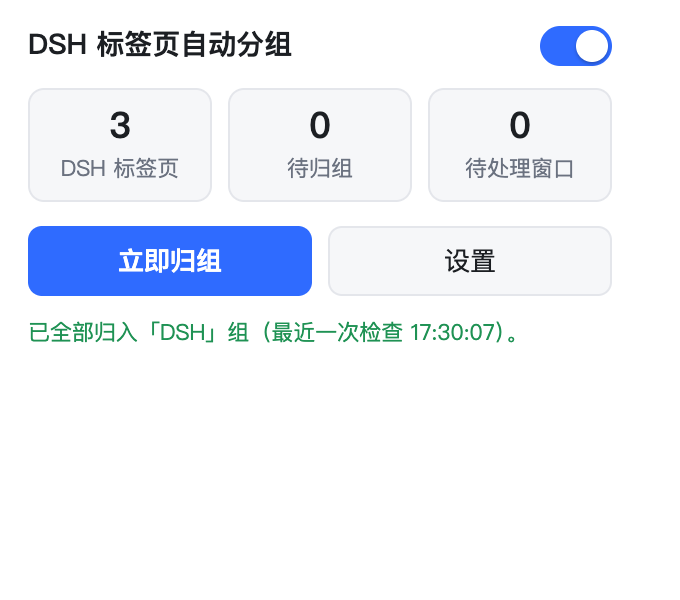
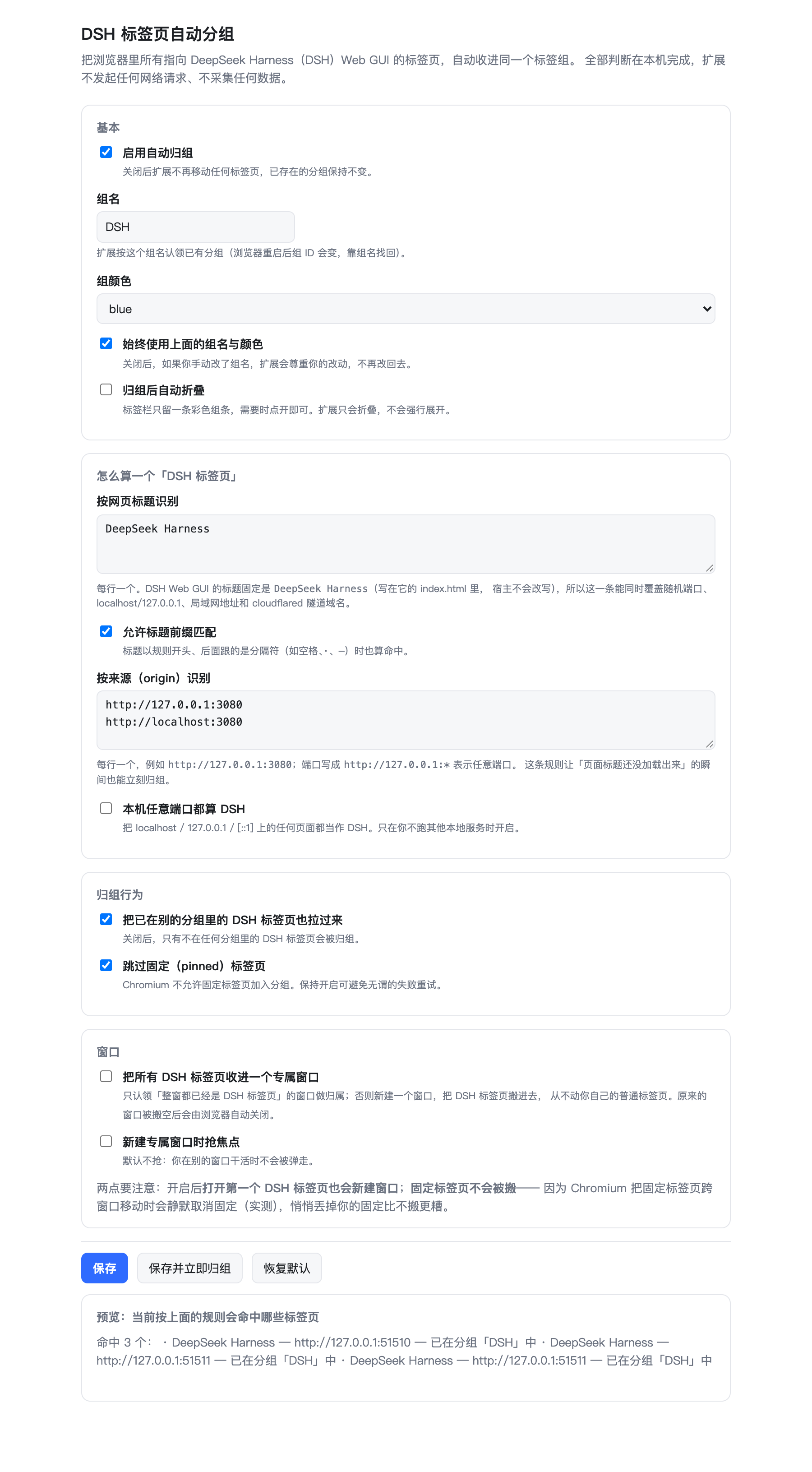
浏览器自己的标签栏属于浏览器内核 UI,任何页面级 API 都截不到,所以这里没有"标签栏截图"—— 与其画一张示意图,不如不放。
分两步。第二步只有一次点击,且只需做一次。
cd <你的 dsh-tab-groups 目录>
dsh plugin --profile web add link:$PWD
宿主半区随后会把扩展镜像到 $DSH_HOME/dsh-tab-groups-extension(默认 ~/.dsh/dsh-tab-groups-extension),
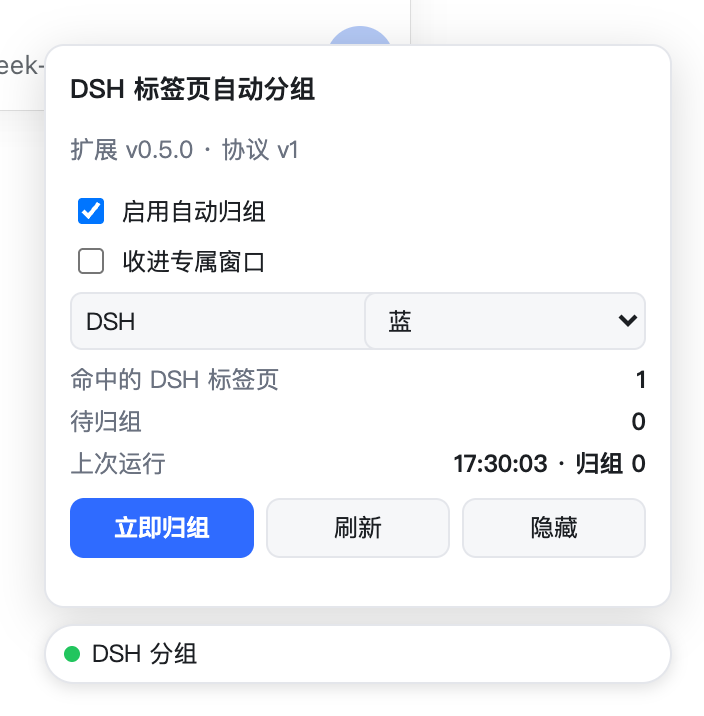
并在日志里打印这个路径。刷新 GUI 后右下角出现「DSH 分组」芯片。
从 npm 装也一样(dsh plugin --profile web add dsh-tab-groups),镜像路径固定,不依赖包安装在哪。
edge://extensions(Chrome 是 chrome://extensions),打开左下角开发人员模式~/.dsh/dsh-tab-groups-extension
(Finder 里按 Cmd+Shift+G 可以粘贴这个路径)一行命令直接打开那个页面:
open -a "Microsoft Edge" "edge://extensions/"
不要 DSH 插件也行:直接对本仓库目录做「加载解压缩的扩展」即可, 插件那半边不影响扩展的任何行为。
ping / status / reconcile / set-config,
详见工作原理。识别锚点是网页标题 DeepSeek Harness。三个证据,都是查证的:
@deepseek-ai/dsh-web-frontend/dist/index.html 里 <title> 写死为 DeepSeek Harness;document.title 赋值,运行期不会变;window.__DSH_BOOT__,不重写 <title>
(dsh-host-webserver/lib/index.js 里连 title 这个词都不出现)。前缀匹配只在"后续第一个字符不是字母数字"时才算命中,所以
DeepSeek Harness · 会话标题、DeepSeek Harness — 登录 命中,DeepSeek Harness Docs 不命中。
另有按 origin 的规则(默认 http://127.0.0.1:3080、http://localhost:3080),
负责"标题还没加载出来的那一瞬间"就立刻归组。
| 脸 | 跑在哪 | 负责 |
|---|---|---|
浏览器扩展 manifest.json + src/ + icons/ | Edge / Chrome 等 Chromium 浏览器 | 全部标签组行为 |
DSH 插件 lib/ + cordis.patch.yml | DSH 宿主 + Web GUI 页面 | 镜像扩展、检测它、引导安装、驱动它 |
宿主半区(lib/index.js)在插件激活时把扩展那半边复制到 $DSH_HOME/dsh-tab-groups-extension:
幂等(带版本戳,同版本不重复复制)、窄删除(只替换已知的那几个条目,绝不动目录里别的东西)。
浏览器半区(lib/client.js)是一颗自带的 shadow-DOM 芯片,不依赖任何官方 slot 或服务形状——
因为"扩展没装"这个状态正是它存在的理由,它必须在那时也能工作。
扩展 manifest 里声明了 externally_connectable:
"matches": ["http://127.0.0.1/*", "http://localhost/*", "https://*.dsh-market.com/*"]
Chromium 只向匹配的页面注入 chrome.runtime。于是:
chrome.runtime.sendMessage → 扩展在;不需要探测扩展 URL、不需要改 manifest、不需要额外权限。协议如下(src/protocol.js,纯逻辑、有单测):
| 消息 | 返回 |
|---|---|
{type:'ping'} | {ok, installed, protocol, id, version} |
{type:'status'} | 开关、组名、颜色、命中数、待归组数、窗口数、上次运行结果 |
{type:'reconcile'} | 立即归组,返回 {moved, groups, matched, errors} |
{type:'set-config', config} | 逐键白名单校验后写入并立即重新归组 |
它故意什么都不暴露:状态里只有计数,没有任何标签页地址、标题或 ID。
打开后,所有 DSH 标签页会被收进同一个窗口,而这个窗口里只有 DSH 标签页。规则:
tabId 播种(把第一个 DSH 标签页直接作为新窗口的初始标签页),而不是裸建一个空窗口:
裸建会留下一个多余的 about:blank 标签页(实测),端到端里有专门断言盯着"前后 about:blank 数量不变"。chrome.tabs.move 跨窗口移动固定标签页会成功但静默取消固定——
悄悄丢掉用户的固定比不搬更糟,所以固定标签页原地不动。focused: false,你在别的窗口干活时不会被弹走(想抢焦点可以在设置里打开)。| 座位 | 槽 | 为什么要有它 |
|---|---|---|
| 一级设置分区(设置 → 「DSH 标签页」) | settings.section(list) | DSH 生态的惯例:插件设置待在插件设置页 |
| 「插件」分区里本插件那一页 | plugins.bundle.config(keyed,key = 包名) | 装完插件的人会去插件页找,那里本来只有一段描述和不可点的组件清单 |
| 状态点芯片 | 自持 shadow DOM,不用 React | 扩展未装时唯一能看到的东西,且能自己摊开安装引导 |
仍然零构建:加载器会给客户端半区一个 require,require('react') 就能拿到 React
(dsh-free-search 就是这么做的),所以这个文件既是源码也是产物。
两个踩过的坑,写在这里省得下次再踩:
ctx.slots 是 cordis 服务,不声明 inject 就去访问会抛错,而 apply 一抛,
客户端 entry 就变成 failed,整个 GUI 启动直接报
web boot: 1 entry did not activate——而且不告诉你原因。所以 inject = ['slots'],
且所有取用都套了 try/catch。inject 只能写成数组:这个壳把 { optional: ['slots'] } 解析成一个名叫 optional 的服务,
于是 entry 永远 pending (waiting for service: optional)。settings.plugins.tab:那个槽属于**「内置插件」**分区,用来放各家内置插件的视图;
第三方 bundle 的配置归 plugins.bundle.config(按包名 key),渲染在自己那一页上。hidden:所以"元素存在"不等于"分区正在显示",
自动化里必须按可见判定(offsetParent/:visible),否则会读到上一屏残留的节点。macOS 上装不了"静默"扩展。 唯一能静默装扩展的机制是企业策略
ExtensionInstallForcelist,而微软官方文档明确写着:
On macOS instances, apps and extensions from outside the Microsoft Edge Add-ons website can only be force installed if the instance is managed via MDM, or joined to a domain via MCX. — Microsoft Edge 策略文档
而且它不只是"文档这么写":本机实测 Enrolled via DEP: No、MDM enrollment: No、无任何受管策略文件,
所以即使去配策略,非商店扩展在 macOS 上也不会被强制安装。
「加载解压缩的扩展」那一次点击是省不掉的;想彻底免掉只能上架 Edge 加载项商店。
externally_connectable 只能按 host 匹配、不能按端口,因此本机上任何网页(任意 localhost 端口)
都能连上这个扩展。作为补偿,配置写入走逐键白名单校验(未知键直接拒绝、类型不对直接报错),
状态响应里只有计数。一个恶意本地页面最多能改组名/颜色/开关或触发一次归组。
改了组名又重启浏览器会另建一个新组:扩展把"自己拥有的组 ID"记在 chrome.storage.session,
浏览器重启后组 ID 失效,只能按组名找回。想避免就保持组名不变,或把"始终使用配置的组名"打开。
不劫持别人的分组:只认领组名匹配或自己记录过的组;你手动建好、里面恰有一个 DSH 标签页的组 不会被改名(那个标签页会被拉出来,除非关掉"从别的分组拉过来")。
专属窗口模式的代价:开启后,你打开的第一个 DSH 标签页也会被搬进一个新窗口(因为"整窗只有 DSH 标签页" 这个条件一开始不成立);固定标签页会留在原来的窗口里(原因见上)。默认关闭,就是为了让你自己权衡。
开发者模式提示:每次启动 Edge 可能提示"停用开发人员模式扩展",这是浏览器正常提示,选择保留即可。
Safari 用不了这个方案。 本机实测(macOS 26.7.1 + Safari 27.0):
Safari 扩展 API 没有 tabGroups,连 tabs.Tab.groupId 都不存在;AppleScript 词典
(/Applications/Safari.app/Contents/Resources/Safari.sdef,8710 字节全文)里只有一个 tab 类,
属性仅 source/URL/index/text/visible/name,没有 tab group 类/元素/属性/命令。
唯一的一手能力是快捷指令:Safari 自带 Create Tab Group / Move Tabs to Tab Group / Search Tabs
这几个 App Intent,可用 /usr/bin/shortcuts run "<名称>" 无点击触发——但 macOS 没有"标签页被打开"触发器,
所以做不到事件驱动。如果你只是想"别让 DSH 标签混进普通标签",把 GUI 加成 Safari Web App
(添加到程序坞)或给它独立 Profile 比任何脚本都稳。
npm test                    # 74 项纯逻辑单测(node --test,无需浏览器)
npm run id                  # 复查扩展 ID:manifest 的 key、插件常量、client 内联值三者是否一致

# 真实浏览器端到端:加载扩展、开标签页,从扩展自己的 service worker 里读
# chrome.tabGroups 状态做断言(不是 mock)
DSH_E2E_URL="http://127.0.0.1:3080/?token=..." \
E2E_CHANNEL=msedge \
PLAYWRIGHT_PATH="/path/to/node_modules/playwright" \
node tools/e2e.mjs

# 插件能不能在真实 DSH 宿主里挂载?(隔离 DSH_HOME,不碰你的 profile 与 ~/.dsh)
DSH_BIN=/path/to/dsh PLAYWRIGHT_PATH="/path/to/node_modules/playwright" npm run test:mount

# does the plugin's own section under Settings really render, and can it write config back?
DSH_BIN=/path/to/dsh PLAYWRIGHT_PATH="/path/to/node_modules/playwright" npm run test:section

# 插件在设置页里的那个分区真的渲染出来、且能写回配置吗?
DSH_BIN=/path/to/dsh PLAYWRIGHT_PATH="/path/to/node_modules/playwright" npm run test:section

# 重新生成 README 截图(真机截图,非示意图)
npm run screenshots
四层验证,每层都在本机跑过:
| 通道 | 断言数 | 结果 |
|---|---|---|
| 纯逻辑单测(识别 / 分组决策 / 窗口归并决策 / 协议与信任边界 / 两张脸一致性 / 宿主镜像) | 74 | 74/74 |
| 真浏览器端到端(Chromium 与 Microsoft Edge 154.0.4258.53,含真实 DSH GUI 会话) | 53 | 53/53 |
插件挂载(隔离 DSH_HOME → 真宿主 → 真浏览器打开该实例 GUI) | 9 | 9/9 |
| 插件界面(隔离实例与用户实时实例都跑:一级设置分区 + 插件页那一块,覆盖可见性、版本显示、勾选保存) | 14 | 14/14 |
端到端覆盖:自动建组、组名与颜色、后开的 DSH 标签页自动入组、DeepSeek Harness Docs 不被误伤、
普通网页不被归组、固定标签页被正确放过、弹窗与设置页改配置后真实标签组跟着变、
重复触发幂等、关标签页后组自动清除、清除后再开能重建;
专属窗口(在设置页打开开关 → 分散在两个窗口的 3 个 DSH 标签页聚进同一个窗口、该窗口里只有 DSH 标签页、
你自己的普通标签页一个都没被搬走、专属窗口里的分组也建好了、前后 about:blank 数量不变、关掉开关后恢复);
页面 → 扩展的协议全线(含非法配置被拒绝);
以及真实 DSH GUI 里的芯片(零注入由宿主投递、默认收起、点开显示计数、「隐藏」生效、刷新后回来、
点「立即归组」标签组真的恢复)。
挂载通道的第三段尤其能说明问题:用一个只含核心 web bundles + 本插件的临时 profile 起真实实例,
宿主半区必须真的写出镜像,真实宿主必须把插件的浏览器半区投递给真浏览器(全程不做任何注入),
芯片必须连上扩展且页面无 JS 报错。这三条通道都不往你的 profile 或 ~/.dsh 里装任何东西。
| 项 | 值 |
|---|---|
| DSH | >=0.2.0-rc.2 |
| 浏览器 | Edge / Chrome / Brave / Arc / Vivaldi 等 Chromium 内核(需 MV3 + 标签组 API,Chrome 89+) |
| Safari / Firefox | 不支持(Safari 无标签组 API;Firefox 需另写扩展) |
| Node(仅工具与测试) | >=22 |
| 依赖 | 运行时零依赖;扩展零构建 |
MIT
Automatically collect every browser tab showing the DeepSeek Harness (DSH) Web GUI into one tab group.
You keep several DSH conversations open at once — every sidebar row is a real link, so a middle click is a
new tab — and the tab strip is a mess within minutes. This extension files those tabs into one group named
DSH the moment they appear, follows along as you open more, and lets the browser remove the group when the
last one closes. The repository is one package with two faces: the browser extension performs every
grouping action, and the DSH plugin mirrors it to a fixed path, detects it inside the GUI, guides
installation and drives it.
dsh-session-url turns every sidebar row into a
real link (middle click / Cmd+click opens a new tab), so "one conversation, one tab" becomes the norm —
while native tab groups still have to be built by hand.chrome.tabs, chrome.tabGroups, chrome.runtime — none of them). A host
plugin runs in Node and cannot reach the browser either. The tab strip is only reachable from an
extension, so an extension is the only shape this feature can take.DeepSeek Harness: one rule covers a random --port, localhost vs
127.0.0.1, LAN binds and cloudflared tunnel hostnames (which no port rule can ever match). Prefix
matching is deliberately strict, so an unrelated site titled DeepSeek Harness Docs is not caught.manifest.json + src/) and a
DSH plugin (lib/ + cordis.patch.yml). The browser ignores the plugin files, DSH ignores the extension.key, so the id is always
pnncehmieeobfabnbdepbldiknndjbhl wherever the folder lives — the precondition for the two faces to
address each other.tabs / tabGroups / storage), no host permissions, no content
scripts, no network requests, no telemetry.
The browser's own tab strip is browser chrome that no page-level API can capture, so there is no tab-strip screenshot here — a diagram would be a fake, and not shipping one is better than shipping that.
Two steps. The second is a single click, and only once.
cd <your dsh-tab-groups directory>
dsh plugin --profile web add link:$PWD
The host half then mirrors the extension to $DSH_HOME/dsh-tab-groups-extension (by default
~/.dsh/dsh-tab-groups-extension) and logs that path. Refresh the GUI and a "DSH 分组" chip appears in the
corner.
From npm it is the same (dsh plugin --profile web add dsh-tab-groups); the mirror path is fixed and does
not depend on where the package was installed.
edge://extensions (chrome://extensions in Chrome) and turn on Developer mode~/.dsh/dsh-tab-groups-extension
(press Cmd+Shift+G in Finder to paste that path)One command to open that page:
open -a "Microsoft Edge" "edge://extensions/"
The DSH plugin is optional: point "Load unpacked" straight at this repository directory and the extension behaves exactly the same.
ping / status / reconcile / set-config; see How it works.The anchor is the page title DeepSeek Harness, and that choice is verified rather than guessed:
<title> is hard-coded to DeepSeek Harness in @deepseek-ai/dsh-web-frontend/dist/index.html;document.title assignment, so it cannot change at runtime;window.__DSH_BOOT__ into index.html and never rewrites <title>
(dsh-host-webserver/lib/index.js does not contain the word title at all).Prefix matching only fires when what follows is not a word character, so DeepSeek Harness · session and
DeepSeek Harness — sign-in match while DeepSeek Harness Docs does not. Configured origins (default
http://127.0.0.1:3080, http://localhost:3080) are the fallback for the instant before a title loads.
| Face | Runs in | Owns |
|---|---|---|
browser extension — manifest.json + src/ + icons/ | Edge / Chrome and other Chromium browsers | all tab-group behaviour |
DSH plugin — lib/ + cordis.patch.yml | the DSH host and the Web GUI page | mirroring the extension, detecting it, guiding install, driving it |
The host half (lib/index.js) copies the extension face to $DSH_HOME/dsh-tab-groups-extension when the
plugin activates: idempotent (a version stamp means a same-version run copies nothing) and narrow (only the
known face entries are replaced, never anything else in that directory). The browser half (lib/client.js)
is a self-contained shadow-DOM chip that depends on no official slot or service shape — because "the
extension is missing" is precisely the state it exists to explain.
The extension declares externally_connectable:
"matches": ["http://127.0.0.1/*", "http://localhost/*", "https://*.dsh-market.com/*"]
Chromium injects chrome.runtime only into matching pages. So:
chrome.runtime.sendMessage → the extension is installed;No probing of extension URLs, no manifest hacks, no extra permissions. The protocol (src/protocol.js,
pure logic, unit-tested):
| Message | Returns |
|---|---|
{type:'ping'} | {ok, installed, protocol, id, version} |
{type:'status'} | switch, group name, colour, matched count, pending count, window count, last run |
{type:'reconcile'} | group now, returning {moved, groups, matched, errors} |
{type:'set-config', config} | validate key by key, write, then re-group |
It deliberately exposes nothing else: status carries counts only — no tab URL, title or id.
Enabled, every DSH tab is consolidated into one window that holds nothing but DSH tabs. The rules:
tabId (one of the DSH tabs becomes its initial tab) rather than created
bare: a bare windows.create() leaves a stray about:blank tab behind (verified), and an end-to-end
assertion watches that the blank-tab count never changes.chrome.tabs.move succeeds but silently
unpins the tab — quietly dropping someone's pin is worse than leaving the tab alone.focused: false, so you are not yanked out ofDeepSeek Harness(DSH)Web 插件聚合生态包 · 一切皆插件,创意工坊分发(dsh-market.com)
把回答做成一页可视化 HTML:模型只写简短的 Markdown 草稿,随包附带的 `am` 命令行生成页面,支持流程图、时序图、树、时间线、ER 图、表格和提示框。
在 dsh 里装上这个插件即可,无需登录、注册或填 API Key,就能使用包括 Muse Spark 1.3、MiMo V2.6 在内的前沿模型——完全免费,不限量。 All you do is install this plugin in dsh: no login, no sign-up, no API key — the frontier models are just there, Muse Spark 1.3 and MiMo V2.6 among them. Completely free, with no usage cap.

