
packages/dsh-task-board
zhu1090093659/dsh-web侧边栏多列任务看板:卡片交给真实 DSH 智能体会话执行,支持 cron 定时(Host 侧到点执行,关浏览器也生效)。

DSH 会话头里的下载进度:百分比、速率、剩余时间与阶段,下载前先探测文件大小,中断后按字节区间续传。进度卡片以固定浮层显示在聊天窗口右上角。
Live download progress for DeepSeek Harness — no more staring at a silent chat while the agent downloads a 1 GB installer.
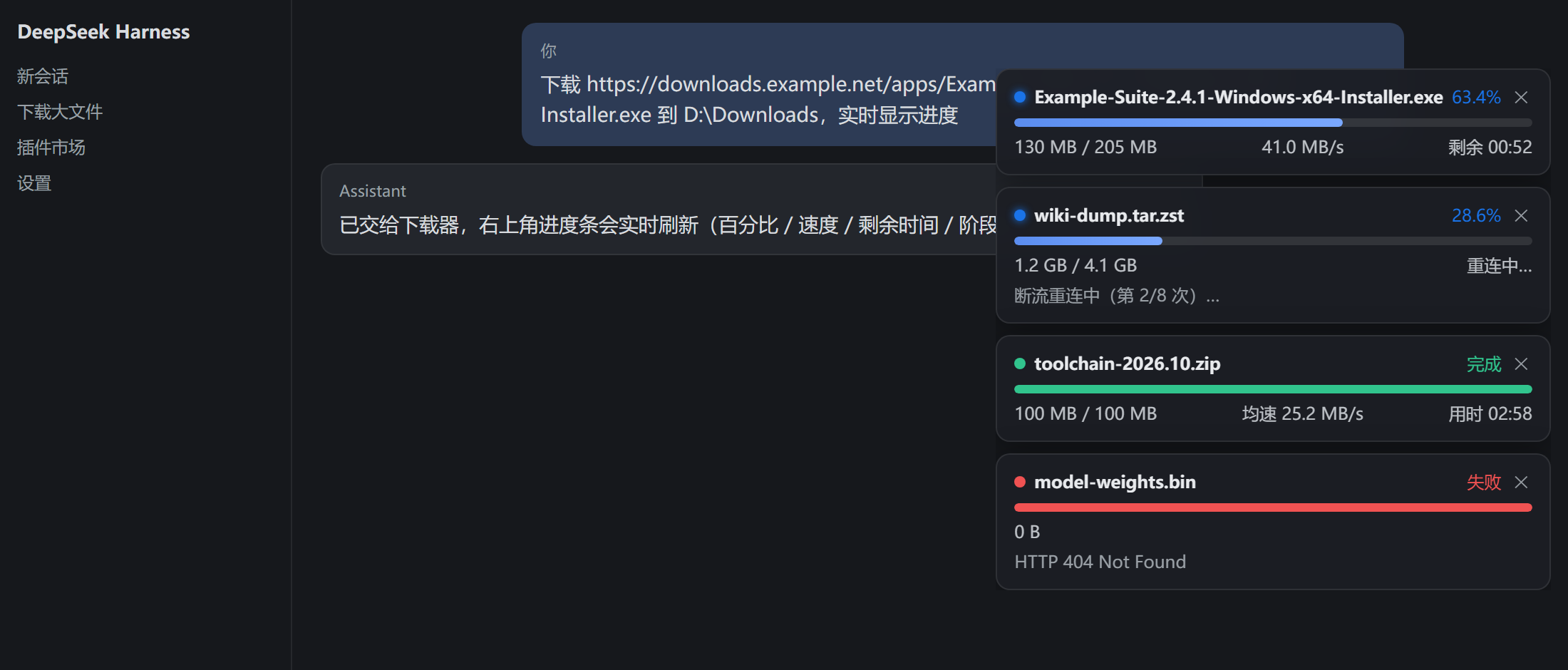
Same UI in light theme:
docs/screenshot-light.png
The cards in the top-right corner are rendered by this plugin's client half (lib/client.js); the numbers come from the real download worker (skills/download-progress/scripts/dl.mjs).
dl start resolves total size first, then estimates duration from the per-host speed history.dl resume continues from the .part file.failed in 20 s, so nothing hangs on screen forever.cordis.patch.yml), client half auto-injected through the ./client export, Node ≥ 18 standard library only. All data stays on your machine.From the DSH plugin market (once listed): search dsh-download-progress → install → restart DSH.
Manual install from this repo:
git clone https://github.com/Beership/dsh-download-progress.git
cd dsh-download-progress && npm pack          # -> dsh-download-progress-0.3.2.tgz
Then in ~/.dsh/profiles/desktop/package.json add the package to dependencies and to dsh.profile.bundles, extract the tarball into that profile's node_modules/dsh-download-progress, and restart DSH.
Prefer the prebuilt tarball: https://github.com/Beership/dsh-download-progress/releases/download/v0.3.2/dsh-download-progress-0.3.2.tgz
After install + restart, just ask in a session:
Download https://example.com/electron-v33.2.0-win32-x64.zip to
D:\Downloadsand show live progress
The agent calls the bundled skill, a worker starts in the background, and every dl.mjs download (from any agent/session) shows up on the progress cards.
CLI, if you want to drive it yourself:
node dl.mjs start <URL> --dir D:\Downloads   # background, returns a job id immediately
node dl.mjs status [--json]                  # progress of all jobs
node dl.mjs wait <id>                        # block until finished
node dl.mjs cancel <id>                      # keep the .part for later
node dl.mjs resume <id>                      # continue from the .part
node dl.mjs clean [--force]                  # drop job records (files are kept)
agent session
  └─ dl.mjs (bundled skill script, Node stdlib)
       ├─ probe: HEAD/Range → size + ETA estimate from per-host history
       ├─ worker: writes ~/.agent-downloads/jobs/<id>/status.json every 250 ms
       └─ stall → reconnect + range resume; cancel/fail → `dl resume`
DSH runtime (lib/index.mjs, cordis plugin)
  └─ webServer: GET /api/dsh-download-progress/list, POST .../cancel (host-authenticated)
DSH web client (lib/client.js)
  └─ adaptive polling (450 ms while cards are visible, 1.5 s otherwise, paused in background tabs)
A one-shot command executor (DSH's ops_bash and friends) kills the whole process tree it spawned as soon as the command returns — a detached child included, via a Windows job object. On Windows the worker is therefore spawned by Win32_Process.Create through WmiPrvSE, whose parent is outside that job object; on POSIX detached: true (setsid) is enough. Because WMI children do not inherit the caller's environment, the job home is passed explicitly as --home.
npm test                    # node --test: local HTTP fixture, no network
npm run screenshot          # regenerate docs/screenshot-*.png with the real client.js
npm run pack:check          # what goes into the tarball
Layout:
| Path | Purpose |
|---|---|
lib/index.mjs | cordis plugin: HTTP API + stale-job self-healing + skill installation |
lib/client.js | web client: polling, card rendering, cancel, auto-collapse |
skills/download-progress/ | the agent skill (SKILL.md + scripts/dl.mjs) |
cordis.patch.yml | bundle patch that inserts the plugin into the runtime |
test/, scripts/ | smoke tests and the screenshot generator |
--home — fixes downloads that stayed at queued/probe when AGENT_DL_HOME was customized (WMI children inherit the provider's environment, not the caller's).status --json always prints valid JSON ([] when there is no job).Content-Disposition.重连中… instead of 测速中…; ✕ is keyboard accessible (role=button, Enter/Space); fewer needless re-renders; dismissed set is capped.dl start returned, so status.json stopped updating. Fixed by launching the worker through WMI on Windows (Win32_Process.Create) and setsid on POSIX.EPERM/EBUSY (Windows rename contention).MIT
侧边栏多列任务看板:卡片交给真实 DSH 智能体会话执行,支持 cron 定时(Host 侧到点执行,关浏览器也生效)。
DSH Web UI 插件与皮肤合集:任务看板、git 图、右侧面板、远程移动端 UI、桌宠、实时 token 统计与皮肤中心。
助手回复内渲染交互式 UI 组件:布局、图表、表单、测验、mermaid、3D 场景与回传事件循环。
