

dsh-web
zhu1090093659/dsh-webDeepSeek Harness(DSH)Web 插件聚合生态包 · 一切皆插件,创意工坊分发(dsh-market.com)
English | 简体中文
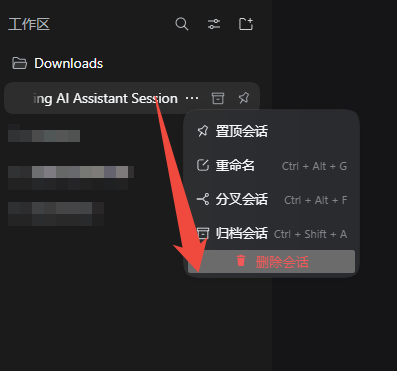
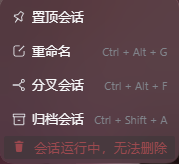
DeepSeek Harness has archive, rename and fork — but no way to delete a conversation. This plugin adds the missing red Delete session row to every session's ⋯ menu, with a confirmation dialog in front of it. It deletes for real: no hidden leftovers that quietly come back.

Primary tested target: the DeepSeek Harness desktop app. The browser-form web profile (dsh web) is expected to work — the plugin uses only web-surface APIs and has no desktop-only calls — but it has not been separately tested; web users try it at their own risk and are welcome to report back.
# From npm (recommended) — desktop app, the tested target
dsh plugin --profile desktop add dsh-session-clean

# Browser-form profile (dsh web) — expected to work, NOT separately tested
dsh plugin --profile web     add dsh-session-clean

# From GitHub (desktop)
dsh plugin --profile desktop add github:Ansellwan/DeepSeekHarness-Session-Delete
Restart DSH afterwards (the software build has no hot reload; for a dsh web server, restart the process).
Upgrade (add does not upgrade by itself):
dsh plugin --profile desktop add dsh-session-clean@<version>
Uninstall:
dsh plugin --profile desktop remove dsh-session-clean
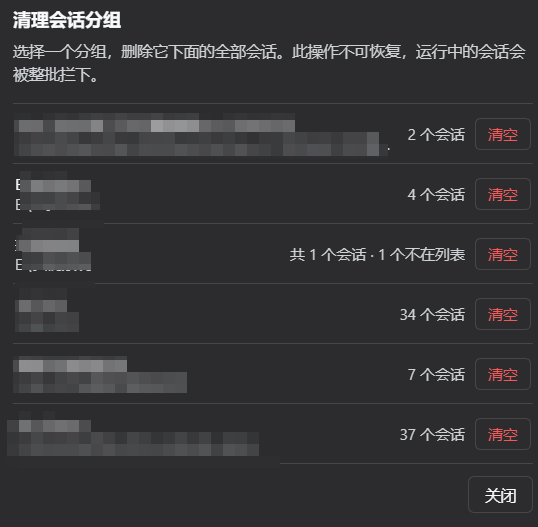
⋯ menu, after pin / rename / fork / archive.Click Clean workspace at the sidebar foot and pick a workspace — every session in it goes in one step. The list also has an Ungrouped row for sessions no workspace owns.
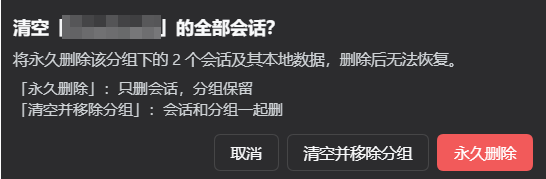

The shipped Delete workspace action and this plugin's panel do different things, and this plugin never second-guesses the official one:
| What you do | Sessions | The group |
|---|---|---|
| Shipped Delete workspace | kept — they move to Ungrouped | unregistered |
| Panel → Clean | deleted | kept, as an empty group you can start sessions in |
| Panel → Clean and remove group | deleted | unregistered |
"Get rid of this whole project" is therefore one panel action: pick the group, choose Clean and remove group, confirm once (the confirmation still names the exact session count). If you only want the conversations gone but the folder kept for future work, choose Clean.
| ✅ Deleted | The conversation itself, its cached title / outline / token stats, oversized tool output spilled to disk, and its entries in the sidebar bookkeeping (grouping, pin, archive) |
| ❌ Left alone | Attachments under ~/.dsh/attachments/ — they are stored by content hash and can be shared by several conversations, so deleting one session's copy could damage another conversation |
| ❌ Left alone | This plugin's own log (~/.dsh/logs/session-delete.log) — it records what was deleted |
| ❌ Left alone | Copies that other plugins make into their own databases |
Until the DSH process exits, an empty session object stays in memory — DSH offers no official way to clear it. It no longer shows up in any list, and it is gone after a restart.
~/.dsh/sessions/…, ~/.dsh/storages/session_projcache/…, and its spilled-output folder inside the temp directory.| DeepSeek Harness | desktop 0.2.0-rc.2 — the tested target |
| Profile | desktop: tested and supported. Web-surface profiles (browser-form dsh web): expected to work (only web-surface APIs are used, no desktop-only calls) but not separately tested — try at your own risk and report back |
| Node | ≥ 18 (ships with the DSH runtime) |
| Capability class | 界面与体验 (UI & experience) |
client.js): one order: 500 row in the official sidebar.workspaces.session.menu.item slot list, the same extension point the built-in rows use; busy state comes from the host-injected useSessionStatus snapshot; the dialog lives in the frame-wide shell.overlay slot so closing the menu cannot kill it.index.js): a private /_dsh-session-clean route re-probes the session, then deletes in one order — unload the session from the Host's live store, remove it from the workspace registry, erase the durable files (log directory, session_projcache record, spill directory). The registry is written through the same open storage-domain handle the registry itself holds, so the sidebar refreshes from the change event.SessionStore.liveEntryFor(session).detach() — the same store.delete + session/disposed an owner's unload performs. That event is what the session controller turns into api-session/removed, which makes the browser drop the row for real and closes the session's log writer, so the transcript cannot be re-persisted. liveEntryFor / detachEntered are internal (absent from the generated API catalog), so each step is capability-probed; any failure falls back to a reported hide instead of a silent lie.sessions, keyed by the full session id. Removing the key through the live domain — not just the backing file — is what stops the next checkpoint from recreating the document.app.asar patching and no overriding of official loader rows, so DSH upgrades are safe.DSH 有归档、重命名、分叉,却没有删除会话。这个插件在侧栏每个会话的 ⋯ 菜单里补上一项红色「删除会话」,点之前先弹确认框。删就是真删:不会给你留个"看起来删了、过两天又冒出来"的尾巴。
主测试目标是 DeepSeek Harness 桌面版。 浏览器形态的 web profile(dsh web)按设计应当可用——插件只用到 Web 面 API,没有任何桌面端专属调用——但未单独实测;Web 端用户请自行尝试,欢迎反馈结果。
# 从 npm 安装(推荐)—— 桌面版,已实测的主目标
dsh plugin --profile desktop add dsh-session-clean

# 浏览器形态 profile(dsh web)—— 按设计可用,但未单独实测
dsh plugin --profile web     add dsh-session-clean

# 从 GitHub 安装(桌面版)
dsh plugin --profile desktop add github:Ansellwan/DeepSeekHarness-Session-Delete
安装后重启 DSH(软件形态没有热刷新;dsh web 服务重启进程即可)。
升级(add 不会自动升版,须显式版本号):
dsh plugin --profile desktop add dsh-session-clean@<新版本号>
卸载:
dsh plugin --profile desktop remove dsh-session-clean
⋯ 菜单里多一项红色「删除会话」(排在置顶 / 重命名 / 分叉 / 归档之后)点侧栏底部的「清理分组」,选一个分组,点「清空」,整组会话一次性删掉。列表里还有一行「未分组」,装的是不属于任何分组的会话。
官方「删除工作区」与本插件的面板做的是不同的事,本插件从不替官方动作做决定:
| 你做的操作 | 会话 | 分组 |
|---|---|---|
| 官方 删除工作区 | 保留——下沉到「未分组」 | 注销 |
| 面板 → 清空 | 删除 | 保留,变成一个可以新建会话的空分组 |
| 面板 → 清空并移除分组 | 删除 | 注销 |
所以“把这个项目彻底清掉”是面板里的一个动作:选中分组 → 选「清空并移除分组」→ 确认一次(确认框仍会写明会话数量)。如果只想清掉对话、留着文件夹以后继续用,就选「清空」。
| ✅ 会删 | 这段对话本身,它的标题 / 大纲 / token 统计等缓存,工具输出过长时落盘的溢出文件,以及它在侧栏里的各种登记(分组、置顶、归档) |
| ❌ 不动 | ~/.dsh/attachments/ 里的附件原件——它们按内容存一份,多个会话可能共用同一份,按会话删会连累别的对话 |
| ❌ 不动 | 本插件自己的日志(~/.dsh/logs/session-delete.log,记录删过谁、删了哪些文件) |
| ❌ 不动 | 其他插件自己抄到各自数据库里的副本 |
另外,DSH 进程退出前,内存里还会留一个空的会话对象(官方没提供清理它的接口)。它不会再出现在任何列表里,重启后彻底消失。
~/.dsh/sessions/…、~/.dsh/storages/session_projcache/…,以及临时目录里属于它的溢出文件目录| DeepSeek Harness | 桌面版 0.2.0-rc.2 —— 已实测的主目标 |
| Profile | desktop:已实测、正式支持。 Web 形态 profile(dsh web 浏览器形态):按设计可用(只用到 Web 面 API,无桌面端专属调用),但未单独实测——请自行尝试并反馈遇到的问题 |
| Node | ≥ 18(DSH 运行时自带) |
| 能力分类 | 界面与体验 |
client.js:向官方 slot 列表 sidebar.workspaces.session.menu.item 注册 order: 500 的菜单行(与内置 pin=100 / rename=200 / fork=300 / archive=400 同一列表,官方支持的扩展点);忙碌状态来自宿主注入的 useSessionStatus 快照;确认弹窗挂在框架级 shell.overlay 槽位,菜单关闭不会连带销毁。index.js:注册私有路由 /_dsh-session-clean,先重探会话活动,再按固定顺序删除——① 把仍驻留内存的会话从宿主活动存储中卸载 → ② 从工作区注册表移除(全局归档 / 置顶集 + 各工作区会话列表)→ ③ 清理落盘数据(会话目录、session_projcache 投影缓存记录、spill 溢出目录)。注册表写入走它自己已打开的同一个存储域句柄,写即持久化并发变更事件,侧栏据此刷新。SessionStore.liveEntryFor(session).detach()(即属主卸载时执行的同一段 store.delete + session/disposed)。该事件被会话控制器转成 api-session/removed,客户端据此真的把那一行删掉,同时关闭该会话的日志写入器,因此对话记录不会被重新落盘。liveEntryFor / detachEntered 属于内部成员(不在生成的 API catalog 里),所以每一步都先做能力探测,失败就退化为「如实汇报的隐藏」,不做无声的假删除。sessions、键是完整会话 id。必须通过活动域删键(而不是只删文件),否则域内存里的那行还在,下一次检查点就会把文件重新写出来。app.asar,不 patch 任何官方装载行,升级 DSH 不受影响。MIT
DeepSeek Harness(DSH)Web 插件聚合生态包 · 一切皆插件,创意工坊分发(dsh-market.com)
把回答做成一页可视化 HTML:模型只写简短的 Markdown 草稿,随包附带的 `am` 命令行生成页面,支持流程图、时序图、树、时间线、ER 图、表格和提示框。
在 dsh 里装上这个插件即可,无需登录、注册或填 API Key,就能使用包括 Muse Spark 1.3、MiMo V2.6 在内的前沿模型——完全免费,不限量。 All you do is install this plugin in dsh: no login, no sign-up, no API key — the frontier models are just there, Muse Spark 1.3 and MiMo V2.6 among them. Completely free, with no usage cap.

