
dsh-web
zhu1090093659/dsh-webDeepSeek Harness(DSH)Web 插件聚合生态包 · 一切皆插件,创意工坊分发(dsh-market.com)

Run DeepSeek Harness (DSH), a local AI agent, inside VS Code — native sidebar panel + editor bridge. A pure protocol client: no rewriting DSH, no second server
Run DeepSeek Harness — the local AI agent — inside VS Code. A native sidebar panel plus an editor bridge that connects to DSH as a protocol client, without rewriting it and without starting a second server.
Read this in: English · 简体中文
TL;DR — DeepSeek Harness (DSH) is an AI agent that lives on your machine (default
http://127.0.0.1:3080). DSH ships a web UI, but a web UI is just one client of DSH's wire protocol.dsh-vscis another client — a real VS Code sidebar. It does not rewrite DSH and it does not copy its UI: it talks the protocol and renders the work in a panel that belongs to VS Code, plus a native editor bridge for your code.
Most "AI-in-IDE" tools rebuild the AI. This project does the opposite:
npm original). Whatever it can do, this extension can surface.If you already use DSH (web GUI or CLI) and you work in VS Code, dsh-vsc turns your editor into a first-class DSH surface with one shared history, one contract, and no second server.
Native sidebar panel
+N-M change stats per turn./api/respond.Native editor bridge
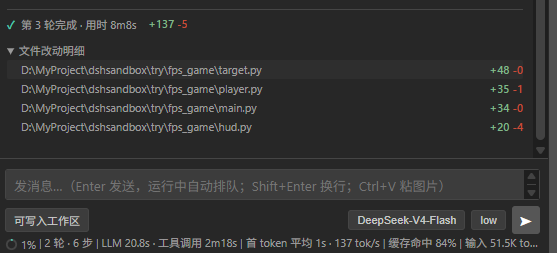
write / edit / str_replace_editor tool calls, reports changed files per turn, opens the native VS Code git diff in one click.Harness lifecycle
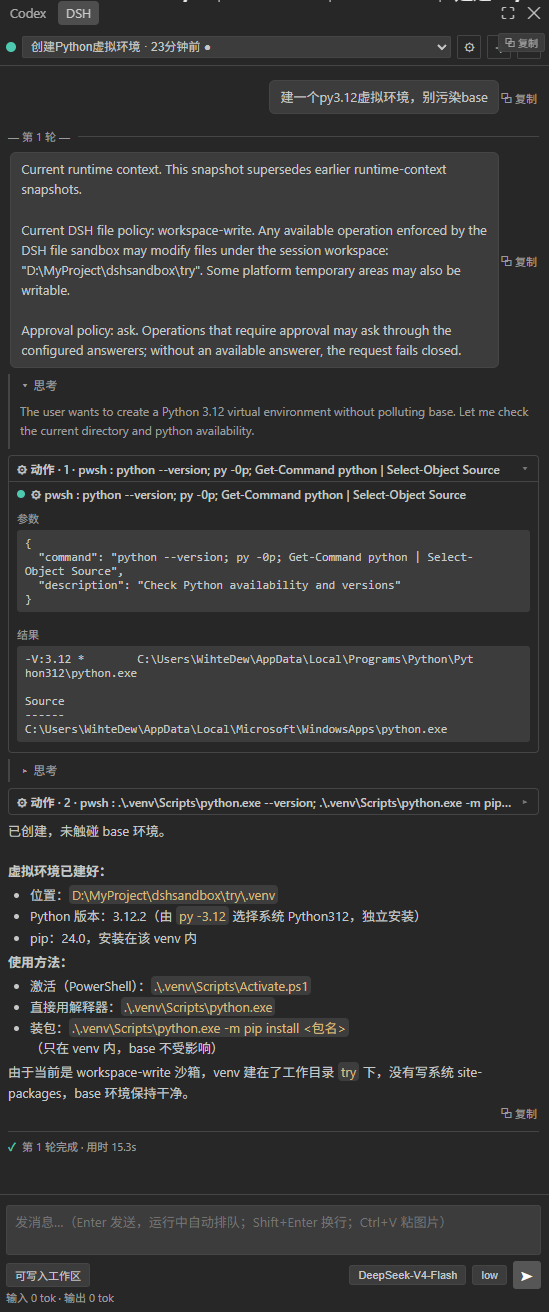
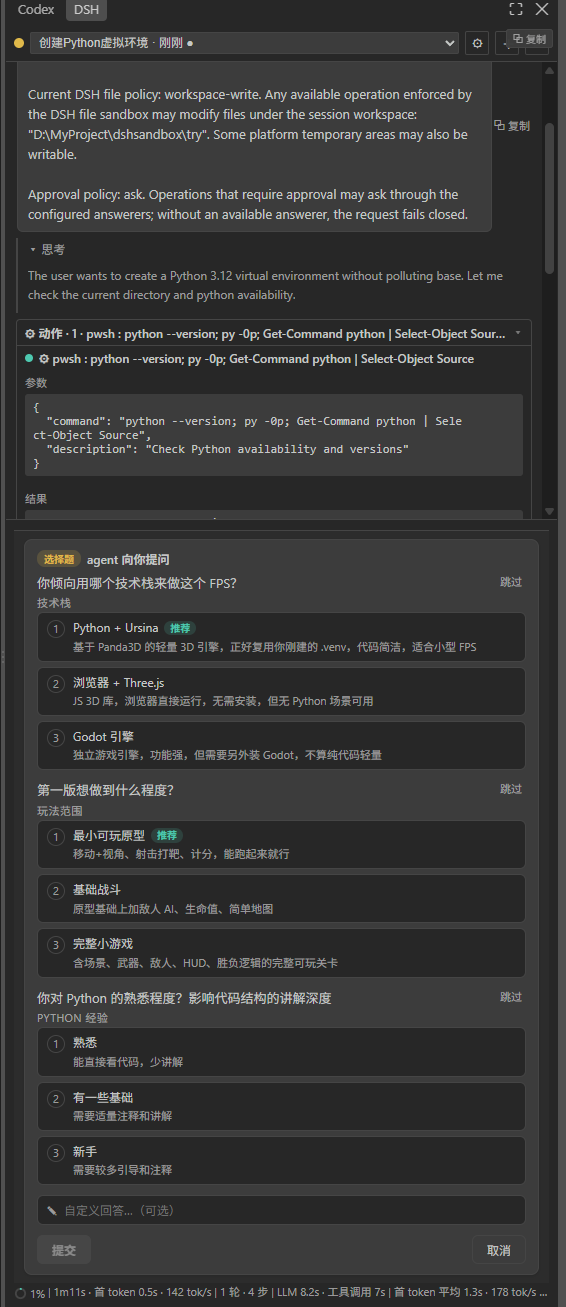
Sidebar & chat — the native DSH panel: session list, streaming reply, collapsible "⚙ Actions", per-turn timing, +N-M stats
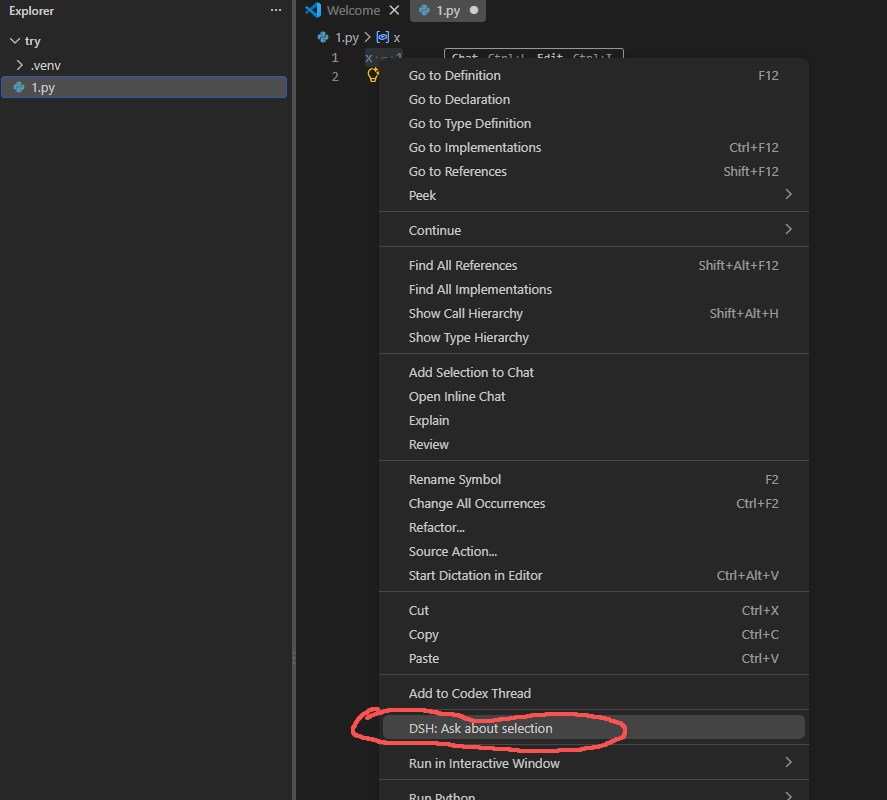
Ask about selection — select code in the editor, right-click → DSH: Ask about selection
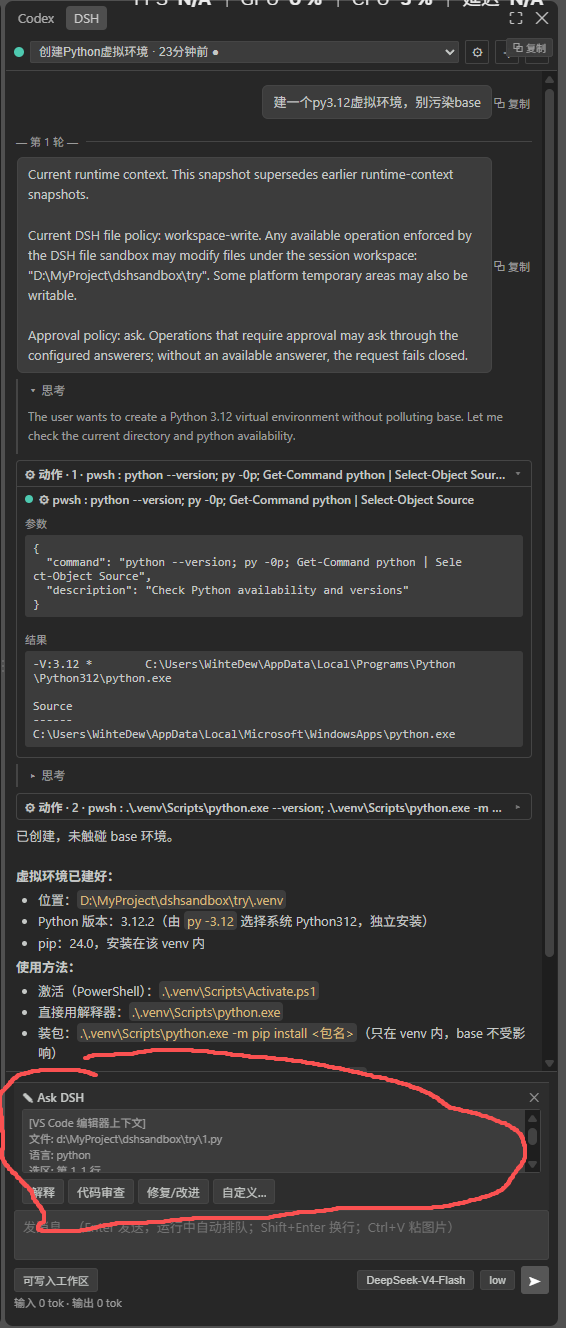
Ask card — structured context card (file / selection / workspace / branch) shown in the panel
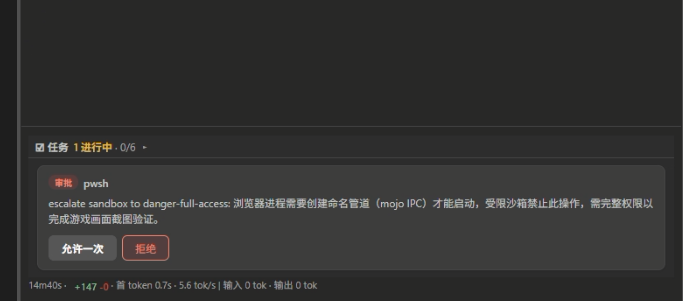
Approval card — allow once / deny when the agent requests a privileged operation
Question card — single / multi choice, recommended badge, custom answer
Review Agent Changes — changed files per turn → native git diff
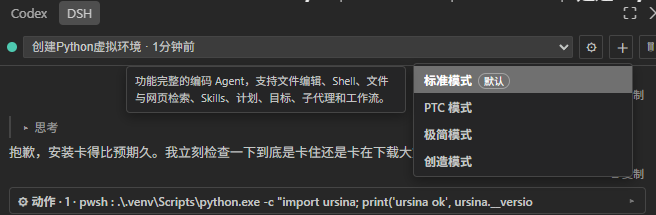
Session modes — standard / PTC / minimal / creative
Requires Windows / macOS / Linux + VS Code
^1.90.0. DSH itself does not need to be installed separately — the extension auto-starts one when none is running.
Option A — Release package (recommended)
Download the latest dsh-vsc-<version>.vsix from Releases.
Install it (VS Code Ctrl+Shift+P → Install from VSIX, or command line):
code --install-extension dsh-vsc-<version>.vsix --force
Reload the window (Ctrl+Shift+P → Reload Window), then click the DSH icon in the left activity bar.
Existing harnesses are reused automatically (
npm i -g @deepseek-ai/dshor a runningnpx @deepseek-ai/dsh web), defaulthttp://127.0.0.1:3080, overridable withDSH_WEB_URLor thedshVsc.urlsetting.
Option B — from source
git clone https://github.com/zhibailu/dsh-vsc.git
cd dsh-vsc
npm install
npm run package        # esbuild build + vsce package → dsh-vsc-<version>.vsix
code --install-extension dsh-vsc-<version>.vsix --force
No API key needed in the extension. Your key stays on the DSH side (configured the first time you run dsh web). The extension is a shared client and never touches your key.
DSH exposes two things: an RPC interface (POST /api/<endpoint> — slash-separated since 0.2.1, with every argument in payload.args) and a real-time event stream (several logical streams multiplexed on one WebSocket, /api/remote.mux: session follow, projection control, workspace, and $events for approvals/questions). The web GUI is just one consumer of that contract.
dsh-vsc is a second consumer:
src/harness/client.ts — a ~200-line minimal protocol client. It reimplements the DSH wire contract in Node (≥ 18, global fetch), imports no DSH internals, and is deliberately thin — it implements the protocol, not the plugin framework.overlay) because the protocol exposed neither a client count nor a way to hide tool consoles. It is fully retired as of DSH 0.2.1: console hiding is now upstream (dsh-win32-process sets STARTF_USESHOWWINDOW|SW_HIDE), and clientCount disappeared with the dsh-host-apiproxy package. This extension no longer touches a single official file, and injects no NODE_OPTIONS.~/.dsh corrupt each other's history (corrupt session log: seq gap). So the extension never starts a second server on an existing history: it reuses a live harness, auto-starts one only when none is reachable, and on shutdown stops only the instance it started (0.2.1 no longer exposes clientCount, and an orphan is worse than a stop).A full, reader-friendly deep-dive — written for someone who doesn't know the domain — lives in docs/design.md.
I don't take DSH's job; I'm its best client.
| Command | What it does |
|---|---|
DSH: Open Sidebar | Focus the DSH sidebar |
DSH: Start Web Harness | Start/connect the harness explicitly (clears the "don't respawn" latch) |
DSH: Stop Auto-started Harness | Stop only the instance this extension started; never a shared one |
DSH: Refresh Connection Status | Re-probe the harness |
DSH: Open Web GUI (advanced) | Open the full embedded DSH web GUI as a tab |
DSH: Ask about selection | Ask DSH about the selected code (also in the right-click menu) |
DSH: Review Agent Changes | Open a native git diff of the files the agent changed |
| Setting | Default | Description |
|---|---|---|
dshVsc.url | http://127.0.0.1:3080 | Base URL of the DSH harness. Also honors DSH_WEB_URL. |
dshVsc.autoStart | true | Auto-start dsh web when no harness answers at the configured URL. |
write / edit / str_replace_editor tool events; files changed via a shell are not counted (git diff review still works manually).+N-M counter covers only those file tools; the timer is display-only on the bridge side (latest in-flight round; finalized to history when the task ends).npm install
npm run typecheck # tsc --noEmit (both configs)
npm run build # esbuild → dist/extension.js + dist/media
npm run package # build + package vsix
F5 debug via .vscode/launch.json → Extension Development Host.
Automated regression test (jsdom simulates the webview, feeds real event streams to verify panel rendering):
node scratch/auto-test.mjs <sessionId> <turnNo>
src/.llms.txt — machine-readable doc index for LLM / AI crawlers.AGENTS.md — onboarding guide for AI coding agents working in the repo.See CONTRIBUTING.md. We welcome issues, PRs, and docs improvements — especially anything that clarifies the architecture for newcomers.
MIT © 2026 zhibailu — see LICENSE.
DeepSeek Harness(DSH)Web 插件聚合生态包 · 一切皆插件,创意工坊分发(dsh-market.com)
把回答做成一页可视化 HTML:模型只写简短的 Markdown 草稿,随包附带的 `am` 命令行生成页面,支持流程图、时序图、树、时间线、ER 图、表格和提示框。
在 dsh 里装上这个插件即可,无需登录、注册或填 API Key,就能使用包括 Muse Spark 1.3、MiMo V2.6 在内的前沿模型——完全免费,不限量。 All you do is install this plugin in dsh: no login, no sign-up, no API key — the frontier models are just there, Muse Spark 1.3 and MiMo V2.6 among them. Completely free, with no usage cap.

