
dsh-web
zhu1090093659/dsh-webDeepSeek Harness(DSH)Web 插件聚合生态包 · 一切皆插件,创意工坊分发(dsh-market.com)

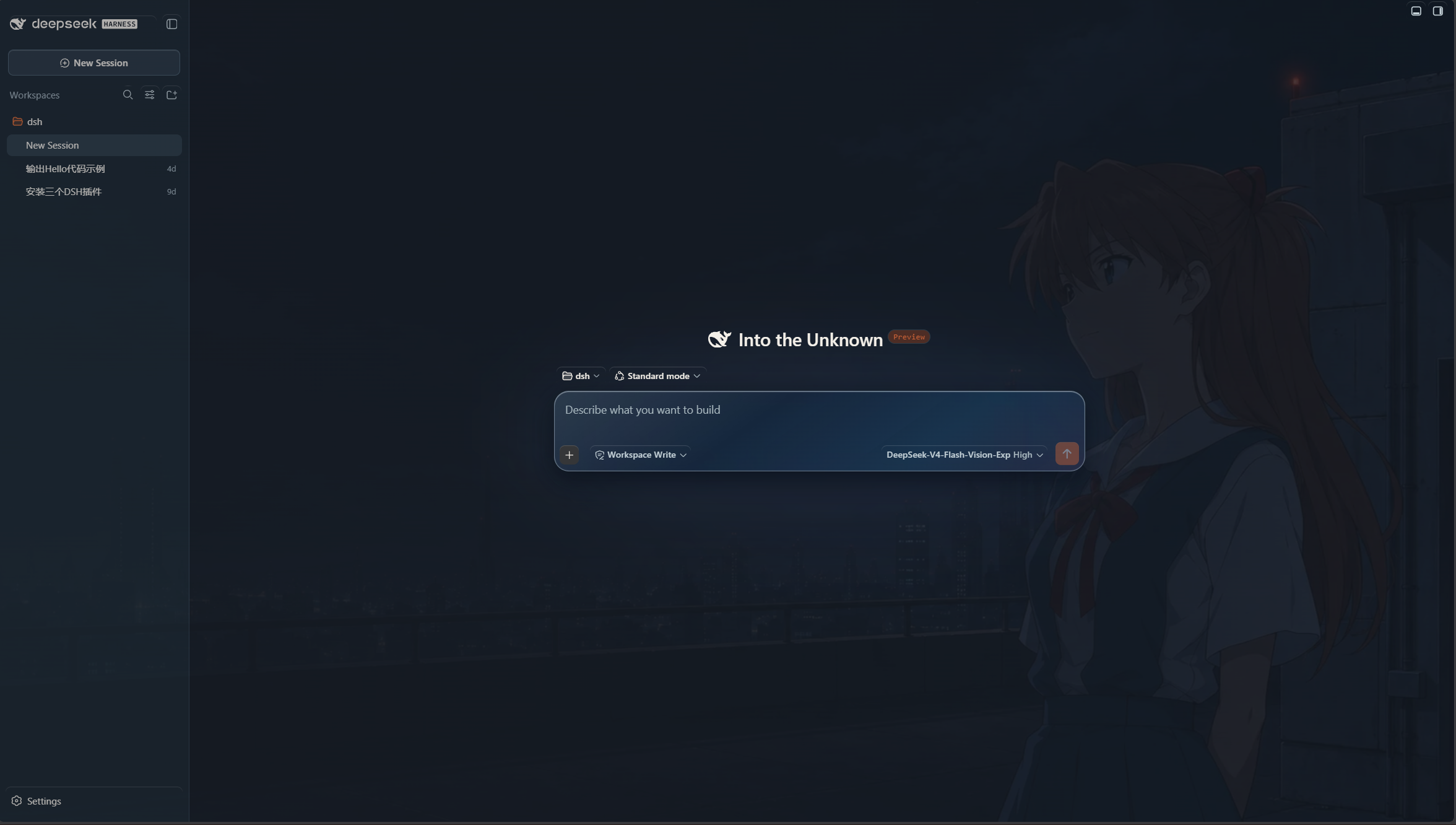
Theme-Asuka — An unofficial Asuka-inspired theme plugin for DeepSeek Harness Web UI, featuring time-of-day wallpapers, adaptive palette transitions, and restrained EVA-02 visual details.
An unofficial fan-made Light/Dark appearance plugin for the DeepSeek Harness Web UI. It pairs restrained school blue, ribbon red, warm paper, and quiet Tokyo-3 night tones with three right-composed wallpapers that follow the local time of day.
Not affiliated with DeepSeek, khara, Evangelion, or any original rights holder.
0.2.1-rc.24.0.5>=20Version 3.3.0 targets DSH 0.2.1-rc.2 and includes WebGPU optics. Its glass
surfaces, scene switching and sidebar/menu behavior were checked in an isolated
Windows DSH Web profile using the Codex in-app browser. Ubuntu/WSL and real model
streaming have not been rechecked for this baseline; the user's 2026-10-01 WSL
confirmation belongs to 3.2.2 / DSH 0.2.0-rc.2. See
COMPATIBILITY.md for evidence and limits.
Install the npm package using either the DSH plugin installation page or the command line. Both methods install prebuilt Host/Client code and all three public wallpapers.
DSH plugin installation page: open the plugin installation page, enter the npm package name below, and install:
dsh-asuka-school-theme
The package name installs the latest version. To install this specific release, enter dsh-asuka-school-theme@3.3.0 instead.
Command line: run on the host where DSH is installed (PowerShell or a Unix shell):
dsh plugin --profile web add dsh-asuka-school-theme@3.3.0
Restart the DSH Web profile after installing, updating or removing the plugin.
Install the prebuilt 3.3.0 Release asset:
dsh plugin --profile web add https://github.com/Yyyyyylor/dsh-asuka-school-theme/releases/download/v3.3.0/dsh-asuka-school-theme-3.3.0.tgz
The Release asset contains the same prebuilt Host/Client code and all three public wallpapers.
In the repository root, run:
pnpm install
pnpm build
npm pack
dsh plugin --profile web add ./dsh-asuka-school-theme-3.3.0.tgz
The package filename should match the .tgz emitted by npm pack.
Install from the fixed v3.3.0 source tag:
dsh plugin --profile web add github:Yyyyyylor/dsh-asuka-school-theme#v3.3.0
This requires Git to be available on the host. Pin the tag instead of using
main so updates remain predictable.
Version 3.3.0 uses WebGPU to render rounded lens refraction maps, Fresnel/specular light and a restrained caustic rim. SVG backdrop filters then sample the live page behind each surface, including DOM text; no wallpaper copy, screen recording or DOM rasterization library is used. The GPU canvas contains optical data, not the page image. Maps update on geometry changes, not in a continuous frame loop. Missing WebGPU, device loss or initialization failure retains the existing SVG optics; unsupported backdrop engines retain frosted glass. WebGPU requires a secure context (HTTPS or localhost).
Rounded background refraction applies to the composer, sidebar, header, menus and Settings on Chromium, with a curved highlight rim and subtle dispersion on compact controls. Settings uses a stronger 48px background blur while keeping its translucent tint and rim highlights. Other engines retain frosted glass. On narrow windows, the right sidebar shares the available width with the main content instead of automatically covering it; its fullscreen button remains available. Its button glyph, tooltip and keyboard shortcut follow the displayed layout; exiting fullscreen returns to the shared width while keeping the sidebar open. Fullscreen entry and exit animate the sidebar and main area together, with one glass rim and stable conversation content during the transition. Pointer highlights respond softly near the rim and fade when the pointer leaves. Both reduced-motion preferences stop pointer-following highlights. This is a Web effect inspired by Liquid Glass; it does not use Apple's native material. See the implementation and verification limits.
The default mode is Off. This plugin leaves the official Light, Dark, and System appearance unchanged; it only adds the selected wallpaper scene.
Wallpaper images are decoded before the existing crossfade starts, and likely next scenes are preloaded while the browser is idle. Range-control previews are frame-coalesced, so opacity and blur adjustments remain responsive without reapplying unrelated theme tokens. Previously decoded preset images are reused until plugin disposal; blur is applied to each wallpaper layer before its opacity crossfade, avoiding a filtered parent that flattens both changing layers. Palette variables are prepared off-document and applied in one style update.
No credentials, telemetry, image upload, or browser localStorage preference
store is used. Scalar preferences are stored in DSH's plugin-owned Host
entry's live Config form (asuka-school-theme). DSH migrates the old settings
document into the profile; the entry ID and preference fields are unchanged.
The three bundled WebPs are generated project assets; see
assets/LICENSE.md and docs/ASSETS.md.
Do not package private artwork from assets/private/.
The Host reads only the three package-owned images and serves fixed GET/HEAD
routes on the existing DSH Web server. The browser uses same-origin DSH
transport for images, settings and explicit session-title edits. No third-party
service, data upload, telemetry, credentials or subprocess is used. The runtime
dependency is pinned Schemastery 3.18.5; DSH/Cordis are host-provided optional
peers, not additional runtime installations. There are no installation lifecycle
scripts. See Store review for dependency, permission and
failure boundaries. Independent supply-chain review and Store automatic
rechecking remain pending; declarations do not guarantee approval.
Maintainers should start with the project index and the repository-specific agent guide.
pnpm build
pnpm test
pnpm check
npm pack --dry-run
The package publishes prebuilt lib/index.js and lib/client.js; end users do
not need a postinstall build. See docs/RESEARCH.md for the
historical implementation notes and docs/COMPATIBILITY.md
for remaining live integration checks.
DeepSeek Harness(DSH)Web 插件聚合生态包 · 一切皆插件,创意工坊分发(dsh-market.com)
把回答做成一页可视化 HTML:模型只写简短的 Markdown 草稿,随包附带的 `am` 命令行生成页面,支持流程图、时序图、树、时间线、ER 图、表格和提示框。
在 dsh 里装上这个插件即可,无需登录、注册或填 API Key,就能使用包括 Muse Spark 1.3、MiMo V2.6 在内的前沿模型——完全免费,不限量。 All you do is install this plugin in dsh: no login, no sign-up, no API key — the frontier models are just there, Muse Spark 1.3 and MiMo V2.6 among them. Completely free, with no usage cap.

