
dsh-web
zhu1090093659/dsh-webDeepSeek Harness(DSH)Web 插件聚合生态包 · 一切皆插件,创意工坊分发(dsh-market.com)

A DeepSeek Harness web plugin: set a background image and adapt the UI's text, background, brand and border colors to the image palette automatically.Built with DeepSeek Harness
English | 中文
A DeepSeek Harness web plugin: set a background image and adapt the UI's text, background, brand and border colors to the image palette automatically.
Built with DeepSeek Harness.
| Effect | Settings page |
|---|---|
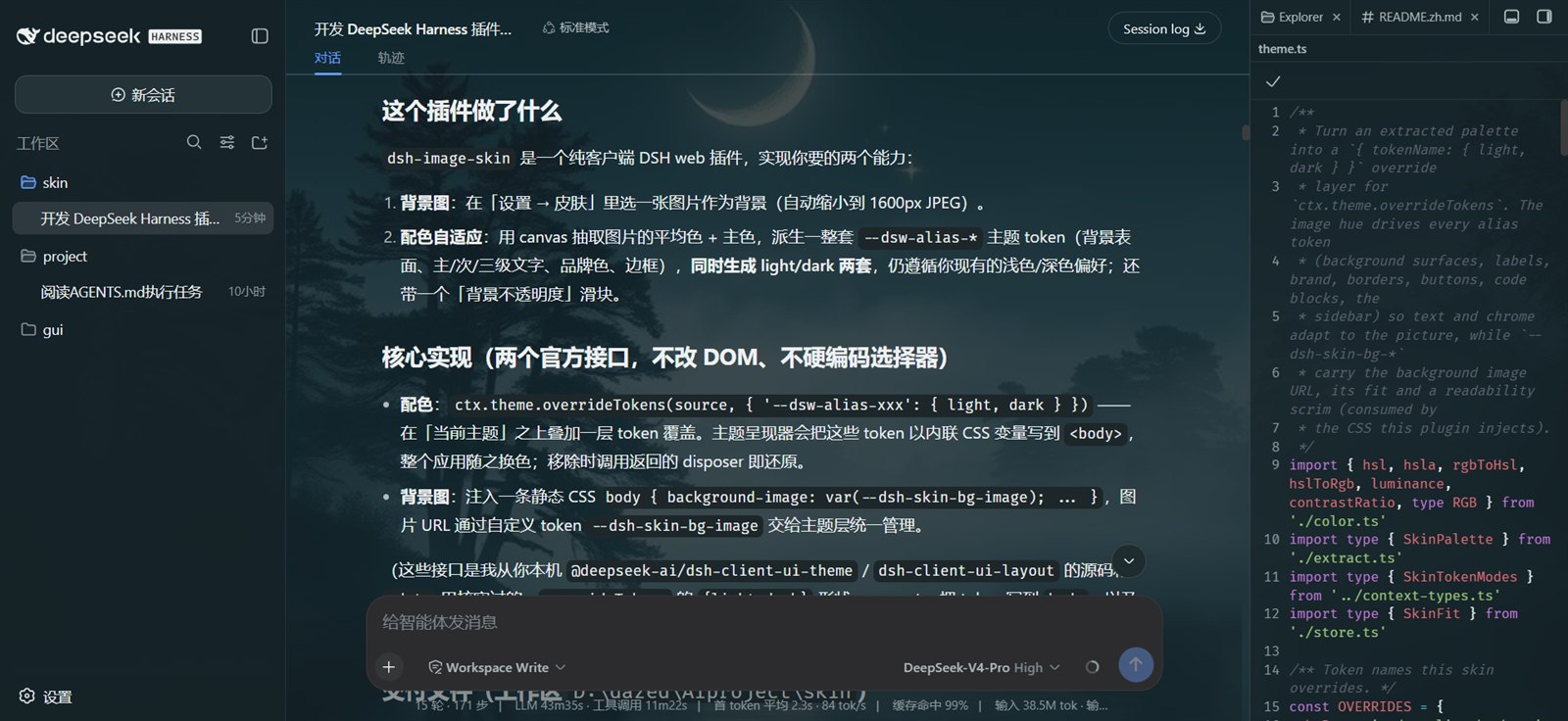 | 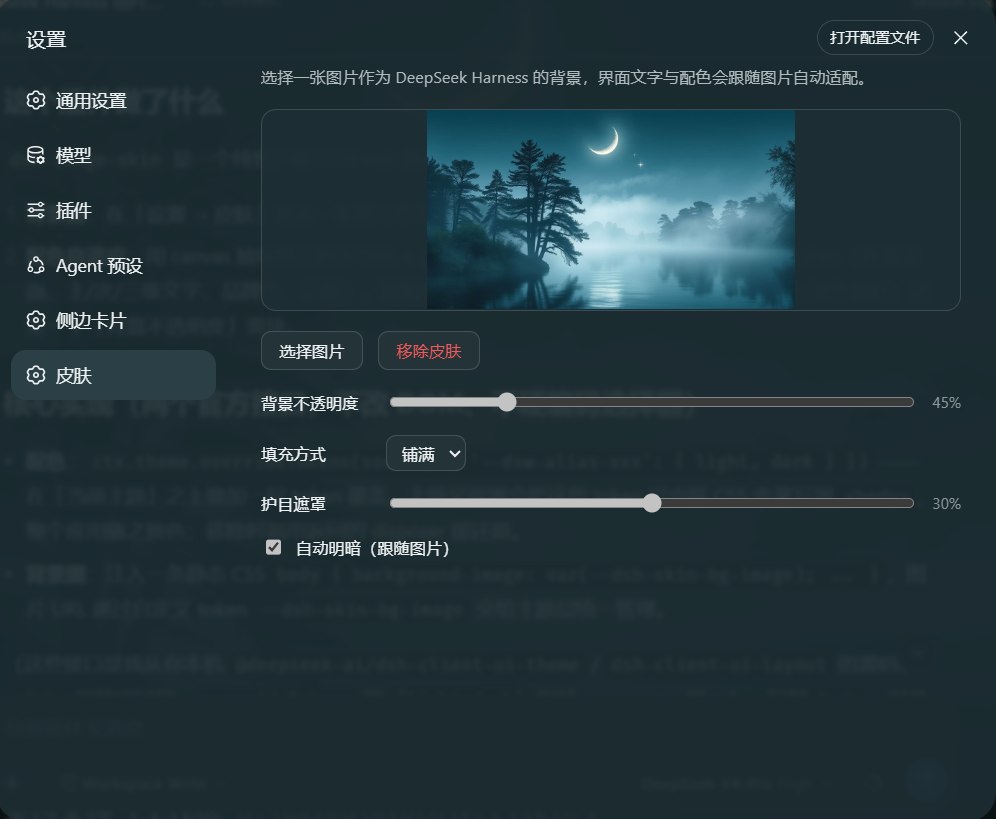 |
--dsw-alias-* / --dsw-specific-* theme tokens
(background surfaces, primary/secondary/tertiary labels, brand, borders,
buttons, code blocks, the sidebar) in both light and dark modes,
respecting your existing light/dark preference.localStorage and restore on refresh.settings.section) with zh/en
copy that follows the DSH language setting.Everything goes through two official seams — no DOM-structure surgery and no hard-coded product selectors:
ctx.theme.overrideTokens(source, tokens) stacks a token layer over the
active theme ({ '--dsw-alias-xxx': { light, dark } }). The theme presenter
writes those tokens as inline CSS variables on <body>, so the whole app
recolors. Removing the skin calls the returned disposer to restore the theme.body { background-image: … }. The image
URL, fit and scrim ride custom tokens (--dsh-skin-bg-*), so the theme layer
owns them and tears them down with the layer.ctx.theme.register + ctx.theme.setTheme (auto light/dark) — with
"follow image" on, a scheme-carrier theme (colorScheme: light|dark, empty
tokens) is registered and made active; the real colors still come from the
override layer. Only the built-in light/dark/system preferences are
persisted, so the in-process auto id never overwrites your durable preference,
and leaving auto restores the prior one.src/index.ts # host half: no-op mount point
src/context-types.ts # structural ctx mirror + @deepseek-ai/cordis augmentation
src/client/index.tsx # client half: overrideTokens + CSS + settings section
src/client/SkinSettings.tsx # settings UI (upload / preview / opacity / remove)
src/client/theme.ts # palette → token overrides
src/client/extract.ts # image downscale + palette extraction (canvas)
src/client/color.ts # pure color math (RGB/HSL/luminance)
src/client/store.ts # localStorage persistence
cordis.patch.yml # bundle patch (mounts the plugin into a profile)
scripts/build.mjs # esbuild build (host ESM + wrapped client bundle)
scripts/smoke.mjs # smoke test (host exports + client bundle contract)
Requires Node.js ≥ 22.13 (pnpm 11's requirement) and pnpm 11.
pnpm install
pnpm build        # emits lib/index.js and lib/client.js (esbuild + tsc declarations)
pnpm typecheck    # tsc --noEmit
pnpm smoke        # smoke test: host exports + client bundle contract (no browser)
DSH checks a bundle's declared @deepseek-ai/dsh-* peerDependencies against its own
runtime version before loading it, so check out the tag that matches the DSH you run:
| Tag | DSH runtime | slots service comes from |
|---|---|---|
v1.1.0 | 0.2.0-rc.2 (0.2.x) | @deepseek-ai/dsh-client-ui-renderer |
v1.0.0 | 0.1.0-rc.6 (0.1.x) | @deepseek-ai/dsh-client-runtime |
git checkout v1.1.0    # for dsh 0.2.x
git checkout v1.0.0    # for dsh 0.1.x
Switching tags needs no rebuild: they differ only in the manifest
(peerDependencies, dsh.client.inject, version) and in type-erased sources, so the
emitted lib/ bundle is the same. For development, run pnpm install after switching —
pnpm-lock.yaml is kept per tag.
These git checkout steps apply to a local clone mounted with link:. There is no
in-place "switch version" in dsh plugin: it forwards its arguments to pnpm, so changing
the installed version means changing the dependency spec (pnpm add <spec> inside the
profile, or remove + add). The profile then restarts on the new copy; a git spec is
compatibility-checked only after pnpm runs, and an incompatible tag is rejected and rolled
back (see below).
A
github:install builds itself:package.jsondeclaresprepare: pnpm build, and pnpm runsprepareon a fetched git dependency. pnpm 11 blocks that script until the package is allowlisted, so the first attempt fails on purpose and prints the exact key to add (see "Install from GitHub" below). Use thelink:flow for development.
If the DSH log says skipping profile bundle "dsh-image-skin", the checked-out tag does
not match the running runtime: switch tags rather than granting the
dsh plugin allow-version exemption.
Local development (link, recommended)
cd <this repo>
pnpm install && pnpm build

# one step: install AND auto-mount (no manual file edits)
dsh plugin --profile web add link:<absolute path to this repo>
Then restart DSH and hard-refresh the browser (Ctrl/Cmd+Shift+R). dsh plugin
detects dsh.bundle.patch and appends the package to dsh.profile.bundles
automatically.
GitHub tag (no local clone)
# 1. first attempt fails and prints the exact allowBuilds key it needs
dsh plugin --profile web add github:YouHui1/dsh-image-skin#v1.1.0

# 2. paste that key into ~/.dsh/profiles/web/pnpm-workspace.yaml, then retry
#    allowBuilds:
#      'dsh-image-skin@github:YouHui1/dsh-image-skin#<sha>': true
dsh plugin --profile web add github:YouHui1/dsh-image-skin#v1.1.0
The key must match what pnpm printed, including the commit SHA: pnpm resolves the tag
to a commit, and a repo-level key such as github:YouHui1/dsh-image-skin does not match.
A different tag, or a moved tag, means a different SHA, pnpm prints a new key, and step 1
is repeated. prepare itself runs pnpm build, so the machine doing the install needs
Node ≥ 22.13 and registry access for the devDependencies.
This repo is not published to npm (package.json has "private": true) — local
use just needs the link flow above. See AGENTS.md if you ever want to publish.
Never mount through both channels at once (that loads two copies). Remove any leftover hand-written
insertline fromcordis.patch.ymlbefore switching to the bundle channel.
Bundle channel (dsh plugin add)
dsh plugin --profile web remove dsh-image-skin
This removes the dependency, uninstalls the package, and drops it from
dsh.profile.bundles. Restart DSH + hard-refresh.
Manual link install: delete the dsh-image-skin dependency from
~/.dsh/profiles/web/package.json, delete the image-skin insert block from
cordis.patch.yml, then pnpm install and restart.
Skin data: the image lives under the dsh-image-skin.v1 localStorage key —
tap "Remove skin" before uninstalling, or delete the key in DevTools →
Application → Local Storage.
data:image/jpeg (a few hundred KB), well under the
localStorage quota.sat ≤ 45), and layered surfaces (menus/popovers) stay
≥ 80% opaque to preserve readability.Third-party community plugin — not affiliated with DeepSeek or DeepSeek Harness. Names and logos belong to their respective owners.
DeepSeek Harness(DSH)Web 插件聚合生态包 · 一切皆插件,创意工坊分发(dsh-market.com)
把回答做成一页可视化 HTML:模型只写简短的 Markdown 草稿,随包附带的 `am` 命令行生成页面,支持流程图、时序图、树、时间线、ER 图、表格和提示框。
在 dsh 里装上这个插件即可,无需登录、注册或填 API Key,就能使用包括 Muse Spark 1.3、MiMo V2.6 在内的前沿模型——完全免费,不限量。 All you do is install this plugin in dsh: no login, no sign-up, no API key — the frontier models are just there, Muse Spark 1.3 and MiMo V2.6 among them. Completely free, with no usage cap.

