
dsh-web
zhu1090093659/dsh-webDeepSeek Harness(DSH)Web 插件聚合生态包 · 一切皆插件,创意工坊分发(dsh-market.com)

WeChat bridge + phone layout for DeepSeek Harness: chat with your DSH from WeChat (text, images, files, daily digest) and use its web UI on a phone. 微信桥接 + 手机端适配,把 DeepSeek Harness 变成随身可用的 AI 助手
Turn DeepSeek Harness (DSH) into something you can carry in your pocket — a WeChat bot that talks to your DSH from anywhere, plus a plugin that reshapes the DSH web UI into a phone-shaped app.
中文说明 · Setup guide · Phone app · Pitfalls · Usage boundary
⚠️ Personal use only. This is a single-owner tool: one person, one bot, one conversation. It is not authorised for public services, group messaging, marketing, harassment, privacy invasion, circumventing platform rules, or operating someone else's account — see docs/USAGE-BOUNDARY.md. You are solely responsible for how you deploy it.
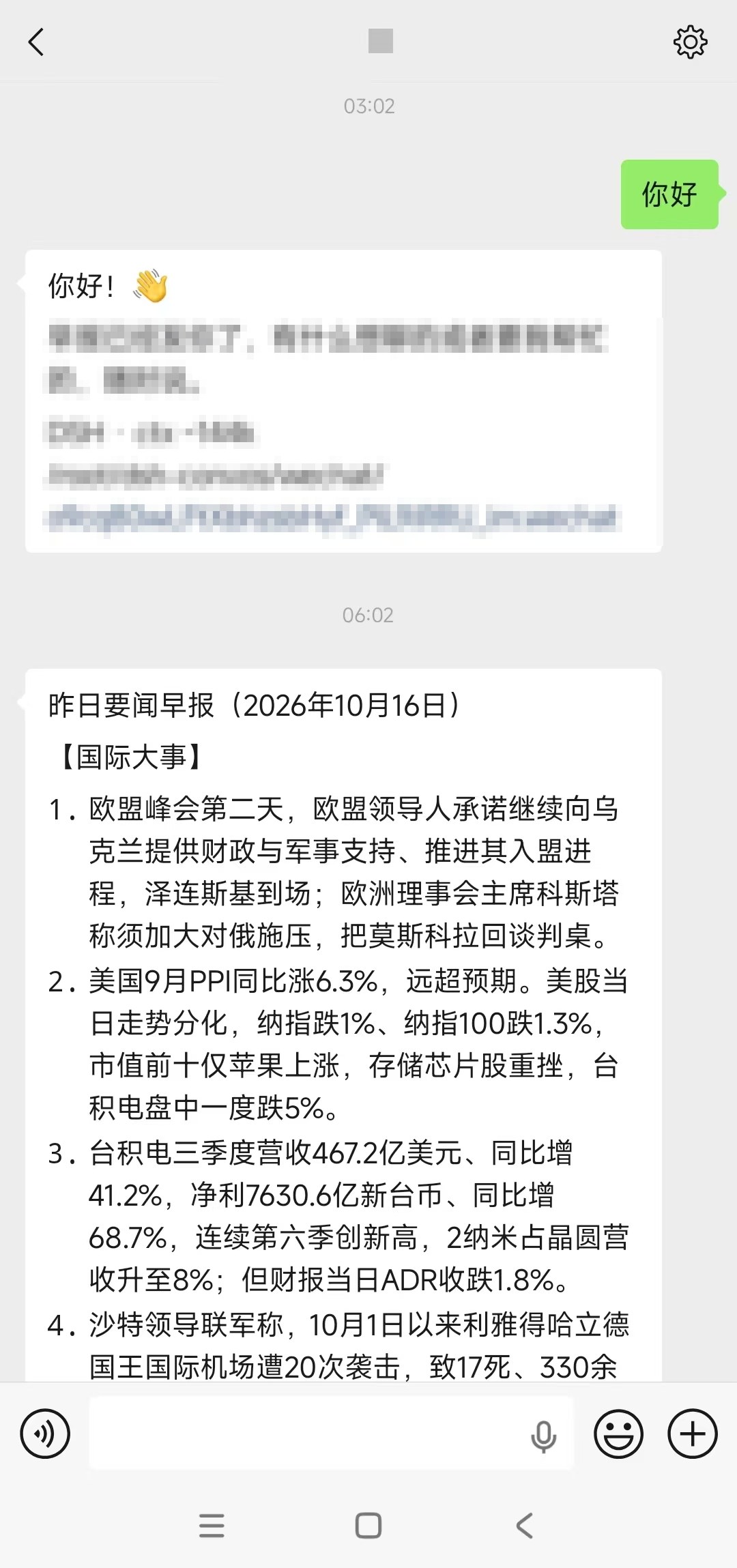
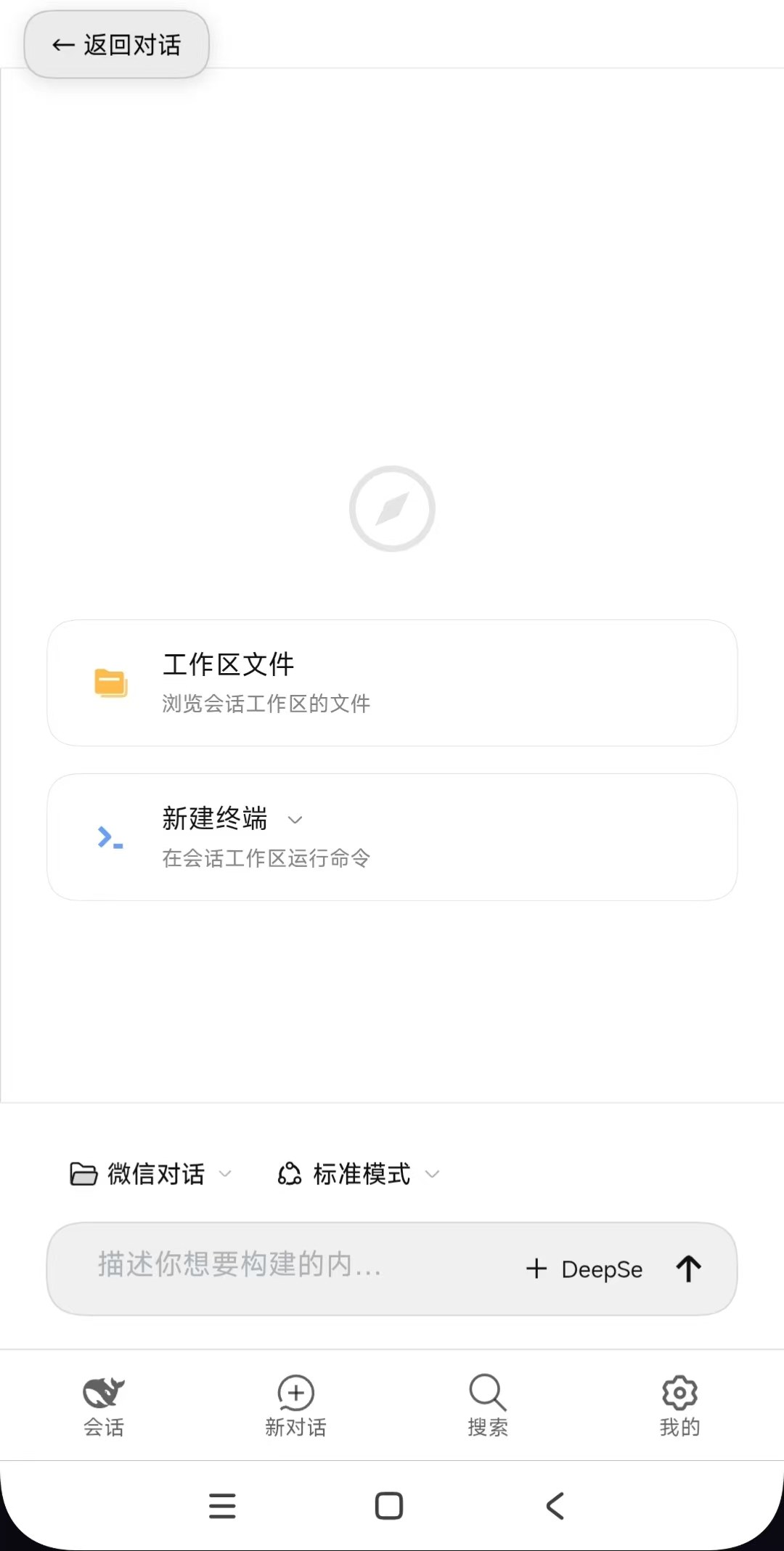
Two independent DSH plugins — use either one on its own.
dsh-wechat-connect — WeChat bridgeRuns on your server and long-polls the WeChat iLink bot gateway. Text, images, voice and files go both ways, in one single conversation with one single working directory — the bot serves its owner and nobody else.
[[send:/abs/path]] and the bridge uploads it back to the chat.dsh-mobile-ui — phone layout for the DSH web UIThe shipped web surface is a three-column desktop layout; on a phone the composer hides behind the keyboard, the sidebar crushes the conversation to a sliver, and the settings page wraps every label one character per line. This plugin injects a stylesheet plus a small script through the documented webserver/index-inject seam — no source edits, no dist patching:
| Problem on a phone | What the plugin does |
|---|---|
| Left icon rail eats 56px, controls are 28px tall | Bottom tab bar, 44px touch targets |
| Keyboard covers the composer | Layout height tracks visualViewport |
| Sidebar squeezes content to 132px | Full-screen conversation drawer that auto-closes on pick |
| Settings crushes labels vertically | Full-screen single column, nav becomes a horizontal strip |
| Right sidebar opens with no way back | A visible "← back to chat" button |
| iOS zooms the page on focus | 16px inputs |
| No home-screen app | PWA manifest + PNG icons → installs as an app (own icon, full screen, no browser UI) |
📱 It also becomes a real phone app — no APK, no app store: Chrome → "Add to Home screen" gives you a full-screen app icon, and the manifest's
start_urlcan point at a short login link so it re-authenticates itself. See docs/MOBILE-APP.md.
packages/
  dsh-wechat-connect/   WeChat bridge plugin (iLink gateway)
  dsh-mobile-ui/        Phone layout plugin (HTTP injection, no source edits)
deploy/
  systemd/              boot start, crash restart, watchdog, session filing, journald caps
  scripts/              watchdog + workspace-filing scripts
  nginx/                reverse proxy + mTLS device-level access example
  pwa/                  manifest example + icon renderer (home-screen app)
docs/
  SETUP.md              zero-to-running deployment guide
  MOBILE-APP.md         installing the web UI as a phone app (PWA)
  PITFALLS.md           18 hard-won lessons about DSH internals and the WeChat gateway
  USAGE-BOUNDARY.md     personal-use-only terms
# Server with Node 20+
npm i -g @deepseek-ai/dsh

# Drop the plugins into a DSH profile and list them in its bundles — see docs/SETUP.md
Minimal profile config ($DSH_HOME/profiles/wechat/cordis.patch.yml):
- id: wechat-connect
  config:
    enabled: true
    sessionProfile: headless
    workDir: /root/dsh-convos/wechat        # one working directory, one session
    allowFrom: "wxid_your_peer@im.wechat"   # your own id only; empty or "*" = anyone
    schedule:
      enabled: true
      time: "06:00"
      prompt: |
        [scheduled digest] Research yesterday's world + AI news, write a Word
        document, summarise it as a chat message, then output [[send:/abs/path]].
Full walkthrough — model API, QR login, reverse proxy with client certificates, keep-alive stack: docs/SETUP.md.
allowFrom set to your own WeChat id so strangers who find the bot get ignored.context_token from an inbound message, so you must message the bot once first.channel_version changes the upload response shape (the code handles both).MIT for the code. Usage is limited to personal self-hosted use — see docs/USAGE-BOUNDARY.md.
DeepSeek Harness(DSH)Web 插件聚合生态包 · 一切皆插件,创意工坊分发(dsh-market.com)
把回答做成一页可视化 HTML:模型只写简短的 Markdown 草稿,随包附带的 `am` 命令行生成页面,支持流程图、时序图、树、时间线、ER 图、表格和提示框。
在 dsh 里装上这个插件即可,无需登录、注册或填 API Key,就能使用包括 Muse Spark 1.3、MiMo V2.6 在内的前沿模型——完全免费,不限量。 All you do is install this plugin in dsh: no login, no sign-up, no API key — the frontier models are just there, Muse Spark 1.3 and MiMo V2.6 among them. Completely free, with no usage cap.

