

dsh-web
zhu1090093659/dsh-webDeepSeek Harness(DSH)Web 插件聚合生态包 · 一切皆插件,创意工坊分发(dsh-market.com)
Drive the DeepSeek Harness agent on this computer from your phone, in QQ.
It goes through Tencent's official QQ bot platform (api.bot.qq.com, bound by scanning a QR
code), so there is no public IP to expose, no reverse proxy, and no third-party protocol client
in the middle. Bind once, and it keeps working.
Runs on the current DSH desktop app — developed and tested against DSH 0.2.0-rc.2.
This is the QQ counterpart of dsh-wechat-plugin. It is feature-aligned with it, with a few deliberate departures where the QQ protocol makes the WeChat machinery unnecessary — see Differences from the WeChat version.
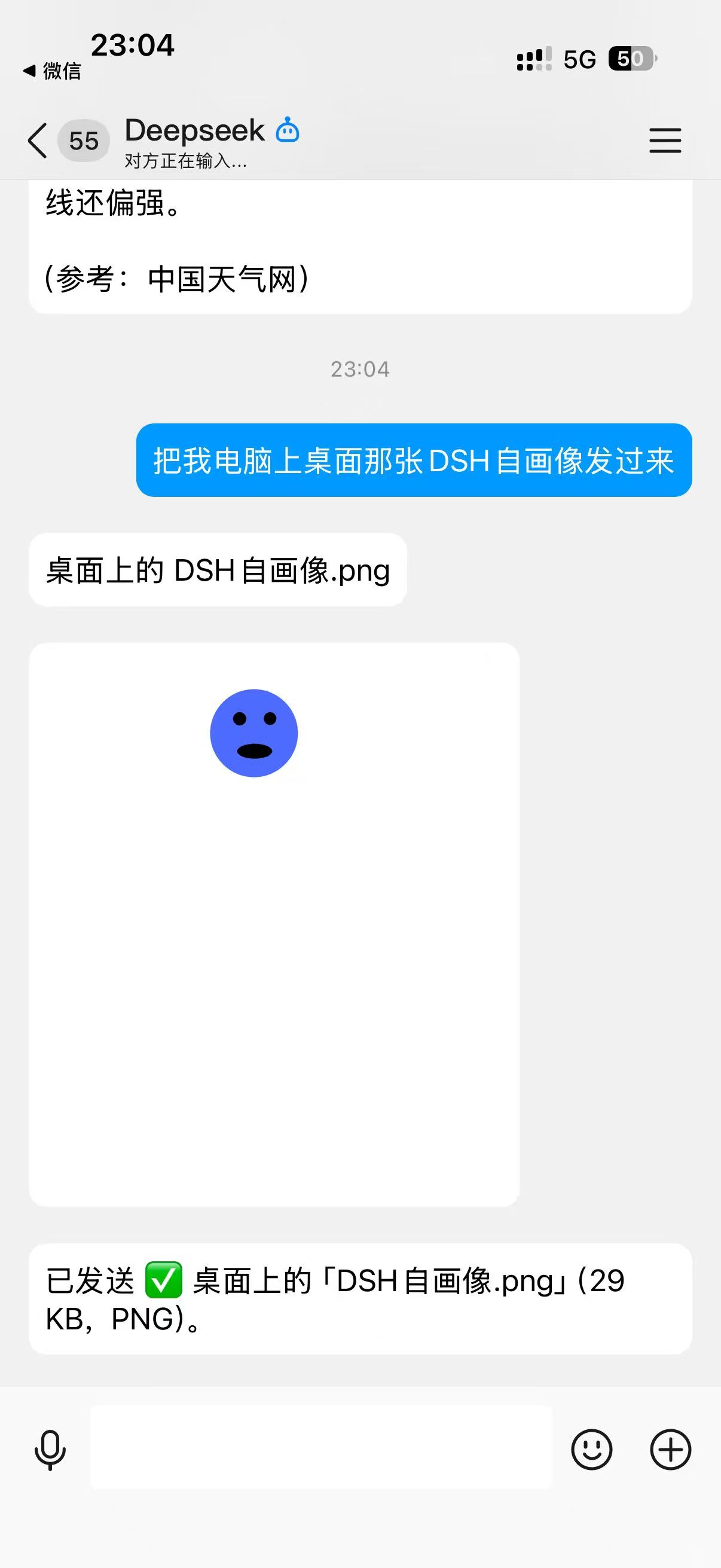
Ask for a file in one sentence and it lands on your phone. Say "send me that DSH self-portrait from my desktop" in QQ and the agent finds the file on the computer, sends it back, and confirms with "sent — DSH 自画像.png on the desktop (29 KB, PNG)". The + at the right of the composer is the attachment entry: images, videos, voice and files all go in that way (see Media in both directions).
send_to_qq.
A reply that runs long is turned into a .md file and sent to your phone instead of being cut./new, /list, /switch, /current, /cancel — or
just say "switch to the other one". The list has session folders and sessions as two levels./model lists the models with
each one's reasoning levels; /model 2 and /model 等级 high switch them, effective from the
next step.notify_qq lets any session on this machine message you — that is what makes
"tell me when it is done" work. It works in practice: a ten-message burst was delivered in full,
and the last six of those went out as proactive pushes. (Tencent's rules for unsolicited sends can
change and the plugin assumes no quota; anything undelivered is queued and flushed the next
time you speak.)schedule_create / schedule_list /
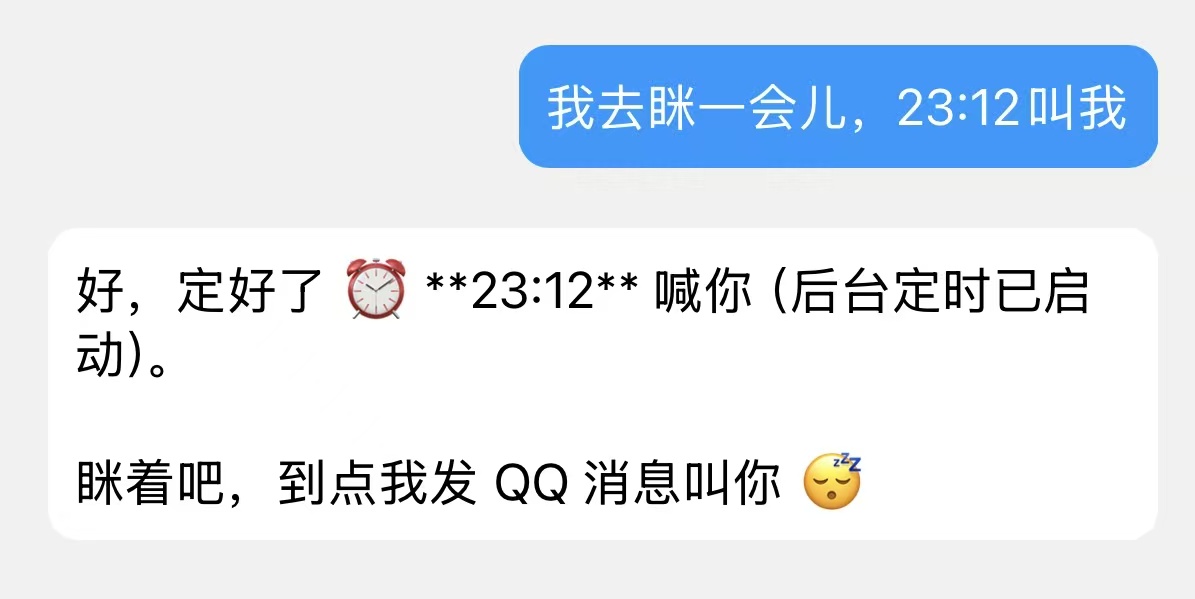
schedule_delete / schedule_update — just say "wake me at 23:12". The plugin does not
reimplement what DSH already has; it is only the channel.For the DSH desktop app on a machine that stays on. It needs DSH's workspace, tool and UI services — the standard desktop composition.
| DSH desktop | @deepseek-ai/dsh-desktop 0.2.0-rc.2 or newer |
| Phone | mobile QQ, to scan one QR code |
| QQ bot | nothing to register in advance. The bot application is created by that scan; you do not need an AppID/AppSecret beforehand |
| Tencent's rules | an uncertified bot is usable only by its administrator — that is, only by you, which is exactly what a personal remote control wants |
Open the plugin entry in the sidebar and choose 添加插件 (add plugin). The field takes a package name, a Git URL, a tarball, or a local path.
The name to install is
dsh-qq-pluginThe repository and the package share one name, so there is nothing to reconcile — but the
-pluginsuffix is easy to drop by accident. Copydsh-qq-pluginrather than typing it. The install command has to match the package name exactly.
From a terminal, that is one line (--profile web works just as well if that is the profile you use):
dsh plugin --profile desktop add dsh-qq-plugin
dsh-qq-plugin
Add a version if you need one: dsh-qq-plugin@1.0.5.
C:\path\to\dsh-qq
Point it at the directory that holds package.json — the folder is dsh-qq, the package it
declares is dsh-qq-plugin.
npm pack
# → dsh-qq-plugin-1.0.5.tgz
Paste the absolute path to that .tgz into 添加插件.
The app drives pnpm underneath, so the same thing headlessly:
dsh plugin --profile desktop add dsh-qq-plugin
dsh plugin --profile desktop add C:\path\to\dsh-qq
You then have to enable the bundle yourself — which is what 立即启用 does for you — in
~/.dsh/profiles/desktop/package.json:
{
  "dsh": {
    "profile": {
      "bundles": [
        "@deepseek-ai/dsh-base",
        "@deepseek-ai/dsh-web-app",
        "dsh-qq-plugin"
      ]
    }
  }
}
Wait for the install to finish, click 立即启用 (enable now), and restart DSH.
After restarting DSH, open Settings → QQ and click 开始扫码 (start the QR bind). Scan the code with mobile QQ and confirm on the phone.
The scan is the whole registration. The bot application is created by that scan, so you do not need to register anything on Tencent's open platform first and you do not need an AppID/AppSecret in advance — nor a public IP or a reverse proxy.
The credentials land straight in DSH's credential store — the plugin's own state file records only the AppID, never the AppSecret. The channel connects by itself once bound: send any message to the bot in QQ and you should get a reply.
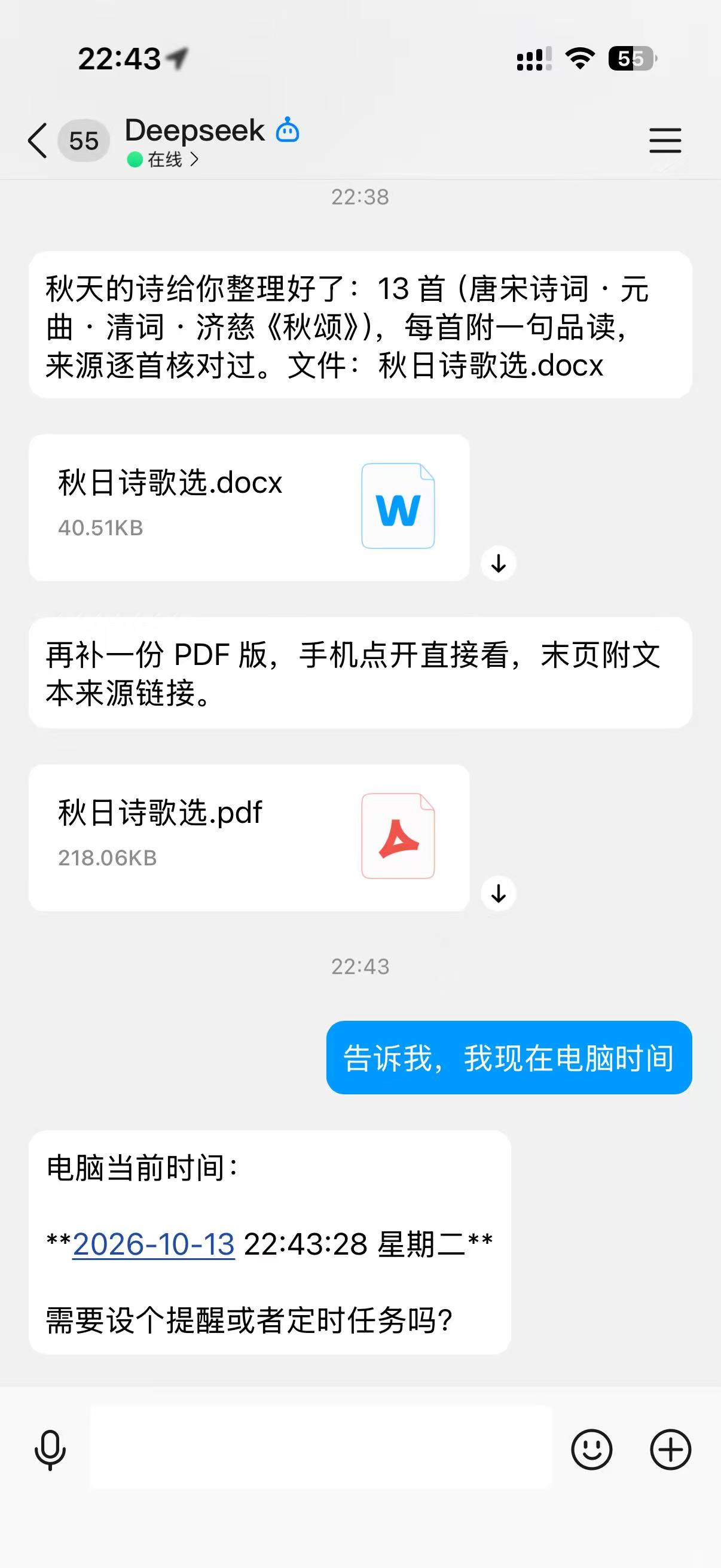
That is what it looks like in real use, after installing it: the agent put together a 13-poem
anthology on the computer and sent both the docx and the pdf straight to the phone; in the same
conversation, "tell me the computer's current time" came back as 2026-10-13 22:43:28 Tuesday,
along with an offer to set a reminder.
The computer was locked at that moment — the phone says 22:43 and so does the lock screen:
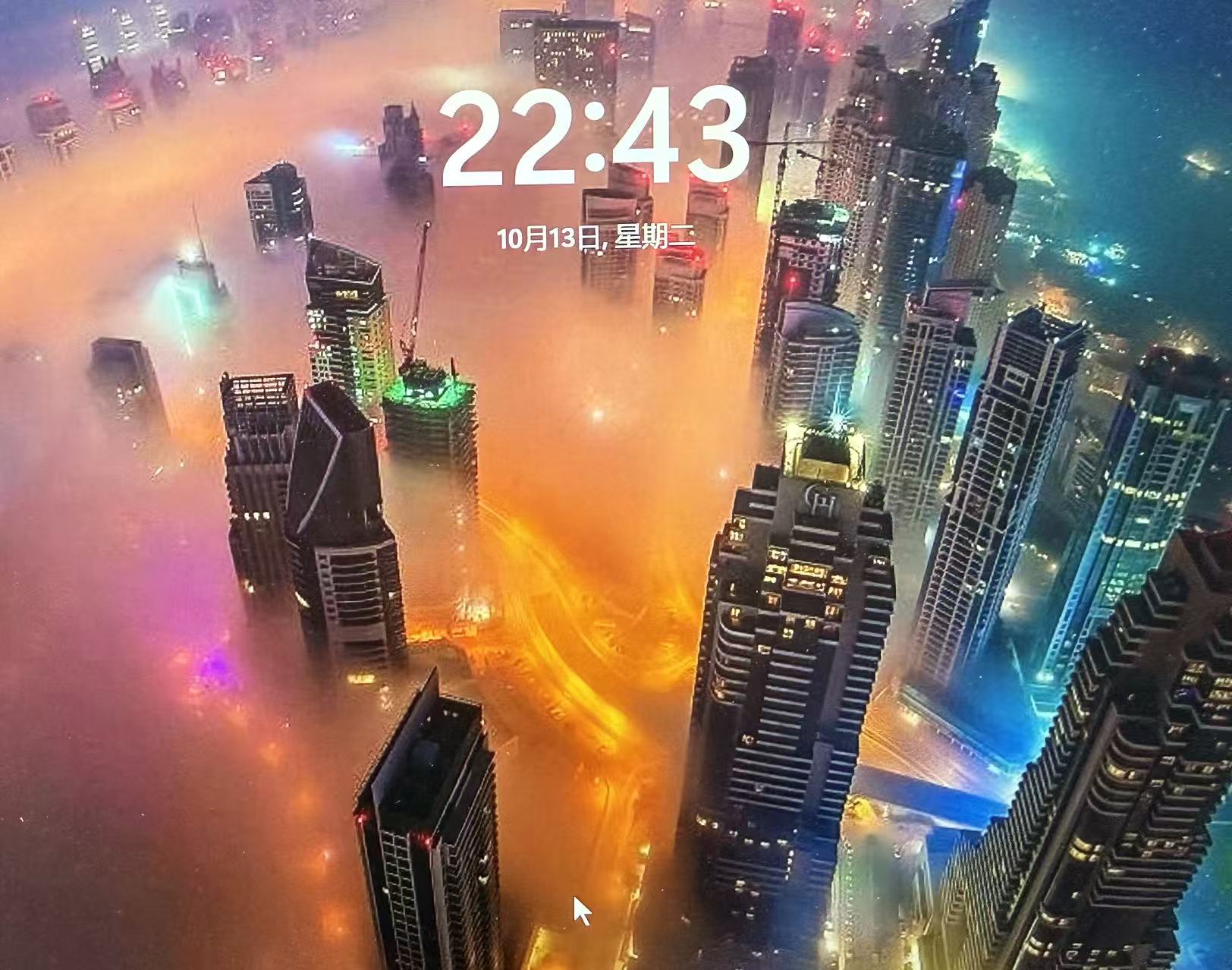
Locking the screen does not stop the agent, so it keeps working after you walk away while the conversation on your phone carries on. The reverse is also true: locking is exactly what you should do when you leave (see Security).
Just send a message and it reaches the agent:
你好
What follows is grouped by capability, and each group carries a real screenshot showing what it looks like and what it proves.
One QQ chat sits in front of any number of DSH conversations. /list opens this workspace's
conversations, ten per screen:
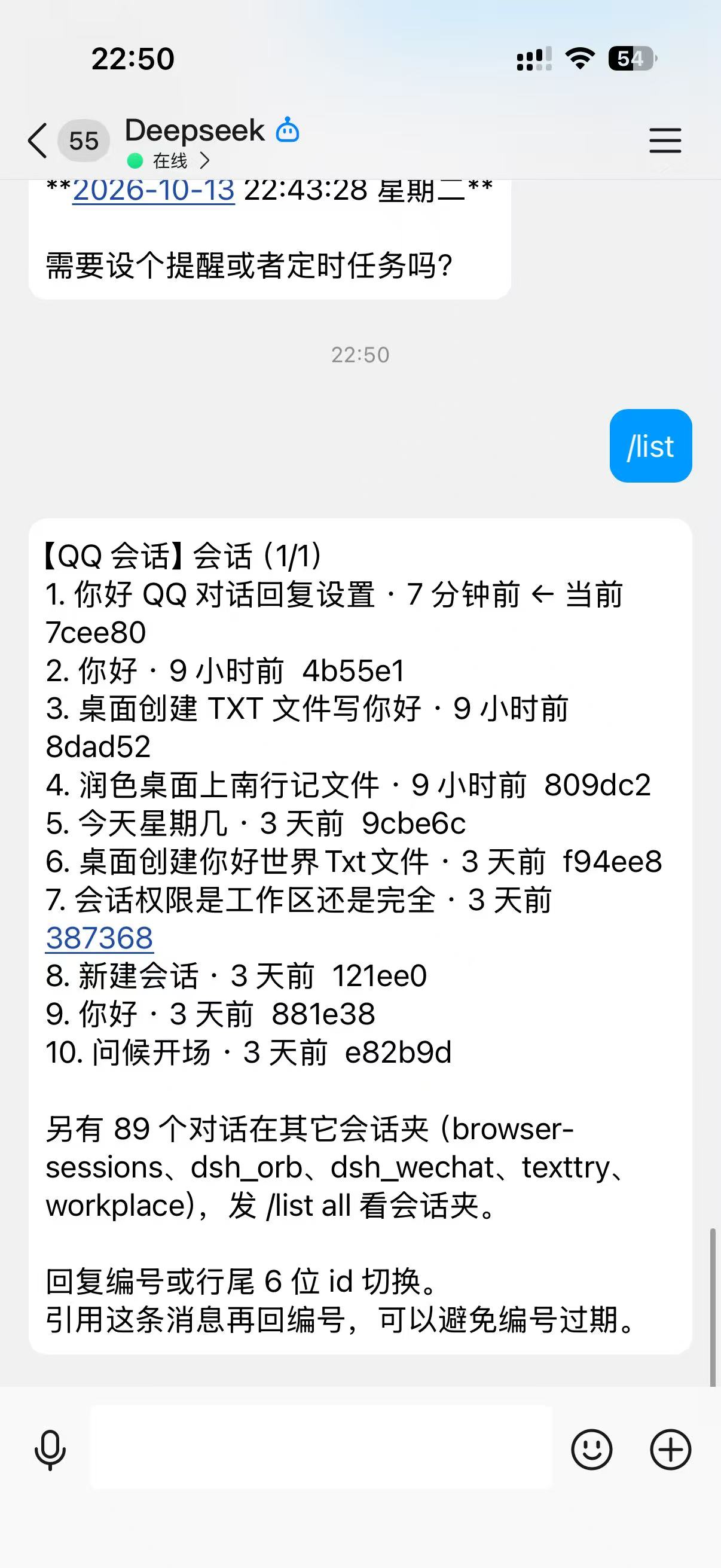
One shot, four things proved: ten rows per screen, a six-character id at the end of every row
(7cee80, 4b55e1…), the current conversation marked ← 当前, and that footer line. The list also
tells you there are 89 more conversations in the other session folders.
/list all is the level above — the session folders (across projects and workspaces), each with
its conversation count; reply with a number or a name to enter one, and what you get is that
folder's conversation list (the screenshot replies 1, so it enters 「QQ 会话」):
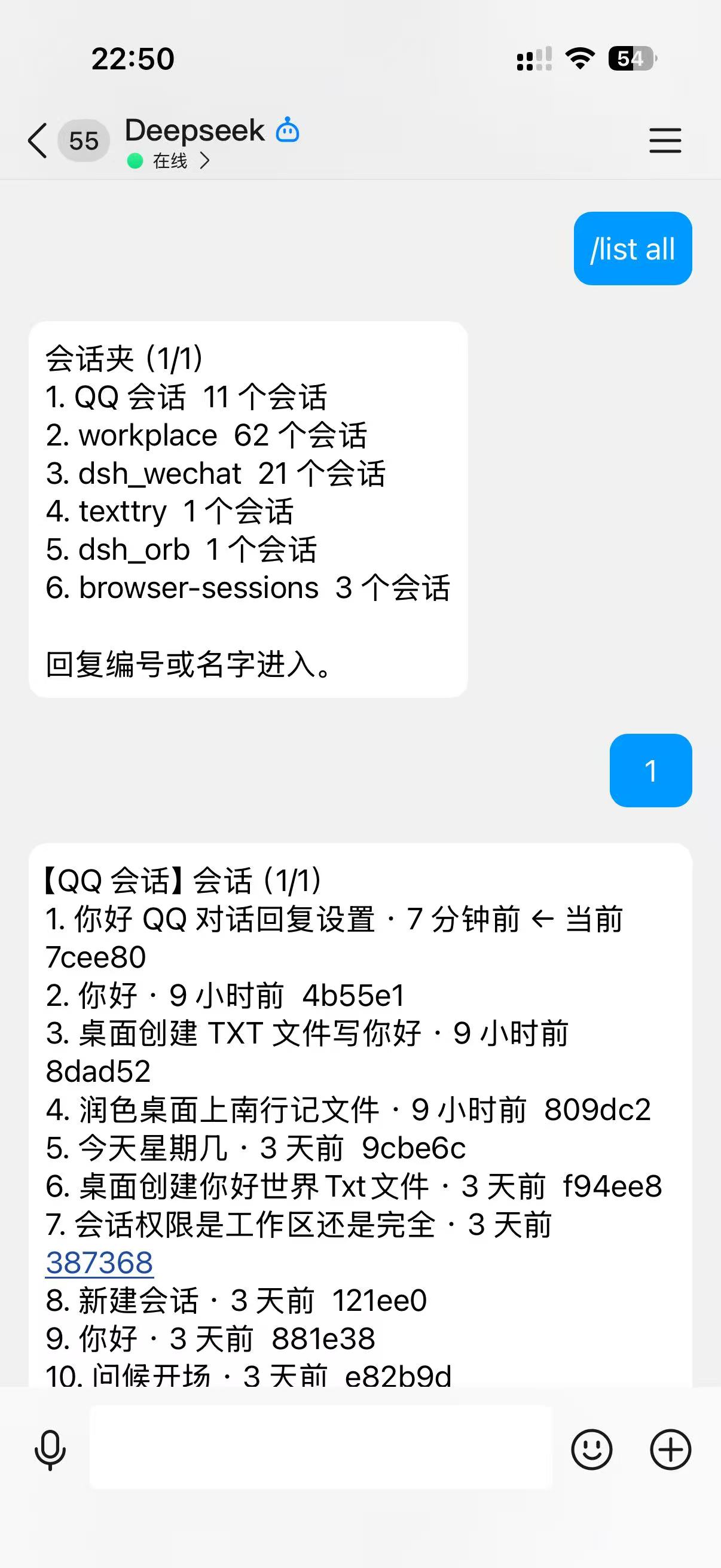
Entering a folder only moves where you are browsing, not which conversation you are bound to — to actually switch you still pick a conversation inside it.
A bare digit is /switch <digit>: with the list on screen there is no need to type /switch,
just reply 2 — and it tells you which one you landed on, short id included, so you can check it
against the row you meant:
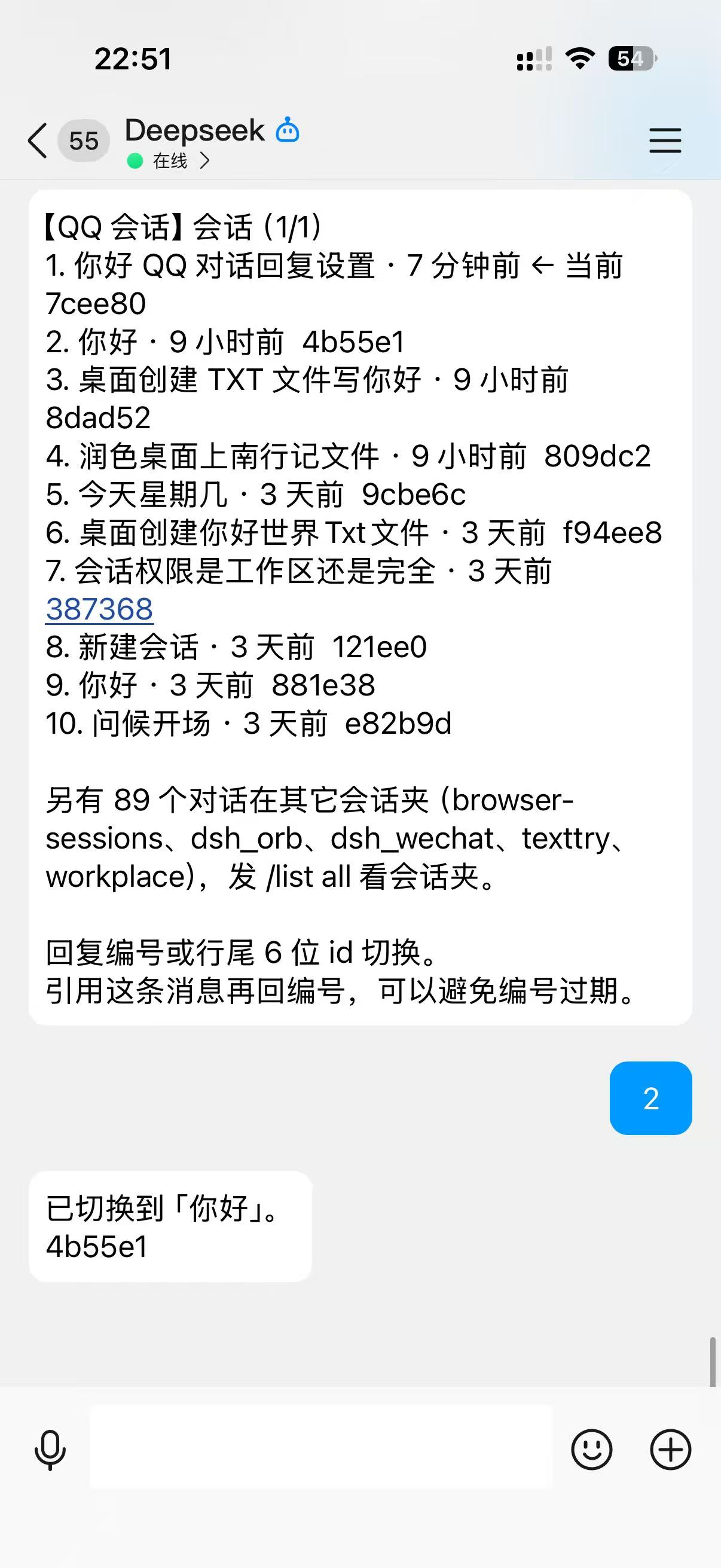
★ Quoting freezes the numbering: long-press the list message and quote it before replying with a number, and the number is read as that screen printed it. Sessions running while you read cannot make you land on the wrong one — the numbering is frozen inside that message. The list footer says so itself: 「引用这条消息再回编号,可以避免编号过期。」
Plain language works too. Here the user sends 「查看所有会话」 (show all conversations) — not a command:
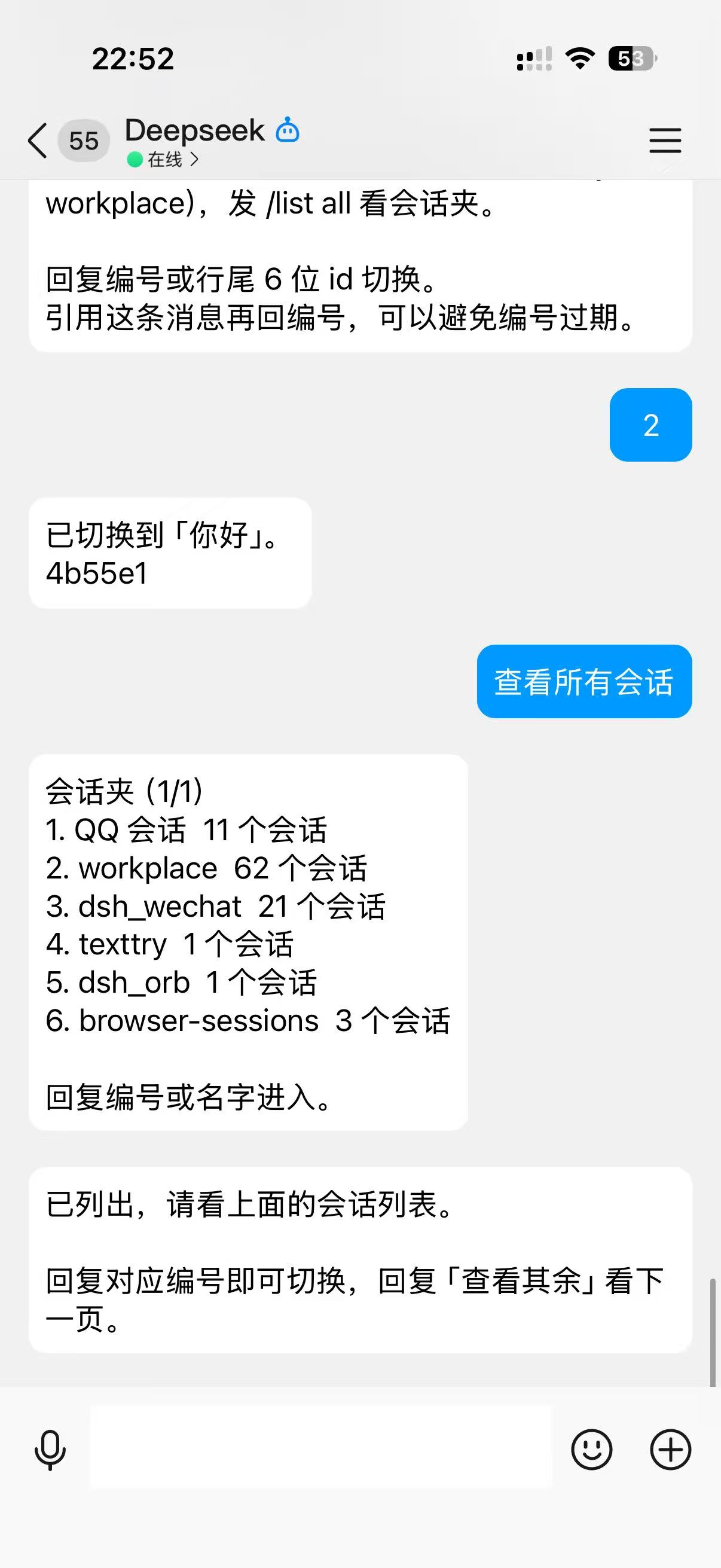
The agent judges intent rather than matching fixed rules: it recognised "list conversations", listed the session folders, and told you that a number switches and 「查看其余」 turns the page. A switch also reports whether it succeeded or failed.
Type these to control which DSH conversation you are talking to:
| Command | What it does |
|---|---|
/new [title] | Start a fresh conversation. Anything after it becomes the title: /new 修复登录 starts a conversation called 「修复登录」 |
/list | Go straight to this workspace's conversations (ten per screen) |
/list all | List the session folders (workspaces) on this machine, one per line with its conversation count; reply with a number or a name to enter |
/switch 3 | Move to the 3rd row of that screen |
/switch e716f0 | Move by the short id at the end of the row — unrelated to numbering, and it never expires |
| Reply 「查看其余」 | Walk down ten rows (both levels, all the way to the end). Numbering runs on across screens (1–10, then 11–20) |
Reply 3, a name, or a trailing id | No need to type /switch while the list is on screen |
Quote a list message → /switch 3 | Numbered by that screen; the numbering is frozen inside that message |
/model | Which models there are, and each one's reasoning levels, with the one in use marked |
/model 2 | Switch to the 2nd one; a model name works too |
/model 等级 high | Change the reasoning level of the current model (the level names are the ones the list prints) |
/model 2 等级 high | Change the model and the level together |
/current | Which conversation you are in |
/cancel | Stop the task that is running |
/help | This list |
Spaces are optional: /switch3, /switch 3 and /switch:3 all work — these commands get typed
on a phone keyboard, where a dropped space is normal. A word that merely starts with a command is
not one, so /news is not /new.
Numbering expires: sessions run while you are reading the list, so by the time you reply "3" the 3rd row may be someone else. Every row therefore ends with a short id of at most 6 characters — reply with that, or quote that screen's list message and the number is read as that message printed it.
The list has two levels, ten rows per screen: /list opens this workspace's conversations;
/list all lists the session folders (workspaces), which you enter by number or name. Both
levels walk down ten rows with 「查看其余」, and numbering runs on across screens. When you reach
the end it says so instead of inviting you to keep going. Entering a folder only moves where you
are browsing, not which conversation you are bound to — to actually switch you still pick a
conversation inside it.
/model lists which models there are (marked 「(当前)」/「(默认)」 — current / default) and each
one's reasoning levels. /model <name|number> switches model; /model 等级 high changes only the
reasoning level; /model 2 等级 high changes both. A switch takes effect from the next step.
Reasoning levels come from the host adapter. The bundled DeepSeek adapter publishes
off/low/high/max(printed asOff/Low/High/Max), and those are the names/model 等级accepts, case-insensitively. There is no separate Chinese spelling — the level names are the ones the list prints, exactly as the WeChat channel does it.
Plain language works here too — "switch to the other one", "what conversations do I have", "stop". The agent judges the intent rather than matching fixed rules, and a switch tells you whether it succeeded or failed.
In: send the agent an image / video / voice message / file from your phone. Voice is transcribed server-side and you never see that step. Document attachments (Word, Excel) are readable too.
Here is a photo of a dog sent in, with a single question — "what is this":
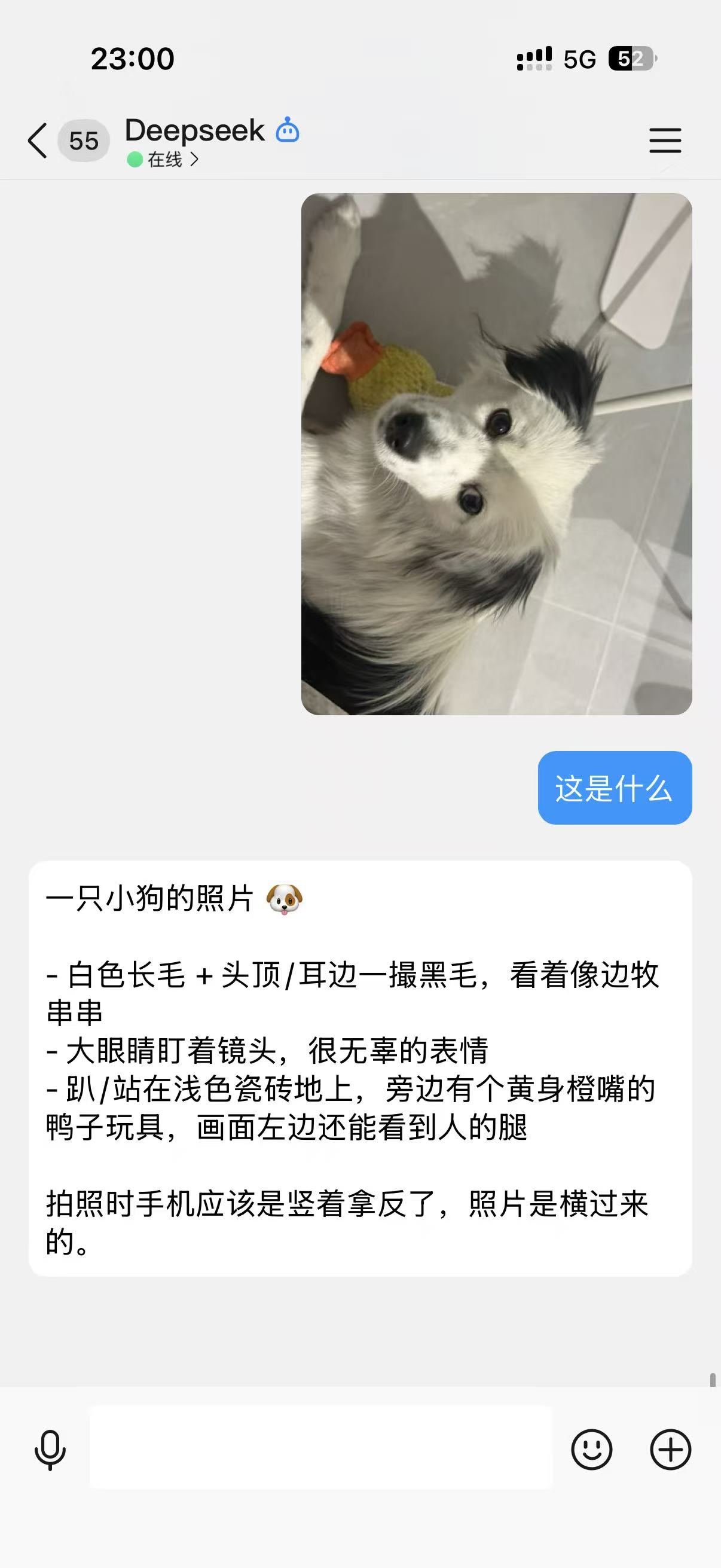
What is worth noticing is not that it recognised a dog but the two details only someone who really looked at the image could give: the yellow-bodied orange-beaked duck toy, the person's legs at the left edge of the frame, and its unprompted remark that the photo is sideways (the phone was held the wrong way round).
Now a PDF sent in, again with a single question — "what is this":
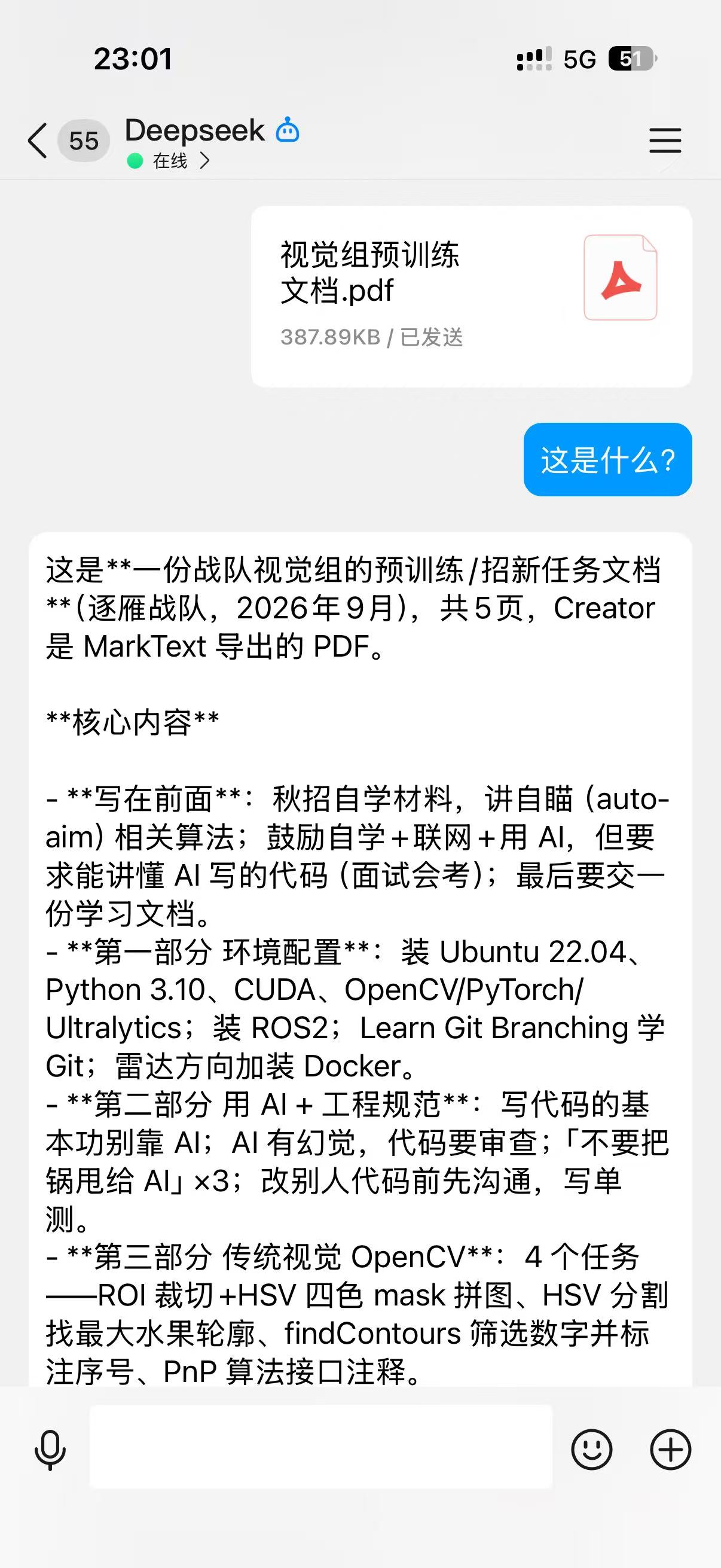
Document attachments are read too: it says this is a five-page recruitment task document, exported from MarkText, and summarises it as "Part 1 environment setup / Part 2 using AI plus engineering discipline / Part 3 traditional OpenCV, four tasks".
Out: the agent sends files from this computer to your phone with send_to_qq — images arrive
as photos, videos as playable clips, everything else as a file attachment:
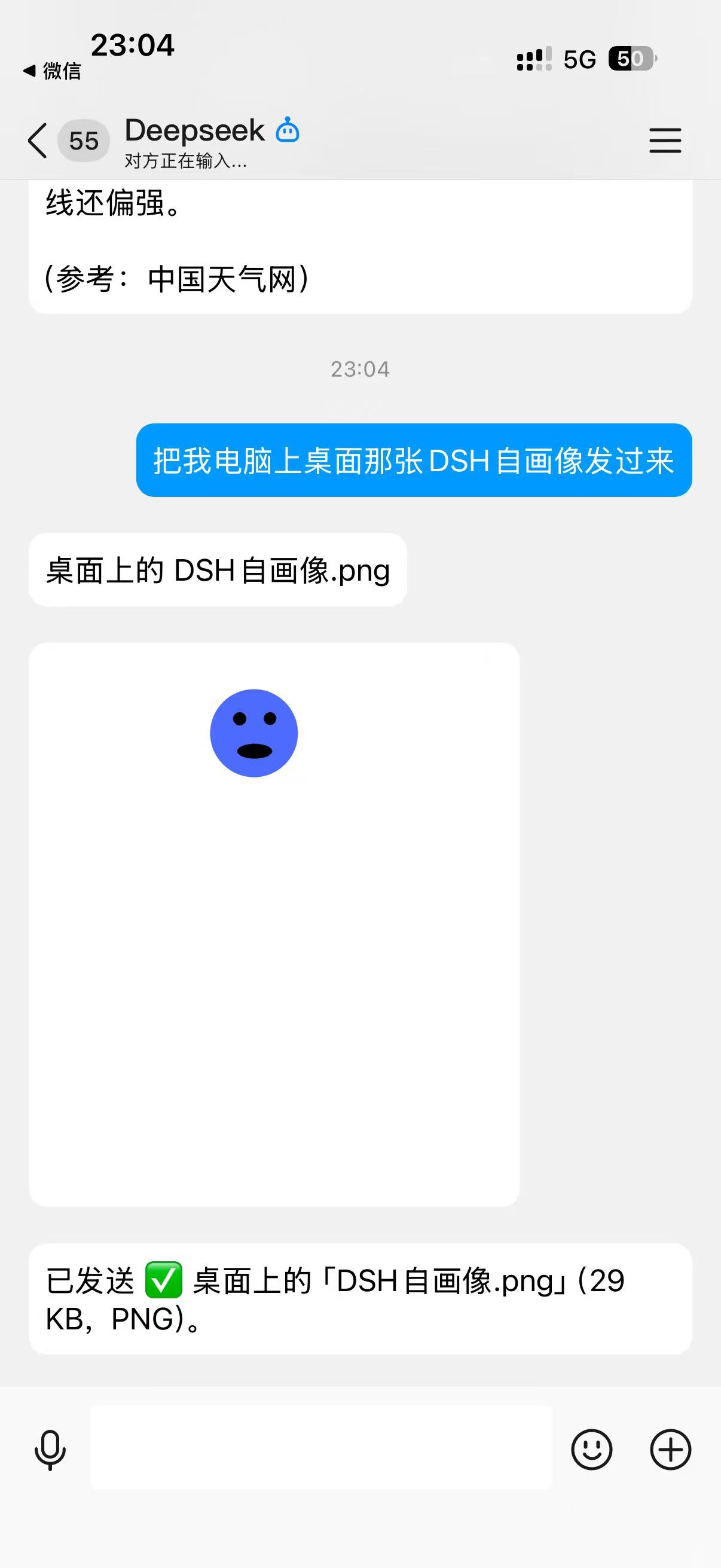
This is the story the cover image at the top of the page tells, and it is a complete pickup: say which file you mean, the agent finds it on the computer and sends it back, and it confirms with the filename and size so you can see at a glance whether it sent the one you meant.
★ A reply that runs long is turned into a .md file and sent to your phone (4000 characters by
default, adjustable; 0 = no limit):
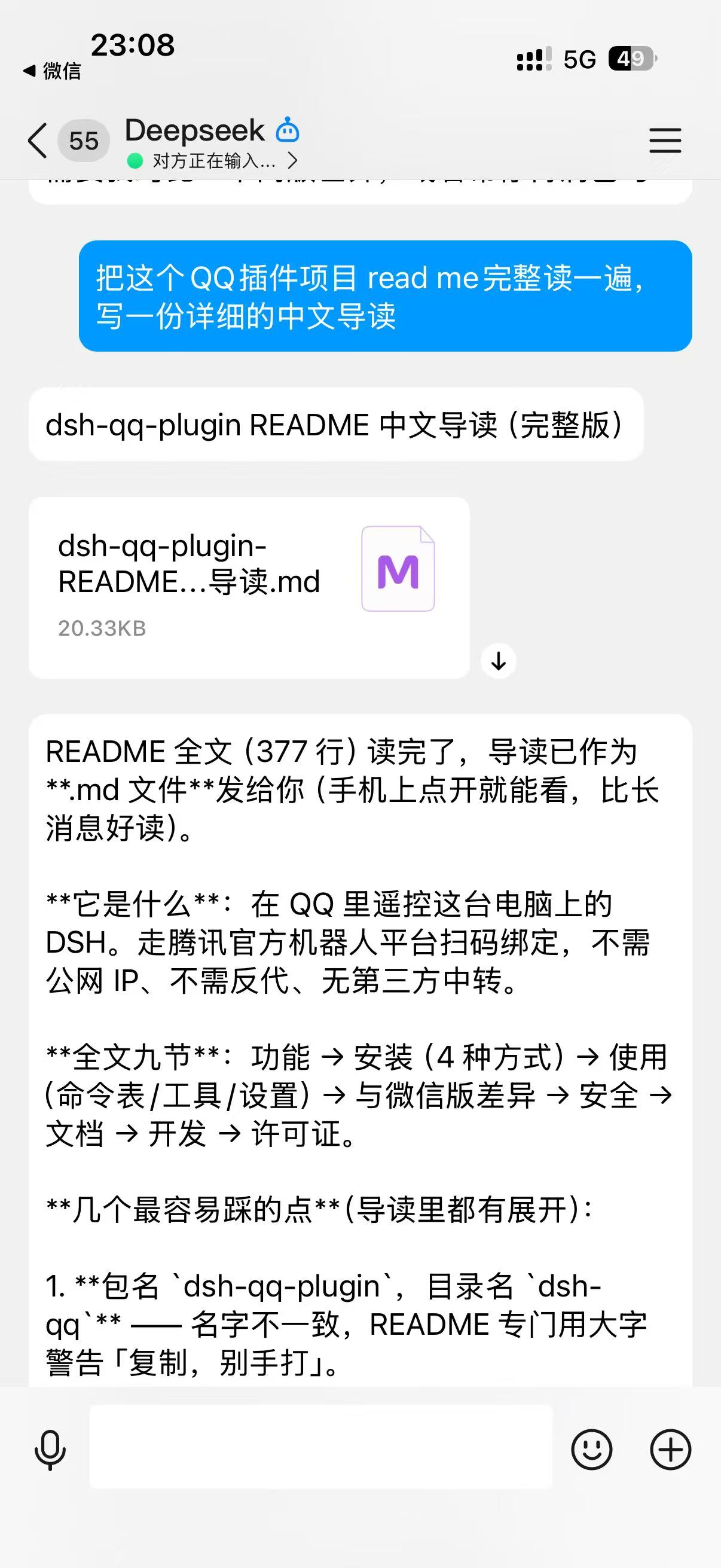
Something that would not fit on one phone screen is far more usable as a file — not truncated, and not split into a dozen messages that flood the chat. The threshold is the settings page's "单条回复字数上限" (per-reply character limit).
Voice: hold to talk on the phone and the agent receives text (transcribed server-side, with nothing extra for you to do):
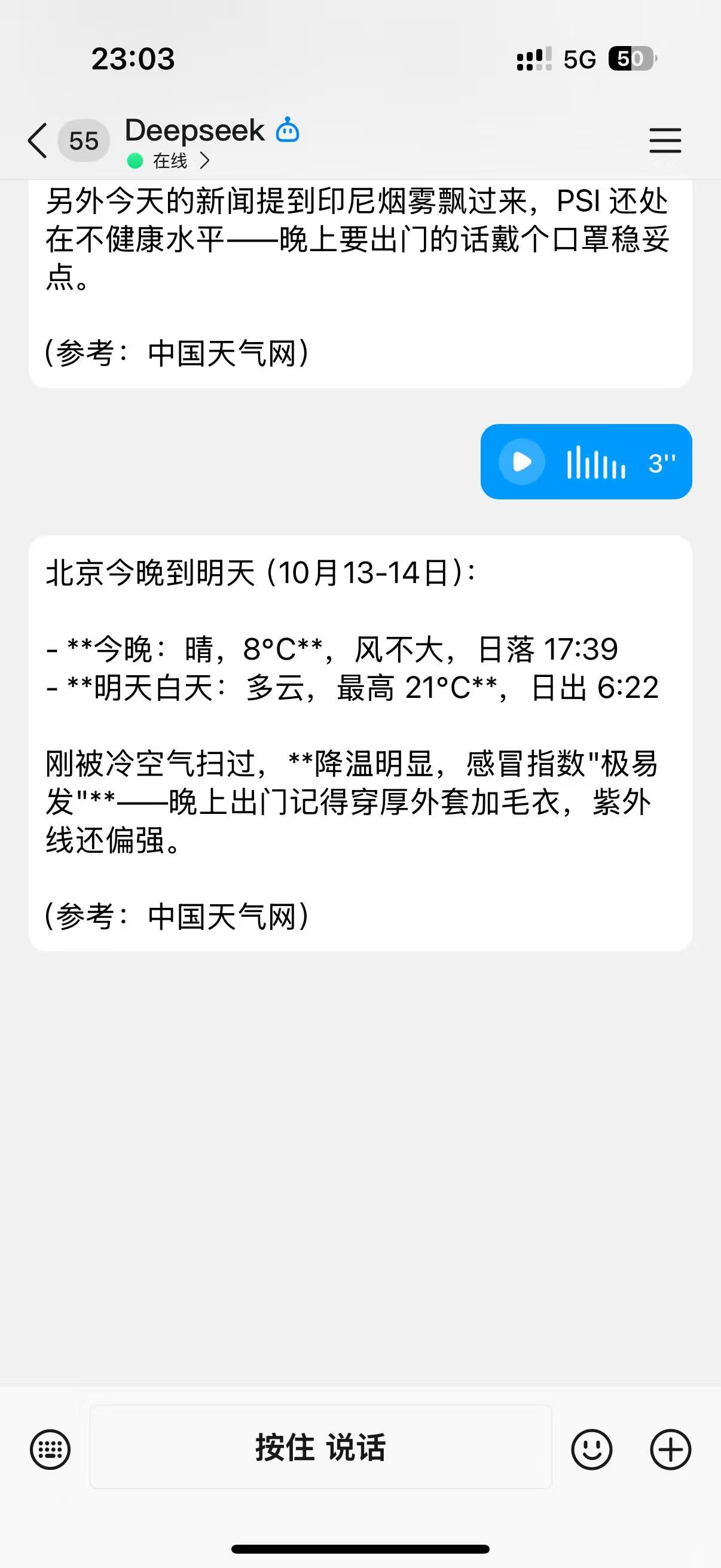
Under that 3-second voice bubble in the screenshot is a complete weather answer — the middle step, turning speech into text, is invisible on your phone, and does not need to be visible.
These three have no screenshots — they are a question and an answer inside the same conversation, so a picture of one would look much like the ones above; prose says it better. This is what arrives on your phone:
★★ notify_qq: any session on this machine can push a message to you — that is what "tell me
when it is done" is built on. On the left is the desktop session doing the work; on the right is
what arrives on mobile QQ:
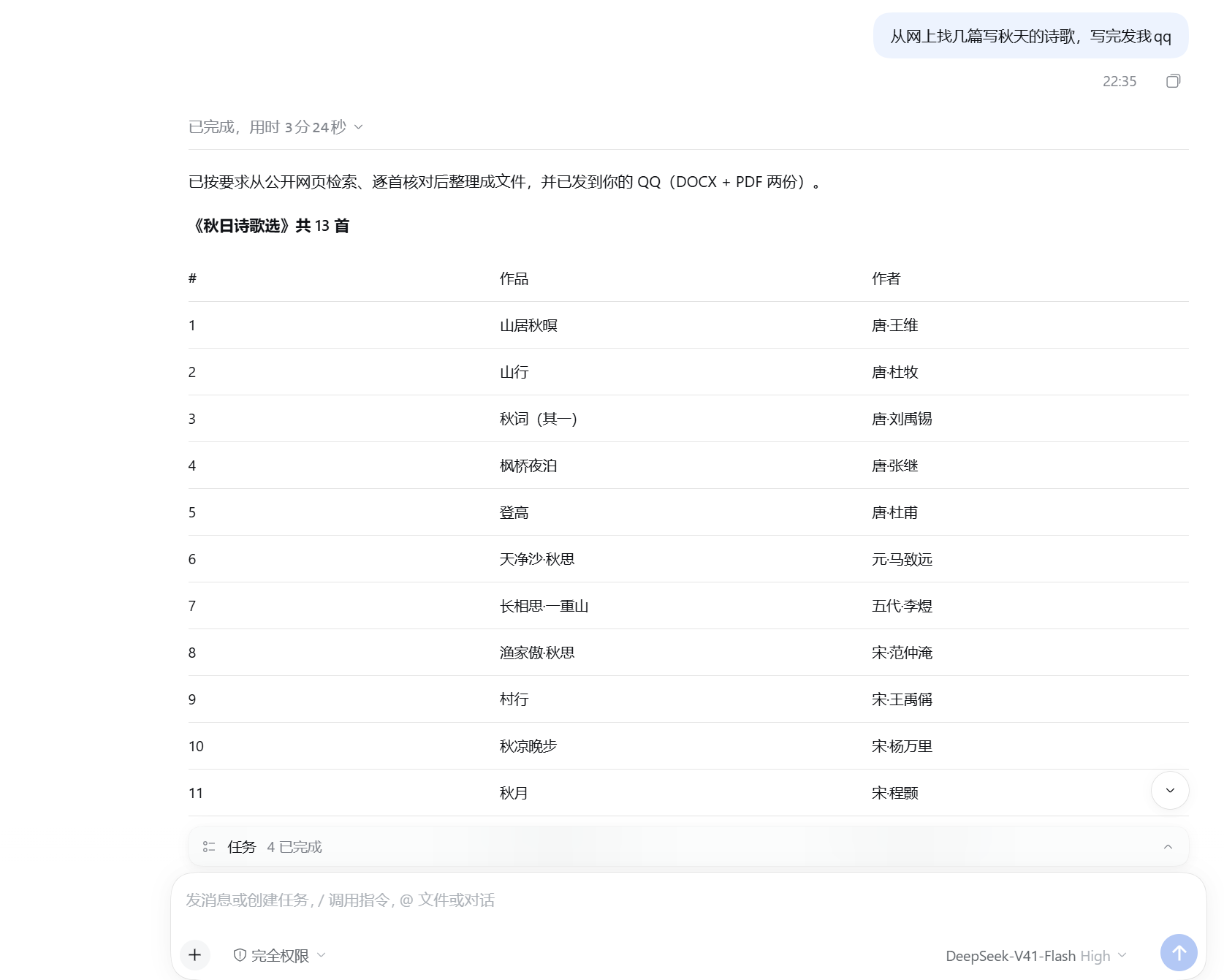
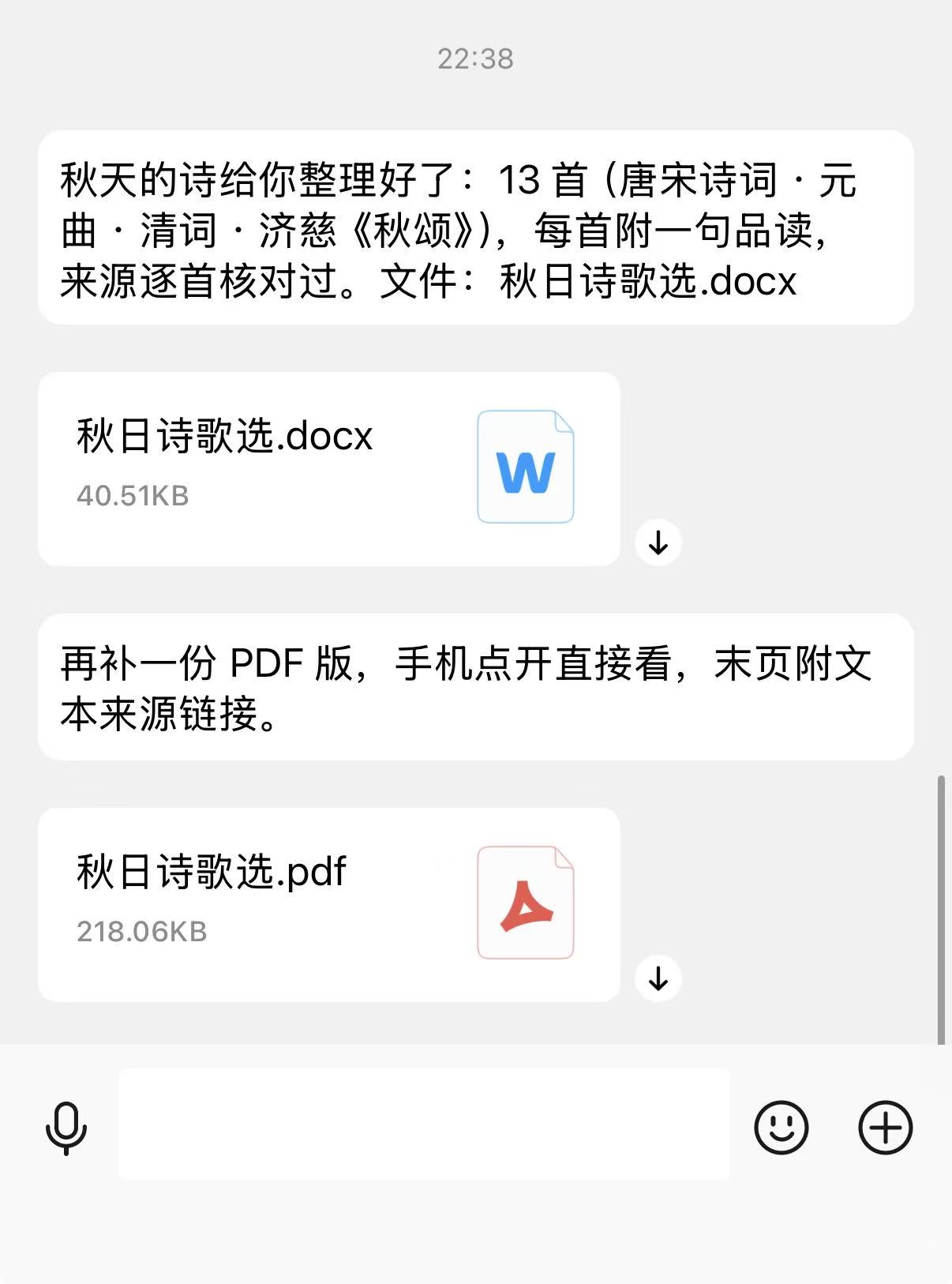
Note that the two sides are not the same session: the work was done by that desktop session, and
the message arrived in the QQ conversation you are bound to. That is exactly why
allowCrossSessionNotify is on by default — without it, the session doing the work could not report
its own result.
It works in practice: a ten-message burst was delivered in full, and the last six of those went out as proactive pushes. (Tencent's rules for unsolicited sends can change and the plugin assumes no quota; anything undelivered is queued and flushed the next time you speak.)
Scheduled tasks run through the DSH host's own schedule_create / schedule_list / schedule_delete / schedule_update — the plugin does not reimplement what DSH already has, it is only
the channel. Plain language is enough:
When the time comes it really does push one over (this is a proactive push, not you asking):
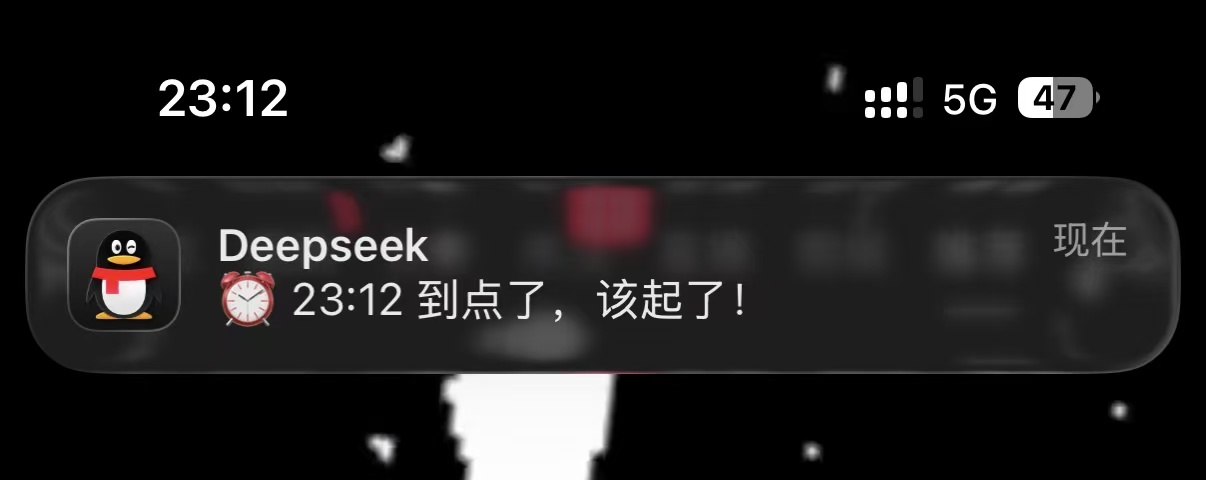
"Remind me every morning at 9 what I have to do today", "send me the current time every hour",
"show me which scheduled tasks I have" all belong here. Showing them is schedule_list, and so are
deleting and changing them.
| Tool | What it does |
|---|---|
send_to_qq | Send a file from this machine to the conversation that asked. Images arrive as photos, videos as playable clips, everything else as a file attachment |
notify_qq | Push to your current QQ conversation from any session. This is what "tell me when it is done" is built on, and it works in practice (a ten-message burst arrived in full; the last six were proactive pushes) |
qq_session_control | Look at, switch, create or interrupt conversations; list (or switch) models and their reasoning levels |
The
qq_/_qqin those names is deliberate: tool names are unique across the whole host scope, and the WeChat plugin already occupiessession_control. Two plugins claiming the same name means whichever registers second fails silently.
Those three come from the plugin. Scheduling is not among them because it does not need the
plugin to implement anything: it runs through the DSH host's own schedule_create /
schedule_list / schedule_delete / schedule_update, and the plugin's part is
DeepSeek Harness(DSH)Web 插件聚合生态包 · 一切皆插件,创意工坊分发(dsh-market.com)
把回答做成一页可视化 HTML:模型只写简短的 Markdown 草稿,随包附带的 `am` 命令行生成页面,支持流程图、时序图、树、时间线、ER 图、表格和提示框。
在 dsh 里装上这个插件即可,无需登录、注册或填 API Key,就能使用包括 Muse Spark 1.3、MiMo V2.6 在内的前沿模型——完全免费,不限量。 All you do is install this plugin in dsh: no login, no sign-up, no API key — the frontier models are just there, Muse Spark 1.3 and MiMo V2.6 among them. Completely free, with no usage cap.

