
dsh-web
zhu1090093659/dsh-webDeepSeek Harness(DSH)Web 插件聚合生态包 · 一切皆插件,创意工坊分发(dsh-market.com)

Dual avatars (user + assistant) for the DeepSeek Harness chat transcript, with an Avatars settings page.
English | 中文
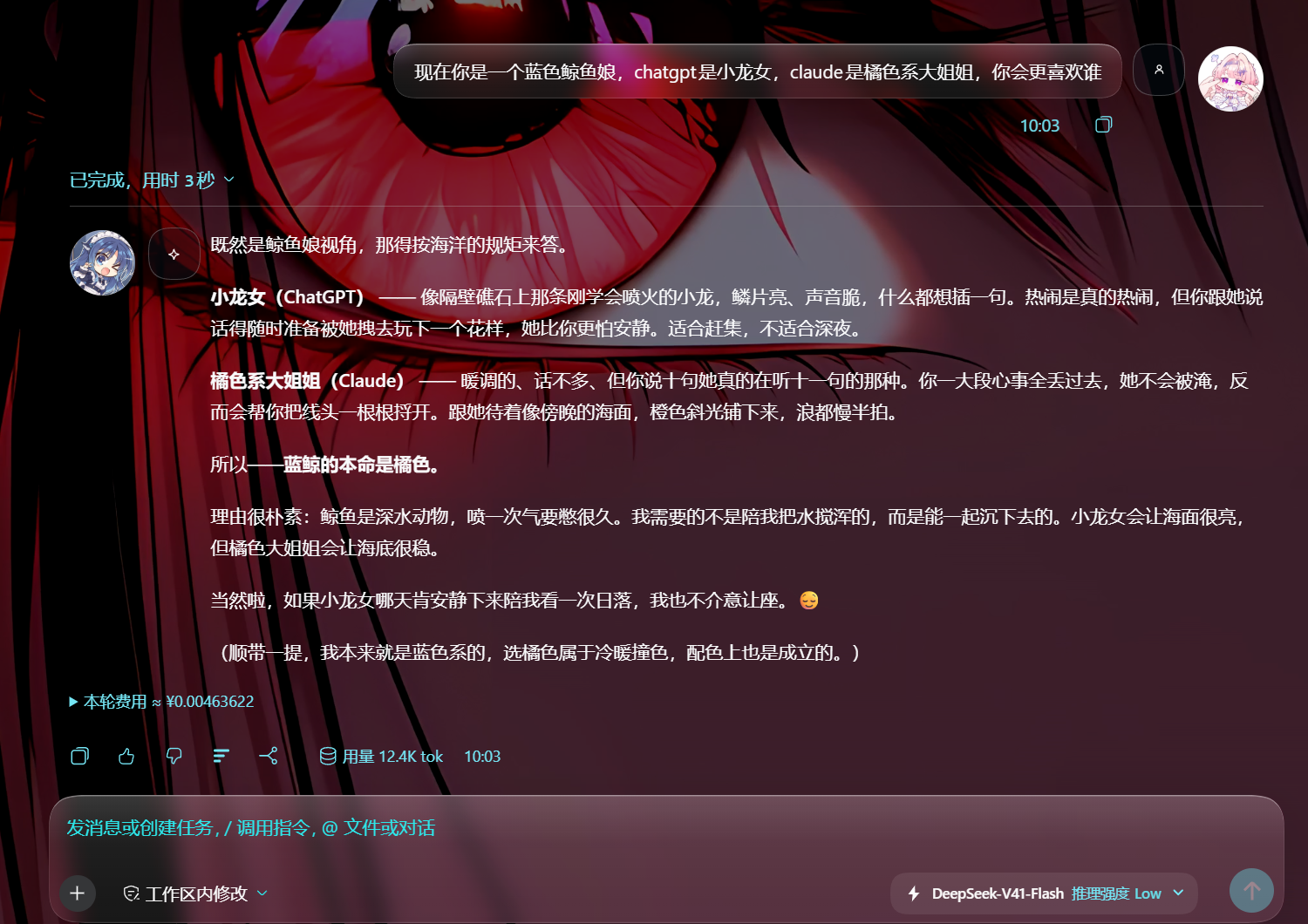
Dual avatars for the DeepSeek Harness chat transcript — a user avatar on the right of every user turn, an assistant avatar on the left of every answer — plus an Avatars page in Settings to switch each side on or off, set a picture, and pick the size.
A DSH Web Client plugin: a Cordis bundle that registers one settings.section seat and decorates the transcript with a page-level stylesheet.
Three ways in, easiest first. Plugin market — switch on Plugins → More → Experimental plugins → Custom plugin markets, add this source under Discover, and install the card:
https://raw.githubusercontent.com/suwodhcbbc/dsh-avatar-chat/main/index.json
One command — quit the app first, then:
dsh plugin --profile desktop add github:suwodhcbbc/dsh-avatar-chat
From the app — Plugins → Add plugin in the sidebar, same spec. Restart DeepSeek Harness either way. Details in Install.
Transcript — the user's picture beside the request on the right, the assistant's beside the reply on the left, both at 50 px:
Settings — the Avatars page this plugin adds, with a picture chosen on each side:
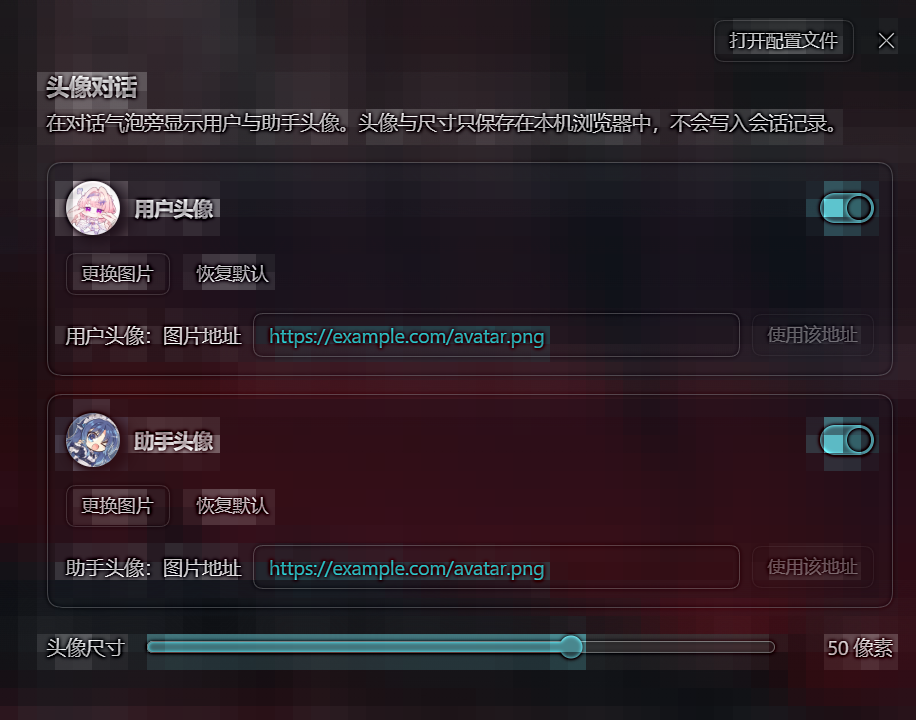
Both come from the author's own desktop build (Chinese locale, custom wallpaper); the pictures, the size, and the toggles are exactly the controls the page exposes.
https://… address. The address is probed once before it is adopted.0.2.1-alpha.4 (Web / Desktop). The plugin uses only the shipped theme tokens and the settings.section slot.react, react/jsx-runtime, @deepseek-ai/dsh-client-store, @deepseek-ai/dsh-client-ui-primitives — are all part of the shell's frozen module table, so nothing extra needs installing next to this package.A profile-local plugin joins a profile as a bundle: its package.json declares dsh.bundle.patch, and the profile lists the package name in dsh.profile.bundles. The profile's own cordis.patch.yml is id-targeted — it can only override or disable an entry a bundle layer already declared — so adding a row there installs nothing.
DSH ships a custom plugin market. Switch it on — Plugins → More → Experimental plugins → Custom plugin markets, then Plugins → Discover — add this index source, and the plugin appears as a card you install with one click:
https://raw.githubusercontent.com/suwodhcbbc/dsh-avatar-chat/main/index.json
The index pins one exact commit, so a card install is reproducible rather than "whatever main is today". Switch the source back off at any time; the plugin stays installed.
In the sidebar, Plugins → Add plugin. Paste the spec, install, then restart:
github:suwodhcbbc/dsh-avatar-chat
Quit the app first: the desktop profile is locked while the application runs.
dsh plugin --profile desktop add github:suwodhcbbc/dsh-avatar-chat
dsh plugin forwards the rest of the line to pnpm inside the profile directory, so every spec pnpm accepts works here — github:<owner>/<repo>, a git URL, an absolute path (bare or link:/file:), a .tgz URL, or a registry name. Two things happen and there is no third step:
dsh.bundle.patch, the profile's dsh.profile.bundles gains its name automatically.Name the profile you actually run: desktop for the desktop application, web for dsh web. Restart afterwards — the bundle stack is composed at boot.
A git-hosted install runs the package's prepare script, which pnpm blocks until the exact key it prints is allowed under allowBuilds. This package declares no scripts at all, so there is nothing to allow.
When pnpm cannot run, the same two facts can be applied by hand: copy package.json, cordis.patch.yml and lib/ into <profile>/node_modules/dsh-avatar-chat/ (for example ~/.dsh/profiles/desktop), add "dsh-avatar-chat" to the profile's dsh.profile.bundles, and restart. Being listed in bundles is what composes the plugin into the tree; it does not also have to appear in dependencies.
After the restart, this should name the package and a real directory:
cordis_inspect → host / Config / listConfigs { "entry": "include:ui-avatar-chat" }
Open Settings → Avatars.
https://… URL and apply it.Nothing else to do: the transcript picks the settings up on the next paint.
Preferences live in the browser's localStorage under the single key dsh.avatar-chat.v1, as JSON:
{ "schemaVersion": 1, "size": 28,
  "user":      { "visible": true, "image": "data:image/webp;base64,…" },
  "assistant": { "visible": true, "image": null } }
schemaVersion, an out-of-range size, or a malformed side is repaired in place and reported as damaged.DSH has no slot that adds leading or trailing chrome to an individual chat message row: conversation.chat.node's keyed seats are already fully occupied by the shipped renderers (user, steering, assistant-step, …) and a third-party package cannot import or wrap them. Every class name inside the chat subtree is also a CSS-Modules hash, so it is not addressable from another package.
What is stable is the row element itself, which carries data-chat-flow-kind (equal to the chat node kind), data-chat-turn, and data-chat-group-part. So the plugin ships a page-level stylesheet that selects on those attributes, and drives it entirely from root-element state:
data-dsh-avatar-chat, -user, -user-image, -assistant, -assistant-image--dsh-avatar-chat-size and the two picture variablesThe avatar is painted by an absolutely-positioned ::before inside padding the stylesheet reserves on the decorated row; the row keeps its shipped display, so host layout is untouched.
The stylesheet is a plain .css side-effect import, which the DSH client bundler turns into a tagged <style data-plugin-css> element — deduplicated by tag id, so re-running the plugin never double-injects it. Every root write is absolute, so applying twice is idempotent.
data-chat-flow-kind, which is not a published contract. If the chat row markup changes, avatars disappear silently until the selector is updated.user, steering and assistant-step rows are decorated. Tool calls, commands, system prompts and turn-process rows have no avatar.position: relative, so it is the containing block for its own absolutely-positioned descendants.--dsw-alias-brand-primary, which is near-black in light mode and near-white in dark mode — an inverse monochrome accent, not a brand blue.Verified against DeepSeek Harness 0.2.1-alpha.4 on Windows with the shipped Web client, in both unit tests and a real headless-Chromium run against an assembled profile.
The lib/ directory in this repository is the built artifact and is what the loader consumes. Rebuilding it requires a DeepSeek Harness source checkout: this package is compiled by the repository's shared client bundler preset (packages/client/tsdown.client.ts), which owns the window.__ModuleLoader__.load({ id, factory }) wrapper, the platform externals, and the CSS inlining.
To rebuild: place src/ at packages/client/ui-avatar-chat/src in the checkout, then
pnpm --filter @deepseek-ai/dsh-client-ui-avatar-chat bundle
Keep the package name in sync — the module id baked into lib/client.js comes from package.json, and the loader matches the bundle row to that id.
MIT
DeepSeek Harness(DSH)Web 插件聚合生态包 · 一切皆插件,创意工坊分发(dsh-market.com)
把回答做成一页可视化 HTML:模型只写简短的 Markdown 草稿,随包附带的 `am` 命令行生成页面,支持流程图、时序图、树、时间线、ER 图、表格和提示框。
在 dsh 里装上这个插件即可,无需登录、注册或填 API Key,就能使用包括 Muse Spark 1.3、MiMo V2.6 在内的前沿模型——完全免费,不限量。 All you do is install this plugin in dsh: no login, no sign-up, no API key — the frontier models are just there, Muse Spark 1.3 and MiMo V2.6 among them. Completely free, with no usage cap.

