
dsh-web
zhu1090093659/dsh-webDeepSeek Harness(DSH)Web 插件聚合生态包 · 一切皆插件,创意工坊分发(dsh-market.com)

Host-side dsh plugin that adds seven reasoning-effort levels to third-party llm-pi-ai models in the web composer.
dsh 0.2 思考等级与视觉能力解放插件
兼容 DSH 0.2.0-rc.2。
models/*.toml,为常见的模型自动补全 reasoning_effort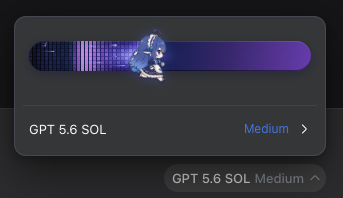
模型目录按家族拆分在 models/ 下,每个文件对应一个家族:
models/
  gpt.toml
  claude.toml
  gemini.toml
  qwen.toml
  ...
每个 TOML 文件声明 family 和一组 [[models]]。例如:
family = "gpt"

[[models]]
model = "gpt-5.4"
aliases = []
input = ["text", "image"]
contextWindow = 1050000
maxOutputTokens = 128000

[models.pricing]
currency = "USD"
unit = "per_million_tokens"
input = 2.5
output = 15
cacheRead = 0.25

[models.reasoningEfforts]
low = "low"
medium = "medium"
high = "high"
xhigh = "xhigh"

[models.sources]
capabilities = "https://models.dev/api.json"
pricing = "https://developers.openai.com/api/docs/models/gpt-5.4"
TOML 没有 null:可选价格、容量等字段省略即表示未知;reasoningEfforts.off
由生成器自动补为 null,源文件中不要手写。
修改 TOML 后运行:
pnpm run generate:models  # 重新生成 src/model-catalog.generated.json
pnpm run check:models     # 检查生成物是否与 TOML 一致
input 回填只写含 image 的声明:text-only 不写(适配器默认本来就是 text,
写死反而会让未来的目录修正无法生效,还会覆盖用户显式配置的 route 级
defaultInput)。
第三方网关发布的模型 id 拼写常与目录主名不同(如聚合网关的
deepseek-v4.1-flash)。未收录时匹配失败会回退到适配器默认的
input = ["text"],或 fuzzy 错配到退役条目报出错误的 text-only——表现为
“当前模型不支持图片”。新增网关拼写时把它收录为对应条目的 aliases
(匹配时会取 / 尾部并去符号),并在 tests/model-catalog.test.ts 补
alias 形态断言。
升级插件后若某模型仍拒图,检查用户层 settings 中该模型条目是否已被旧版
写死 input: ["text"]:插件只填空缺,不会覆盖既有值。手动删掉该字段,
下次 settings 变化即按新目录重新回填。
pnpm install
pnpm run build
pnpm run typecheck
pnpm test
lib/ 是随 Git 仓库提交的构建产物。这样通过 GitHub URL 直接安装时不需要在
安装生命周期中额外调用 node 或重新构建;修改源码后请运行 pnpm run build
并一并提交 lib/。npm 发布前由 prepublishOnly 自动重新构建。
从 GitHub 安装时不要直接在任意目录执行 pnpm add:那样只会安装 npm 包,
不会把插件 bundle 加入 DSH profile。应使用 DSH 的插件管理器:
dsh plugin --profile web add github:NexusAgentX/dsh-reasoning-effort
也可以使用完整 URL:
dsh plugin --profile web add https://github.com/NexusAgentX/dsh-reasoning-effort
安装完成后重启 DSH,或在启用了 HMR 的 Web profile 中等待自动重载。
本地源码安装:
cd /absolute/path/to/dsh-reasoning-effort
pnpm install && pnpm run build

# 包内 cordis.patch.yml(package.json 的 dsh.bundle 声明)会自动把
# providers-reasoning 插件行挂进 profile 层栈,无需手写 patch。
dsh plugin --profile web add link:$PWD
DSH 的 dsh plugin 底层会调用 pnpm。出现:
dsh: pnpm was not found; install pnpm and make it available on PATH.
说明启动 DSH 的进程找不到 pnpm,不是插件本身安装失败。先确认:
command -v pnpm
pnpm --version
如果终端能找到、但 Desktop/Web 图形界面仍失败,通常是 GUI 没有继承 shell 的
PATH。安装 pnpm 到系统 PATH,或在对应 profile 的 cordis.patch.yml 中为
plugin-manager 配置绝对路径:
- id: plugin-manager
  config:
    pnpmCommand: /absolute/path/to/pnpm
然后重新运行安装命令。若 pnpm 缓存了旧的失败结果,可指定提交号:
dsh plugin --profile web add github:NexusAgentX/dsh-reasoning-effort#1186dbb
MIT。第三方素材(鲸鱼精灵图)的来源与版权声明已并入 LICENSE。
DeepSeek Harness(DSH)Web 插件聚合生态包 · 一切皆插件,创意工坊分发(dsh-market.com)
把回答做成一页可视化 HTML:模型只写简短的 Markdown 草稿,随包附带的 `am` 命令行生成页面,支持流程图、时序图、树、时间线、ER 图、表格和提示框。
在 dsh 里装上这个插件即可,无需登录、注册或填 API Key,就能使用包括 Muse Spark 1.3、MiMo V2.6 在内的前沿模型——完全免费,不限量。 All you do is install this plugin in dsh: no login, no sign-up, no API key — the frontier models are just there, Muse Spark 1.3 and MiMo V2.6 among them. Completely free, with no usage cap.

