
dsh-web
zhu1090093659/dsh-webDeepSeek Harness(DSH)Web 插件聚合生态包 · 一切皆插件,创意工坊分发(dsh-market.com)

适配 DeepSeek Harness 的预算监视器插件,让 API 花费变透明。通过图标展示账户余额、当前轮/会话的花费、以及任务花钱速率,提醒或帮助用户阻断突发性大量烧钱(例如未经过协商发放几十个 Subagent 等等)A Deepseek Harness plugin that makes cost transparent: floating window showing balance left on your API account, what the turns you ran actually cost, and how fast is your agent using your balance for tasks.
English | 简体中文
A DeepSeek Harness (dsh) plugin that floats a small
window over the conversation showing how much balance is left on your API account, what the turns
you just ran actually cost and how fast is your balance decreasing when performing different tasks.
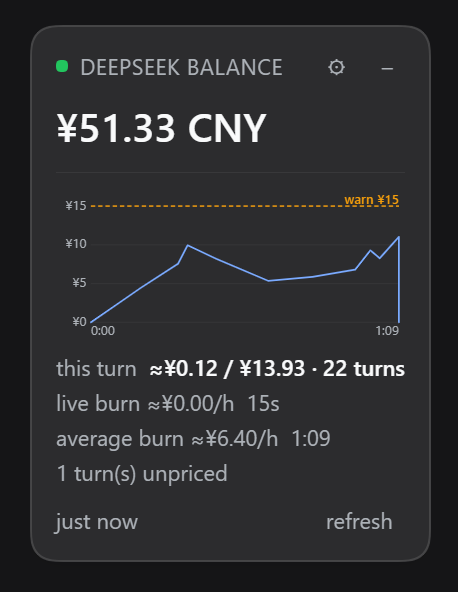
The expanded panel on a real account: the balance, this turn's cost beside the conversation's, both burn
rates, and the live-burn chart drawn against the turn's own elapsed time. Captured at 0.6.2.
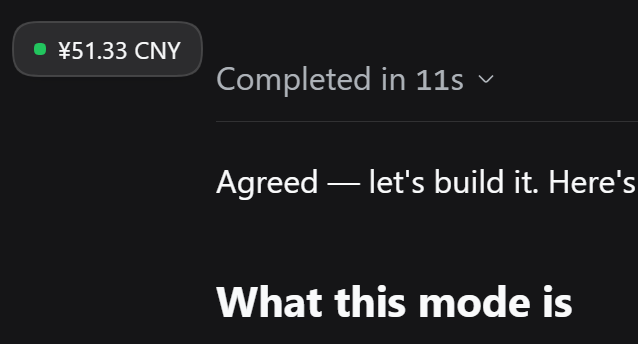
Collapsed to a pill — one click, or a double-click on the header — it leaves only the status dot and the amount. The dot keeps its colour, so a spend warning survives the collapse.
The headline is total_balance from DeepSeek's public balance API: topped-up money plus granted credit,
which is the number that decides whether the next call works. The two parts are not shown separately — one
figure is the honest report, because topped_up_balance alone reads 0.00 on an account living on granted
credit and would say "broke" about an account that is working fine.
The cost figures are computed from the token usage DeepSeek already reports on every assistant message, which DSH already records. They spend no tokens of their own: no model call, no extra request, no estimation prompt. See What it costs you.
Every figure below is read off the screenshot above, so the examples are real rather than illustrative.
| Element | Meaning |
|---|---|
¥51.33 CNY | total_balance — the whole balance: topped-up money plus granted credit. The headline, and the only balance row. |
| Green dot🟢 | is_available: true — the account can make API calls. |
| Amber dot🟡 | The balance is stale, the last check failed, is_available is false, or the live burn is over the warning threshold. |
| Red dot🔴 | The spend limit was crossed and the plugin interrupted the turn. Reserved for that one event. |
| Red dot (other) | Nothing could be read and no previous value is on screen. |
just now | When the host last got an answer. A stale number is labelled, never passed off as current. |
this turn ≈¥0.12 / ¥13.93 · 22 turns | The turn you are waiting on, and after the slash the whole conversation — including the agents either of them spawned. One row, because "what this cost" and "what it all costs" is one thought. |
live burn ≈¥0.00/h · 15s | What the last 15 seconds cost, projected to an hour. The sudden-loss figure, and the one both thresholds act on. It reads ¥0.00/h here because nothing settled inside those 15 seconds — a true reading, not a fault. A pulsing dot marks a turn still in flight. |
average burn ≈¥6.40/h · 1:09 | That turn's cost over its own elapsed time: ¥0.12 across 1 min 9 s. A running average, frozen the moment the turn ends. |
| The chart | live burn against the turn's elapsed time, 0:00 → 1:09. The blue line is anchored at the origin — nothing had been spent yet — and the amber warn ¥15 line is the warning threshold. |
1 turn(s) unpriced | A model with no published rate was seen, so those turns are reported rather than costed at a guess. |
session ¥15.12 · 4 turns | The conversation total on a row of its own — only when there is no turn yet to pair it with. |
Not available for API calls | is_available: false. |
No API key is configured… | The host found no key; the message names the credential reference to set. |
The header already says DeepSeek balance, so the amount carries no caption and there is no second balance line. Every setting lives behind the gear button.
A research turn that fans out to sixty subagents is invisible from the conversation: one turn is open, no answer has arrived, and the balance is falling. Balance alone tells you that you are spending; it does not tell you how fast, which is the number you need to decide whether to stop.
The panel answers that with four figures, all derived from data already on disk:
this turn — what the turn you are waiting on has cost so far. It updates as each step settles, because
usage is reported per assistant message rather than per turn.live burn — what the last window cost (burnWindowMs, 15 seconds by default), projected to an
hour. This is the sudden-loss detector and the figure the two thresholds act on. It is deliberately
short and therefore jumpy: 0 whenever nothing has settled inside the window, which is true rather than
broken. A 15-second window is the price of noticing within seconds instead of minutes.average burn — that turn's cost divided by its elapsed time. A running average, recomputed once a
second against the live clock and frozen when the turn ends, which is what makes two finished tasks
comparable: one turn's rate is a fact about that task, not about the profile's recent mood.session — every turn in this conversation plus every subagent session beneath it. A fan-out bills in
the children, so counting only the session you are looking at would report the calm, not the fire. The
N agents suffix tells you how many are in flight.Two rates rather than one, because one number hid both: averaging a 15-second window into a task-long mean gives a figure that is neither immediate enough to catch a runaway nor stable enough to compare tasks.
Because the whole point is spotting the expensive task, this turn and both burns count the agents that
turn spawned, attributed by time window rather than by turn number. A subagent has its own private turn
sequence, so summing only the conversation's own turns would report a calm rate while sixty agents burn.
The settings tab lists recent turns hottest first — cost, rate and duration — so the expensive tasks are identifiable after the fact rather than only while they run.
Both are expressed in the balance's own currency: CNY per hour on a CNY account, USD per hour on a USD one.
burnWarnPerHour turns the dot amber and tints the live burn figure. Purely informational.terminateAbovePerHour goes further: when the live burn crosses it, the plugin interrupts the running
turn, exactly as pressing stop does, and the dot turns red.It is off by default (0), deliberately. Stopping a task is destructive and the rate is an estimate, so it
has to be asked for. When it does fire: the stop is latched per turn number, so one runaway turn is interrupted
once rather than once per poll; queued input you have already typed is preserved; and the session log records
turn/end with reason: { kind: "aborted", reason: { kind: "hook", reason: "dsh-budget-watcher/over-budget" } },
so the turn's end has a stated cause rather than looking like a crash. See
Known limitations for how precise the turn targeting is, which is the honest caveat.
Both thresholds and the burn window are on the settings tab.
Under the figures, and above the refresh row, the panel draws this turn's live burn rate against its own
elapsed time — d(currency)/dt for the turn in hand. It is on by default and can be switched off
(graphEnabled).
It spans the panel's full content width, so it lines up exactly with the this turn row — and it cannot make
the panel any wider than the text already does, which is what keeps the panel narrow.
burnWarnPerHour, and red is terminateAbovePerHour — drawn
only when that is above 0, since a stop line at "off" would mean nothing. The caption beside each line
takes that line's colour, so the pairing survives both themes.▲, rather than dropped.
Hiding the line you set would be worse than showing it out of scale.¥0 / ¥20 / ¥40
rather than ¥10 above ¥5.00.t=0, so the rate there is honestly
zero; starting at the first settled step instead made the left of the plot look like missing data.live burn row, so the two cannot disagree; the host samples it
at each settled step and the panel extends it to now once a second.DeepSeek reports exact token usage on every assistant message, and DSH writes it into the session log. The plugin reads that log and multiplies by DeepSeek's published rates:
cost = uncached input × cache-miss rate
     + cache-read tokens × cache-hit rate
     + output tokens × output rate
Two details make the difference between an estimate and a wrong number:
inputTokens is the uncached half. The cache buckets are separate. Subtracting cache reads from
inputTokens — the obvious-looking arithmetic — collapses the uncached half to zero on a well-cached turn
and under-reports exactly the turns worth watching. dsh-llm-deepseek states the identity outright:
totalTokens = inputTokens + outputTokens + cacheReadTokens + cacheWriteTokens.assistant/attempt, which carries no usage
field at all — its numbers survive only in the last usage chunk of its stream. Reading just usage would
silently drop the cost of every retry.Peak and off-peak rates are applied per call from the timestamp (peak is 01:00–04:00 and 06:00–10:00 UTC,
Monday to Friday, which is 09:00–12:00 and 14:00–18:00 Beijing time on the same days). reasoningTokens is recorded but never priced separately: it is a subset of output tokens,
so charging for it as well would double-bill.
dsh plugin --profile <your-profile> add dsh-budget-watcher
For a profile installed from this repository instead of npm:
dsh plugin --profile <your-profile> add github:NeutronStar714/dsh-budget-watcher
Then restart that profile. dsh plugin add writes the dependency and appends the package to
dsh.profile.bundles; a running process does not pick up a new bundle on its own. Configuration edits to the
row are live afterwards when the profile sets "patchReload": "live".
Confirm it landed:
dsh plugin --profile <your-profile> list
The widget appears in the bottom-right corner as soon as the profile is up. If it does not, see Troubleshooting.
[!NOTE] The DSH desktop application owns its bundled profile exclusively, and the CLI refuses to modify it (
error: profile "desktop" is managed exclusively by the Electron application). Install into that profile from the app's own Settings → Plugins page instead, then restart the app. The CLI path above is for profiles you create and run yourself, such asdsh web.
dsh plugin --profile <your-profile> remove dsh-budget-watcher
The plugin never asks for a key of its own. It reads the same DEEPSEEK_API_KEY credential reference the
shipped DeepSeek adapter uses, so a key you already configured for inference is reused. Resolution order:
apiKey from this plugin's config, when set.apiKeyEnv (default DEEPSEEK_API_KEY) through ctx.credentials — this is what the Web Models page writes.DEEPSEEK_API_KEY from the environment that launched dsh.It is resolved at every refresh, so storing a key takes effect on the next poll without a restart. The key is used for one outbound request and is never written to the page, the route response, or a log.
[!IMPORTANT] This reads the public API balance at
https://api.deepseek.com/user/balance, which is what an API key unlocks. It is not the same number as Settings → Account, which comes from the DeepSeek Platform web API through a signed-in OAuth grant. If you sign in with an account and never stored an API key, the widget reports that no key is configured. See Known limitations.
Edit your profile's cordis.patch.yml, keeping the comments and replacing [] if the file is still empty:
- id: budget-watcher
  config:
    provider: deepseek
    apiKeyEnv: DEEPSEEK_API_KEY
    refreshIntervalMs: 60000
    currency: auto
A patch replaces the row's whole config object, so keep every override together. All fields are optional.
| Option | Default | Purpose |
|---|---|---|
provider | deepseek | Which API account to read. Only deepseek is implemented; see Known limitations. |
apiKey | (empty) | An explicit key. Prefer apiKeyEnv: a key written here lives in your profile file. |
apiKeyEnv | DEEPSEEK_API_KEY | Credential reference resolved through ctx.credentials. |
endpoint | (the provider's) | Override the balance endpoint. Intended for testing against a stand-in server. |
refreshIntervalMs | 60000 | How long the host reuses one balance answer before calling DeepSeek again. Minimum 15000. This paces the upstream API call, not the panel — see Known limitations. |
requestTimeoutMs | 10000 | Deadline for one balance request. |
currency | auto | Which currency the cost figures and both thresholds are shown in. auto follows the featured balance wallet; CNY or USD force it. A closed set, because DeepSeek publishes rates in exactly those two currencies. |
allowNonLoopback | false | Allow the widget to read balance when the GUI is served on a non-loopback address. |
costEnabled | true | Estimate what recent turns cost from the usage the provider already reports. Spends nothing. |
graphEnabled | true | Draw the live-burn chart in the panel. Turning it off leaves every figure in place. |
burnWindowMs | 15000 | Window for the live burn rate, in milliseconds (minimum 5000). Short on purpose: this is the figure that catches a sudden loss. |
burnWarnPerHour | 2 | Per-hour spend above which the panel turns amber, in the balance's currency. 0 disables the warning. |
terminateAbovePerHour | 0 | Per-hour spend above which the running turn is interrupted, in the balance's currency. 0 — the default — disables it. |
usdToCny | auto | Exchange rate for models priced in USD by a third party. auto fetches the European Central Bank's daily reference rate; a number (7.2) uses that rate and makes no network request. Defaults to auto. |
There is no exchange-rate setting, because there is no exchange rate: costs are priced from DeepSeek's published CNY or USD rate card, matching whichever currency the featured balance is held in. See Where the numbers come from.
To disable the plugin without uninstalling it:
- id: budget-watcher
  disabled: true
The panel's gear button opens a Budget tab in DSH's right sidebar: every option above as an editable field, with Save. The gear only appears when a tab could actually be registered, so it is never a control that does nothing.
Durations are shown in the units you think in — the balance cache and the live burn window in seconds — and converted back on save. The API key field is write-only: it starts blank, blank means leave it alone, and clearing it removes the key from the profile. The running key value is never sent to the page; the form only knows whether one is set.
Currency is a drop-down of auto / CNY / USD, not a text field: those are the only currencies
DeepSeek publishes rates in, so anything else could only ever be wrong. The two thresholds are labelled with
the currency the balance is actually held in.
The form scrolls, and Save is pinned to the bottom of it, so the button stays reachable however long the settings and the recent-turns list grow. The turn list is bounded and scrolls separately.
Saving goes through DSH's own config editor, so the change lands in your profile's cordis.patch.yml and is
applied by the normal loader path — the same file and the same mechanism you would edit by hand:
- id: budget-watcher
  name: dsh-budget-watcher
  config:
    currency: CNY
    burnWindowMs: 15000
    burnWarnPerHour: 3.5
    terminateAbovePerHour: 0
A value set back to its default is removed rather than written, so the row goes back to inheriting. Config edits apply without restarting DSH.
If the row cannot be written — no config editor in the composition, or a home patch or --patch overlay that
also sets it — the tab says so and disables Save rather than failing on click.
[!NOTE] This uses the plugin's own route plus the host
configEditorservice rather than DSH's generatedremote.settingstransport. The generated path needs a schemasteryConfigwhose fields are all.volatile(), and a client-side form built onconfigForms; the route is smaller, is covered by tests, and was verified writing a real profile patch. Migrating to the generated transport is the natural next step if the plugin grows more settings.
Two halves in one package, which is what dsh.bundle.patch plus dsh.client describe.
Host half (index.js) does everything that needs a secret or a socket. It resolves the key, calls
GET https://api.deepseek.com/user/balance with Authorization: Bearer <key>, normalizes the response, and
serves it to the page as JSON over one route: GET /dsh-budget-watcher/balance.
refreshIntervalMs, and concurrent requests share
one in-flight upstream call, so ten open windows do not mean ten requests.0.00.?refresh=1 bypasses the freshness window; that is what the refresh button does./api, so it applies its own checks: the Host header must
name a loopback authority (which is what stops a DNS-rebinding page), a present Origin must match Host,
and sec-fetch-site: cross-site is refused. Only GET is served.Client half (lib/client.cjs) is a hand-written classic script in the loader's lazy-CJS format — no
bundler, no JSX, no runtime dependencies. It registers into the frame-wide shell.overlay slot, the seat
described by DSH as "above every column and outside their scroll containers", and draws with React.createElement
and the --dsw-* theme tokens so it follows the active light or dark theme. Its stylesheet carries
data-plugin / data-plugin-css, which is how the shell reclaims plugin CSS on unload.
Which conversation to price comes from the client, not from a guess. A root-scoped slot entry receives the
frame's standard kit as props, so the panel reads the retained session the same way DSH's own title bar does —
useSessions, selecting the row with retainedBy.mainView > 0 — and sends it as ?session=. The host falls
back to the newest live root session when the parameter is absent, so an older client still gets an answer
rather than nothing.
The package declares no @deepseek-ai/dsh* peer dependencies and imports none, so the compatibility gate
cannot refuse it and there is nothing for pnpm to install. The one optional import, @deepseek-ai/schemastery
for config validation, is dynamic and degrades to unvalidated config rather than failing the profile.
| Path | What it is |
|---|---|
index.js | Host half: config, credential resolution, the upstream request, caching, the /dsh-budget-watcher/balance route and its fence, and the cost payload. |
lib/balance.js | Pure helpers: normalizing the payload, choosing a currency, mapping HTTP failures to messages. No DSH or fetch imports, so it is directly testable. |
lib/cost.js | Pure cost model: DeepSeek's rate card, peak/off-peak selection, usage→USD, and the fold from session events to per-turn totals. |
lib/ledger.js | Which sessions count as one conversation's spend: the live tree, descendants, and a total that does not fall when a subagent finishes. |
lib/client.cjs | Client half: the floating window, drag/collapse state, session handshake, polling, and the panel stylesheet. |
cordis.patch.yml | The bundle patch inserting the loader row. |
test/ | node --test suite: balance, cost, ledger, host (the route against a stubbed API) and client (the bundle in a VM with a stubbed loader). |
docs/screenshotnew.png | The expanded panel, captured at 0.6.2 on a real account. Named screenshotnew rather than screenshot so GitHub serves the current image instead of a cached copy of the previous one. |
docs/screenshot_pill.png | The same watcher collapsed to a pill, captured at 0.6.2. |
README.zh-CN.md | 简体中文翻译。The English file is authoritative where the two differ. |
No build step and no dependencies — node --test is the whole toolchain.
node --test
To try a local checkout against a real profile without publishing:
dsh plugin --profile <your-profile> add link:/absolute/path/to/dsh-budget-watcher
Then restart the profile. Because the dependency is a symlink, edits to index.js are picked up by a profile
restart, and edits to lib/client.cjs are served on the next request.
| Symptom | Cause and fix |
|---|---|
| No widget at all | The profile was not restarted after dsh plugin add, or the row is disabled. Check dsh plugin --profile <name> list. |
No API key is configured | Store a DeepSeek API key on the Models page, or export DEEPSEEK_API_KEY before launching dsh. |
DeepSeek rejected the API key | The key is wrong, revoked, or belongs to a different account. |
Could not reach api.deepseek.com | Offline, or a proxy that DSH's global dispatcher does not know about. See Known limitations. |
forbidden: host is not a loopback authority | You reached the GUI through a LAN name or a non-loopback reverse proxy. Set allowNonLoopback: true only if you accept that the route is then reachable by anyone who can reach that address. |
| The number never changes | refreshIntervalMs has not elapsed, so the host is still serving the cached answer. The relative timestamp tells you when it last moved. |
| The cost figures do not appear when you send a prompt | Fixed in 0.6.3. Before that the panel polled on the balance-cache window, so a prompt sent just after a poll coul |
DeepSeek Harness(DSH)Web 插件聚合生态包 · 一切皆插件,创意工坊分发(dsh-market.com)
把回答做成一页可视化 HTML:模型只写简短的 Markdown 草稿,随包附带的 `am` 命令行生成页面,支持流程图、时序图、树、时间线、ER 图、表格和提示框。
在 dsh 里装上这个插件即可,无需登录、注册或填 API Key,就能使用包括 Muse Spark 1.3、MiMo V2.6 在内的前沿模型——完全免费,不限量。 All you do is install this plugin in dsh: no login, no sign-up, no API key — the frontier models are just there, Muse Spark 1.3 and MiMo V2.6 among them. Completely free, with no usage cap.

