
dsh-web
zhu1090093659/dsh-webDeepSeek Harness(DSH)Web 插件聚合生态包 · 一切皆插件,创意工坊分发(dsh-market.com)

把 DSH 对话区拆成任意数量的原生窗格:左右、上下、田字 2×2 与自动网格,每个窗格都是独立会话。
中文(默认) · English
把 DeepSeek Harness 的对话区拆成原生多窗格工作区——左右分屏、上下分屏、田字 2×2 或自动网格,窗口放得下多少会话就开多少。每个窗格都是真实会话,拥有自己的输入框、流式输出、停止、队列、待办、附件、/ 命令、ask_user_question、审批与视图页,桌面端(dsh-app://)同样可用。
| 方式 | 适用场景 | 插件安装位置 |
|---|---|---|
Web(dsh web,浏览器打开) | 先在浏览器里试用、远程机器 | web profile |
桌面端 DSH Desktop(dsh-app://) | 日常使用,支持完整桌面能力,推荐 | desktop profile,由桌面端管理 |
lib/client.js 已预构建,无原生依赖、无安装脚本;macOS / Windows / Linux 行为一致。dsh plugin --profile web add dsh-split-workspace
dsh --profile web
dsh --profile web 会启动 Web 服务并打印带 token 的地址;如果服务已在运行,安装后重启它,再硬刷新页面。
在联网机器上打包,或从 GitHub Release 下载 .tgz,然后拷到目标机器:
# 联网机器
npm pack dsh-split-workspace
# 目标机器:.tgz 绝对路径
dsh plugin --profile web add /absolute/path/dsh-split-workspace-<version>.tgz
# 或者解压后安装目录
dsh plugin --profile web add /absolute/path/dsh-split-workspace
dsh --profile web
lib/client.js,通常不需要再构建。仓库根目录必须能直接看到 package.json。dsh-split-workspace 并安装;或进入 插件 → 添加插件 → 安装第三方插件,填入包名。dsh-split-workspace。桌面端的
desktopprofile 由 Electron 应用独占管理。不要在终端执行dsh plugin --profile desktop add ...,该命令会拒绝执行;桌面端请用上面的插件市场 / 添加插件界面。
npm pack dsh-split-workspace,或从 Release 下载 .tgz,拷到目标机器。.tgz 的绝对路径(安装器会识别为「压缩包」);.tgz 解压,再填解压后的目录路径(目录根下要有 package.json)。dsh-split-workspace 已启用;桌面端需完整重启,Web 端需重启 dsh web 并刷新。window.__dshSplitWorkspace.health(),可看到版本、窗格数和几何状态。dsh-app://)构建,preload 只在顶层框架运行。sqrt(n) 列的均衡行优先网格。没有模式菜单——增删窗格都会重新适配网格。想要上下堆叠,把第二个窗格的标题拖到第一个上,再移到底部边缘;手动拖拽的结果会被保留,自动网格只是起点。Esc 取消。预览只计算几何,不重新挂载正在运行的会话。⤢ 按钮)最大化/还原。dsh-prompt-history,它的可拖动 会话目录 (☰) 握把会在每个活动窗格的左边缘垂直居中显示一次。每次分屏调整(新增、关闭、重排、拖动分隔条、最大化或右侧栏推挤)都会把受影响的握把重新放回窗格左边缘与垂直中心;没有变化的窗格保留手动拖动的位置。隐藏的原生会话和非窗格视图里的副本会被隐藏,握把不再堆叠。桌面端从 dsh-app://app/ 提供客户端,并通过 Electron preload 注入启动图(__DSH_BOOT__、__DSH_TRANSPORT__ 等)。preload 只在顶层框架运行,所以同源 iframe 会永远停在 “Loading plugins…”。因此窗格引擎在顶层客户端运行,按会话重新挂载原生对话组件——与上游插件相同的架构。
window.__dshSplitWorkspace.health():版本、宿主、窗格、几何、持久化树、崩溃保护。window.__dshSplitWorkspace.split(sessionId):把会话加为窗格。window.__dshSplitWorkspace.arrange("auto"):重新适配自动布局(旧模式名会被接受并忽略)。window.__dshSplitWorkspace.focusChat()、closeFocused()。window.__dshSplitWorkspace.reflow():拖动预览状态(排查占位/闭合行为用)。window.__dshSplitWorkspace.setEnabled(false):总开关。window.__dshSplitWorkspace.reset():清除已保存布局。Alt+T:切换聚焦窗格里的紧凑 TUI 输入框。Alt+Shift+←/→/↑/↓:在窗格间移动焦点。| 左右两列 · Side by side | 上下两列 · Stacked | 田字 · 2×2 grid |
|---|---|---|
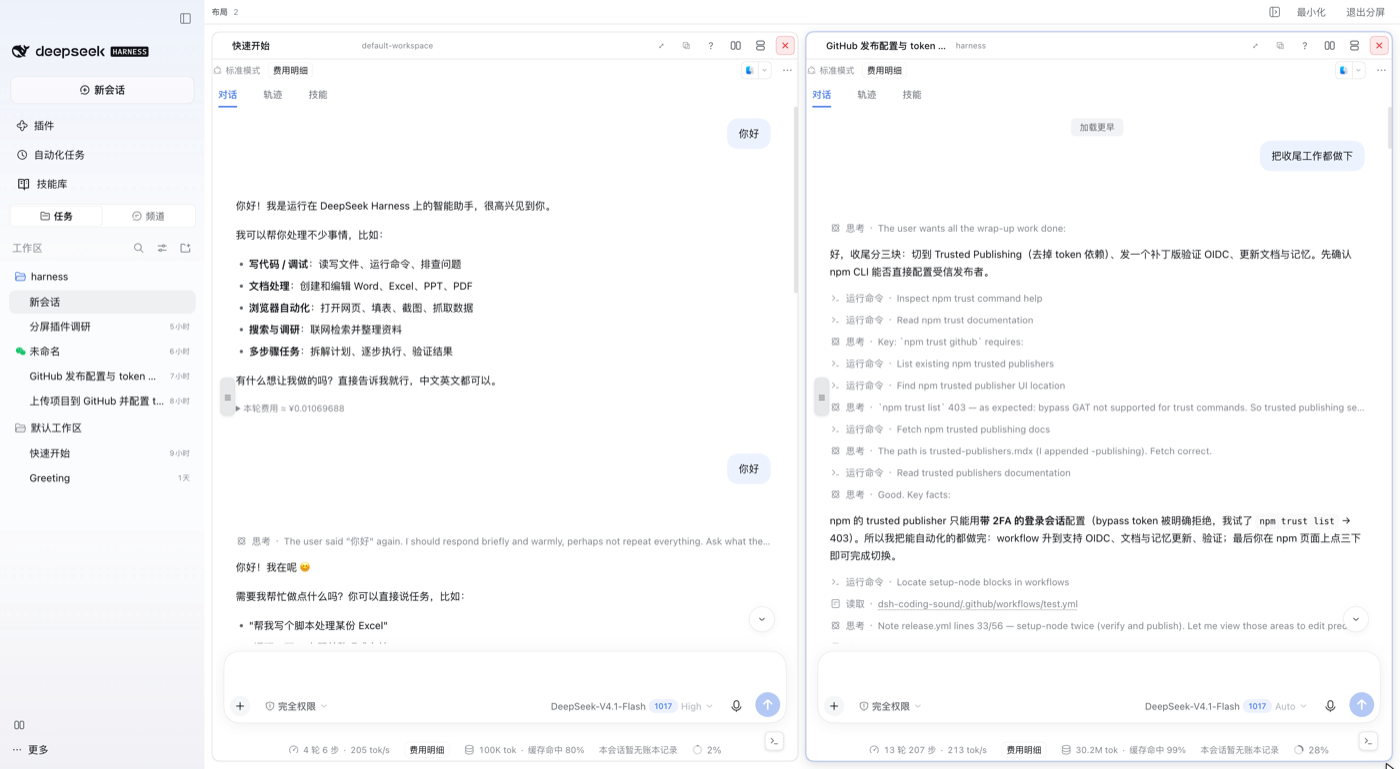 | 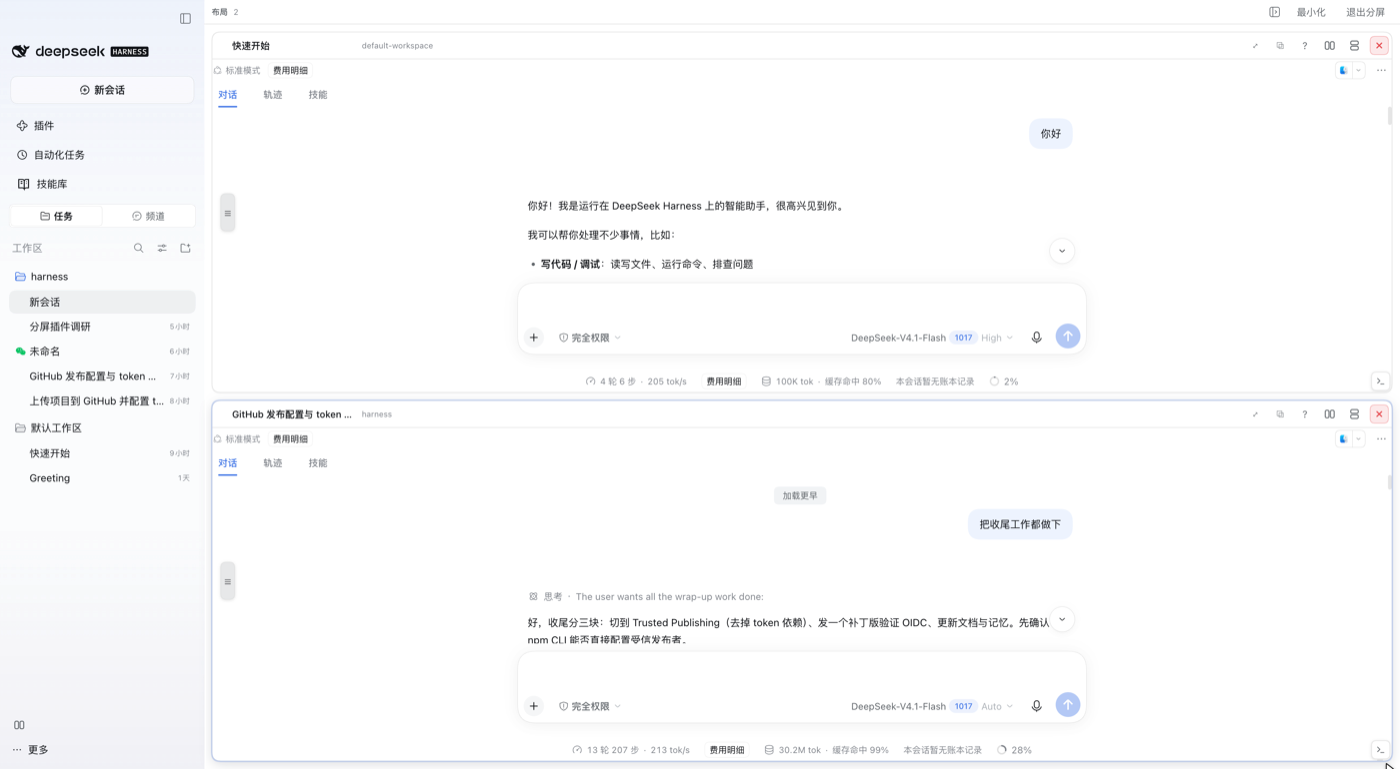 | 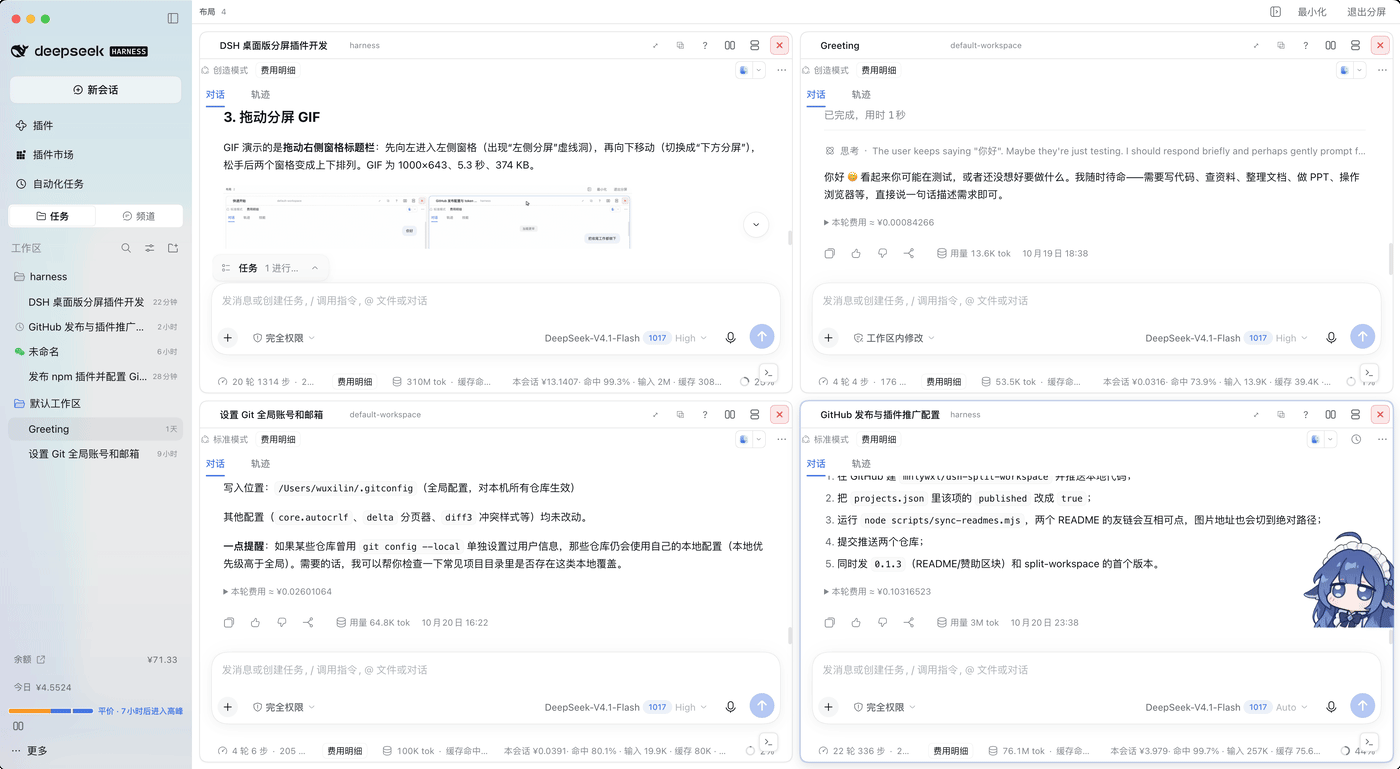 |
| 2 panes · automatic columns | 2 panes · dragged into rows | 4 panes · automatic 2×2 田字 |
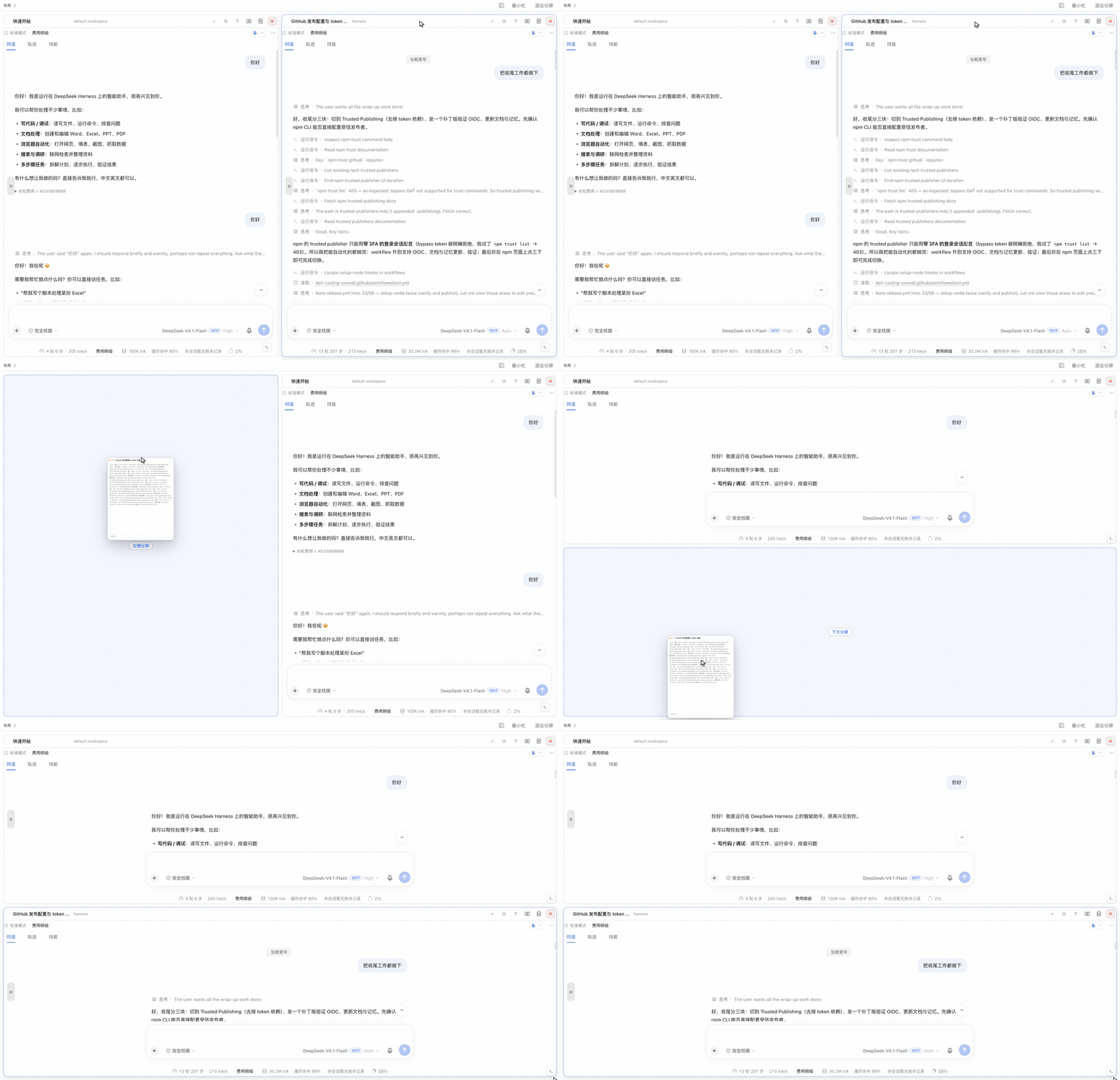
Drag a pane by its header to re-arrange it — the dashed hole previews where it will land:
data-composer-card,隐藏的原始输入框和非聚焦窗格不会抢走全局选择器;每个窗格仍挂载自己的输入浮层,切换窗格时非聚焦窗格的浮层隐藏但状态保留。dsh-tweaks-prompt-history 的历史角标、dsh-prompt-history 的候选提示、斜杠/模型菜单因此都定位在当前窗格。dsh-prompt-history)按活跃窗格隔离:预测上下文只读活跃窗格的对话行,隐藏的原始页不再抢输入焦点;非活跃窗格的草稿被外部写入时会回滚,Tab/→ 只把预测写入当前窗格。MIT。见 THIRD-PARTY-NOTICES.md。
Split screen for DeepSeek Harness (DSH) Desktop — open as many conversations as you need, side by side, stacked, or in a 2×2 / automatic grid.
dsh-split-workspace turns the DeepSeek Harness conversation area into a native
multi-pane workspace, including in the Desktop app (dsh-app:// shell). Each
pane is a real session with its own composer, streaming, Stop, queue, todos,
attachments, / commands, ask_user_question, approvals and view tabs.
中文简介:把 DeepSeek Harness 的对话区拆成任意数量的原生窗格,支持左右分屏、 上下分屏、田字 2×2 和自动网格;每个窗格都是真实会话,拥有自己的输入框、流式输出、 停止、队列、待办、附件、斜杠命令、审批和视图页。适用于 DSH 桌面端。
Search terms / 搜索关键词:split screen, split view, split pane, multi-pane, multi-session, multi-window, tiled workspace, unlimited panes, DSH Desktop, 分屏, 分屏插件, 多窗格, 多窗口, 多会话, 左右分屏, 上下分屏, 并排, 田字布局.
The pane engine is derived from dsh-split-screen 1.7.0 (MIT). This package adapts it for the Desktop shell and adds the automatic layout, the unlimited pane count, rename/copy/maximize and the compact toolbar.
Pick where to run it
| Mode | Best for | Plugin profile |
|---|---|---|
Web (dsh web, browser) | Trying it in a browser or on a remote machine | web |
DSH Desktop (dsh-app://) | Daily use with full desktop features (recommended) | desktop, managed by the app |
lib/client.js, has no native modules and no install scripts, and is identical on macOS / Windows / Linux.Web: online install
dsh plugin --profile web add dsh-split-workspace
dsh --profile web
dsh --profile web prints the tokenized URL. If the server is already running, restart it after installing and hard-refresh the page.
Web: offline install
Pack on a connected machine (or download the .tgz from a GitHub Release), copy it to the target, then:
npm pack dsh-split-workspace                      # connected machine

dsh plugin --profile web add /absolute/path/dsh-split-workspace-<version>.tgz
# or, after extracting:
dsh plugin --profile web add /absolute/path/dsh-split-workspace
dsh --profile web
package.json (release tarballs already include lib/client.js).Desktop: online install
dsh-split-workspace, and install it. Or use Plugins → Add plugin → Install a third-party plugin and enter the package name.dsh-split-workspace.The
desktopprofile is owned by the Electron app. Do not rundsh plugin --profile desktop add ...in a terminal; it is rejected. Use the in-app plugin market / Add plugin UI instead.
Desktop: offline install
npm pack dsh-split-workspace, or download the .tgz from a Release, and copy it to the target..tgz (the installer recognises it as a tarball);.tgz and enter the extracted directory (its root must contain package.json).Enable and verify
dsh-split-workspace enabled. Restart Desktop completely, or restart dsh web and refresh the page for Web.window.__dshSplitWorkspace.health() in the browser/desktop console to see the version, pane count and geometry.Start splitting
dsh-app://), where the
preload only runs in the top frame.sqrt(n) columns. There
is no mode menu — adding or closing a pane simply re-fits the grid. For a
stacked pair, drag the second pane's header over the first, then move down
to the bottom edge; a deliberate drag is kept, and the automatic grid is
only the starting point.dsh-prompt-history is installed, its draggable 会话目录 (☰) grip is
shown once per live pane, on the pane's left edge and vertically centered.
Every split adjustment (add, close, re-arrange, divider drag, maximize or a
right-sidebar push) re-homes the affected grips to the left edge and the
vertical center of their pane; a pane whose box did not change keeps a
deliberate vertical drag. The copies mounted by the hidden stock conversation
and by non-pane views are hidden, so the grips no longer stack on top of each
other.The Desktop app serves the client from dsh-app://app/ and injects the boot
graph (__DSH_BOOT__, __DSH_TRANSPORT__, …) through the Electron preload.
That preload runs only in the top frame, so a same-origin iframe stays at
“Loading plugins…” forever. The pane engine therefore runs in the top
client, re-hosting the stock conversation primitives per session — the same
architecture the upstream plugin uses.
window.__dshSplitWorkspace.health() — version, host, panes, geometry,
persisted tree, crash guard.window.__dshSplitWorkspace.split(sessionId) — add a session as a pane.window.__dshSplitWorkspace.arrange("auto") — re-fit the automatic layout
(legacy mode names are accepted and ignored).window.__dshSplitWorkspace.focusChat(), closeFocused().window.__dshSplitWorkspace.reflow() — live pane-drag preview state
(diagnostics for the hole/collapse behaviour).window.__dshSplitWorkspace.setEnabled(false) — kill switch.window.__dshSplitWorkspace.reset() — clear the saved layout.Alt+T — toggle the compact TUI composer in the focused pane.Alt+Shift+←/→/↑/↓ — move focus between panes.data-composer-card; the hidden stock composer and inactive panes no longer
win global selectors. Every pane still mounts its own composer overlays, and
inactive panes hide (without unmounting) those overlays, so
dsh-tweaks-prompt-history history pills, dsh-prompt-history suggestion
ghosts, and slash/model menus stay anchored to the pane being typed in.dsh-prompt-history) are scoped to
the active pane: prediction context reads only that pane's transcript, an
external write into an inactive pane's draft is rolled back, and Tab/→
inserts the prediction into the pane being typed in.MIT. See THIRD-PARTY-NOTICES.md.
dsh-coding-sound)— 用声音盯住 Agent:按输出文字演奏生成式背景音乐,完成、等待审批与工具执行各有可配置的提示音。
dsh-coding-sound) — Generative background music and notification chimes for DeepSeek Harness: hear whether the agent is thinking, still working, or waiting for you.如果这个项目帮你省下了盯屏幕的时间,欢迎请作者喝杯咖啡 ☕,或者给作者「充充电」⚡。金额随意,心意最重要。
If this project saved you some screen time, you can buy the author a coffee ☕ or top up the author's battery ⚡. Any amount is welcome — the thought counts.


支付宝 · 微信支付 / Alipay · WeChat Pay
DeepSeek Harness(DSH)Web 插件聚合生态包 · 一切皆插件,创意工坊分发(dsh-market.com)
把回答做成一页可视化 HTML:模型只写简短的 Markdown 草稿,随包附带的 `am` 命令行生成页面,支持流程图、时序图、树、时间线、ER 图、表格和提示框。
在 dsh 里装上这个插件即可,无需登录、注册或填 API Key,就能使用包括 Muse Spark 1.3、MiMo V2.6 在内的前沿模型——完全免费,不限量。 All you do is install this plugin in dsh: no login, no sign-up, no API key — the frontier models are just there, Muse Spark 1.3 and MiMo V2.6 among them. Completely free, with no usage cap.

